

Solid-state drives have transformed network-attached storage performance over the past decade, and in 2026, the synology ssd nas configuration has become a cornerstone of modern business infrastructure. Furthermore, organisations demanding high-performance file access, database workloads, and virtualisation environments are increasingly turning to SSD-accelerated NAS solutions. Nevertheless, implementing a synology ssd nas correctly requires careful planning around drive compatibility, cache strategies, endurance requirements, and workload patterns. This guide explores the technical considerations, configuration best practices, and real-world performance optimisation strategies for businesses deploying Synology NAS with SSD technology.
Understanding SSD Roles in Synology NAS Architecture
Solid-state drives serve multiple functions within Synology NAS systems, and therefore understanding these distinct roles is essential before purchasing hardware. Moreover, SSDs can act as primary storage volumes, read-write cache layers, or metadata acceleration depending on your specific model and DSM configuration.
Primary SSD Storage Pools
All-flash Synology NAS arrays use SSDs exclusively for storage volumes, delivering consistently low latency and high IOPS across all workloads. In addition, these configurations eliminate spinning disk bottlenecks entirely, making them ideal for databases, virtual machine datastores, and applications requiring predictable sub-millisecond response times. Nevertheless, all-flash deployments carry higher per-terabyte costs and require careful capacity planning.
- Use cases: Database servers, development environments, high-frequency file access
- Typical models: RackStation RS2421+, FlashStation FS series
- Drive requirements: Enterprise-grade SSDs with high endurance ratings
SSD Cache Acceleration
The most common synology ssd nas deployment model combines traditional HDD storage pools with dedicated SSD cache drives. Furthermore, this hybrid approach delivers SSD-like performance for frequently accessed data whilst maintaining cost-effective capacity for archival storage. According to Synology’s official guidance on SSD cache creation, read-only cache requires one SSD minimum, whilst read-write cache demands a mirrored pair for data protection.
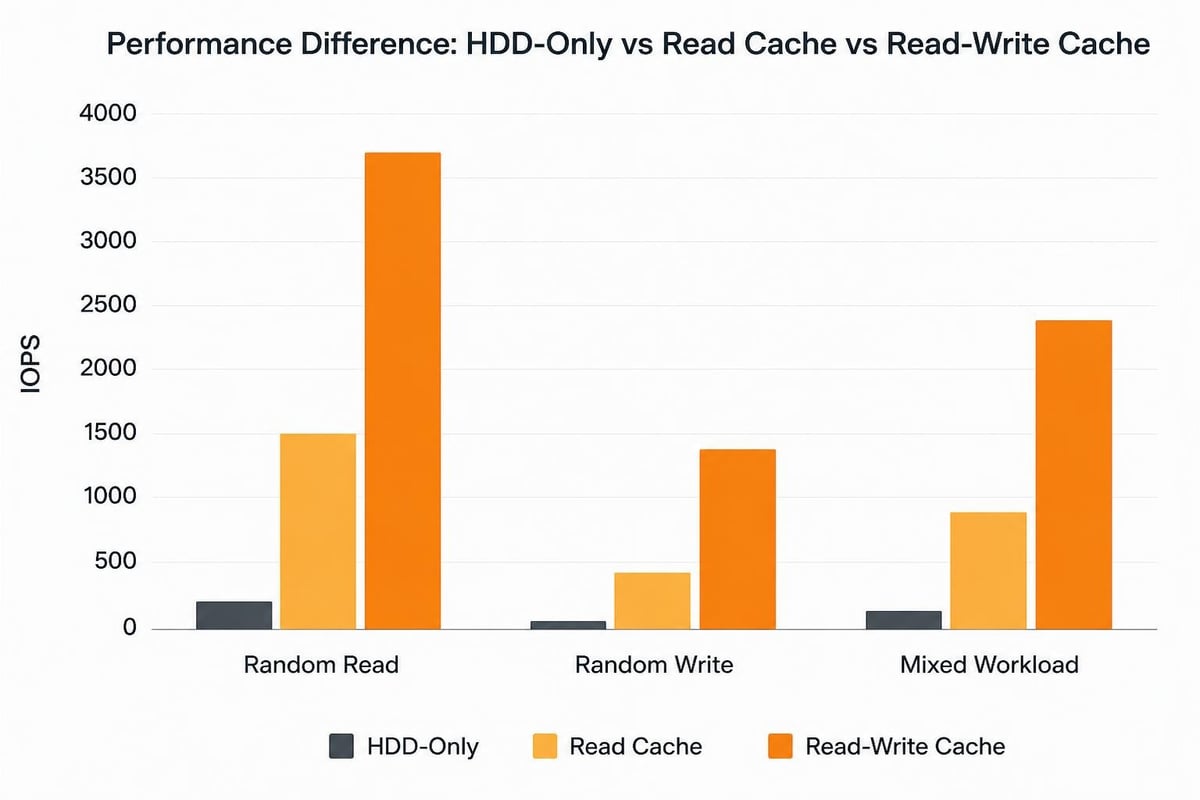
Read-only cache accelerates frequently read data blocks, reducing load on spinning disks for hot datasets. In contrast, read-write cache also buffers write operations, improving throughput for mixed workloads but requiring two SSDs in RAID 1 configuration. Therefore, understanding your I/O pattern is critical before selecting a cache strategy.

Selecting Compatible SSDs for Synology Systems
Not all solid-state drives function reliably in Synology NAS environments, and consequently, drive selection directly impacts stability and performance. Moreover, Synology maintains detailed compatibility matrices covering form factors, interfaces, and specific models.
M.2 NVMe vs 2.5" SATA Considerations
Modern Synology NAS units typically support M.2 NVMe SSDs in dedicated cache slots or 2.5" SATA SSDs in standard drive bays. Furthermore, NVMe drives offer significantly higher sequential throughput (3,000+ MB/s vs 550 MB/s for SATA), but SATA drives often provide better cost-per-gigabyte and broader compatibility.
| Feature | M.2 NVMe SSD | 2.5" SATA SSD |
|---|---|---|
| Sequential Read | 3,500 MB/s (PCIe 3.0) | 550 MB/s |
| Interface | PCIe lanes (direct) | SATA 6Gb/s |
| Form Factor | M.2 2280 (dedicated slots) | 2.5" drive bay |
| Typical Cost/TB | Higher | Lower |
| Heat Generation | Moderate to high | Low to moderate |
Therefore, verify your specific NAS model's specifications before purchasing drives. In addition, consult the Synology SSD compatibility list to confirm supported brands and capacities, as unsupported drives may cause stability issues or void warranties.
Endurance and TBW Requirements
SSD endurance, measured in terabytes written (TBW) or drive writes per day (DWPD), determines lifespan under continuous write workloads. Nevertheless, consumer-grade SSDs typically offer 150-600 TBW ratings, whereas NAS-optimised drives from Seagate IronWolf or Western Digital Red deliver 1,000+ TBW. According to Backblaze’s analysis of SSD reliability, monitoring write amplification and remaining lifespan through SMART attributes helps prevent unexpected failures.
For a synology ssd nas running read-write cache in a busy environment, calculate expected daily write volumes and multiply by 365 to ensure the SSD's TBW rating exceeds three to five years of operation. Furthermore, enterprise SSDs include power-loss protection circuitry, reducing data corruption risk during unexpected shutdowns.
Configuring SSD Cache for Optimal Performance
Once compatible drives are installed, DSM's Storage Manager guides administrators through cache creation. Moreover, several critical decisions during setup influence long-term performance and reliability.
Cache Sizing and Workload Matching
Synology recommends cache sizes between 1% and 10% of the primary storage pool capacity, depending on working dataset size. In addition, key considerations when creating SSD cache include application access patterns, file size distributions, and available drive slots.
- Analyse I/O patterns using Storage Analyzer or third-party monitoring to identify hot data segments
- Calculate working set by determining which files are accessed daily or weekly versus archived long-term
- Size cache accordingly: If 500 GB of data accounts for 80% of reads, a 64-128 GB read cache delivers significant gains
- Monitor hit rates post-deployment and adjust cache size if hit rates fall below 70-80%
Nevertheless, oversized cache wastes SSD capacity without proportional benefits, whilst undersized cache forces frequent evictions and reduces effectiveness. Therefore, iterative tuning based on real-world metrics yields optimal configurations.
Read-Only vs Read-Write Cache Trade-offs
| Cache Type | Advantages | Disadvantages | Best For |
|---|---|---|---|
| Read-only | Single SSD required, lower cost, simpler setup | No write acceleration | Media libraries, file servers with infrequent writes |
| Read-write | Accelerates both reads and writes, buffers burst workloads | Requires two SSDs (RAID 1), higher cost | Databases, virtual machines, development servers |
For business environments running secure cloud storage solutions or collaboration platforms, read-write cache typically delivers better user experience during simultaneous access. Furthermore, write buffering reduces wear on primary HDD arrays by coalescing small writes into larger sequential operations.
Advanced Performance Tuning Techniques
Beyond basic cache configuration, several DSM settings and hardware optimisations further enhance synology ssd nas performance. Moreover, understanding these advanced options helps extract maximum value from SSD investments.
Skip Sequential I/O for Better Cache Efficiency
Large sequential transfers (media streaming, backup operations) bypass cache by default in DSM 7, preventing cache pollution from one-time reads. Nevertheless, administrators can adjust this threshold in Storage Manager's cache settings. For instance, setting the skip threshold to 128 KB ensures video files don't evict frequently accessed small files from cache.
- Default skip size: 256 KB
- Recommended for mixed workloads: 128-512 KB
- Disable skip: Only for all-SSD systems where all I/O benefits from caching
Furthermore, enabling "Pin Synology system to SSD cache" reserves cache space for DSM itself, ensuring responsive management interfaces even under heavy user load. This feature proves particularly valuable in environments running Docker containers or Virtual Machine Manager.
RAID Configuration and Over-Provisioning
SSD-based storage pools benefit from RAID configurations optimised for flash media characteristics. In addition, RAID 5 or RAID 6 arrays spread write operations across multiple drives, reducing per-drive wear. Nevertheless, RAID 1 (mirroring) offers the best write performance for two-drive configurations whilst maintaining full data redundancy.
Over-provisioning reserves 7-10% of SSD capacity for wear levelling and garbage collection, extending drive lifespan. Therefore, when creating volumes on SSD-only pools, leave 10% unallocated or partition drives to 90% capacity. This practice is especially critical for write-intensive applications like database servers or development environments.
Monitoring and Maintenance Schedules
Proactive monitoring prevents SSD failures from causing data loss or downtime. Moreover, DSM's Storage Analyzer and S.M.A.R.T. test scheduler provide essential visibility into drive health.
- Enable S.M.A.R.T. tests: Schedule extended tests monthly to detect early wear indicators
- Monitor cache hit rate: Maintain 75%+ hit rates; lower percentages suggest cache resizing needed
- Track SSD lifespan: Review "Percentage Used" and "Available Spare" attributes quarterly
- Plan replacement cycles: Order replacement SSDs when drives reach 80% of rated TBW
Furthermore, implementing managed cloud security services ensures backup copies of critical data exist independent of the NAS, providing recovery options if SSD failures occur unexpectedly. Therefore, pairing local SSD acceleration with cloud-based disaster recovery delivers both performance and protection.
Real-World Performance Benchmarks and Expectations
Understanding realistic performance gains helps set appropriate expectations for synology ssd nas deployments. Nevertheless, actual results vary based on network infrastructure, client hardware, and workload characteristics.
Typical Performance Improvements
| Workload Type | HDD Only | With Read Cache | With Read-Write Cache |
|---|---|---|---|
| Random Read IOPS | 150-200 | 5,000-15,000 | 5,000-15,000 |
| Random Write IOPS | 100-150 | 100-150 | 2,000-8,000 |
| Sequential Read | 220 MB/s | 220-450 MB/s | 220-450 MB/s |
| Sequential Write | 180 MB/s | 180 MB/s | 300-600 MB/s |
These figures assume 1GbE network connectivity; 10GbE or 25GbE networks unlock higher throughput. In addition, detailed SSD benchmarks from Tom’s Hardware provide comparative performance data for specific drive models under various workloads.
Network Bottlenecks and Scaling Considerations
Even the fastest synology ssd nas configuration cannot overcome network bandwidth limits. Therefore, 1GbE connections cap throughput at approximately 110-120 MB/s regardless of storage performance. Furthermore, upgrading to 10GbE ($300-500 per port including switches and NICs) becomes cost-effective when multiple users access the NAS simultaneously or large file transfers occur frequently.
For businesses operating ISO 27001-certified data centres or private cloud infrastructure, pairing local SSD-accelerated NAS with geographically distributed backup systems ensures regulatory compliance whilst maintaining high performance. Moreover, European businesses subject to GDPR benefit from keeping data within EU jurisdictions, making local NAS infrastructure preferable to US-based cloud services.

Enterprise-Grade SSD Features for Business Use
Business-critical Synology deployments warrant SSDs designed specifically for 24/7 operation and sustained workloads. Moreover, features like power-loss protection and advanced error correction distinguish enterprise drives from consumer models.
Power-Loss Data Protection (PLDP)
Unexpected power failures can corrupt data mid-write, particularly for cached operations not yet committed to permanent storage. Nevertheless, enterprise SSDs incorporate capacitors or battery backup to flush pending writes during power loss. According to Seagate’s technical guidance on power-loss protection, this feature prevents file system corruption and ensures data integrity.
For instance, Seagate IronWolf 110 SSDs include PLDP alongside 1,800 TBW endurance ratings (960 GB model), making them suitable for read-write cache in production environments. In addition, PCWorld's review of the IronWolf 110 highlights real-world NAS performance under sustained write loads.
Firmware Optimisation and Thermal Management
NAS-specific SSDs often include firmware tuned for RAID environments and sustained sequential writes. Furthermore, thermal throttling during extended transfers can degrade performance, making proper airflow and cooling essential. Therefore, monitor SSD temperatures through DSM's Hardware & Power interface and ensure adequate case ventilation.
- Target operating temperature: 40-60°C under load
- Warning threshold: 70°C (sustained)
- Critical threshold: 75-80°C (throttling likely)
Moreover, M.2 NVMe drives generate more heat than 2.5" SATA models, sometimes requiring heatsinks or active cooling in densely populated slots. Consequently, verify thermal specifications against your NAS model's ventilation capabilities before deployment.
Migration Strategies and Deployment Planning
Introducing SSD acceleration into existing Synology infrastructure requires careful migration planning to avoid downtime. Nevertheless, DSM supports non-disruptive cache addition and gradual storage pool transitions.
Adding Cache to Live Systems
DSM allows administrators to create SSD cache on operational storage pools without taking volumes offline. Furthermore, cache population occurs transparently as data is accessed, with full effectiveness typically achieved within hours to days depending on working set size.
- Install SSDs in designated cache slots (M.2) or available drive bays (2.5")
- Navigate to Storage Manager > SSD Cache > Create
- Select cache type (read-only or read-write) based on workload analysis
- Choose drives and confirm RAID configuration for read-write cache
- Monitor hit rates over 48-72 hours and adjust skip sequential I/O thresholds
In addition, scheduling cache creation during off-peak hours minimises impact on production workloads, though modern Synology systems handle cache initialisation with minimal performance degradation. Therefore, most businesses can deploy SSD cache without scheduling maintenance windows.
Migrating to All-Flash Arrays
Transitioning from hybrid to all-flash storage requires data migration between pools. Moreover, Synology's Storage Migration service (available on plus-series models) automates this process with minimal downtime.
Pre-migration checklist:
- Verify new SSD pool has equal or greater capacity than source HDD pool
- Ensure network bandwidth supports large data transfers (consider direct connection)
- Schedule migration during low-activity periods to reduce impact
- Maintain recent backups in case migration issues arise
Furthermore, for organisations evaluating cloud-first strategies, comparing on-premises synology ssd nas performance against managed services like vBoxxCloud helps identify optimal hybrid architectures. European businesses particularly benefit from GDPR-compliant cloud storage hosted in Netherlands data centres, combining the low latency of local SSD NAS with the redundancy and accessibility of geo-distributed cloud infrastructure.
Cost-Benefit Analysis and ROI Calculations
Justifying SSD investments requires quantifying performance gains against hardware costs and operational efficiencies. Nevertheless, reduced wait times, higher user density, and extended HDD lifespan often deliver measurable returns within 12-18 months.
Direct Cost Comparison
| Component | Cost (2026 estimate) | Notes |
|---|---|---|
| 1 TB NAS SATA SSD (consumer) | £80-120 | 600 TBW typical |
| 1 TB NAS SATA SSD (enterprise) | £180-250 | 1,800+ TBW, PLDP |
| 1 TB M.2 NVMe SSD (consumer) | £90-140 | Higher performance, similar endurance |
| 1 TB M.2 NVMe SSD (enterprise) | £220-300 | 3,000+ TBW, advanced features |
For a typical read-write cache deployment requiring two 512 GB SSDs (mirrored), total hardware investment ranges from £160-600 depending on drive class. Moreover, comparing this cost against productivity gains and infrastructure longevity improvements reveals substantial ROI.
Productivity and Efficiency Gains
Reducing file access latency from 15-20ms (HDD) to 1-2ms (SSD cache) accelerates workflows across the organisation. Furthermore, consider these quantifiable benefits:
- User productivity: 10-15% faster file operations for knowledge workers accessing shared documents
- Backup windows: Faster backups due to improved IOPS, reducing backup job duration by 30-50%
- HDD lifespan: Reduced mechanical wear on primary storage extends HDD replacement cycles
- Energy efficiency: All-flash systems consume 60-70% less power than equivalent HDD arrays
Therefore, a 50-person organisation gaining 30 minutes weekly per employee from faster file access realises approximately 1,300 hours annually, equivalent to £25,000-40,000 in productivity value at typical European wage rates. In addition, reduced power consumption and cooling requirements lower operational expenses over the NAS system's lifespan.
Future-Proofing Synology SSD Infrastructure
Storage technology evolves rapidly, and consequently, selecting scalable synology ssd nas platforms ensures relevance beyond immediate needs. Moreover, emerging standards and interface technologies influence upgrade paths and long-term investment protection.
PCIe 4.0 and Next-Generation NVMe
Synology's 2026 product line increasingly supports PCIe 4.0 NVMe SSDs, doubling theoretical bandwidth to 7,000 MB/s sequential reads. Nevertheless, real-world NAS workloads rarely saturate even PCIe 3.0 interfaces, making PCIe 4.0 a future-proofing consideration rather than immediate necessity. Furthermore, PCIe 4.0 drives command 20-30% price premiums over equivalent PCIe 3.0 models.
For businesses planning 5+ year deployment cycles, investing in PCIe 4.0-capable NAS units provides upgrade flexibility as faster SSDs become cost-effective. In addition, backward compatibility ensures current-generation drives function perfectly whilst allowing seamless migration to faster media when replacing worn SSDs.
Emerging Storage Class Memory Technologies
Technologies like Intel Optane and persistent memory blur the line between RAM and storage, offering sub-10-microsecond latency. Nevertheless, high costs and limited capacity keep these technologies in specialised high-performance computing niches for now. Therefore, traditional NAND-based SSDs remain the practical choice for general-purpose synology ssd nas deployments through at least 2028.
Implementing a synology ssd nas delivers transformative performance improvements for businesses demanding responsive file access, database performance, and virtualisation support. Nevertheless, success requires careful drive selection, appropriate cache strategies, and ongoing monitoring to ensure reliability and efficiency.
For European businesses seeking GDPR-compliant infrastructure beyond local NAS systems, vBoxx provides secure hosting and cloud solutions running on ISO 27001-certified infrastructure in the Netherlands. Moreover, vBoxx combines the benefits of European data sovereignty with enterprise-grade security, complementing local SSD-accelerated storage with geo-redundant cloud backup and collaboration platforms. Explore how vBoxx's managed services and green hosting practices can enhance your digital infrastructure whilst maintaining full regulatory compliance.