

Modern businesses require robust networking infrastructure that balances performance, security, and manageability without the complexity of traditional enterprise hardware. A Synology router represents a unique category in the networking market, combining consumer-friendly setup with enterprise-grade features through the company's Router Manager (SRM) operating system. Furthermore, for European organisations prioritising data sovereignty and GDPR compliance, these devices offer powerful network control whilst maintaining privacy standards increasingly demanded by regulatory frameworks in 2026.
What Distinguishes a Synology Router from Traditional Networking Hardware
Unlike conventional routers that rely on web interfaces with limited functionality, the Synology Router Manager (SRM) platform delivers a sophisticated operating system designed around centralised management and extensibility. This approach transforms network hardware into an integrated security and connectivity platform.
The SRM Operating System Architecture
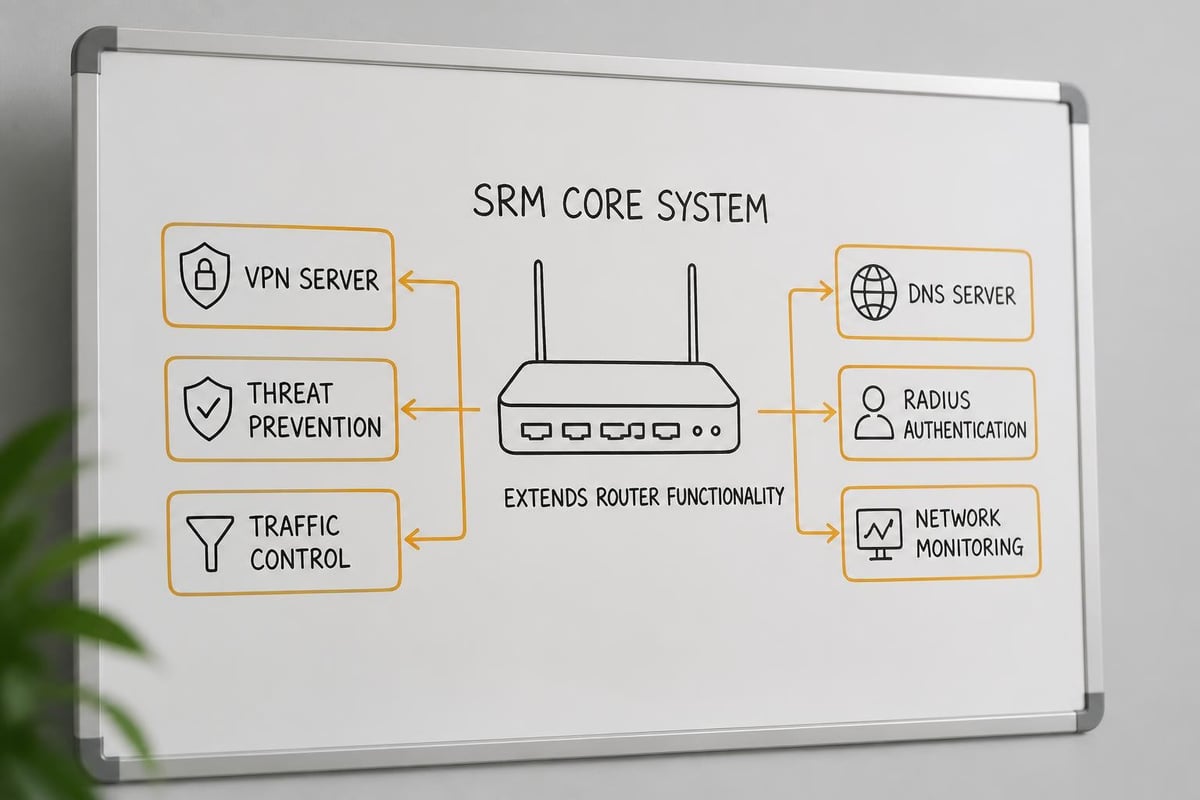
SRM provides a desktop-like interface accessible from any browser, offering intuitive control over advanced networking features. Moreover, the system supports add-on packages that extend functionality beyond basic routing and Wi-Fi management.
Key architectural advantages include:
- Unified dashboard for monitoring traffic, security events, and connected devices
- Modular package system allowing installation of VPN servers, threat intelligence, and traffic analytics
- Role-based administration enabling delegation of specific network management tasks
- Automatic updates delivering security patches and feature enhancements without manual intervention
The platform architecture separates the control plane from the data plane, consequently ensuring that management tasks don't impact routing performance during peak usage periods.
| Feature Category | Traditional Router | Synology Router |
|---|---|---|
| User Interface | Basic web panel | Desktop-style OS |
| Security Updates | Manual/inconsistent | Automatic/scheduled |
| VPN Server Types | Usually 1-2 protocols | Multiple (OpenVPN, L2TP, SSTP, WebVPN) |
| Traffic Analytics | Basic logs | Deep packet inspection with visualizations |
| Extensibility | Fixed features | Package-based expansion |

Core Networking Capabilities for Business Environments
The practical deployment of a Synology router in business settings reveals capabilities that address specific enterprise requirements whilst maintaining accessibility for organisations without dedicated networking staff.
Advanced Security Layers and Threat Prevention
Security features extend beyond basic firewall rules to incorporate intelligent threat detection and prevention mechanisms. Safe Access parental controls, when applied in business contexts, become content filtering policies that enforce acceptable use across the organisation.
Furthermore, the Threat Prevention package analyses network traffic in real-time, blocking connections to known malicious domains and IP addresses. This database updates continuously, therefore providing protection against emerging threats without requiring administrator intervention.
The system implements:
- Intrusion Prevention System (IPS) scanning inbound and outbound traffic for attack signatures
- DNS-based filtering preventing access to phishing sites and malware distribution points
- DoS protection mitigating volumetric attacks and connection flood attempts
- Application-layer inspection identifying and controlling specific protocols regardless of port
- Geo-blocking capabilities restricting traffic based on geographic origin
In addition, the platform supports multiple VLAN configurations, allowing network segmentation that isolates guest networks, IoT devices, and sensitive business systems onto separate logical networks with distinct security policies.
VPN Server and Remote Access Solutions
The integrated VPN server functionality transforms a Synology router into a secure gateway for remote workers and inter-office connectivity. Consequently, businesses eliminate the need for separate VPN appliances or cloud-based services that may route traffic through jurisdictions with problematic data sovereignty laws.
Available VPN protocols include:
- OpenVPN for cross-platform compatibility and strong encryption
- SSTP for Windows environments requiring NAT traversal
- L2TP/IPSec for mobile device connectivity
- WebVPN enabling browser-based access without client installation
The WebVPN feature particularly benefits organisations supporting diverse endpoints, nevertheless maintaining security through two-factor authentication and session timeout controls. Therefore, employees access internal resources through an SSL-encrypted browser session without installing VPN client software on personal devices.
For businesses managing cloud server hosting infrastructure across multiple locations, site-to-site VPN tunnels establish permanent encrypted connections between offices or between on-premises networks and cloud environments.
Mesh Networking and Multi-Site Deployment Strategies
Synology's approach to mesh networking extends beyond consumer whole-home coverage to address distributed business environments requiring consistent policy enforcement across multiple access points.
Seamless Roaming and Coverage Extension
The mesh implementation, demonstrated comprehensively in StorageReview’s RT6600ax testing, maintains a single network name whilst intelligently steering devices between access points based on signal strength and band availability. Moreover, the system automatically selects optimal backhaul channels, whether using dedicated wireless bands or wired Ethernet connections.
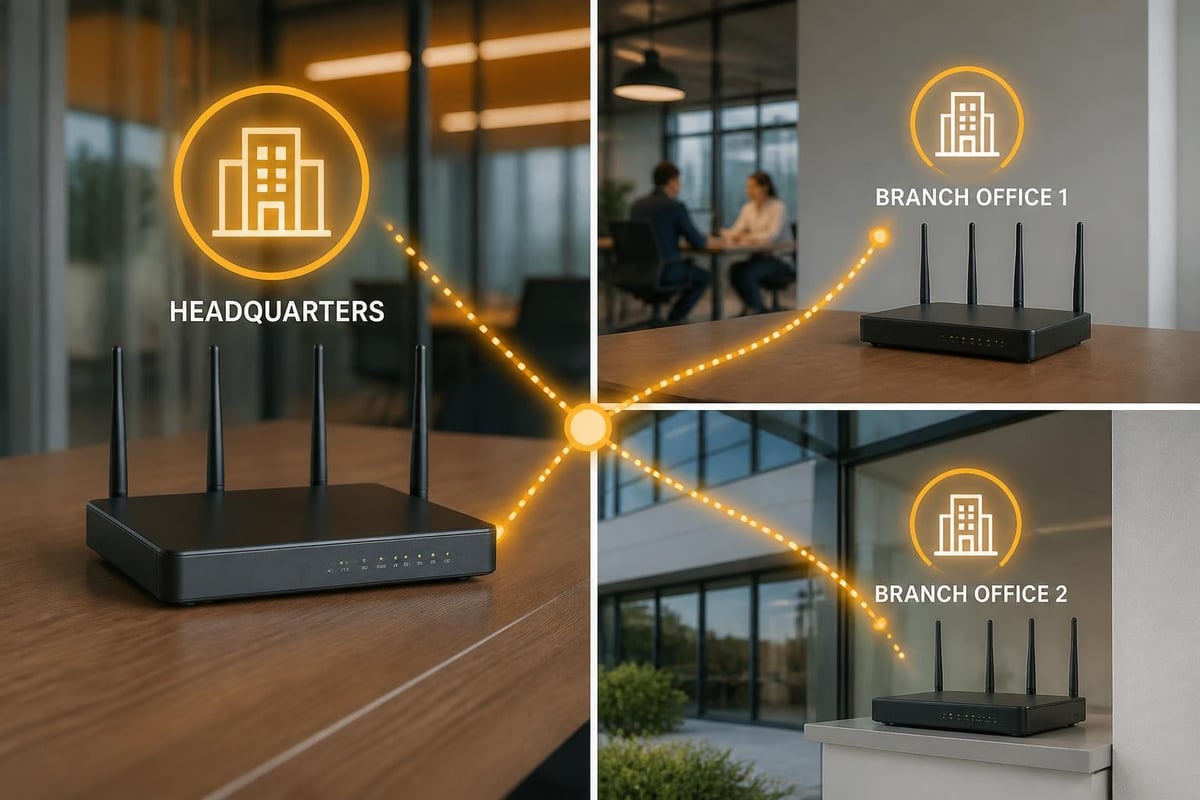
In practical deployment scenarios, businesses benefit from:
| Deployment Pattern | Configuration Approach | Primary Benefit |
|---|---|---|
| Single-office expansion | Wireless mesh nodes | Eliminates cabling requirements |
| Multi-floor coverage | Wired backhaul to nodes | Maximum throughput per node |
| Temporary locations | Portable mesh points | Rapid deployment capability |
| Branch office integration | VPN + local mesh | Unified management across sites |
Furthermore, the centralised management interface allows administrators to configure all mesh nodes from a single dashboard, therefore eliminating the need to access each device individually when updating security policies or wireless settings.
Integration with Business Cloud Infrastructure
Network infrastructure increasingly serves as the integration point between on-premises resources and cloud services. A Synology router provides several mechanisms to bridge these environments securely.
Secure Tunnels to European Cloud Platforms
Businesses prioritising data sovereignty particularly value the ability to establish encrypted tunnels directly to cloud infrastructure hosted within specific jurisdictions. For organisations using platforms emphasising GDPR compliance and European data residency, VPN tunnels ensure that traffic between office networks and cloud resources never traverses networks subject to foreign surveillance frameworks.
The traffic routing capabilities allow administrators to configure split-tunnel policies, consequently directing cloud-bound traffic through VPN connections whilst allowing general internet access to route directly. This approach optimises bandwidth usage whilst maintaining security for sensitive communications.
Nevertheless, effective integration requires consideration of several factors:
- MTU settings to prevent fragmentation across VPN tunnels
- DNS resolution ensuring internal hostnames resolve correctly
- Failover behaviour when primary WAN connections experience interruptions
- QoS policies prioritising business-critical cloud applications
In addition, businesses running collaborative platforms benefit from configuring traffic prioritisation rules. For example, vBoxxConnect users can establish QoS policies that prioritise video conferencing and real-time communication traffic over background file synchronisation, therefore ensuring optimal call quality during peak usage periods.
Load Balancing and Connection Resilience
Multi-WAN capabilities transform the Synology router into a sophisticated load balancer and failover device. Businesses with multiple internet connections configure the system to distribute traffic across links based on:
- Round-robin distribution for equal utilisation
- Ratio-based allocation favouring faster connections
- Failover-only configuration reserving secondary links for outage scenarios
- Application-specific routing directing certain services through designated connections
The health-check mechanism continuously monitors each WAN connection, automatically rerouting traffic when link degradation or failure occurs. Therefore, businesses maintain connectivity even during ISP outages or circuit degradation.
Hardware Specifications and Performance Considerations
Understanding the hardware capabilities underlying a Synology router helps inform appropriate deployment decisions and capacity planning.
Processing Power and Throughput Capabilities
Current-generation models like the RT6600ax, as analysed in Android Central’s comprehensive review, incorporate quad-core processors specifically selected to handle simultaneous routing, VPN encryption, and deep packet inspection without performance degradation.
Key performance metrics include:
| Specification | RT6600ax | RT2600ac (Previous Gen) |
|---|---|---|
| CPU | Quad-core 1.8 GHz | Dual-core 1.7 GHz |
| RAM | 1 GB DDR4 | 512 MB DDR3 |
| Wi-Fi Standard | Wi-Fi 6 (802.11ax) | Wi-Fi 5 (802.11ac) |
| 2.5 GbE Ports | 1 | 0 |
| USB Ports | 1 × USB 3.2 | 1 × USB 3.0 |
| VPN Throughput | ~900 Mbps | ~300 Mbps |
Furthermore, the inclusion of 2.5 Gigabit Ethernet provides headroom for multi-gigabit internet services and high-speed NAS connectivity, nevertheless requiring compatible network infrastructure to realise full benefits.
Storage and Package Expansion
The USB 3.2 port enables external storage attachment for several business-relevant applications. Administrators can configure attached drives for network file sharing, centralised backup storage, or local caching of frequently accessed cloud content.
Moreover, the storage serves as the foundation for several SRM packages:
- Download Station for centralised file retrieval and torrent management
- Media Server enabling DLNA streaming across the network
- Cloud Station providing file synchronisation capabilities
- USB Printer sharing eliminating the need for dedicated print servers
In addition to storage expansion, the package ecosystem continues growing, with regular SRM updates delivering new capabilities and security enhancements throughout the device lifecycle.
Network Management and Monitoring Tools
Effective network administration requires visibility into traffic patterns, security events, and device behaviour. The Synology router provides comprehensive monitoring tools accessible through both web interfaces and mobile applications.
Real-Time Traffic Analysis and Historical Reporting
The Traffic Control package delivers granular visibility into bandwidth consumption across devices, applications, and time periods. Furthermore, administrators configure traffic quotas and rate limits for specific devices or entire VLANs, therefore preventing bandwidth monopolisation by non-critical activities.
Traffic analysis features include:
- Per-device bandwidth graphs showing upload and download trends
- Application protocol identification revealing which services consume capacity
- Historical data retention enabling trend analysis and capacity planning
- Alert thresholds triggering notifications when usage exceeds defined limits
Nevertheless, the system balances detail with performance, consequently aggregating older data whilst maintaining granular recent statistics. This approach ensures that monitoring overhead doesn't impact routing performance even on networks with hundreds of connected devices.
Security Event Logging and Incident Response
Security logs aggregate events from the firewall, intrusion prevention system, and authentication mechanisms into a searchable interface. Moreover, the system supports syslog export to external security information and event management (SIEM) platforms, therefore integrating with broader security monitoring infrastructure.
The logs capture:
- Blocked connection attempts with source IP, destination, and threat classification
- VPN authentication events including successful logins and failed attempts
- Rule violations when traffic matches configured deny policies
- System changes documenting administrative actions and configuration modifications
In addition, businesses subject to compliance requirements benefit from the comprehensive audit trail, which demonstrates network security controls and incident response capabilities during regulatory assessments.
Comparison with Enterprise Networking Solutions
Positioning a Synology router relative to traditional enterprise networking equipment reveals distinct trade-offs and appropriate use cases.
Cost and Complexity Considerations
Traditional enterprise solutions from vendors like Cisco, Fortinet, or Ubiquiti offer deeper feature sets and higher throughput but require specialised networking knowledge for configuration and ongoing management. Furthermore, these platforms typically involve substantial upfront investment and recurring licensing costs for security subscriptions and support contracts.
| Aspect | Synology Router | Enterprise Hardware |
|---|---|---|
| Initial Cost | £300-£500 | £1,000-£10,000+ |
| Annual Licensing | Included | £500-£3,000+ |
| Configuration Complexity | Moderate | High |
| Management Interface | Unified GUI | Often CLI-based |
| Support Model | Community + paid options | Vendor contracts required |
| Scalability Ceiling | Small-medium business | Enterprise campus |
Nevertheless, for organisations with 5-100 employees, the Synology approach delivers 80% of enterprise functionality at 20% of the cost, therefore representing an optimal balance for businesses without dedicated IT departments.
When to Choose Each Approach
Synology routers excel in scenarios requiring:
- Rapid deployment without extensive networking expertise
- Unified management of routing, security, and VPN from a single interface
- Moderate throughput requirements (under 1 Gbps aggregate)
- Budget constraints limiting capital expenditure on networking infrastructure
Conversely, traditional enterprise gear remains appropriate for:
- High-density environments with hundreds of simultaneous wireless clients
- Multi-gigabit throughput requirements exceeding 2-3 Gbps
- Complex routing protocols like BGP or OSPF for multi-site networks
- Regulatory mandates requiring specific vendor certifications
As noted in TechRadar’s comparative analysis, the Synology platform particularly appeals to technically capable business owners who understand networking concepts but lack the time or inclination to manage command-line configurations.
European Data Sovereignty and Privacy Implications
For businesses operating under GDPR and related European privacy frameworks, network infrastructure choices carry implications beyond mere functionality.
Keeping Traffic Within Jurisdictional Boundaries
When configuring VPN services and remote access, the routing topology determines which countries' networks carry encrypted traffic. A Synology router deployed within European premises and connecting to cloud infrastructure hosted in European data centres ensures that traffic never transits networks subject to extraterritorial surveillance frameworks.
Furthermore, businesses can implement DNS-level filtering that directs queries to European DNS resolvers rather than services operated by non-European entities. Therefore, even metadata about browsing patterns and service usage remains within appropriate jurisdictional boundaries.
The system supports configuration of:
- Custom DNS servers per network segment or device
- DNS-over-HTTPS encrypting DNS queries to prevent interception
- Local DNS resolution for internal hostnames without external queries
- Conditional forwarding directing specific domains to designated resolvers
Moreover, traffic logging and security event data remains stored locally on the router or attached storage, consequently avoiding cloud-based analytics platforms that might process network metadata outside desired jurisdictions.
Authentication and Access Control
The built-in RADIUS server capability enables centralised authentication for wireless networks and VPN connections without relying on cloud identity providers. In addition, administrators can integrate with on-premises directory services whilst maintaining complete control over credential storage and authentication logs.
Nevertheless, organisations should implement multi-factor authentication for administrative access and VPN connections, therefore adding defence-in-depth protection against credential compromise. The system supports both time-based one-time passwords and hardware security keys for this purpose.
Practical Deployment Scenarios and Configuration Patterns
Real-world implementations reveal common patterns that maximise the value of Synology router deployments across various business contexts.
Multi-Location Professional Services Firm
A consultancy with three offices across the Netherlands, Belgium, and Germany deployed Synology routers as VPN gateways at each location. The site-to-site VPN tunnels create a unified network allowing seamless file sharing and communication across locations.
Configuration highlights include:
- VLAN segmentation separating employee, guest, and IoT devices
- Traffic prioritisation ensuring video calls receive adequate bandwidth
- Centralised threat prevention protecting all locations from a single threat intelligence feed
- Unified wireless network allowing employees to roam between offices without reconfiguration
Furthermore, the firm configured split-tunnel VPN for remote employees, directing access to internal file servers through encrypted tunnels whilst allowing direct internet access for general browsing.
Small Creative Agency with Cloud Workflows
A design studio with 12 employees relies heavily on cloud-based creative collaboration tools and large file transfers. Their Synology router configuration emphasises bandwidth management and reliable cloud connectivity.
The deployment incorporates:
- Dual WAN connections with automatic failover to prevent upload interruptions
- QoS rules prioritising creative software traffic over background updates
- Guest network isolation for client devices during on-site presentations
- VPN access enabling secure remote work without compromising file transfer speeds
In addition, the studio attached a large USB drive to the router, configuring it as a local cache for frequently accessed project assets, therefore reducing repeated cloud downloads and improving workflow responsiveness.
Manufacturing Facility with IoT Integration
A small manufacturing operation deployed a Synology router to manage growing numbers of connected industrial sensors, quality control cameras, and building management systems alongside traditional office IT.
The network architecture implements:
- Separate VLANs isolating industrial control systems from business networks
- Firewall rules preventing IoT devices from initiating internet connections
- Local DNS resolution for internal device addressing without external dependencies
- Bandwidth allocation guaranteeing capacity for monitoring systems during peak usage
Moreover, the facility configured alerting rules that notify administrators when specific IoT devices go offline or exhibit unusual traffic patterns, therefore enabling rapid response to potential equipment failures or security incidents.
Long-Term Viability and Support Lifecycle
Investment in networking infrastructure requires consideration of ongoing vendor support and platform longevity.
Software Update Commitment and Feature Development
Synology maintains an impressive track record of delivering software updates to hardware several generations old. Furthermore, as documented by Tom’s Hardware’s Synology coverage, the company regularly backports security fixes to devices no longer receiving major feature updates, therefore extending useful lifespan beyond typical consumer networking equipment.
The update model includes:
| Update Type | Frequency | Scope |
|---|---|---|
| Security patches | As needed | All supported models |
| Minor updates | Monthly | Bug fixes and stability |
| Major versions | Annual | New features and UI enhancements |
| Package updates | Continuous | Individual add-on modules |
Nevertheless, businesses should monitor the official release notes to understand which features arrive on specific hardware generations and plan refresh cycles accordingly.
Community Resources and Professional Support
The active Synology community provides extensive documentation, configuration guides, and troubleshooting assistance through forums and third-party blogs. Moreover, the company offers paid support packages for businesses requiring guaranteed response times and direct vendor assistance.
In addition, the standardised SRM interface means that knowledge transfers readily between hardware models, consequently reducing training requirements when upgrading or expanding network infrastructure.
Performance Optimisation and Advanced Configuration
Maximising the capabilities of a Synology router requires attention to several configuration details often overlooked in basic deployments.
Wireless Optimisation for Dense Environments
In office environments with numerous Wi-Fi networks from neighbouring businesses, careful channel selection and power management prevent interference whilst maintaining adequate coverage. Furthermore, the Smart Connect feature automatically steers capable devices to less-congested 5 GHz bands, therefore improving overall network performance.
Advanced wireless configurations include:
- Manual channel selection avoiding overlap with neighbouring networks
- Transmit power adjustment reducing coverage area to prevent co-channel interference
- Beamforming optimisation for environments with fixed device locations
- Airtime fairness preventing slower devices from monopolising wireless capacity
Nevertheless, as highlighted in Windows Central’s performance analysis, wireless performance depends heavily on environmental factors, consequently requiring site-specific tuning rather than relying solely on default settings.
VPN Performance Tuning
VPN throughput, whilst impressive compared to previous-generation hardware, still represents the primary performance constraint for remote access scenarios. Therefore, organisations with demanding remote access requirements should consider several optimisation approaches.
Techniques include:
- Protocol selection favouring OpenVPN with hardware acceleration over software-only implementations
- Compression configuration balancing CPU overhead against bandwidth reduction
- MTU optimisation preventing fragmentation across the encrypted tunnel
- Encryption cipher selection using AES-128 where AES-256 proves unnecessarily resource-intensive
In addition, businesses supporting remote desktop protocols should configure traffic prioritisation rules that favour interactive remote access over bulk file transfers through VPN tunnels.
Modern business networking demands solutions that deliver enterprise-grade security and management without the complexity and cost of traditional infrastructure. A Synology router provides this balance, offering comprehensive features through an accessible interface whilst maintaining the flexibility required by growing organisations. For European businesses prioritising data sovereignty and regulatory compliance alongside powerful network capabilities, combining robust on-premises networking with secure cloud infrastructure ensures complete control over digital operations. vBoxx complements this approach by providing ISO 27001-certified hosting, GDPR-compliant cloud storage and communication tools, and secure password management, all running on European infrastructure outside the reach of foreign surveillance frameworks, delivering the complete technology foundation your business needs.