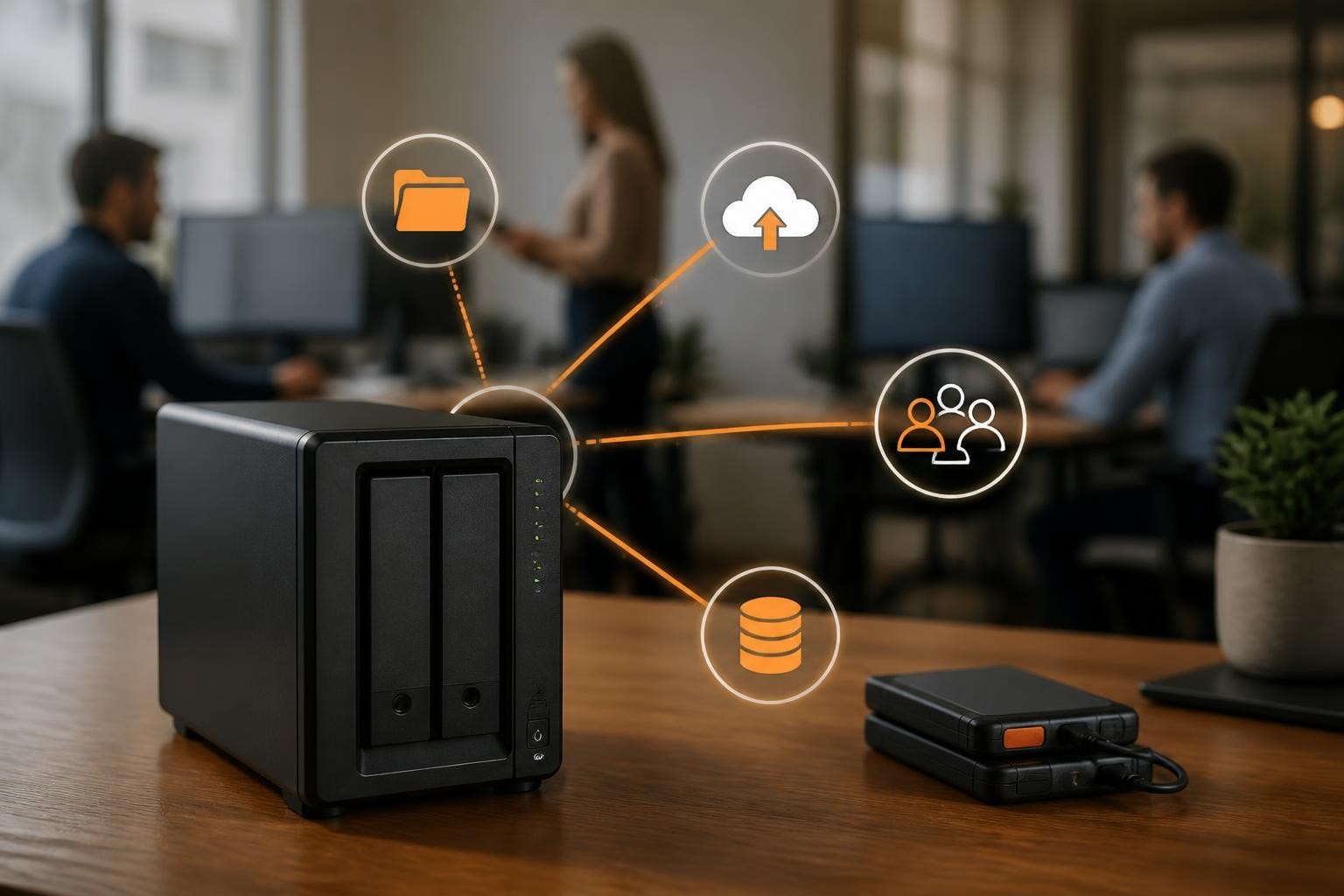

For businesses seeking reliable, scalable data storage solutions, a synology nas 4 bay represents the sweet spot between capacity and cost-effectiveness. In particular, these four-bay network-attached storage systems provide sufficient drive slots for redundancy whilst maintaining a manageable footprint. As a result, they are ideal for small to medium-sized enterprises that require professional-grade data management without the complexity of larger infrastructure. Furthermore, as data volumes continue to expand exponentially in 2026, organisations need storage solutions that balance performance, security, and future-proofing capabilities.
Understanding 4-Bay NAS Architecture
A synology nas 4 bay system utilises four drive bays to create flexible storage configurations that protect your data whilst maximising usable capacity. In particular, the architecture allows businesses to implement various RAID configurations, from simple mirroring to advanced parity systems.
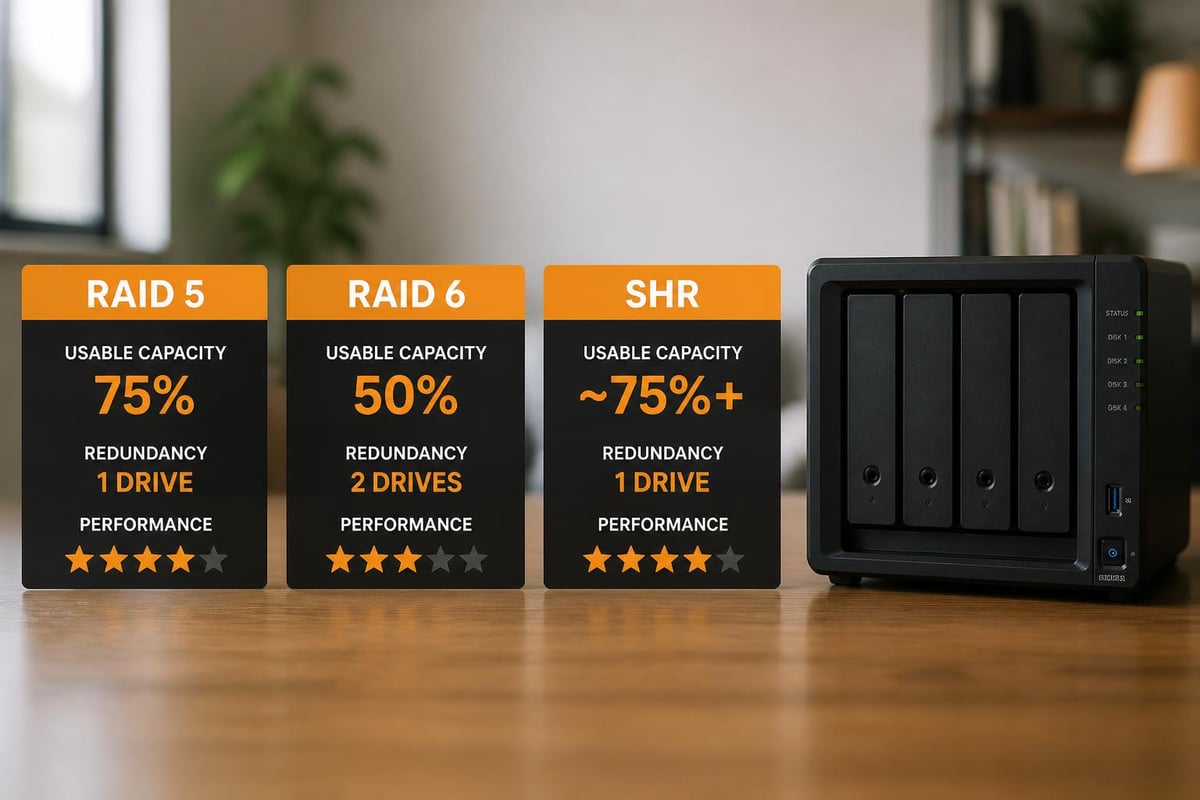
RAID Configuration Options
Four-bay systems offer exceptional versatility in how you protect and organise data. The most common configurations include:
- RAID 1: Mirrors data across two drives, providing 50% usable capacity with single-drive failure protection
- RAID 5: Distributes parity across three or four drives, offering better capacity utilisation with single-drive redundancy
- RAID 6: Uses dual parity, protecting against two simultaneous drive failures
- RAID 10: Combines mirroring and striping for maximum performance and redundancy
- Synology Hybrid RAID (SHR): Proprietary system that optimises capacity whilst maintaining data protection
The choice between these configurations depends on whether you prioritise capacity, performance, or redundancy. Most businesses running critical applications opt for RAID 5 or SHR as they provide excellent balance.
Hardware Specifications That Matter
When evaluating a synology nas 4 bay system, processor performance, memory capacity, and network connectivity determine real-world capabilities. In particular, modern models feature Intel or AMD processors with multiple cores, essential for handling concurrent users and running containerised applications. Furthermore, RAM capacity directly impacts multitasking efficiency and system responsiveness. As a result, network speed also plays a key role in ensuring smooth data transfer and overall performance.
| Specification | Entry-Level | Mid-Range | High-Performance |
|---|---|---|---|
| Processor | Dual-Core 1.4GHz | Quad-Core 2.0GHz | Quad-Core 2.6GHz |
| RAM | 2GB (expandable to 6GB) | 4GB (expandable to 32GB) | 8GB (expandable to 32GB) |
| Network | 1 x 1GbE | 2 x 1GbE | 2 x 10GbE |
| Transcoding | Software only | Hardware-assisted | Hardware 4K |
Memory capacity directly impacts how many simultaneous operations your NAS can handle efficiently. In particular, businesses running virtualisation workloads or Plex media servers should prioritise models with expandable RAM options. Furthermore, the HardwareLab review of the Synology DS423+ provides excellent insights into how hardware specifications translate to real-world Plex performance. As a result, sufficient memory ensures smoother multitasking and improved system stability under heavy workloads.
Business Applications and Use Cases
A synology nas 4 bay serves multiple critical functions within modern business environments. In particular, beyond simple file storage, these systems act as centralised hubs for collaboration, backup, and application hosting. Furthermore, they support secure remote access for distributed teams. As a result, they also improve overall operational efficiency across organisations.
Centralised File Management and Collaboration
DiskStation Manager (DSM), Synology’s operating system, transforms basic storage into a sophisticated collaboration platform. In particular, teams can share files securely, furthermore maintain version histories, and as a result access documents from anywhere with appropriate permissions.
The platform integrates seamlessly with existing workflows through:
- Universal Search: Locate files across all shared folders instantly using content indexing
- Cloud Sync: Bidirectional synchronisation with platforms like OneDrive, Google Drive, and Dropbox
- Office Suite: Built-in document editing capabilities without requiring Microsoft 365 or Google Workspace
- Mobile Applications: Access files securely from iOS and Android devices with granular permission controls
For businesses concerned about data sovereignty and privacy, maintaining files on-premises whilst retaining cloud-like accessibility offers distinct advantages. In particular, encrypted cloud services complement local storage, furthermore providing offsite backup locations, and as a result ensuring zero-knowledge encryption for enhanced security.
Backup and Disaster Recovery
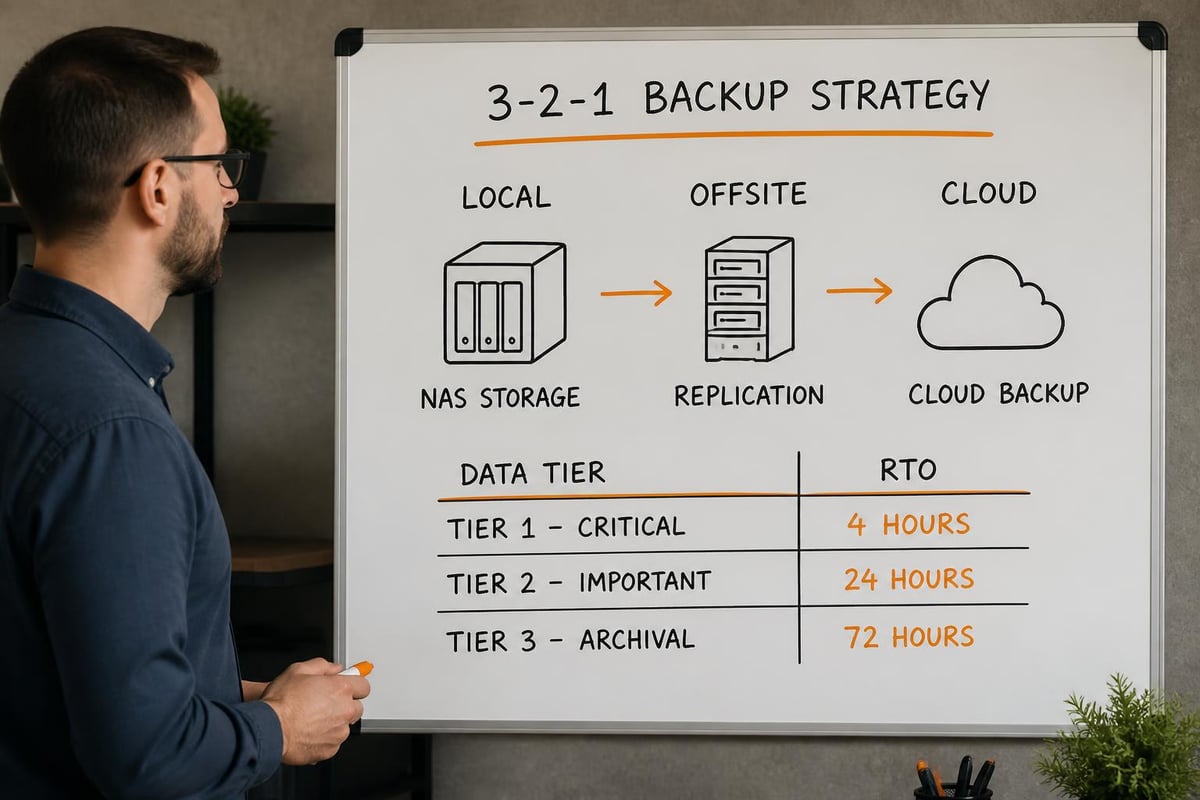
Three-two-one backup strategies require multiple copies across different media and locations. In particular, a synology nas 4 bay functions as both a backup target and source, furthermore protecting critical business data from ransomware, hardware failure, and human error. As a result, this approach strengthens overall data resilience and disaster recovery capability.
Active Backup for Business, included with DSM, provides:
- Agentless backup for VMware and Hyper-V virtual machines
- Physical PC and server backup with system-level recovery
- File server backup with deduplication and compression
- Microsoft 365 and Google Workspace backup for SaaS data protection
The deduplication technology reduces storage requirements by identifying and eliminating redundant data blocks. In particular, businesses typically achieve 50–70% space savings when backing up multiple similar systems. Furthermore, this improves overall storage efficiency. As a result, it reduces long-term infrastructure costs and capacity demands.
Security Features and Compliance Considerations
Data breaches and compliance violations carry severe financial and reputational consequences. In particular, a synology nas 4 bay includes comprehensive security features that protect sensitive business information from unauthorised access and cyber threats. Furthermore, these protections help organisations meet regulatory requirements. As a result, they reduce risk exposure and strengthen overall data governance.
Multi-Layer Security Architecture
Security begins at the firmware level and extends through every access point. Synology implements several defensive layers:
Network Security
- Firewall with geo-blocking and DoS protection
- Automatic IP blocking after failed login attempts
- VPN server capabilities (OpenVPN, L2TP/IPsec, SSTP)
- SSL/TLS certificate management with Let’s Encrypt integration
Access Control
- Two-factor authentication (2FA) supporting authenticator apps and hardware keys
- Active Directory and LDAP integration for centralised user management
- Granular folder and file permissions with Windows ACL support
- Account protection with password complexity requirements
Data Protection
- AES-256 volume encryption for data at rest
- Secure erasure following NIST 800-88 standards
- Immutable snapshots protecting against ransomware
- Antivirus scanning with ClamAV integration
The comprehensive guide to Synology NAS systems published by Android Central highlights security features across different models, helping businesses select appropriate protection levels for their requirements.
Compliance and Audit Capabilities
Organisations subject to GDPR, HIPAA, or industry-specific regulations need detailed audit trails. In particular, DSM logs all system activities, user actions, and file operations, furthermore providing comprehensive tracking for accountability, and as a result delivering forensic evidence when required for compliance or investigations.
Log Center consolidates information from all services:
- User connection logs showing authentication attempts and session durations
- File access logs recording who opened, modified, or deleted specific files
- System event logs capturing configuration changes and security incidents
- Application logs from installed packages and services
These logs can be forwarded to SIEM systems for centralised security monitoring and compliance reporting. In particular, this enables real-time visibility into system activity, furthermore strengthens threat detection capabilities, and as a result supports more effective compliance reporting and audit readiness.
Performance Optimisation and Scalability
A synology nas 4 bay delivers excellent baseline performance. In particular, understanding optimisation techniques ensures you maximise your investment, furthermore improves system efficiency, and as a result helps you plan effectively for future growth.
Network Configuration Best Practices
Network connectivity often becomes the bottleneck limiting NAS performance. Proper configuration addresses this limitation:
Link Aggregation: Models with dual network ports support IEEE 802.3ad aggregation, combining multiple connections for increased bandwidth and failover protection. In practice, this doubles throughput when multiple clients access the NAS simultaneously.
Jumbo Frames: Increasing the maximum transmission unit (MTU) from 1500 to 9000 bytes reduces CPU overhead and improves large file transfer speeds by approximately 15-20% in optimised environments.
Network Segregation: Separating storage traffic onto dedicated VLANs prevents interference from general business network activity, ensuring consistent performance during peak usage periods.
The detailed review of the Synology DS923+ by ElectronicsWizardry demonstrates real-world performance testing under various network configurations.
SSD Caching and Tiering
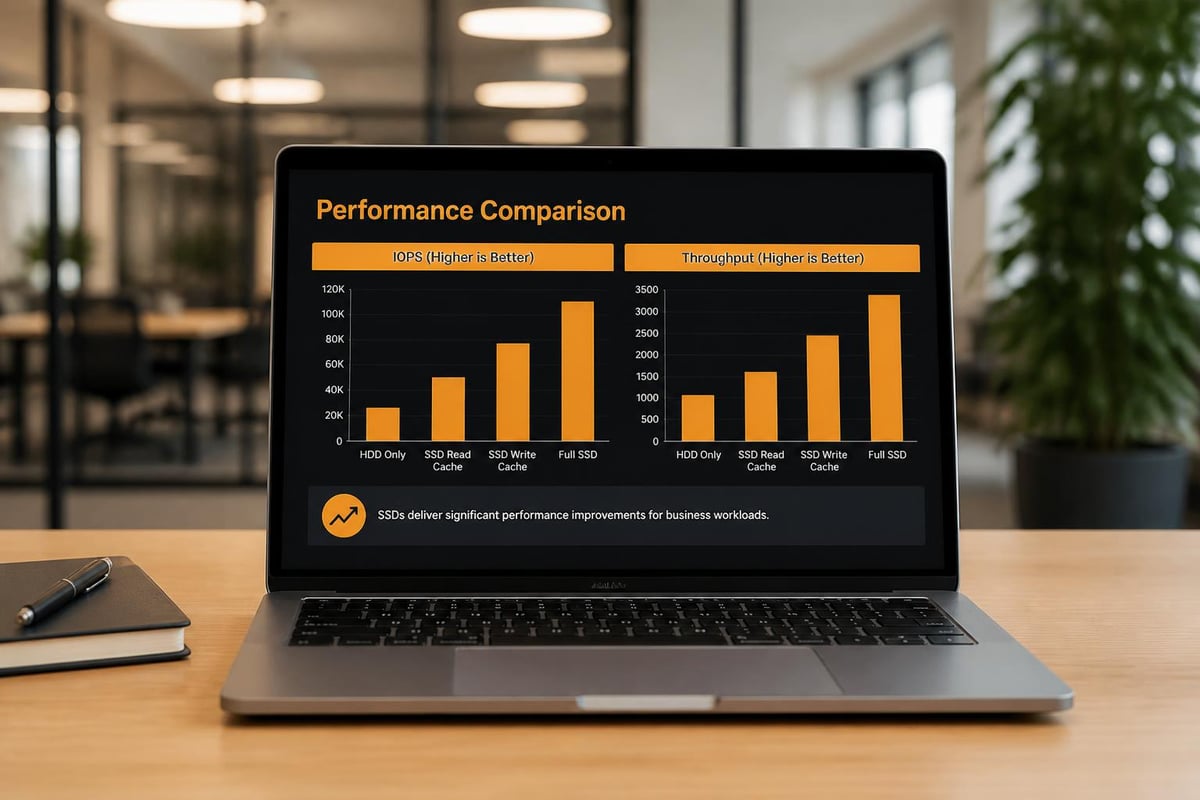
SSD technology dramatically accelerates NAS performance for applications requiring rapid random access. A synology nas 4 bay supports multiple SSD implementation strategies:
| Implementation | Configuration | Use Case | Performance Gain |
|---|---|---|---|
| Read Cache | 1-2 SSDs in slots | Frequently accessed files | 2-3x faster reads |
| Write Cache | 2 SSDs (mirrored) | Database workloads | 3-5x faster writes |
| SSD Storage Pool | All 4 bays with SSDs | Maximum performance | 10x faster overall |
| Auto-Tiering | Mix HDDs and SSDs | Balanced cost/performance | Intelligent placement |
Read caching suits businesses where users repeatedly access the same files, such as design agencies working with large media libraries. In particular, write caching benefits database applications and virtualisation platforms where small, frequent writes occur constantly. Furthermore, these caching strategies improve overall system responsiveness. As a result, they optimise performance for both read and write-intensive workloads.
Capacity Expansion Strategies
Four drive bays provide substantial initial capacity, but businesses inevitably require additional storage. Synology offers several expansion paths:
- Drive Upgrades: Replace existing drives with larger capacities one at a time, allowing the RAID array to rebuild between replacements
- Expansion Units: Connect DX517 or similar expansion chassis via eSATA, adding five additional bays without replacing the main unit
- Network Expansion: Deploy additional NAS units and use Synology’s federation features to present unified storage
- Cloud Tiering: Archive infrequently accessed data to cloud storage automatically using Cloud Sync and Glacier integration
Most businesses find drive upgrades most cost-effective initially. A system starting with 4TB drives (12TB usable in RAID 5) can grow to 20TB drives (60TB usable) without purchasing new hardware.
Software Ecosystem and Package Management
DiskStation Manager transforms basic hardware into a versatile platform through its extensive package ecosystem. In particular, over 100 first-party and third-party applications extend functionality far beyond simple file storage. Furthermore, this enables organisations to tailor deployments to specific needs. As a result, it significantly increases overall system flexibility and business value.
Essential Business Applications
Synology Drive provides private cloud functionality comparable to Dropbox or Google Drive, but with complete data ownership. In particular, teams synchronise files across devices whilst maintaining version histories and collaboration capabilities. Furthermore, this improves workflow continuity across distributed environments. As a result, organisations retain full control over their data while enabling seamless collaboration.
Synology Office enables real-time document collaboration directly within the browser. In particular, multiple users can edit spreadsheets, presentations, and documents simultaneously without external subscriptions. Furthermore, this reduces dependency on third-party productivity suites. As a result, teams can work more efficiently within a unified platform.
Surveillance Station converts your synology nas 4 bay into a professional video management system. In particular, the platform supports thousands of IP camera models, providing motion detection, continuous recording, and intelligent analytics. Furthermore, this enhances physical security monitoring capabilities. As a result, businesses gain scalable, centralised video surveillance infrastructure.
MailPlus delivers complete email server functionality with spam filtering, antivirus scanning, and mobile device support. In particular, businesses maintain email independence whilst ensuring message privacy. Furthermore, this reduces reliance on external email providers. As a result, organisations retain full control over their communication infrastructure.
For organisations exploring comprehensive solutions, vBoxx offers demonstrations that showcase secure cloud storage, email solutions, and password management working together in unified platforms.
Virtualisation and Container Support
Modern Synology 4-bay models support Virtual Machine Manager and Container Manager, enabling businesses to consolidate infrastructure. In particular, this allows organisations to run multiple virtual machines and containerised applications on a single device. Furthermore, it reduces the need for separate physical servers. As a result, this improves infrastructure efficiency and lowers operational complexity.
Virtual Machine Manager runs complete operating systems within the NAS:
- Windows Server instances for specific applications
- Linux distributions for development environments
- Test environments isolated from production systems
- Legacy application preservation
Container Manager (Docker) provides lightweight application deployment:
- Pre-configured applications from Docker Hub
- Custom business applications packaged as containers
- Resource-efficient alternative to full virtualisation
- Simplified updates and rollback capabilities
These capabilities reduce server sprawl whilst maintaining application isolation and security boundaries. In particular, they ensure workloads remain separated, furthermore improving system organisation and security control, and as a result enabling more efficient and secure infrastructure management.
Selecting the Right Model for Your Business
Synology produces several four-bay models targeting different business requirements and budgets. In particular, understanding the distinctions ensures you select appropriate hardware for your specific needs. Furthermore, this helps align system capabilities with workload demands. As a result, it improves long-term performance, scalability, and cost efficiency.
Model Comparison and Recommendations
DS423+: Entry-level model featuring an Intel Celeron processor, ideal for file sharing and basic backup tasks. Maximum 32GB RAM supports moderate virtualisation workloads. The iFeeltech review of the DS925+ provides insights into this category’s real-world business performance.
DS923+: Mid-range option with AMD Ryzen processor and 10GbE upgrade capability. Designed for businesses requiring faster network speeds and enhanced processing power for multimedia or development workloads.
DS920+: Popular model balancing performance and cost, supporting hardware transcoding for 4K media and extensive containerisation. Particularly suited to creative agencies and media production environments.
DS1522+: Premium five-bay alternative for businesses requiring maximum expansion capability through eSATA connectivity. Supports up to 15 drives total with expansion units.
The comprehensive guide to 4-bay NAS options by NASCompares provides visual comparisons helping businesses understand practical differences between models.
Total Cost of Ownership Considerations
Beyond initial hardware costs, businesses must evaluate ongoing expenses:
- Drive Costs: Enterprise-grade drives cost more initially but provide better reliability and warranty terms
- Power Consumption: Modern NAS units consume 30-60 watts during operation, translating to £40-80 annually at UK electricity rates
- Maintenance Contracts: Optional support packages provide priority assistance and advanced replacement
- Software Licensing: Most Synology packages are free, but camera licenses for Surveillance Station and additional users for MailPlus carry incremental costs
Calculate total five-year costs rather than focusing solely on acquisition price to make informed decisions. In particular, this enables more accurate budgeting over time. Furthermore, it accounts for ongoing operational expenses. As a result, organisations can make better long-term investment decisions.
Integration with Business Infrastructure
A synology nas 4 bay must integrate seamlessly with existing systems to deliver value. In particular, compatibility with authentication systems, backup software, and business applications determines practical utility. Furthermore, this ensures smooth workflow integration across environments. As a result, it enhances operational efficiency and reduces deployment complexity.
Directory Services Integration
Active Directory and LDAP integration centralises user management. Rather than maintaining separate accounts on the NAS, businesses leverage existing credentials:
- Single sign-on (SSO) experience for users
- Automatic permission inheritance from AD groups
- Simplified onboarding and offboarding processes
- Consistent password policies across infrastructure
Domain trust relationships enable the NAS to participate fully in Windows environments, appearing as a native file server to end users. In particular, this allows seamless integration with existing Active Directory infrastructure. Furthermore, users can authenticate using their standard corporate credentials without additional configuration. As a result, it simplifies access management while maintaining consistent security policies across the organisation.
Hybrid Cloud Architectures
Modern businesses rarely choose purely on-premises or entirely cloud-based strategies. In particular, hybrid approaches combine local performance with cloud scalability. Furthermore, they provide geographic redundancy for critical workloads. As a result, organisations achieve greater resilience and operational flexibility across their infrastructure.
A synology nas 4 bay facilitates hybrid models through:
Cloud Sync: Bidirectional synchronisation with major cloud providers maintains identical copies in multiple locations. In particular, encryption occurs before data leaves your network, protecting confidentiality. Furthermore, this ensures consistent data availability across environments. As a result, organisations maintain secure, synchronised cloud integration.
Hyper Backup: One-way backup to cloud destinations with versioning and deduplication. In particular, it supports Amazon S3, Azure, Backblaze B2, and other S3-compatible services. Furthermore, this enables flexible multi-cloud backup strategies. As a result, businesses gain reliable long-term data protection with efficient storage usage.
VPN Connectivity: Site-to-site VPN tunnels connect distributed offices, presenting unified storage across geographic locations whilst maintaining security. In particular, this enables secure encrypted communication between locations. Furthermore, it ensures consistent access to centralised resources. As a result, organisations achieve unified storage management across distributed environments.
Businesses prioritising data sovereignty and secure hosting infrastructure often combine local Synology storage with privacy-focused cloud providers offering European data residency guarantees.
API and Developer Access
RESTful APIs enable custom application integration. Developers can programmatically:
- Upload and download files from business applications
- Query file metadata and search indices
- Trigger backup jobs and monitor completion status
- Create and manage user accounts and permissions
This extensibility ensures the NAS adapts to evolving business requirements rather than constraining workflows.
Maintenance and Lifecycle Management
Proper maintenance extends hardware lifespan whilst ensuring consistent performance and data integrity. In particular, a synology nas 4 bay requires minimal ongoing attention when configured correctly.
Routine Maintenance Tasks
Monthly Activities:
- Review system health notifications and resolve warnings
- Verify backup job completion and test restoration procedures
- Check available storage capacity and plan for expansion
- Update installed packages to latest stable versions
Quarterly Activities:
- Run S.M.A.R.T. extended tests on all drives
- Review security logs for suspicious activity patterns
- Test disaster recovery procedures with actual restoration
- Audit user accounts and remove unnecessary access
Annual Activities:
- Update DSM to the latest major version after testing in non-production
- Review and update security policies as threats evolve
- Evaluate capacity projections and budget for expansion
- Assess whether current hardware meets changing business needs
Drive Health Monitoring
S.M.A.R.T. (Self-Monitoring, Analysis and Reporting Technology) data predicts drive failures before they occur. DSM continuously monitors critical parameters:
- Reallocated sector count
- Current pending sector count
- Uncorrectable sector count
- Temperature trends
- Power-on hours
When thresholds exceed acceptable levels, the system sends notifications allowing proactive replacement. This prevents unexpected failures that could compromise data availability.
Environmental and Energy Considerations
Sustainability increasingly influences technology purchasing decisions. A synology nas 4 bay delivers storage efficiency whilst minimising environmental impact through intelligent power management.
Power Management Features
Drive Hibernation: Spins down unused drives after configurable idle periods, reducing power consumption by 40-60% during low-activity periods without impacting availability for active data.
Scheduled Power On/Off: Automatically powers down the NAS during defined periods when business operations don’t require access, such as overnight or weekends.
Link Aggregation Redundancy: Maintains network connectivity whilst allowing individual NICs to enter low-power states during light loads.
For businesses emphasising green hosting practices, combining efficient NAS hardware with renewable energy sources and carbon-neutral data centre partnerships creates genuinely sustainable infrastructure.
Implementing a synology nas 4 bay provides businesses with scalable, secure storage infrastructure that grows alongside organisational needs whilst maintaining data sovereignty and control. Whether you’re consolidating file servers, establishing robust backup systems, or building hybrid cloud architectures, four-bay NAS systems deliver the capabilities modern businesses require. vBoxx complements on-premises storage with secure cloud services, offering encrypted hosting, reliable email solutions, and sustainable infrastructure that prioritises your privacy and environmental responsibility. Contact our team to discover how integrated storage strategies protect your business data whilst maintaining the flexibility and performance your operations demand.