
The rapid adoption of Microsoft 365 across European enterprises has fundamentally transformed how organisations store, collaborate, and communicate. Nevertheless, this shift to cloud-based productivity platforms introduces a critical misconception: many IT leaders assume that Microsoft's native retention and recovery capabilities provide comprehensive protection against data loss. Furthermore, the shared responsibility model clearly defines that whilst Microsoft maintains infrastructure availability, organisations remain accountable for their own data protection. Consequently, third-party backup solutions such as datto saas protection have become essential components of enterprise data resilience strategies, offering granular recovery, extended retention, and compliance capabilities that native tools cannot match.
Understanding the Shared Responsibility Gap
Microsoft explicitly states in its service agreements that platform availability does not equal data protection. Therefore, organisations must implement their own backup strategies to safeguard against accidental deletion, malicious activity, retention policy gaps, and regulatory requirements.
What Microsoft 365 Native Protection Actually Covers
Microsoft provides recycle bins, version history, and litigation hold features across Exchange Online, OneDrive, SharePoint, and Teams. However, these capabilities typically offer limited retention periods ranging from 30 to 93 days depending on license tier and configuration.
- Recycle bin retention: 93 days maximum for most workloads
- Version history: Limited to 500 versions in SharePoint Online
- Litigation hold: Requires E3/E5 licenses and careful configuration
- No protection against: Ransomware encryption, malicious admin actions, or synchronisation errors
Moreover, Microsoft's own guidance on backup privacy and security acknowledges the importance of third-party solutions for comprehensive data protection strategies. In addition, organisations subject to GDPR, NIS2, or sector-specific regulations often require retention periods and recovery capabilities that exceed native Microsoft 365 functionality.

The Business Case for Dedicated SaaS Backup
Data loss scenarios in Microsoft 365 environments stem from multiple vectors. Accidental deletion by end users represents the most common cause, followed by malicious insider actions, security compromises, and application errors during synchronisation or migration.
Furthermore, compliance frameworks increasingly mandate immutable backups with air-gapped storage and verified recovery testing. The NIST SP 800-209 security guidelines for storage infrastructure emphasise the importance of backup immutability and logical separation from production environments.
| Risk Factor | Native M365 Protection | Third-Party Backup Solution |
|---|---|---|
| Accidental deletion | 93-day recycle bin | Multi-year retention |
| Ransomware | Limited | Immutable snapshots |
| Malicious admin | Vulnerable | Separate authentication |
| Compliance retention | License-dependent | Customisable policies |
| Granular recovery | Item-level only | Full flexibility |
Datto SaaS Protection Architecture and Capabilities
Datto saas protection operates as a cloud-to-cloud backup solution specifically engineered for Microsoft 365 environments. Therefore, it eliminates the need for on-premises infrastructure whilst providing enterprise-grade protection across all primary M365 workloads.
Core Features and Workload Coverage
The platform delivers comprehensive backup capabilities across Exchange Online, OneDrive for Business, SharePoint Online, and Microsoft Teams. In addition, the official Datto product brief details automated discovery, incremental backups, and unlimited retention options.
Exchange Online Protection:
- Mailboxes, calendars, contacts, and tasks
- Folder structure preservation
- Individual email recovery or full mailbox restoration
- Support for shared and resource mailboxes
OneDrive and SharePoint Coverage:
- All file types and metadata
- Permission and sharing settings
- Version history retention
- Site collection and library-level recovery
Microsoft Teams Backup:
- Channel messages and conversations
- Files stored in Teams (linked to SharePoint)
- Team configuration and membership
- Private chat history
Backup Frequency and Retention Policies
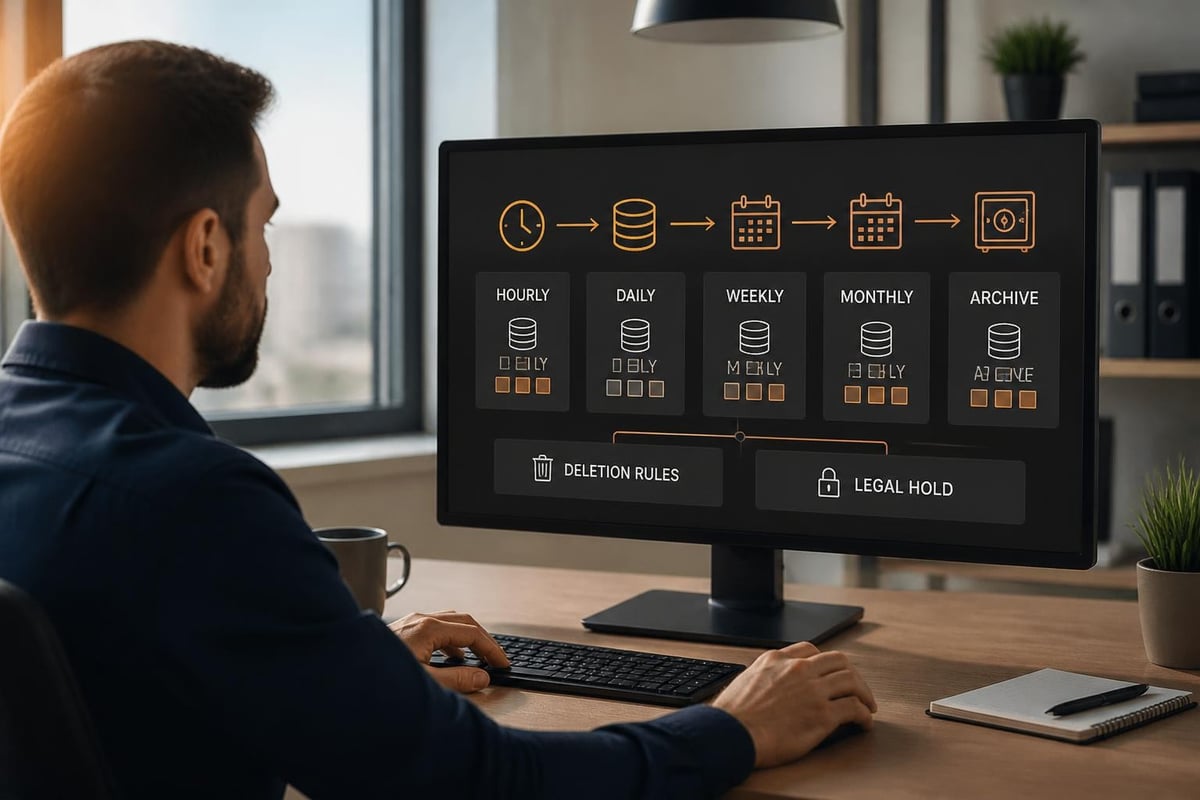
Datto saas protection executes automated backups multiple times daily, capturing incremental changes to minimise storage consumption and network overhead. Moreover, administrators can configure flexible retention policies aligned with organisational compliance requirements.
Organisations can implement grandfather-father-son rotation schemes, indefinite retention for specific data sets, or custom schedules matching regulatory mandates. Furthermore, the platform supports legal hold functionality that prevents backup deletion even when standard retention periods expire.
Security Architecture and Compliance Framework
Data protection solutions must themselves meet rigorous security standards, particularly for European organisations navigating GDPR, NIS2, and sector-specific regulations. Consequently, evaluating the security posture of datto saas protection requires examining encryption, access controls, and data residency.
Encryption and Data Isolation
Datto's security overview confirms that all backup data benefits from AES-256 encryption both in transit and at rest. Nevertheless, organisations should verify that encryption keys remain under appropriate control and that multi-tenancy isolation prevents cross-customer data exposure.
The platform implements role-based access control (RBAC) with multi-factor authentication support, ensuring that only authorised personnel can initiate restores or modify retention policies. In addition, audit logging captures all administrative actions for compliance reporting and security incident investigation.
| Security Control | Implementation | Compliance Benefit |
|---|---|---|
| Encryption at rest | AES-256 | GDPR Art. 32 |
| Encryption in transit | TLS 1.2+ | Data confidentiality |
| Access control | RBAC + MFA | Principle of least privilege |
| Audit logging | Comprehensive | NIS2 incident detection |
| Immutability | Write-once storage | Ransomware protection |
Data Residency and Sovereignty Considerations
For European businesses, data residency represents a critical compliance requirement. Furthermore, the US CLOUD Act grants American authorities potential access to data controlled by US-based companies regardless of physical storage location.
Therefore, organisations evaluating datto saas protection should carefully assess where backup data physically resides and which legal jurisdictions govern data access. Moreover, contracts should explicitly address data location, law enforcement request procedures, and customer notification protocols.
European alternatives such as vBoxx Backup for Microsoft 365 and Google Workspace store all backup data exclusively in ISO 27001-certified data centres in the Netherlands, ensuring GDPR compliance and immunity from the US CLOUD Act. In addition, such providers operate under European privacy law without extraterritorial data access obligations.
Integration with Microsoft 365 and Graph API
Datto saas protection connects to Microsoft 365 environments through the Microsoft Graph API, enabling automated discovery and continuous backup without requiring agent installation or end-user interaction. Nevertheless, this integration approach introduces specific configuration requirements and potential limitations.
Authentication and Permissions Model
The solution requires administrator consent to register an Azure AD application with appropriate Graph API permissions. Therefore, IT teams must grant delegated or application permissions covering Mail.Read, Files.Read.All, Sites.Read.All, and related scopes.
Required Configuration Steps:
- Register Azure AD application in target tenant
- Grant admin consent for Microsoft Graph permissions
- Configure service principal authentication
- Validate backup scope and exclusions
- Initiate first full backup and verify completion
Furthermore, Kaseya's official update on Datto SaaS Protection discusses the platform's migration to modern Graph API endpoints, improving performance and future-proofing integration as Microsoft deprecates legacy protocols.
Limitations and Exclusions
Whilst datto saas protection covers core Microsoft 365 workloads comprehensively, certain data types and scenarios fall outside standard backup scope. Moreover, organisations with complex requirements should verify specific coverage before deployment.
- Not backed up by default: Yammer content, Planner tasks, Stream videos
- Partial coverage: Power BI reports, Forms responses
- Configuration required: Public folder backup, compliance archive integration
- Performance considerations: Very large mailboxes may require extended initial backup windows
In addition, organisations using third-party add-ins or custom applications integrated with Microsoft 365 should verify that associated data receives appropriate protection through either datto saas protection or complementary solutions.
Recovery Capabilities and Business Continuity
The ultimate measure of any backup solution lies in its recovery capabilities during actual data loss incidents. Therefore, evaluating datto saas protection requires examining recovery granularity, speed, and administrative workflows.
Restore Options and Granularity
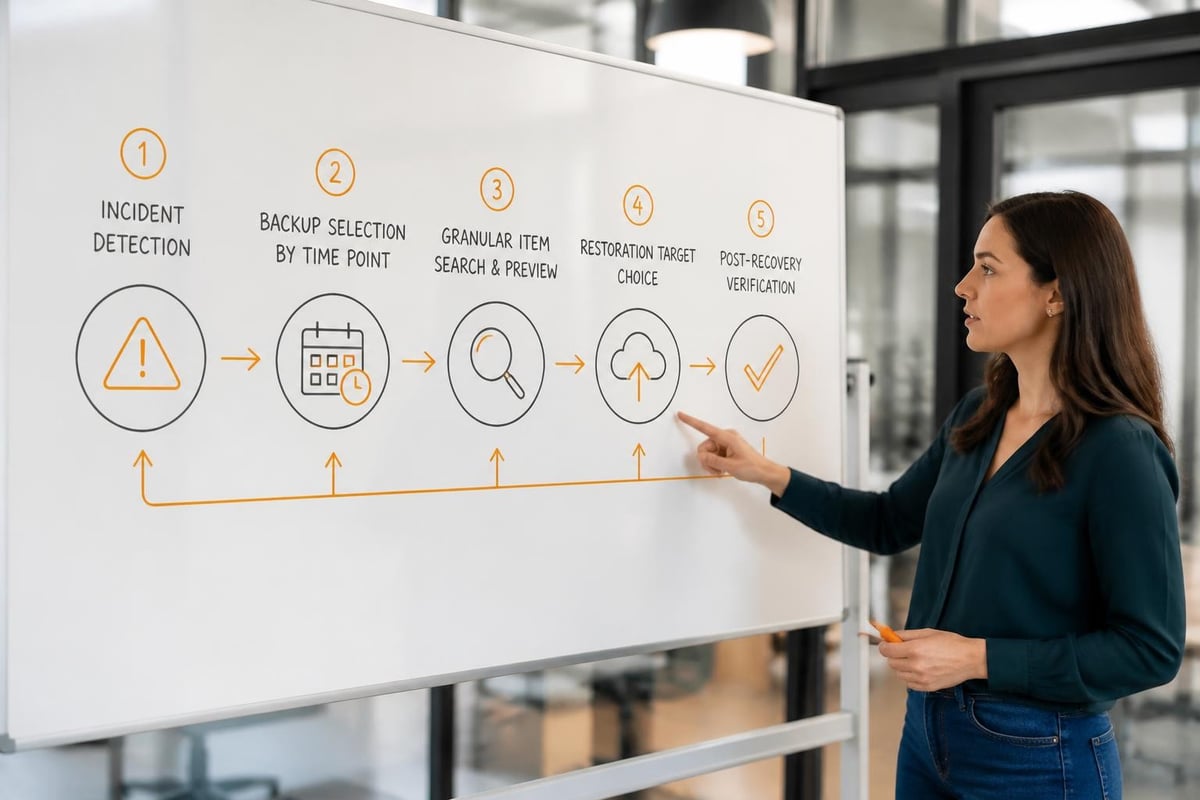
The platform supports multiple restoration scenarios, from single-item recovery to complete mailbox or site restoration. Furthermore, administrators can preview items before restoration and selectively restore specific versions or time points.
Granular Recovery Options:
- Individual emails, attachments, or calendar items
- Specific documents or folder structures
- Complete OneDrive accounts or SharePoint sites
- Teams channels with conversation history
- Cross-user restores for administrative scenarios
Moreover, recovery operations can target either the original location or alternative destinations, supporting migration scenarios, legal discovery processes, or temporary restore environments for data examination.
Recovery Time Objectives and Testing
Recovery speed depends on multiple factors including backup age, data volume, and network connectivity. Nevertheless, organisations should establish and regularly test recovery time objectives (RTO) and recovery point objectives (RPO) aligned with business continuity requirements.
| Scenario | Typical RTO | RPO Capability |
|---|---|---|
| Single email | Minutes | Up to last backup |
| Full mailbox | Hours | Point-in-time selection |
| SharePoint site | Hours to day | Version-specific |
| Complete tenant | Days | Full environment rebuild |
In addition, regular disaster recovery exercises validate not only technical restore capabilities but also administrative procedures, documentation accuracy, and staff competency. Furthermore, these exercises often reveal configuration gaps, permission issues, or process improvements before actual incidents occur.
Competitive Landscape and Analyst Perspectives
The Microsoft 365 backup market has matured significantly, with multiple enterprise-grade solutions competing on features, performance, and price. Therefore, organisations should evaluate datto saas protection within the broader competitive context.
Industry Recognition and Comparative Analysis
Independent analyst firms regularly assess SaaS backup solutions against standardised criteria. For instance, DCIG's 2025-26 TOP 5 report on Microsoft 365 SaaS backup solutions evaluates vendors across 145 features including security, compliance, recovery capabilities, and operational management.
Furthermore, third-party validation provides objective assessment of vendor claims. The Enterprise Strategy Group technical review of Datto SaaS Defense validates security controls, anti-phishing capabilities, and recovery performance through independent laboratory testing.
Key Competitive Differentiators:
- Backup frequency and incremental efficiency
- Maximum retention periods and storage limits
- Recovery speed and granularity options
- Security features including immutability and encryption
- Compliance certifications and data residency options
- Pricing models and total cost of ownership
Evaluating Total Cost of Ownership
Beyond subscription fees, organisations should consider implementation costs, storage consumption charges, data egress fees, and administrative overhead. Moreover, hidden costs often emerge around training, custom integration work, or premium support requirements.
Therefore, comprehensive vendor evaluation should request detailed pricing scenarios reflecting actual usage patterns, including user counts, data volumes, retention requirements, and anticipated growth. In addition, contractual terms around price increases, minimum commitments, and cancellation provisions significantly impact long-term cost predictability.
Implementation Best Practices and Operational Considerations
Successful deployment of datto saas protection requires careful planning, phased rollout, and ongoing operational discipline. Furthermore, organisations should develop comprehensive procedures covering normal operations, incident response, and periodic validation.
Pre-Deployment Planning Checklist
Before initiating implementation, organisations should document current Microsoft 365 configuration, data volumes, compliance requirements, and recovery objectives. Moreover, stakeholder engagement across IT, security, compliance, and business units ensures alignment on requirements and success criteria.
- Inventory current environment: User counts, mailbox sizes, SharePoint sites, Teams usage
- Define retention requirements: Regulatory mandates, legal hold needs, business policies
- Establish recovery objectives: RTO/RPO targets per workload and priority tier
- Review security requirements: Encryption, access control, audit logging expectations
- Plan network capacity: Bandwidth for initial backup and ongoing incremental traffic
In addition, organisations should identify pilot user groups for initial testing, allowing validation of backup and recovery procedures before full-scale deployment. Furthermore, pilot phases reveal configuration issues, performance bottlenecks, or training needs with limited risk exposure.
Ongoing Operational Management
After deployment, regular monitoring ensures backup success rates remain high and data protection objectives continue to be met. Nevertheless, many organisations discover backup failures only when attempting recovery during actual incidents.
Critical Monitoring Activities:
- Daily backup completion verification across all workloads
- Alert configuration for failed jobs or policy violations
- Storage consumption trending and capacity planning
- Periodic restore testing for validation
- User onboarding/offboarding synchronisation
- Security audit log review for suspicious access
Moreover, as Microsoft 365 environments evolve through feature additions, license changes, or organisational restructuring, backup configurations require corresponding updates. Therefore, change management procedures should include backup scope review whenever significant Microsoft 365 modifications occur.
Privacy Implications and European Data Protection
European organisations face unique obligations under GDPR, with data protection by design requirements, data subject rights, and strict cross-border transfer limitations. Consequently, backup solutions must support these compliance obligations rather than creating additional risk.
GDPR Compliance Considerations
Backup data remains subject to all GDPR requirements including lawful basis for processing, data minimisation, storage limitation, and individual rights. Furthermore, backup systems must facilitate data subject access requests, deletion obligations, and breach notification procedures.
When evaluating datto saas protection, organisations should assess how the platform supports:
- Right to erasure: Capability to delete individual data subject information from backups
- Data portability: Export formats and procedures for fulfilling access requests
- Processing records: Documentation of backup activities for Article 30 compliance
- Data breach procedures: Notification timelines and customer alerting mechanisms
Moreover, the use of US-based backup providers introduces additional complexity around international data transfer mechanisms. Therefore, organisations must evaluate whether Standard Contractual Clauses, adequacy decisions, or other transfer instruments provide sufficient legal basis.
For companies prioritising cloud privacy and security within purely European infrastructure, solutions hosted exclusively in EU data centres under European legal jurisdiction eliminate transfer mechanism requirements entirely. In addition, such approaches simplify compliance documentation and reduce regulatory risk.
NIS2 Directive and Incident Reporting
The NIS2 Directive, applicable from October 2024 across EU member states, imposes enhanced cybersecurity requirements on essential and important entities. Furthermore, backup capabilities directly support multiple NIS2 obligations including business continuity, incident recovery, and supply chain risk management.
Organisations within NIS2 scope should verify that backup solutions provide:
- Immutable storage: Protection against ransomware encryption or malicious deletion
- Incident recovery: Documented and tested procedures for rapid restoration
- Audit trails: Comprehensive logging supporting incident investigation
- Vendor security: Assessment of backup provider's own cybersecurity posture
In addition, backup failure or unavailability during a significant incident could constitute a reportable event under NIS2 if it materially impacts service continuity. Therefore, backup infrastructure requires the same resilience and monitoring discipline as primary production systems.
Making the Business Case and Vendor Selection
IT leaders advocating for dedicated Microsoft 365 backup solutions must articulate clear business value, quantified risk reduction, and return on investment. Moreover, vendor selection processes should evaluate not only current capabilities but also long-term viability, product roadmap alignment, and partnership quality.
Quantifying Risk and Building Executive Support
Finance and executive stakeholders require concrete scenarios demonstrating potential losses from data unavailability or permanent deletion. Therefore, business case development should model specific incidents with estimated recovery costs, productivity losses, regulatory penalties, and reputational damage.
Sample Risk Scenarios for Quantification:
- Ransomware incident requiring complete Exchange Online restoration for 500 users
- Accidental SharePoint site deletion containing three years of project documentation
- Malicious insider permanently deleting customer communication records
- Failed Microsoft 365 migration requiring rollback to previous environment state
Furthermore, comparing annual subscription costs against single-incident recovery expenses typically demonstrates favourable ROI even assuming relatively low probability events. In addition, compliance penalties under GDPR, sector-specific regulations, or contractual obligations often exceed multi-year backup solution costs.
Vendor Evaluation Criteria Matrix
Systematic vendor assessment across standardised criteria enables objective comparison and defensible selection decisions. Moreover, weighted scoring models can reflect organisational priorities around security, compliance, support quality, or cost sensitivity.
| Criterion Category | Example Evaluation Factors | Weight |
|---|---|---|
| Technical Capability | Workload coverage, recovery granularity, performance | 30% |
| Security & Compliance | Encryption, certifications, data residency | 25% |
| Operational Excellence | Monitoring, automation, administrative efficiency | 20% |
| Vendor Viability | Financial stability, product roadmap, market position | 15% |
| Support & Partnership | Response times, technical expertise, account management | 10% |
In addition, reference customer conversations provide invaluable insights into actual deployment experiences, hidden costs, support quality, and vendor responsiveness during critical incidents. Furthermore, requesting trial or proof-of-concept periods allows hands-on validation before contractual commitment.
Protecting your Microsoft 365 environment requires more than native retention capabilities, and European organisations must balance comprehensive backup functionality with strict data sovereignty and compliance obligations. Whether you implement datto saas protection or alternative solutions, ensuring GDPR compliance, immutable storage, and verified recovery procedures remains essential for business resilience. vBoxx delivers GDPR-compliant backup for Microsoft 365 and Google Workspace with all data stored exclusively in ISO 27001-certified Dutch data centres, combining enterprise-grade protection with European privacy guarantees and expert migration support.