
The Synology DS918+ remains a widely deployed network-attached storage device in small business and prosumer environments, despite being first released in 2017. As we progress through 2026, many organisations face critical decisions about whether to continue running their ds918 units, upgrade to newer hardware, or migrate to cloud-based infrastructure. Understanding the capabilities, limitations, and realistic lifespan of the ds918 is essential for IT managers and business owners planning their data storage strategy. This guide examines the technical specifications, real-world performance considerations, and strategic alternatives for organisations currently operating or evaluating the ds918 platform.
Understanding the DS918+ Hardware Platform
The ds918 was positioned as a mid-range four-bay NAS solution when Synology launched it, targeting businesses requiring reliable storage with room for expansion. At its core, the unit features an Intel Celeron J3455 quad-core processor running at 1.5GHz (with burst speeds up to 2.3GHz), paired with 4GB of DDR3L RAM as standard. Moreover, the system supports RAM expansion up to 8GB through a single accessible SODIMM slot, though unofficial configurations have pushed this further.
Key Specifications and Capabilities
The official Synology DS918+ data sheet documents the following core specifications:
| Component | Specification | Notes |
|---|---|---|
| CPU | Intel Celeron J3455 (quad-core, 1.5-2.3GHz) | Apollo Lake architecture, 2016 generation |
| Memory | 4GB DDR3L (expandable to 8GB officially) | Single SODIMM slot accessible |
| Drive bays | 4 × 3.5" or 2.5" SATA | Hot-swappable, supports HDDs and SSDs |
| M.2 slots | 2 × M.2 2280 NVMe | SSD cache only, not bootable volumes |
| Network | 4 × 1GbE RJ-45 ports | Link aggregation and failover support |
| Expansion | 1 × DX517 unit (5 additional bays) | Total capacity: 9 drives maximum |
Furthermore, the ds918 includes two USB 3.0 ports and one eSATA port for external storage expansion or backup targets. The hardware transcoding engine built into the Celeron J3455 supports real-time 4K H.264 video transcoding, making the unit popular for Plex media server deployments.

Performance Profile and Real-World Benchmarks
When evaluating any storage platform in 2026, performance expectations have shifted considerably compared to 2017. Nevertheless, understanding what the ds918 can realistically deliver remains important for capacity planning and workload assessment.
Baseline Throughput and Network Performance
Independent testing from StorageReview and SmallNetBuilder demonstrates the following typical performance characteristics:
- Sequential read: 112-115 MB/s (single 1GbE connection)
- Sequential write: 108-112 MB/s (single 1GbE connection)
- Random 4K read (IOPS): 3,200-3,500 (with SSD cache enabled)
- Random 4K write (IOPS): 2,800-3,100 (with SSD cache enabled)
In addition, link aggregation across the four Gigabit Ethernet ports can approach 220-240 MB/s in ideal conditions with multiple clients. However, real-world mixed workloads typically see lower sustained throughput due to protocol overhead and drive performance characteristics.
Cache Performance and NVMe Considerations
The dual M.2 NVMe slots represent one of the ds918's key differentiators. Therefore, organisations often install matched SSDs to create a read-write cache that dramatically improves performance for frequently accessed files and database workloads.
Testing shows cache hit rates of 70-85% in typical office environments, reducing average latency for file operations by 40-60%. Nevertheless, selecting compatible drives is critical; the Synology compatibility database should be consulted before purchasing cache SSDs to avoid stability issues.
| Workload Type | Without Cache | With NVMe Cache | Performance Gain |
|---|---|---|---|
| Office documents (mixed read/write) | 45-55 MB/s | 95-110 MB/s | 95-110% |
| Virtual machine storage | 32-40 IOPS | 180-220 IOPS | 450-550% |
| Database operations | 55-70 IOPS | 280-350 IOPS | 400-500% |
| Media streaming (sequential) | 110-115 MB/s | 112-116 MB/s | Minimal |
Software Ecosystem and DSM Considerations
The ds918 runs Synology's DiskStation Manager (DSM) operating system, currently at version 7.2 in 2026. Furthermore, Synology has committed to supporting the ds918 through at least DSM 7.2, though future major version upgrades remain uncertain given the platform's age.
Package Availability and Application Support
DSM's extensive package ecosystem remains one of Synology's strongest advantages. Additionally, the ds918 supports virtually all current DSM packages including:
- File services: SMB, AFP, NFS, FTP, WebDAV
- Backup solutions: Hyper Backup, Active Backup for Business, Snapshot Replication
- Collaboration tools: Synology Drive, Calendar, Contacts, Office
- Media applications: Video Station, Audio Station, Photo Station
- Surveillance: Surveillance Station (supports 8 camera licenses included)
- Virtualisation: Virtual Machine Manager, Docker support
Moreover, the Windows Central review highlights the ds918's particular suitability for Plex Media Server deployments, where the hardware transcoding capabilities enable smooth 4K playback to multiple clients simultaneously.
Security Updates and Vulnerability Management
As the ds918 ages, security maintenance becomes increasingly critical. Therefore, organisations must maintain current DSM versions and monitor security bulletins. The NIST National Vulnerability Database tracks disclosed vulnerabilities affecting Synology platforms, and timely patching is essential.
Synology typically provides security updates for platforms 5-7 years post-release. Consequently, the ds918's security update window is approaching its practical limit in 2026, making migration planning prudent for organisations with strict compliance requirements.
Upgrade Paths and Expansion Options
Organisations seeking to extend the useful life of their ds918 deployment have several expansion and optimisation strategies available.
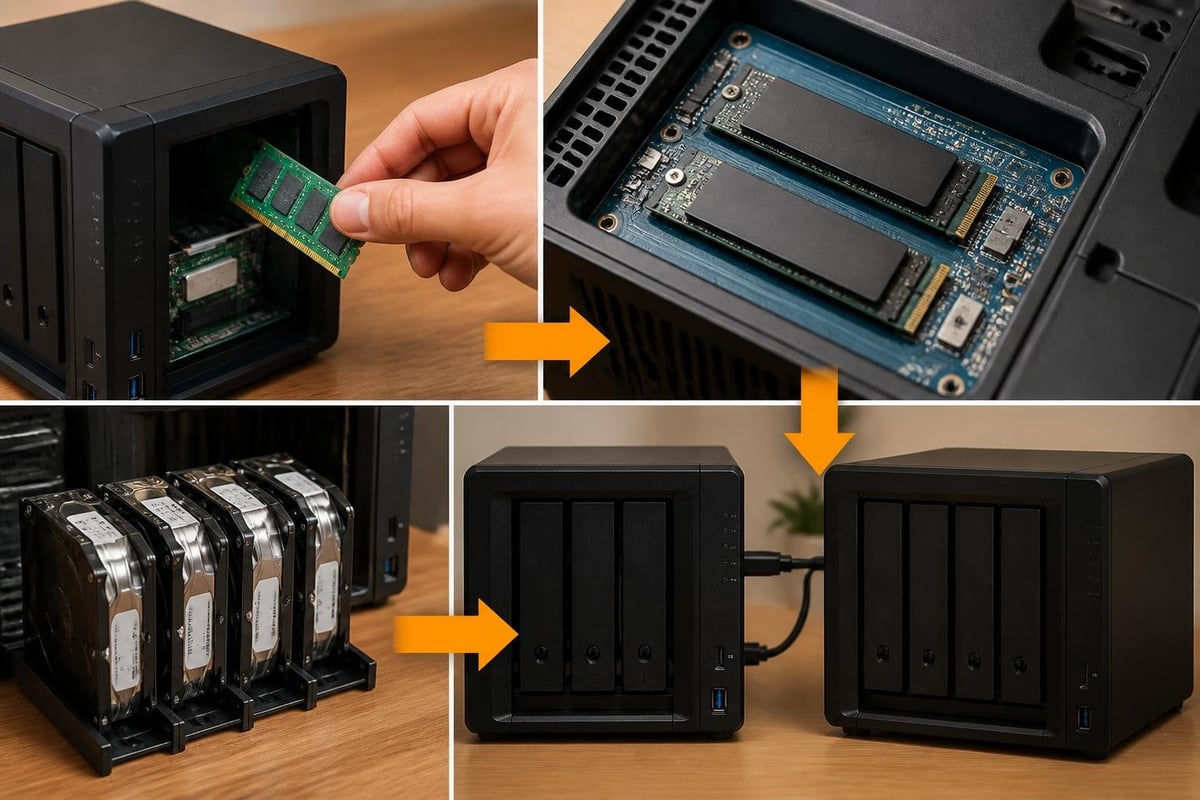
Memory and Cache Upgrades
The most cost-effective performance improvement involves maximising system memory and implementing NVMe caching:
- RAM expansion: Upgrading from 4GB to 8GB (or unofficially to 16GB) improves DSM performance and supports more concurrent users
- NVMe cache installation: Adding matched NVMe SSDs (typically 256GB-512GB each) dramatically improves random I/O performance
- Drive capacity upgrades: Replacing existing drives with higher-capacity units expands storage without additional hardware
The iFixit teardown guide provides detailed instructions for accessing internal components and performing hardware modifications safely.
Physical Expansion with DX517
When four bays prove insufficient, the DX517 expansion unit adds five additional drive bays, bringing total capacity to nine drives. Nevertheless, expansion units introduce additional complexity:
- Management overhead: The DX517 requires its own power supply and physical space
- Performance considerations: eSATA bandwidth is shared across all expansion drives
- Cost analysis: DX517 units often cost 40-60% of a new NAS, making migration alternatives worth evaluating
Furthermore, organisations reaching capacity limits should consider whether expanding a 2017-era platform represents the best long-term investment versus migrating to modern infrastructure.
Migration Considerations for 2026
As the ds918 approaches its ninth year of availability, many organisations face the question of when to migrate rather than continue upgrading.
Comparing DS918+ to Modern Alternatives
The TechRadar discussion of newer Synology models highlights the performance and feature gaps that have emerged:
| Feature | DS918+ (2017) | DS920+ (2020) | DS923+ (2022) |
|---|---|---|---|
| CPU | Celeron J3455 | Celeron J4125 | Ryzen R1600 |
| Base RAM | 4GB DDR3L | 4GB DDR4 | 4GB DDR4 ECC |
| Network | 4 × 1GbE | 2 × 1GbE | 2 × 1GbE |
| M.2 slots | 2 (cache only) | 2 (cache only) | 2 (storage or cache) |
| Max internal drives | 4 | 4 | 4 |
| PCIe expansion | No | No | Yes (10GbE option) |
Additionally, newer platforms offer significantly improved CPU performance (2-3× faster), DDR4 memory support, and expandability options not available on the ds918. The IT Pro review notes that whilst the ds918 remains functional, organisations with growing performance requirements increasingly find its limitations restrictive.
Cloud-Based Alternatives
For organisations evaluating broader infrastructure modernisation, cloud platforms offer compelling alternatives to on-premises NAS deployments. In addition, European businesses subject to GDPR requirements benefit from providers operating infrastructure within EU jurisdictions.
For instance, vBoxxCloud provides GDPR-compliant business cloud storage with 256-bit AES encryption, stored in ISO 27001-certified European data centres in the Netherlands. Moreover, the platform includes eIDAS-compliant digital signing, AI-assisted document search, and team collaboration features that extend beyond traditional NAS capabilities.
Strategic Planning for DS918+ Users
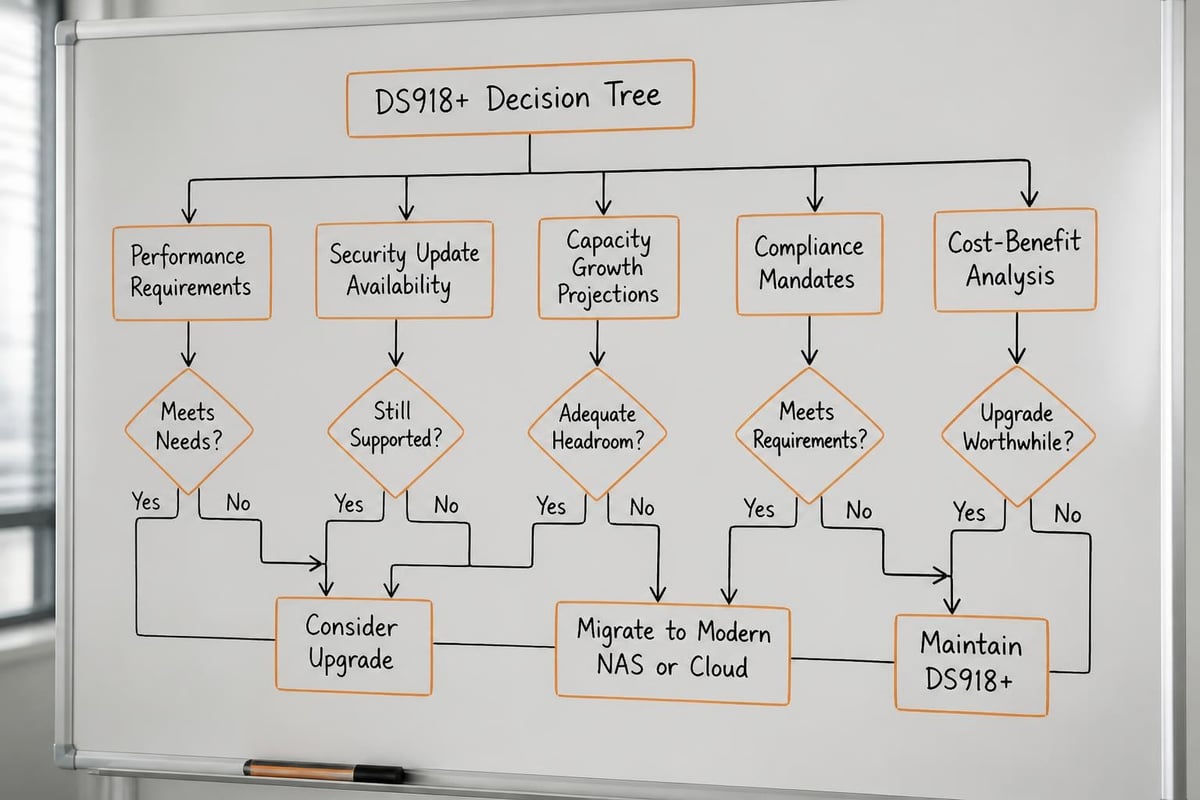
Organisations currently operating a ds918 should evaluate their position using a structured decision framework.
When to Keep Your DS918+
The ds918 remains viable for organisations meeting the following criteria:
- Predictable storage growth: Current capacity meets projected needs for 18-24 months
- Light concurrent users: Fewer than 10-15 simultaneous users accessing files
- Simple workloads: Primarily file sharing and media streaming, minimal database or virtualisation requirements
- Budget constraints: Capital expenditure for replacement hardware not currently available
- Existing investment: Recent drive or expansion purchases that haven't reached ROI
Furthermore, organisations with recently upgraded drives or expansion units may reasonably plan to operate the ds918 through 2027, provided security updates remain available and performance meets operational requirements.
Migration Triggers and Timeline Planning
Conversely, the following scenarios suggest migration planning should become a priority:
- Security support sunset: When Synology announces end-of-life for DSM updates on the ds918 platform
- Performance degradation: User complaints about file access speed or application responsiveness increase
- Capacity constraints: Storage utilisation consistently exceeds 80% with limited expansion options
- Compliance requirements: New regulatory mandates demand features unavailable on the ds918
- Hardware failures: Drive failures increase in frequency or PSU/motherboard issues emerge
In addition, organisations should begin migration planning 12-18 months before anticipated deployment to allow for budgeting, vendor evaluation, and staged data migration.
Practical Deployment Recommendations
For organisations committed to continuing ds918 operation through 2026-2027, the following best practices maximise reliability and performance.
Optimisation Checklist
- Enable automated backups: Configure Hyper Backup to external targets or cloud destinations (ideally following the 3-2-1 backup rule)
- Implement SSD caching: Install matched NVMe SSDs if random I/O performance impacts user productivity
- Monitor drive health: Review SMART data monthly and maintain spare drives for rapid replacement
- Update DSM promptly: Apply security patches within 30 days of release to minimise vulnerability exposure
- Document configuration: Maintain current configuration backups and disaster recovery procedures
- Plan capacity growth: Project storage requirements quarterly and trigger expansion or migration before reaching 85% capacity
Moreover, organisations should establish clear performance baselines using DSM's Resource Monitor to identify degradation trends early and support data-driven migration decisions.
Hybrid Deployment Strategies
Rather than treating migration as an all-or-nothing decision, many organisations benefit from hybrid approaches:
- Cloud-first for new workloads: Deploy new applications and projects directly to cloud storage whilst maintaining the ds918 for legacy data
- Tiered storage models: Keep frequently accessed files on the ds918 with automated archival to cloud storage for older content
- Geographic distribution: Maintain the ds918 at primary locations whilst using cloud infrastructure for remote sites or disaster recovery
Therefore, hybrid strategies enable gradual migration whilst preserving existing investments and minimising operational disruption. Additionally, platforms offering secure European hosting infrastructure provide GDPR-compliant cloud tiers that integrate naturally with on-premises storage.
Cost-Benefit Analysis Framework
Decision-makers evaluating ds918 continuation versus migration should conduct comprehensive total cost of ownership (TCO) analysis.
On-Premises Continuation Costs (24-Month Horizon)
| Cost Category | Estimated Range (EUR) | Notes |
|---|---|---|
| Drive replacements | 800-1,500 | Assumes 1-2 drive failures over period |
| Expansion hardware | 0-900 | DX517 or capacity upgrades if needed |
| Power consumption | 180-240 | ~75W average draw at current electricity rates |
| Administration time | 1,200-2,400 | 2-4 hours monthly at blended IT rates |
| Backup infrastructure | 300-600 | External storage or cloud backup subscriptions |
| Total TCO (24 months) | 2,480-5,640 | Excludes major hardware failure scenarios |
Migration Alternative Costs
Cloud migration costs vary significantly based on storage volume, user count, and feature requirements. Nevertheless, organisations should evaluate:
- Initial migration: Data transfer, configuration, user training, and parallel operation periods
- Ongoing subscription: Monthly or annual fees for cloud storage, typically scaling with capacity and users
- Bandwidth costs: Data transfer fees for high-volume uploads or downloads (though many European providers include generous allowances)
- Integration work: Connecting cloud storage to existing workflows, authentication systems, and business applications
Furthermore, cloud platforms often include features requiring separate licensing on NAS platforms (advanced backup, collaboration tools, mobile access), potentially reducing overall software costs.
The ds918 continues serving many organisations effectively in 2026, particularly for straightforward file sharing and media storage workloads with modest performance requirements. Nevertheless, strategic planning for eventual migration ensures business continuity as the platform ages and security support windows close. Whether you choose to maximise your existing NAS investment or transition to modern infrastructure, vBoxx offers European-hosted cloud solutions with GDPR compliance, ISO 27001-certified data centres in the Netherlands, and comprehensive migration support to ensure your business data remains secure, accessible, and protected under European jurisdiction.