
Choosing the right storage capacity for your Synology NAS is a critical decision that impacts performance, scalability, and long-term total cost of ownership. Furthermore, an 8TB drive offers a sweet spot for many business deployments, balancing generous capacity with manageable cost per terabyte and proven reliability across multiple drive generations. In this guide, we explore every dimension of planning, selecting, and deploying synology 8tb configurations, from compatibility and RAID design to thermal considerations and real-world performance benchmarks. Moreover, we will examine manufacturer options, recording technology trade-offs, and best practices for businesses seeking resilient, GDPR-compliant infrastructure.
Why 8TB Drives Make Sense for Synology Deployments
The 8TB capacity tier has matured into a proven sweet spot for business-class network-attached storage. Manufacturers have refined this form factor over several product cycles, therefore reliability data and firmware optimizations are now abundant. Additionally, pricing per terabyte often reaches its most competitive point at 8TB, delivering better value than smaller capacities without the premium commanded by 12TB or larger drives.Capacity Planning and Cost Efficiency
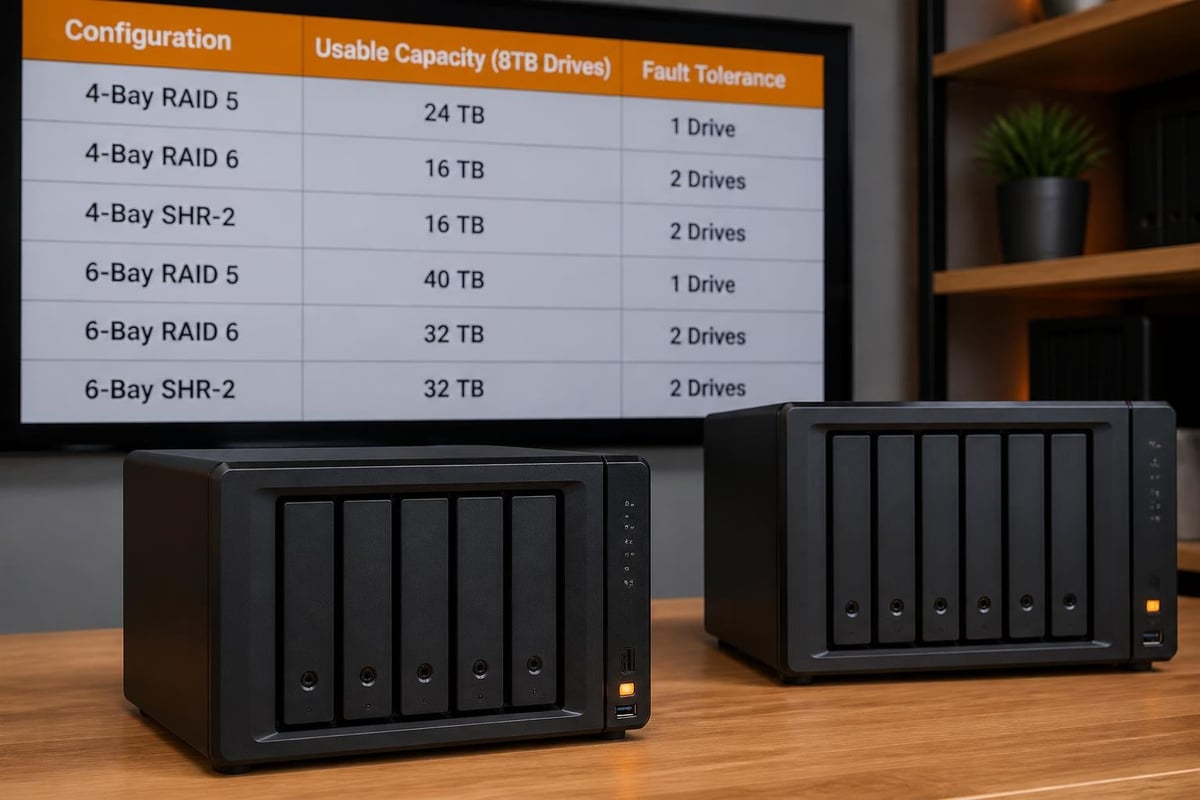
When planning a Synology array, raw capacity must account for RAID overhead and future growth. An 8TB drive offers substantial usable space even after parity or mirroring:- RAID 1 (2-drive mirror): 8TB usable from two synology 8tb drives
- RAID 5 (4-drive array): 24TB usable with single-drive fault tolerance
- RAID 6 (6-drive array): 32TB usable with dual-drive redundancy
- SHR-2 (Synology Hybrid RAID): Flexible usable capacity with two-disk fault tolerance
| Drive Size | Typical Cost/TB | Annual Workload | Warranty Period |
|---|---|---|---|
| 4TB | Higher | 180 TB/year | 3 years |
| 8TB | Optimal | 180-300 TB/year | 3-5 years |
| 12TB | Moderate | 300 TB/year | 5 years |
| 16TB+ | Premium | 550 TB/year | 5 years |
Performance Characteristics at the 8TB Tier
Modern 8TB NAS drives deliver sustained sequential read/write speeds between 180 MB/s and 260 MB/s, depending on recording technology and platter density. Furthermore, cache size (typically 128MB or 256MB) significantly impacts random I/O workloads common in multi-user file sharing and virtualization.Rotational speed remains at 5400 RPM or 7200 RPM for most NAS-grade 8TB models. The slower spindle speed reduces power draw and heat output, which is beneficial in densely populated Synology chassis. In addition, lower RPM drives produce less vibration, improving overall array stability and longevity when multiple drives operate simultaneously.
Tom's Hardware regularly publishes independent benchmarks showing real-world throughput across workloads. These tests reveal that drive-to-drive variance within the same family can be minimal, therefore selecting a well-supported model on Synology's compatibility list is often more important than chasing marginal performance differences.
Choosing the Right 8TB Drive for Your Synology NAS
Not all 8TB drives are created equal. Recording technology, firmware tuning, and workload ratings differentiate enterprise-class models from consumer-grade alternatives. Moreover, Synology's DSM operating system applies compatibility policies that can limit or warn against unsupported drives, making manufacturer certification an important selection criterion.CMR versus SMR: Recording Technology Matters
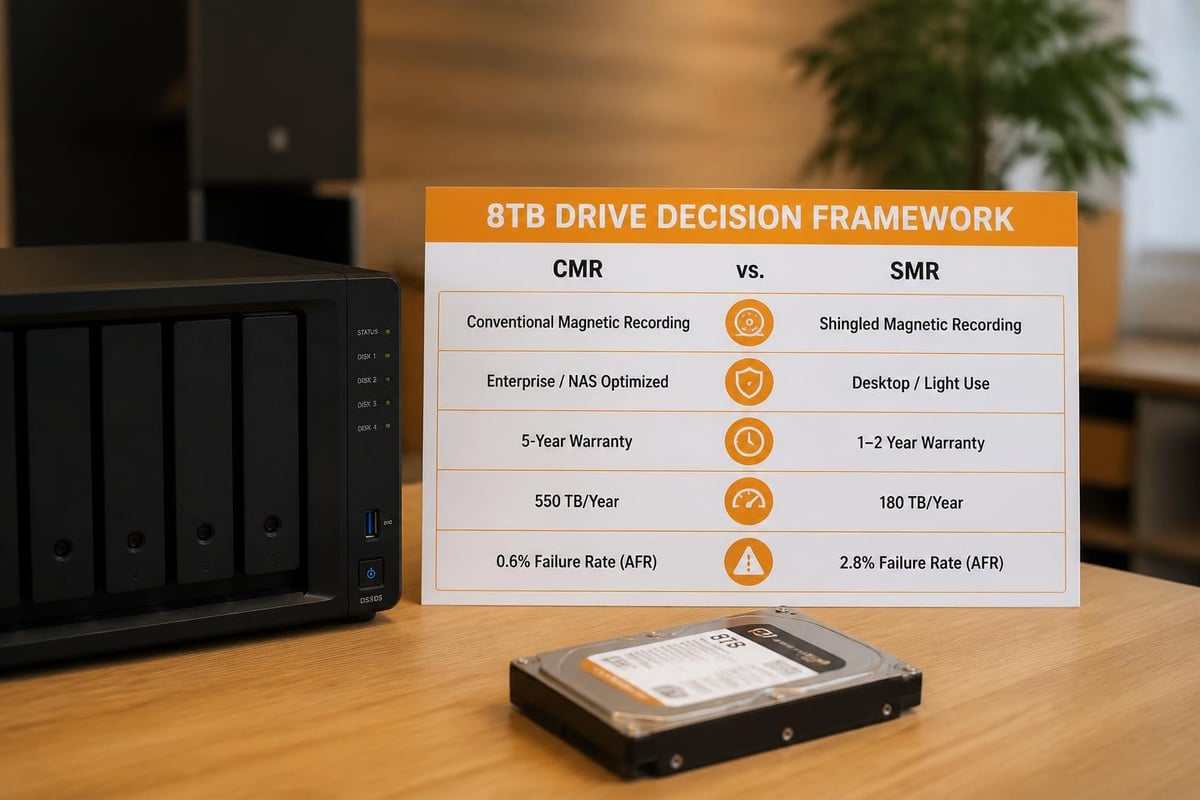
Conventional Magnetic Recording (CMR) and Shingled Magnetic Recording (SMR) represent two fundamentally different approaches to storing data on spinning platters. CMR writes tracks side by side without overlap, enabling fast random writes and optimal RAID rebuild performance. Conversely, SMR overlaps tracks like roof shingles, increasing areal density but introducing write amplification and slower random-write performance.For Synology RAID arrays, CMR drives are strongly preferred. RAID rebuild operations require extensive random writes, and SMR drives can extend rebuild windows from hours to days. Synology's drive compatibility policies explicitly warn against SMR in certain configurations. Additionally, academic research such as the 2025 TU Darmstadt survey on SMR transitions documents the performance penalties and failure-mode differences between recording technologies.
Key CMR models at 8TB:
- Seagate IronWolf (ST8000VN004)
- Western Digital Red Plus (WD80EFZZ)
- Toshiba N300 (HDWG180)
Manufacturer Options and Reliability Data
Three major manufacturers dominate the 8TB NAS drive market: Seagate, Western Digital, and Toshiba. Furthermore, each offers distinct product tiers with varying warranty, workload ratings, and firmware features.Backblaze Drive Stats for Q2 2026 aggregates failure rates from hundreds of thousands of drives in production. Therefore, real-world annualized failure rate (AFR) data provides valuable insight beyond manufacturer warranties. For instance, certain 8TB models consistently demonstrate AFR below 1%, while others exceed 2% under identical workloads.
| Manufacturer | Model Family | Workload (TB/yr) | Warranty | Typical AFR |
|---|---|---|---|---|
| Seagate | IronWolf | 180 | 3 years | 0.8-1.2% |
| Seagate | IronWolf Pro | 300 | 5 years | 0.6-0.9% |
| Western Digital | Red Plus | 180 | 3 years | 0.9-1.3% |
| Western Digital | Red Pro | 300 | 5 years | 0.7-1.0% |
| Toshiba | N300 | 180 | 3 years | 1.0-1.5% |
Compatibility and Firmware Considerations
Synology's DSM 7.3 and later versions enforce stricter compatibility checks, flagging drives not on the official compatibility list. Nevertheless, many third-party drives operate reliably in Synology enclosures. Understanding how DSM handles unsupported drives helps you make informed decisions.Navigating Synology's Compatibility Database
Synology maintains a comprehensive HDD and SSD compatibility search tool that can be filtered by model, capacity, and drive type. Entering your specific Synology model (for example, DS920+, DS1621+, RS2421+) and selecting 8TB displays tested and certified drives.Drives on the compatibility list benefit from:
- Full warranty support from Synology
- Optimized DSM firmware tuning
- Elimination of compatibility warnings during volume creation
- Access to SMART attribute monitoring and health predictions
Firmware and Feature Support
Modern NAS drives include firmware features such as Error Recovery Control (ERC), vibration tolerance, and optimized timeout settings. These features prevent drives from dropping offline during routine error-correction cycles, a common failure mode with desktop-class drives in RAID arrays.Synology's DSM automatically leverages these features when present. In addition, scheduled firmware updates delivered through Synology's package center can improve drive performance and stability. Consequently, selecting drives with active firmware support from the manufacturer reduces long-term maintenance burden.
Firmware best practices:
- Check manufacturer support websites for firmware updates quarterly
- Test firmware updates in non-production arrays before enterprise rollout
- Maintain consistent firmware versions across all drives in a RAID group
- Document firmware versions in change-management systems
RAID Configuration and Rebuild Considerations
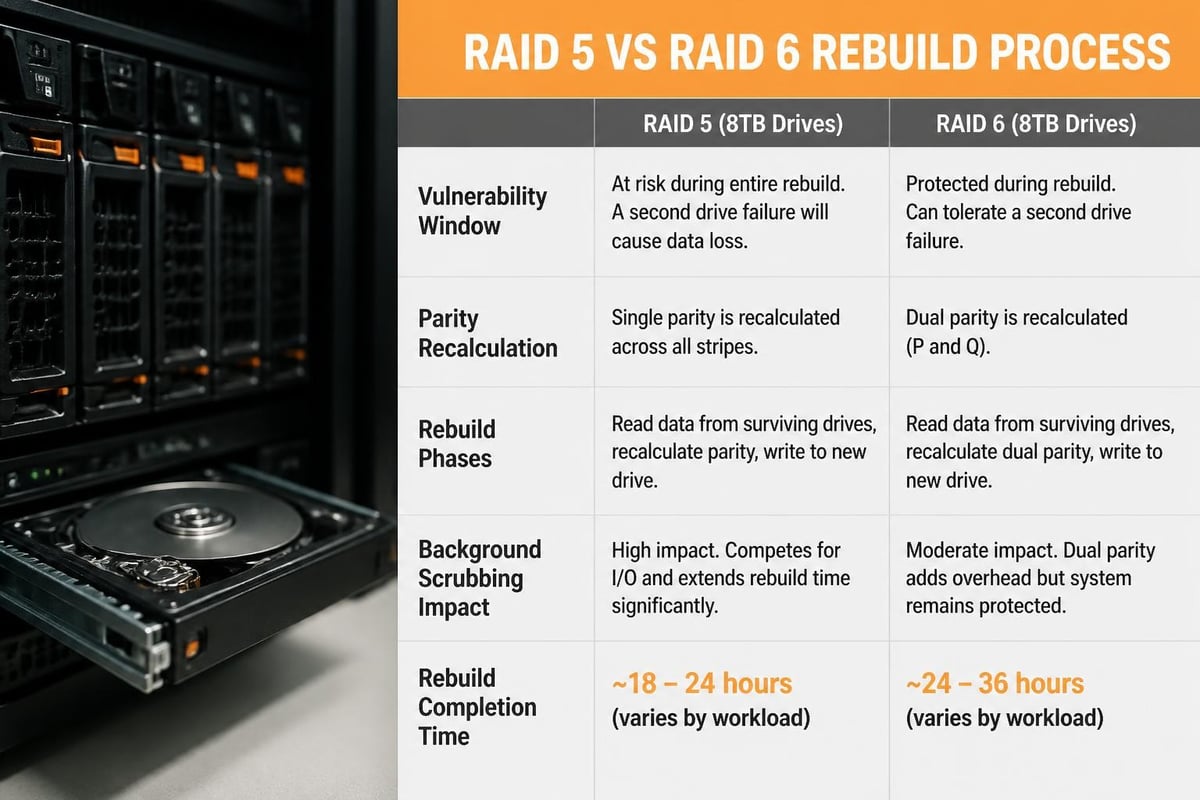
The choice of RAID level profoundly affects both usable capacity and resilience. Moreover, rebuild times for 8TB synology drives can extend to 24-48 hours depending on RAID level, drive performance, and background workload.RAID Level Selection for Business Continuity
RAID 1 offers simplicity and fast rebuilds but sacrifices half the raw capacity. RAID 5 delivers better storage efficiency yet tolerates only a single drive failure. RAID 6 and Synology's SHR-2 provide dual-drive fault tolerance, essential for arrays with four or more 8TB drives where rebuild windows introduce vulnerability.RAID 5 considerations:
- Suitable for four-drive arrays with modest change rates
- Rebuild completes faster than RAID 6 (single parity calculation)
- Risk: second drive failure during rebuild results in data loss
- Best for workloads with robust offsite backup
- Dual-parity protection tolerates two simultaneous failures
- Slower write performance due to double parity overhead
- Rebuild time similar to RAID 5 but array remains protected
- Recommended for arrays of six or more synology 8tb drives
Managing Rebuild Stress and URE Risk
Unrecoverable Read Errors (URE) become statistically significant when rebuilding large-capacity arrays. An 8TB drive typically has a URE rate of one error per 10^14 bits read. During a RAID 5 rebuild of four synology 8tb drives, the array reads approximately 24TB (24 × 10^12 bytes = 1.92 × 10^14 bits), making a URE encounter probable.RAID 6 and SHR-2 mitigate URE risk through dual parity, allowing reconstruction even when a URE is encountered. Furthermore, regular scrubbing (Synology's Data Scrubbing utility runs monthly by default) proactively detects and corrects latent errors before they compound during a rebuild.
Best practices to minimize rebuild stress:
- Schedule rebuilds during low-activity windows
- Pause non-essential background tasks (indexing, Snapshot Replication)
- Monitor drive temperatures and ensure adequate cooling
- Use drives from different manufacturing batches to reduce correlated failures
Thermal Management and Power Consumption
Eight-terabyte drives generate more heat and consume more power than smaller capacities. Therefore, proper thermal design and power budgeting are essential in multi-drive Synology chassis.Heat Output and Cooling Requirements
A typical 7200 RPM 8TB NAS drive dissipates 6-8 watts during active operation and 4-5 watts when idle. In a fully populated six-bay Synology unit, total drive heat output can exceed 40 watts, raising enclosure temperatures significantly if ventilation is inadequate.Synology enclosures include variable-speed fans controlled by DSM's thermal management algorithms. Nevertheless, ambient temperature, rack density, and airflow patterns influence cooling effectiveness. In addition, drives located in the center of tightly packed arrays experience higher temperatures than edge-mounted drives.
Thermal best practices:
- Maintain ambient temperature below 25°C for optimal lifespan
- Leave empty bays populated with blanking plates to preserve airflow
- Monitor drive temperatures via DSM's Storage Manager (aim for <45°C under load)
- Schedule intensive workloads during cooler hours if cooling capacity is marginal
Power Efficiency and UPS Sizing
Each synology 8tb drive draws approximately 1.5-2.0 amps at 12V during spin-up, then settles to 0.5-0.8 amps during sustained operation. A six-drive array requires a power supply capable of handling simultaneous spin-up (worst-case 12A transient) plus continuous load.For uninterruptible power supply (UPS) sizing, calculate total wattage including drives, chassis, and network switches. An array of six 8TB drives plus a Synology DiskStation consumes approximately 100-150 watts under typical load. Therefore, a 1000VA UPS provides 15-20 minutes of runtime, sufficient for graceful shutdown during brief outages.
| Array Size | Typical Power Draw | Recommended UPS | Runtime (approx.) |
|---|---|---|---|
| 2-drive (2×8TB) | 40-60W | 600VA | 30+ minutes |
| 4-drive (4×8TB) | 70-100W | 800VA | 20+ minutes |
| 6-drive (6×8TB) | 100-150W | 1000VA | 15-20 minutes |
| 8-drive (8×8TB) | 130-180W | 1500VA | 15-20 minutes |
Integration with Business Backup and Cloud Strategies
On-premises Synology arrays excel as primary storage repositories, yet comprehensive data protection demands offsite replication and cloud integration. Furthermore, European businesses must navigate GDPR compliance and data-sovereignty requirements when selecting backup destinations.Hybrid On-Premises and Cloud Architecture
A synology 8tb array provides low-latency access to active datasets, while cloud endpoints ensure geographic redundancy. Synology's Hyper Backup application supports scheduled backups to major cloud providers, rsync targets, and secondary Synology units. In addition, versioning and deduplication minimize bandwidth and storage costs.For businesses relying on Microsoft 365 or Google Workspace, cloud-to-cloud backup fills critical retention gaps. vBoxx Backup offers GDPR-compliant European backup with AES-256 encryption, stored in ISO 27001-certified data centres in the Netherlands. This service protects Exchange mail, OneDrive, SharePoint, and Teams content against accidental deletion, ransomware, and retention policy failures, complementing on-premises Synology storage with independent cloud resilience.
Snapshot Replication and Point-in-Time Recovery
Synology's Btrfs file system enables instantaneous snapshots with minimal overhead. Snapshots capture the state of shared folders at specific moments, allowing recovery from ransomware encryption, accidental deletions, or configuration errors. Moreover, snapshots are space-efficient, storing only changed blocks rather than full copies.Snapshot Replication transmits these snapshots to remote Synology units or cloud targets, creating offsite recovery points. A typical strategy combines:
- Hourly snapshots: Retained for 24 hours (local only)
- Daily snapshots: Retained for 7 days, replicated offsite
- Weekly snapshots: Retained for 4 weeks, replicated to secondary site
- Monthly snapshots: Retained for 12 months, archived to cloud storage
Scaling and Future-Proofing Your Synology Infrastructure
Business data growth rarely follows linear projections. Therefore, selecting an initial configuration that accommodates expansion avoids costly forklift upgrades. Moreover, modern Synology models support expansion units and volume migration, providing flexible growth paths.Expansion Units and Volume Migration
Synology's DX expansion chassis add drive bays without replacing the primary NAS. A DS1621+ with six internal bays can attach two DX517 expansion units, scaling to 21 total drives. Consequently, an initial six-drive synology 8tb array (32TB usable in RAID 6) can grow to 112TB usable without data migration.Volume migration allows transitioning from RAID 5 to RAID 6 or SHR to SHR-2 without downtime. DSM rebuilds the array in the background, adding redundancy as business-continuity requirements evolve. Nevertheless, volume migration is write-intensive and can take days for large 8TB arrays, therefore schedule migrations during low-activity periods.
Planning for Capacity Refresh Cycles
Hard drives have finite service lives, typically 3-5 years in 24/7 operation. Planning proactive refresh cycles prevents unexpected failures and maintains warranty coverage. Additionally, newer drive generations often deliver better performance and lower power consumption at the same capacity.A recommended refresh strategy:
- Year 0: Deploy six synology 8tb CMR drives (RAID 6, 32TB usable)
- Year 3: Replace two oldest drives with fresh 8TB drives (staggered)
- Year 4: Replace remaining four drives (complete refresh)
- Year 5: Evaluate 12TB or larger drives for capacity upgrade if growth demands
Advanced Optimizations for Performance-Critical Workloads
Standard configurations serve most business workloads well, yet specific use cases benefit from advanced tuning. Moreover, combining SSD caching, 10GbE networking, and workload-specific file-system settings can dramatically improve application responsiveness.SSD Cache Acceleration
Synology supports read/write SSD caching to accelerate frequently accessed data. A pair of NVMe SSDs in the M.2 slots of models like the DS1621+ or DS920+ can cache hot data from the synology 8tb array, reducing latency for database queries, virtual-machine disk images, and multi-user document collaboration.Read-only caching is safer (no write-cache data loss risk) and benefits read-heavy workloads such as media streaming and archival access. Read-write caching accelerates transactional workloads but requires mirrored SSDs to prevent data loss on cache failure. In addition, Btrfs metadata pinning ensures file-system structures remain in cache, improving directory traversal and attribute lookups.
Network Bonding and 10GbE Upgrades
Gigabit Ethernet becomes a bottleneck when multiple users access large files simultaneously. Link aggregation (bonding) combines multiple gigabit ports to increase throughput and provide fault tolerance. Nevertheless, true performance gains require 10GbE networking, especially when working with 4K video, CAD models, or large datasets.Synology models with 10GbE (or 10GbE expansion cards) saturate network bandwidth, allowing sustained transfers at 600-1000 MB/s from a well-configured synology 8tb RAID array. Furthermore, 10GbE reduces backup windows and accelerates snapshot replication, improving both operational efficiency and disaster-recovery metrics.
10GbE deployment considerations:
- Ensure switches and client NICs support 10GbE (10GBASE-T or SFP+)
- Use Cat6a or Cat7 cabling for copper 10GBASE-T (max 100m)
- Verify drive array throughput matches network capacity (RAID 5/6 read performance)
- Monitor CPU utilization (10GbE can saturate lower-end Synology processors)
Real-World Deployment Scenarios
Understanding how businesses deploy synology 8tb configurations in production environments provides practical context for your own planning. Moreover, these scenarios illustrate trade-offs between performance, redundancy, and total cost.Small Business File Server (4-Drive RAID 5)
A design consultancy with 15 employees deployed four synology 8tb drives in a DS920+ configured as RAID 5. This setup delivers 24TB usable capacity, sufficient for project files, client deliverables, and two years of email archives. Daily snapshots protect against ransomware, while weekly Hyper Backup jobs replicate to a secondary Synology unit in a partner office.Key benefits:
- Fast sequential read/write for Adobe Creative Suite workflows
- Low initial investment (four drives versus six)
- Simple administration through DSM's graphical interface
- Single-drive fault tolerance requires prompt replacement
- Rebuild window creates vulnerability period
- Limited headroom for rapid project growth
Mid-Sized Professional Services Firm (8-Drive RAID 6)
A law firm with 50 users deployed eight synology 8tb drives in an RS2421+ rackmount unit configured as RAID 6. This provides 48TB usable capacity with dual-drive redundancy, essential for regulatory compliance and client confidentiality requirements. Moreover, 10GbE connectivity ensures responsive access to case files and document repositories from workstations across three office floors.Key benefits:
- Dual-drive fault tolerance maintains availability during rebuilds
- Rackmount form factor integrates with existing server infrastructure
- Hot-swap drive bays enable replacement without downtime
- Higher write latency due to dual parity calculations
- Complex licensing and permissions management for 50+ users
- Thermal management in densely packed rack environments
Media Production House (6-Drive SHR-2 with SSD Cache)
A video production company deployed six synology 8tb drives in a DS1621+ with 10GbE and dual NVMe read-write cache. SHR-2 provides 32TB usable capacity with dual-drive redundancy, while SSD caching accelerates 4K video timeline scrubbing and render operations.Performance optimizations:
- NVMe cache absorbs write bursts during video ingest
- 10GbE enables real-time collaborative editing from multiple workstations
- Btrfs metadata pinning keeps directory structures in cache
- Active projects reside on the Synology array for team access
- Completed projects archive to LTO-8 tape for long-term preservation
- Snapshot Replication to offsite Synology provides disaster recovery
Deploying a well-planned synology 8tb storage array delivers the capacity, performance, and resilience that modern businesses demand, while careful drive selection, RAID design, and thermal management ensure long-term reliability and total cost efficiency. When your organisation requires secure, GDPR-compliant infrastructure beyond on-premises storage, vBoxx provides European-hosted cloud solutions, backup services, and managed infrastructure built on ISO 27001-certified data centres in the Netherlands, ensuring your data remains protected, compliant, and accessible without the reach of the US CLOUD Act.