
Email remains the primary attack vector for cybercriminals targeting businesses, with phishing, malware, and business email compromise attacks growing in sophistication and volume. Furthermore, organisations across Europe face increasingly strict regulatory requirements around data protection, message retention, and incident response. A robust email security gateway becomes essential infrastructure for any business that depends on reliable, secure communication. The kaspersky secure mail gateway provides multi-layered defence mechanisms designed to intercept threats before they reach users' inboxes, whilst maintaining message flow and supporting compliance objectives.
Architecture and Deployment Models
The kaspersky secure mail gateway operates as an intermediary between the public internet and your organisation's mail infrastructure. Moreover, it inspects every message in both directions, applying multiple detection engines and policy controls before allowing delivery.
On-Premises Integration
Traditional deployment places the gateway on dedicated hardware or virtual machines within your data centre perimeter. Therefore, all inbound SMTP traffic routes through the appliance before reaching your Exchange, Postfix, or other mail server. This approach offers maximum control over data flows and keeps message content entirely within your infrastructure.
Key deployment considerations include:
- Network positioning (DMZ vs. internal segments)
- High-availability clustering for redundancy
- Storage allocation for message queues and quarantine
- Integration with existing directory services
- Bandwidth and throughput requirements

Virtual and Cloud Deployments
Nevertheless, virtualised deployments reduce hardware overhead whilst maintaining the same security capabilities. The kaspersky secure mail gateway runs efficiently on VMware, Hyper-V, and KVM platforms, making it suitable for businesses already committed to virtualisation strategies.
Furthermore, cloud-hosted configurations allow organisations without on-premises infrastructure to benefit from gateway-level protection. In these scenarios, MX records point to the hosted gateway, which processes messages before forwarding clean mail to cloud-based mailboxes such as Microsoft 365 or Google Workspace.
| Deployment Model | Best For | Primary Advantage | Consideration |
|---|---|---|---|
| On-premises hardware | Large enterprises, regulated sectors | Complete data sovereignty | Capital expenditure, space |
| Virtual appliance | Mid-size organisations | Infrastructure efficiency | Host resource allocation |
| Cloud-hosted | Distributed teams, SaaS email | No local infrastructure | Network latency, provider trust |
Threat Detection and Prevention Capabilities
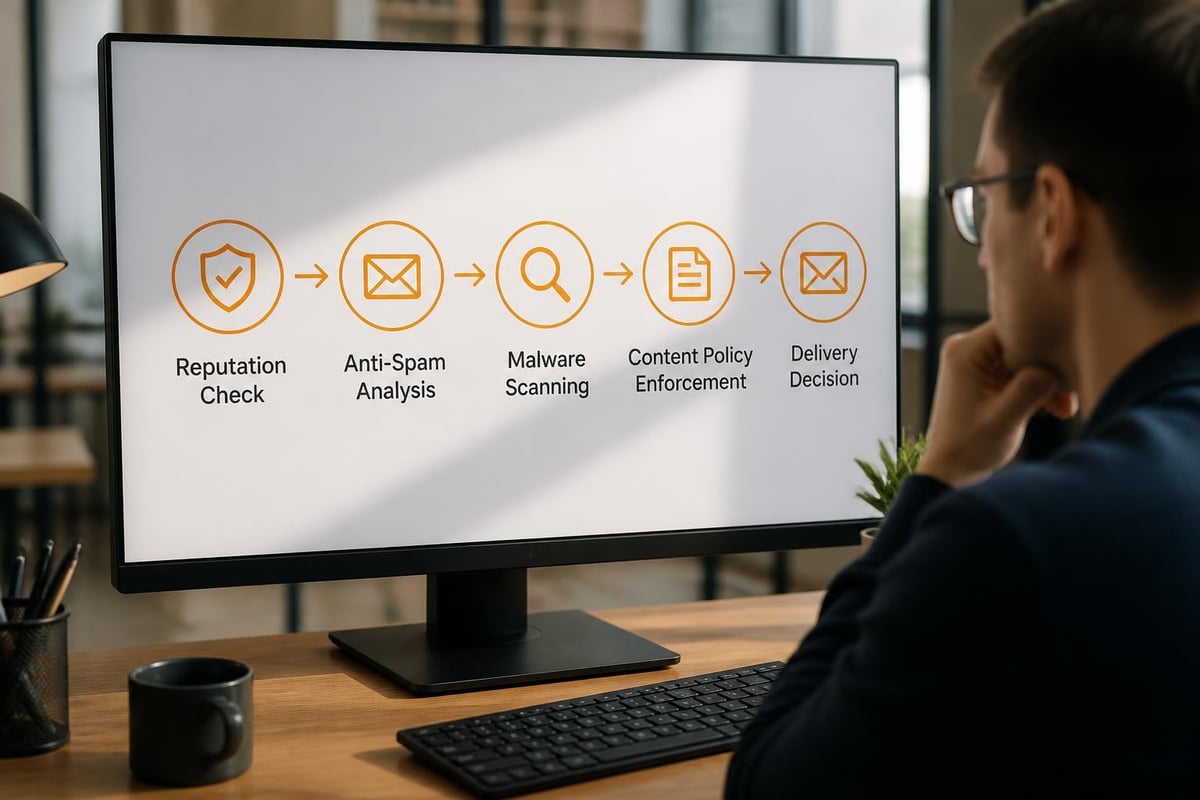
Modern email threats require layered defences that address multiple attack techniques simultaneously. Therefore, the kaspersky secure mail gateway employs several complementary engines working in concert.
Anti-Spam and Content Filtering
Statistical analysis, reputation scoring, and pattern matching identify unsolicited commercial email with high accuracy. In addition, customisable content rules allow administrators to block or flag messages containing specific keywords, file types, or structural patterns.
- Bayesian filtering learns from user feedback to improve accuracy
- SPF, DKIM, and DMARC validation verifies sender authenticity
- Greylisting temporarily rejects first-time senders to deter bulk mailers
- Rate limiting prevents mail flooding attacks
Malware and Exploit Detection
Every attachment and embedded link undergoes scrutiny through multiple detection layers. Moreover, the gateway leverages Kaspersky's threat intelligence network to identify known malicious files and URLs in real time.
Detection methods include:
- Signature-based scanning for known malware families
- Heuristic analysis of suspicious code structures
- Behaviour emulation in sandboxed environments
- URL reputation checking and real-time link analysis
- Archive inspection (ZIP, RAR, 7z, and nested archives)
Independent testing by AV-Comparatives in their Enterprise Product Response validation demonstrates consistent detection rates across diverse threat samples. Furthermore, AV-TEST has recognised Kaspersky's detection capabilities with multiple awards throughout 2024, underscoring the effectiveness of their detection engines in enterprise scenarios.
Advanced Threat Protection
Sophisticated attacks often employ zero-day exploits, polymorphic malware, or targeted social engineering that evades traditional signatures. Nevertheless, the kaspersky secure mail gateway incorporates advanced techniques to address these challenges.
Sandboxing executes suspicious attachments in isolated virtual environments, observing behaviour before delivery. Therefore, previously unknown malware reveals itself through actions such as registry modification, outbound connections, or file encryption attempts.
Anti-phishing modules analyse message content, sender reputation, and embedded links to identify credential harvesting attempts. In addition, machine learning models detect subtle linguistic patterns common in business email compromise schemes, where attackers impersonate executives or trusted partners.
Policy Management and Content Control
Beyond threat prevention, organisations require granular control over what information flows through email channels. Moreover, regulatory frameworks such as GDPR mandate specific handling of personal data and sensitive business information.
Data Loss Prevention Integration
Content inspection rules scan message bodies and attachments for patterns indicating confidential information. Furthermore, administrators can define actions such as quarantine, encryption, or blocking when sensitive data is detected.
- Credit card numbers (PCI DSS compliance)
- National identification numbers
- Medical records and patient data (HIPAA/GDPR)
- Financial statements and proprietary research
- Custom regex patterns for organisation-specific data types
Encryption and Secure Delivery
The kaspersky secure mail gateway supports multiple encryption protocols to protect messages in transit and at rest. Therefore, businesses can enforce TLS connections for specific domains, apply S/MIME or PGP encryption to qualifying messages, and maintain encrypted quarantine storage.
Nevertheless, usability remains paramount. In addition, the gateway can automatically detect when recipients support secure channels and seamlessly upgrade connections without manual intervention.
| Encryption Method | Use Case | Key Management | User Complexity |
|---|---|---|---|
| TLS/STARTTLS | Opportunistic transport encryption | Automatic certificate validation | Transparent |
| S/MIME | End-to-end message encryption | PKI infrastructure required | Certificate distribution |
| PGP/GPG | External partner communication | Public key exchange | Manual key management |
| Portal-based | Ad-hoc secure delivery | Gateway-managed credentials | Web portal login |
Administrative Experience and Operational Efficiency
Security solutions must remain manageable even as organisations scale. Furthermore, the administrative burden directly impacts both operational costs and the speed of incident response.
Centralised Management Console
A web-based interface provides unified visibility across all gateway functions. Moreover, role-based access controls allow delegation of specific tasks without granting full administrative privileges.
Key management capabilities:
- Real-time message tracking and forensics
- Quarantine review and release workflows
- Policy configuration and testing
- Reporting and compliance documentation
- User and group management integration
Integration with Business Systems
The kaspersky secure mail gateway connects seamlessly with existing directory services including Active Directory, LDAP, and Azure AD. Therefore, user provisioning, group memberships, and authentication align automatically with enterprise identity management.
Furthermore, NIST guidance on trustworthy email emphasises the importance of centralised policy enforcement and audit trails. In addition, integration with SIEM platforms allows security operations centres to correlate email events with broader threat intelligence.
For organisations using cloud productivity suites, complementary protection layers become valuable. Moreover, services such as vBoxx Backup for Microsoft 365 and Google Workspace ensure message retention and recovery capabilities remain intact even when primary systems face disruption or data loss.

Compliance and Regulatory Alignment
European businesses face stringent requirements around data protection, message retention, and cross-border data transfers. Therefore, email security infrastructure must support both technical controls and documentation obligations.
GDPR Considerations
The kaspersky secure mail gateway processes personal data including email addresses, message content, and user behaviour patterns. Nevertheless, proper configuration ensures compliance with data protection principles.
Compliance measures include:
- Minimal data retention aligned with business requirements
- Encryption of quarantine and log storage
- Clear data processing agreements with vendors
- Subject access request capabilities
- Breach notification audit trails
Message Archiving and E-Discovery
Long-term retention of business communications supports both regulatory compliance and litigation readiness. Furthermore, the gateway can route copies of qualifying messages to dedicated archiving systems whilst maintaining chain-of-custody documentation.
In addition, organisations in regulated sectors (financial services, healthcare, legal) benefit from tamper-evident storage and rapid search capabilities during audits or investigations.
Performance Optimisation and Scalability
Email infrastructure must handle peak loads without introducing unacceptable latency. Moreover, business growth should not require frequent architectural redesigns.
Throughput and Queue Management
The kaspersky secure mail gateway employs intelligent queue management to maintain service levels even during traffic spikes or temporary backend unavailability. Therefore, messages buffer safely whilst respecting sender retry intervals and preventing mail loss.
Performance factors:
- Hardware specifications (CPU cores, RAM, storage IOPS)
- Database optimisation for large environments
- Connection pooling and parallel processing
- Archive scanning exclusions for trusted senders
- Load balancing across clustered nodes
Monitoring and Capacity Planning
Built-in metrics track message volumes, detection rates, processing times, and resource utilisation. Furthermore, trend analysis identifies growth patterns and potential bottlenecks before they impact service quality.
| Metric | Healthy Threshold | Action Trigger | Response |
|---|---|---|---|
| Queue depth | < 100 messages | > 500 for 15 min | Investigate backend connectivity |
| Scan duration | < 2 seconds/msg | > 5 seconds average | Review policy complexity, hardware |
| Detection rate | 60-80% spam | Sudden spike or drop | Verify rule updates, check bypasses |
| Storage utilisation | < 70% capacity | > 85% | Archive old quarantine, expand storage |
Integration with Modern Email Security Strategies
The email security landscape continues to evolve, with Forrester research highlighting the shift toward API-based cloud email protection alongside traditional gateways. Nevertheless, secure email gateways remain essential components of defence-in-depth strategies.
Complementary Technologies
The kaspersky secure mail gateway works alongside rather than replacing other security controls. Therefore, organisations often deploy multiple layers including endpoint protection, security awareness training, and cloud-native security features.
Layered defence approach:
- Gateway filters bulk threats and known malware
- API-based tools analyse mailbox behaviour post-delivery
- Endpoint agents provide last-line defence
- User reporting captures sophisticated social engineering
- Security operations centre investigates anomalies
Future-Proofing Considerations
Email threats continuously evolve, requiring security solutions that adapt through regular updates and architectural flexibility. Furthermore, support for emerging protocols, encryption standards, and compliance frameworks ensures long-term relevance.
In addition, organisations evaluating email security should consider broader infrastructure security including data storage, authentication, and business continuity measures that complement gateway protection.
Operational Best Practices
Successful deployment requires more than technical installation. Moreover, ongoing tuning, staff training, and incident response preparation determine real-world effectiveness.
Initial Configuration Workflow
- Baseline current environment to understand message volumes and threat levels
- Define policy framework aligned with business risk tolerance and compliance obligations
- Configure in monitor mode to collect data without blocking legitimate mail
- Analyse false positives and adjust detection sensitivity
- Enable enforcement with staged rollout to user groups
- Establish feedback loops for continuous improvement
User Communication and Training
End users inevitably encounter quarantine notifications and delayed messages during initial deployment. Therefore, clear communication about new security measures prevents confusion and support desk escalations.
Furthermore, educating staff about why certain messages are blocked reinforces security awareness and reduces attempts to circumvent controls. In addition, simple self-service quarantine review reduces administrative overhead whilst maintaining security standards.
Technical Support and Maintenance Considerations
Enterprise security infrastructure requires ongoing attention including software updates, threat intelligence refreshes, and configuration adjustments. Moreover, responsive vendor support becomes critical during security incidents or operational disruptions.
Update Management
The kaspersky secure mail gateway receives regular updates addressing both software functionality and threat detection databases. Therefore, organisations must balance rapid protection against new threats with change control processes that prevent service disruption.
Update categories include:
- Critical security patches addressing gateway vulnerabilities
- Threat definition updates adding signatures for new malware families
- Feature releases introducing new capabilities or protocol support
- Performance optimisations improving throughput or resource efficiency
Nevertheless, testing updates in non-production environments before broad deployment remains a fundamental best practice. Furthermore, automated rollback capabilities provide safety nets when updates introduce unexpected behaviour.
Email security demands constant vigilance and layered defences that evolve alongside emerging threats. The kaspersky secure mail gateway provides organisations with robust, enterprise-grade protection that integrates seamlessly with existing infrastructure whilst supporting modern compliance requirements. If you're seeking secure, GDPR-compliant hosting and cloud solutions built on European infrastructure, vBoxx offers a comprehensive suite including secure email, cloud storage, and backup services, all hosted in ISO 27001-certified Dutch data centres and designed to support your business continuity and data sovereignty objectives.