
Deploying a google cloud web server has become a strategic choice for businesses seeking scalable, reliable infrastructure without the overhead of physical hardware. Google Cloud Platform (GCP) offers a comprehensive suite of compute services, from traditional virtual machines to serverless containers, each suited to different workloads and technical requirements. Furthermore, understanding which service fits your use case, how to secure your deployment, and how to optimize for performance and compliance can make the difference between a stable production environment and costly downtime. In this guide, we explore the practical steps, security considerations, and architectural patterns for running web servers on Google Cloud in 2026.
Choosing the Right Google Cloud Compute Service
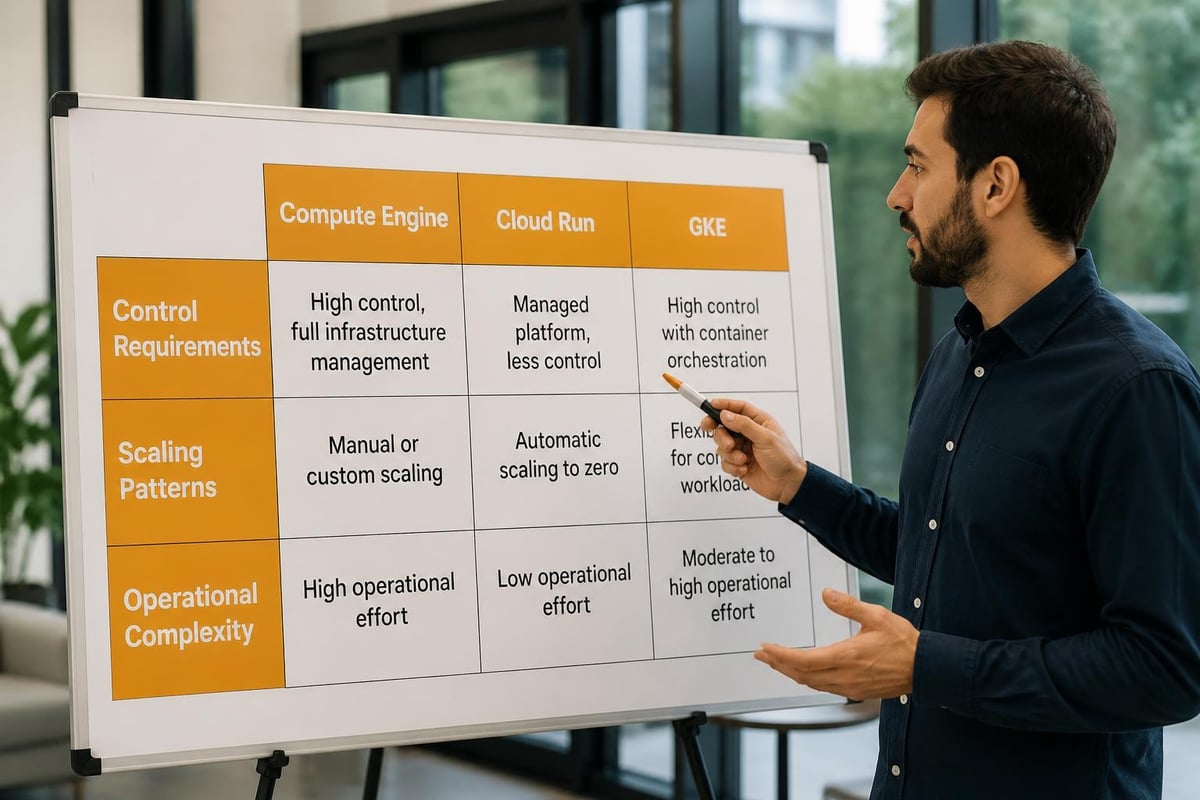
Google Cloud Platform provides several compute options for hosting web servers, and selecting the appropriate service depends on your application architecture, scaling requirements, and operational preferences. Moreover, each service offers distinct trade-offs between control, simplicity, and cost.
Compute Engine for Full Control
Compute Engine is GCP's Infrastructure-as-a-Service (IaaS) offering, providing virtual machines with full operating system access. Therefore, this option suits workloads that require specific kernel modules, custom middleware, or direct server management. You can install NGINX, Apache, or any web server stack, configure firewall rules at the OS level, and tune performance parameters precisely.
Nevertheless, this flexibility comes with operational responsibility. You must handle patching, monitoring, backups, and security hardening yourself. Consequently, Compute Engine is ideal for teams with existing server administration expertise or legacy applications that cannot be containerized.
| Feature | Compute Engine | Cloud Run | GKE |
|---|---|---|---|
| Control | Full OS access | Container runtime | Orchestration layer |
| Scaling | Manual or autoscaler | Automatic | Pod autoscaling |
| Maintenance | Self-managed | Fully managed | Managed control plane |
| Cost model | Per-second billing | Per-request + CPU/memory | Per-node + workload |
Cloud Run for Serverless Simplicity
Cloud Run abstracts infrastructure entirely, running stateless HTTP containers with automatic scaling from zero to thousands of instances. Furthermore, it eliminates server management, patching, and capacity planning. The step-by-step Cloud Run deployment tutorial demonstrates how quickly you can publish a containerized web application.
This service excels for web APIs, frontend applications, and microservices with variable traffic patterns. In addition, Cloud Run integrates natively with Cloud CDN and Cloud Load Balancing for global distribution. However, it imposes constraints: request timeout limits (currently 60 minutes maximum), ephemeral storage, and stateless design requirements.
Google Kubernetes Engine for Complex Workloads
For organizations running multiple services, implementing service mesh, or requiring advanced deployment strategies (blue-green, canary), Google Kubernetes Engine (GKE) provides a managed Kubernetes environment. Therefore, it supports sophisticated routing with Kubernetes Ingress resources, persistent storage, and fine-grained network policies.
GKE offers autopilot mode (fully managed nodes) or standard mode (node-level control). Nevertheless, Kubernetes introduces operational complexity and a steeper learning curve. It is most appropriate when you need container orchestration, multi-tier applications, or when standardizing on Kubernetes across cloud providers.
Deploying Your Google Cloud Web Server
Once you have selected a compute service, the deployment process involves provisioning resources, configuring networking, and establishing secure access patterns. Moreover, automation and infrastructure-as-code practices ensure reproducibility and reduce configuration drift.
Setting Up Compute Engine Instances
Provisioning a Compute Engine instance begins in the GCP Console or via the gcloud CLI. Choose a machine type (e2, n2, or custom), select a boot disk image (Ubuntu, Debian, CentOS, or container-optimized OS), and define your network and region. Furthermore, enable automatic restart and live migration for higher availability.
After provisioning, install your web server software:
- Update the system:
sudo apt update && sudo apt upgrade -y - Install NGINX or Apache:
sudo apt install nginx -y - Configure virtual hosts and document roots
- Enable firewall rules to allow HTTP (80) and HTTPS (443) traffic
- Install SSL certificates using Let's Encrypt or managed certificates
The NGINX Docker documentation provides detailed guidance on deploying NGINX as a web server or reverse proxy, which is particularly useful when fronting backend application servers.
Configuring Load Balancing and CDN
To distribute traffic and improve availability, integrate your google cloud web server with Google Cloud Load Balancing. Global HTTP(S) load balancers support SSL termination, URL mapping, and backend health checks. In addition, they automatically route requests to the nearest healthy instance across regions.
Cloud CDN caches static assets (images, CSS, JavaScript) at Google's global edge locations, reducing latency and origin load. The Cloud CDN overview explains caching behaviour, cache-control headers, and invalidation strategies. Therefore, combining load balancing with CDN delivers faster page loads and improved resilience.
Container Deployment on Cloud Run
Deploying to Cloud Run requires a container image. Build your application into a Docker image, push it to Google Container Registry or Artifact Registry, then deploy:
gcloud run deploy my-web-server \
  --image gcr.io/PROJECT_ID/my-app:latest \
  --platform managed \
  --region europe-west4 \
  --allow-unauthenticated
Cloud Run automatically provisions HTTPS endpoints and scales based on incoming requests. Furthermore, you can configure custom domains, environment variables, and secrets management through the console or YAML descriptors.
Security Hardening for Public Web Servers
Running a public-facing google cloud web server demands rigorous security controls to protect against exploitation, data breaches, and compliance violations. Moreover, threat landscapes evolve continuously, requiring proactive monitoring and regular updates.
Following OWASP and NIST Guidelines
The OWASP Top 10 defines the most critical web application security risks, including injection attacks, broken authentication, and security misconfiguration. Therefore, every web server deployment should include:
- Input validation and output encoding to prevent XSS and SQL injection
- Strong authentication mechanisms with multi-factor authentication
- Role-based access control to limit privilege escalation
- Secure session management with httpOnly and secure cookie flags
- Regular dependency updates to patch known vulnerabilities
In addition, the NIST Guidelines on Securing Public Web Servers provide comprehensive checklists for hardening, logging, and incident response that align with regulatory frameworks.
Implementing HTTPS and TLS Best Practices
All production web servers must enforce HTTPS. Google Cloud offers managed SSL certificates that automatically renew, or you can provision certificates via Let's Encrypt using Certbot. Furthermore, configure your web server to redirect all HTTP traffic to HTTPS and enable HTTP Strict Transport Security (HSTS).
Mozilla's web security guidelines recommend modern TLS configurations:
- TLS 1.3 only or TLS 1.2+ with strong cipher suites
- HSTS headers with long max-age and includeSubDomains
- Content Security Policy (CSP) to mitigate XSS
- X-Frame-Options and X-Content-Type-Options headers
Moreover, test your configuration with SSL Labs or similar scanners to verify compliance with current best practices.

Network Isolation and Firewall Rules
GCP's Virtual Private Cloud (VPC) enables network segmentation. Place your web servers in public subnets with limited ingress rules, whilst backend databases and application servers reside in private subnets without external IP addresses. Furthermore, use Cloud Armor as a Web Application Firewall (WAF) to block malicious traffic based on IP reputation, geo-blocking, and custom rules.
Firewall rules should follow the principle of least privilege:
- Allow only ports 80 and 443 from the internet to web server instances
- Restrict SSH (port 22) to known IP ranges or use Identity-Aware Proxy
- Deny all other inbound traffic by default
- Log denied connections for security monitoring
GDPR Compliance and Data Sovereignty
For European businesses, data sovereignty and GDPR compliance are non-negotiable requirements when deploying a google cloud web server. Nevertheless, Google Cloud operates data centers worldwide, and careful configuration is essential to meet regulatory obligations.
Selecting European Regions
Google Cloud offers multiple regions within the European Union, including europe-west4 (Netherlands), europe-west1 (Belgium), and europe-north1 (Finland). Therefore, deploying compute resources and storing data exclusively in these regions ensures that customer data remains within EU jurisdiction.
Furthermore, configure Cloud Storage buckets, Cloud SQL instances, and Cloud CDN cache locations to use European endpoints. In addition, review Google's Data Processing Amendment and ensure that contracts specify EU data residency.
Navigating the US CLOUD Act
The US CLOUD Act allows American authorities to compel disclosure of data held by US companies, regardless of where the data physically resides. Consequently, European organizations subject to GDPR may face conflicts when using cloud providers headquartered in the United States.
Whilst Google provides strong contractual protections and EU Standard Contractual Clauses, some businesses prefer European infrastructure providers to eliminate this jurisdictional risk entirely. For organizations prioritizing data sovereignty, partnering with a European cloud provider like vBoxx ensures infrastructure outside US legal reach, with ISO 27001-certified data centers in the Netherlands and full GDPR compliance.
Encryption and Access Controls
Implement encryption at rest and in transit for all data processed by your google cloud web server. Google Cloud encrypts data by default, but you can manage encryption keys through Cloud KMS for additional control. Moreover, enable audit logging to track access patterns and detect anomalies.
| Compliance Requirement | Google Cloud Implementation |
|---|---|
| Data residency | Region selection (EU zones) |
| Encryption | Default encryption + Cloud KMS |
| Access logs | Cloud Audit Logs + Cloud Logging |
| Backup retention | Scheduled snapshots with defined retention |
| Incident response | Security Command Center alerts |
Performance Optimization and Scaling
A well-configured google cloud web server must handle traffic spikes, deliver low latency globally, and optimize resource utilization. Therefore, implementing caching strategies, autoscaling policies, and monitoring is critical for production environments.
Autoscaling and Load Distribution
Compute Engine managed instance groups automatically add or remove VM instances based on CPU utilization, HTTP load balancing metrics, or custom Cloud Monitoring signals. Furthermore, configure health checks to remove unhealthy instances from the load balancer pool automatically.
Cloud Run scales automatically based on request volume, from zero instances (no cost when idle) to thousands of concurrent containers. In addition, set concurrency limits and maximum instance counts to control costs and prevent runaway scaling.
Content Delivery and Caching
Cloud CDN caches responses at Google's global edge network, reducing latency for users worldwide. Configure appropriate Cache-Control headers in your application:
Cache-Control: public, max-age=3600for static assetsCache-Control: private, no-storefor personalized or sensitive content- ETag and Last-Modified headers for efficient revalidation
Moreover, use cache invalidation endpoints to purge outdated content when deploying application updates. The Cloud CDN documentation explains advanced features like signed URLs, negative caching, and cache modes.
Monitoring and Site Reliability Engineering
Google's Site Reliability Engineering resources emphasize defining Service Level Objectives (SLOs), implementing robust monitoring, and practicing incident response. Therefore, establish SLOs for availability (e.g., 99.9% uptime), latency (e.g., p95 < 200ms), and error rate (e.g., < 0.1% 5xx responses).
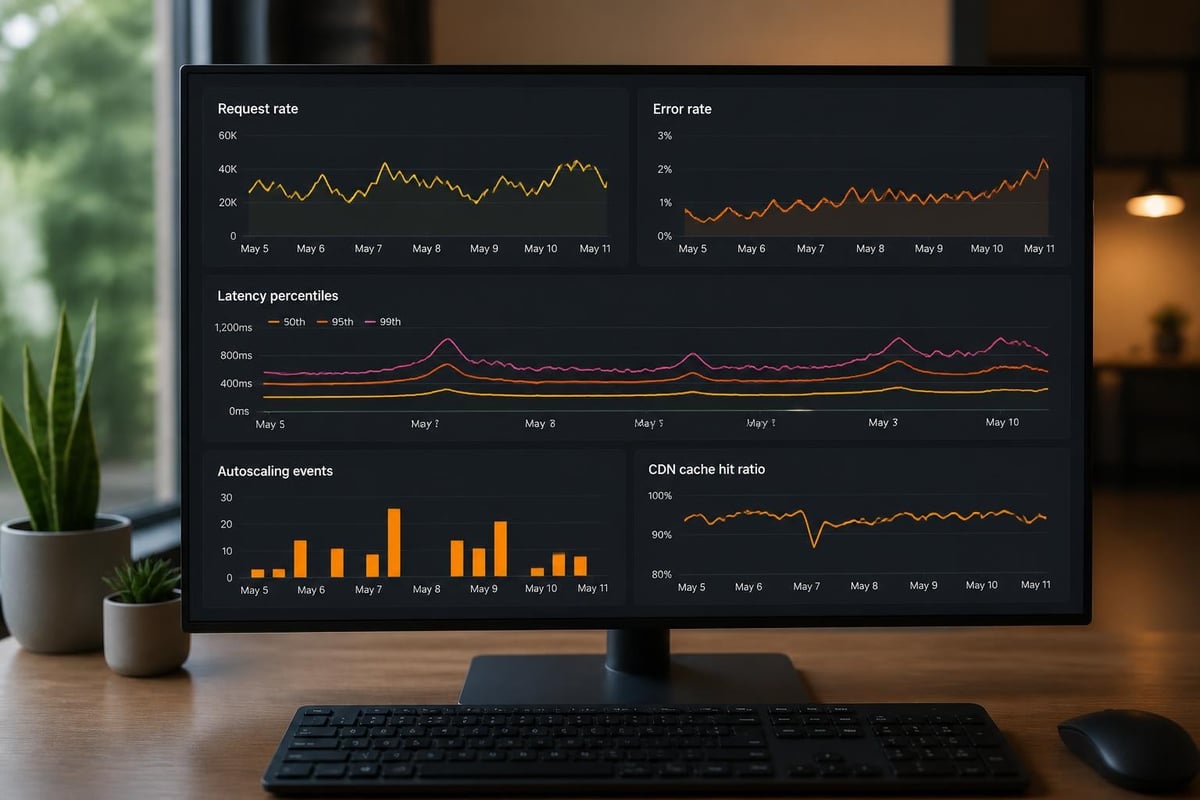
Use Cloud Monitoring to collect metrics, set up alerting policies, and visualize performance dashboards. In addition, integrate Cloud Trace for request latency analysis and Cloud Profiler for application-level performance tuning.
Key metrics to monitor:
- Request rate and error rate (4xx, 5xx responses)
- Response latency (p50, p95, p99 percentiles)
- CPU and memory utilization
- Disk I/O and network throughput
- SSL handshake time and certificate expiry
Cost Optimization Strategies
Running a google cloud web server efficiently requires balancing performance, availability, and budget. Furthermore, GCP's flexible pricing models and commitment discounts offer opportunities to reduce infrastructure costs significantly.
Right-Sizing and Committed Use Discounts
Right-sizing involves matching machine types to actual workload requirements. Use Cloud Monitoring metrics to identify over-provisioned instances and downsize machine types accordingly. Moreover, leverage preemptible VMs (up to 80% discount) or Spot VMs for fault-tolerant workloads like batch processing or development environments.
Committed use discounts provide up to 57% savings in exchange for one- or three-year commitments. In addition, sustained use discounts automatically apply to resources running more than 25% of the month, reducing costs without manual intervention.
Serverless Cost Management
Cloud Run charges only for actual request processing time and allocated CPU/memory. Therefore, ensure containers start quickly, minimize cold start latency, and use minimum instance settings to avoid paying for idle capacity. Furthermore, set request concurrency appropriately to maximize container utilization.
Data Transfer and CDN Costs
Egress charges apply when transferring data from GCP to the internet. Consequently, using Cloud CDN reduces origin traffic and associated costs by serving cached content from edge locations. In addition, configure appropriate cache durations and compression (gzip, Brotli) to minimize bandwidth consumption.
Managing Email and Collaboration Services
Whilst deploying a google cloud web server handles your public-facing applications, many businesses also require reliable email, calendar, and communication infrastructure. Nevertheless, managing these services alongside web hosting can introduce complexity and integration challenges.
European businesses concerned about data sovereignty and GDPR compliance should consider dedicated communication platforms hosted within the EU. For instance, vBoxxConnect offers a GDPR-compliant all-in-one platform for email, calendar, tasks, video conferencing, and team chat, hosted in the Netherlands with seamless cloud integration and free migration services. This approach keeps communication data separate from web application infrastructure, simplifies compliance, and reduces operational overhead.
Backup and Disaster Recovery
A comprehensive backup strategy protects your google cloud web server against data loss from accidental deletion, ransomware, or infrastructure failures. Moreover, regular testing of restore procedures ensures that backups remain viable when needed.
Snapshot Schedules and Retention
Compute Engine supports persistent disk snapshots that capture incremental changes. Configure snapshot schedules through resource policies:
- Daily snapshots with 7-day retention for short-term recovery
- Weekly snapshots with 4-week retention for mid-term rollback
- Monthly snapshots with 12-month retention for compliance
Furthermore, store snapshots in separate regions to protect against regional outages. Cloud Storage bucket versioning and lifecycle policies provide additional layers of protection for application data.
Application-Level Backups
For databases and application state, implement application-consistent backups that capture transactions in a consistent state. Use Cloud SQL automated backups, export to Cloud Storage, or configure database-specific backup tools. In addition, document restore procedures and conduct periodic disaster recovery drills.
Recovery Time and Point Objectives
Define Recovery Time Objective (RTO) and Recovery Point Objective (RPO) based on business requirements. A public web server might target RTO of 1 hour and RPO of 15 minutes, requiring automated snapshot schedules, pre-configured machine images, and infrastructure-as-code deployments.
| Backup Type | Frequency | Retention | Storage Location |
|---|---|---|---|
| Disk snapshots | Daily | 7 days | europe-west4 + europe-west1 |
| Database exports | Every 6 hours | 30 days | Cloud Storage (regional) |
| Configuration backups | On change | Version control | Git repository |
| Application data | Continuous | 90 days | Cloud Storage (dual-region) |
Container Orchestration with GKE
For teams managing multiple services or requiring advanced deployment patterns, Google Kubernetes Engine provides a powerful platform for running containerized web servers. Nevertheless, Kubernetes introduces operational complexity that must be weighed against its benefits.
Ingress Controllers and Service Mesh
GKE supports multiple Ingress controllers for routing external traffic to services. The GKE Ingress controller integrates with Google Cloud Load Balancing and automatically provisions SSL certificates. Moreover, it supports URL-based routing, host-based routing, and backend health checks.
For advanced traffic management, service mesh solutions like Anthos Service Mesh provide:
- Mutual TLS between services for zero-trust networking
- Traffic splitting for canary deployments and A/B testing
- Observability with distributed tracing and service graphs
- Policy enforcement for authentication and authorization
Node Pools and Resource Optimization
Create separate node pools for different workload types: high-memory nodes for databases, preemptible nodes for batch jobs, and GPU nodes for machine learning inference. Furthermore, enable cluster autoscaler to add or remove nodes based on pending pod requests, optimizing costs during low-traffic periods.
Regulatory Compliance Beyond GDPR
Whilst GDPR is paramount for European businesses, additional regulatory frameworks may apply depending on your industry and customer base. Therefore, understanding compliance requirements early in the design phase prevents costly architectural changes later.
NIS2 Directive and Critical Infrastructure
The NIS2 Directive imposes cybersecurity requirements on essential and important entities across the EU. Consequently, organizations in sectors like energy, healthcare, finance, and digital infrastructure must implement risk management measures, incident reporting, and supply chain security.
Web servers processing critical business functions may fall under NIS2 scope, requiring documented security policies, regular vulnerability assessments, and incident response procedures. For detailed guidance, consult resources on NIS2 compliance.
Industry-Specific Standards
Financial services require PCI DSS compliance for payment processing, healthcare organizations must meet HIPAA standards (in US contexts) or national health data regulations, and government contractors face additional certification requirements.
Therefore, verify that your google cloud web server configuration meets applicable standards, including:
- Network segmentation and access controls
- Encryption standards and key management
- Audit logging and retention periods
- Vulnerability scanning and penetration testing
- Change management and approval workflows
Maintaining and Updating Your Infrastructure
A google cloud web server requires ongoing maintenance to remain secure, performant, and cost-effective. Moreover, adopting DevOps practices and automation reduces manual effort and human error.
Patch Management and Security Updates
Establish a regular patching schedule for operating systems, web server software, and application dependencies. Use OS patch management services to automate updates across instance groups, or maintain golden images with the latest patches.
Furthermore, subscribe to security bulletins for your web server software (NGINX, Apache, etc.) and monitor CVE databases for vulnerabilities affecting your stack. Apply critical security patches within defined SLAs, typically 24-48 hours for high-severity vulnerabilities.
Infrastructure as Code
Manage your google cloud web server infrastructure through Terraform, Deployment Manager, or other infrastructure-as-code tools. Version control your configurations in Git, implement code review processes, and use CI/CD pipelines to deploy changes consistently.
Benefits include:
- Reproducibility: Recreate environments exactly for testing or disaster recovery
- Auditability: Track all infrastructure changes through version history
- Collaboration: Review and approve changes before applying to production
- Documentation: Infrastructure code serves as self-documenting architecture
Continuous Integration and Deployment
Implement CI/CD pipelines using Cloud Build, Jenkins, GitLab CI, or GitHub Actions. Automate build, test, and deployment workflows to reduce manual errors and accelerate release cycles. Furthermore, use blue-green deployments or rolling updates to minimize downtime during application updates.
Deploying a google cloud web server in 2026 offers European businesses powerful infrastructure options balanced with the responsibility of security, compliance, and cost management. Whether choosing Compute Engine for full control, Cloud Run for serverless simplicity, or GKE for orchestration, success depends on rigorous security hardening, GDPR-aligned data handling, and proactive monitoring. For organisations prioritising data sovereignty, partnering with a European provider ensures infrastructure remains outside US jurisdiction whilst maintaining enterprise-grade capabilities. vBoxx delivers ISO 27001-certified hosting in Dutch data centers, combining virtual servers, cloud storage, secure communication, and expert support to create a complete, GDPR-compliant digital infrastructure. Explore how vBoxx can support your business with European hosting that prioritizes security, privacy, and sustainability.