
The Mac Mini has evolved into a powerful workhorse for iOS developers seeking a balance between performance, affordability, and compact design. Furthermore, with Apple's transition to Apple Silicon, particularly the M4 chip in 2026, developers now have access to unprecedented processing capabilities in a remarkably small footprint. Moreover, the Mac Mini's efficient architecture makes it an ideal choice for businesses prioritising both computational power and energy efficiency in their development infrastructure.
Why Choose Mac Mini for iOS Development in 2026
The modern development landscape demands hardware that can handle multiple simultaneous tasks without compromising performance. Therefore, selecting the right machine becomes crucial for maintaining productivity and meeting deployment deadlines.
Performance Advantages of Apple Silicon
The M4 chip represents a significant leap forward in processing capabilities for mac mini ios development. Nevertheless, raw power alone doesn't tell the complete story.
Key performance metrics include:
- Neural Engine processing for machine learning tasks
- Unified memory architecture reducing data transfer bottlenecks
- Enhanced GPU cores for SwiftUI previews and graphics-intensive applications
- ProRes encoding capabilities for media-rich applications
- Thermal efficiency allowing sustained performance without throttling
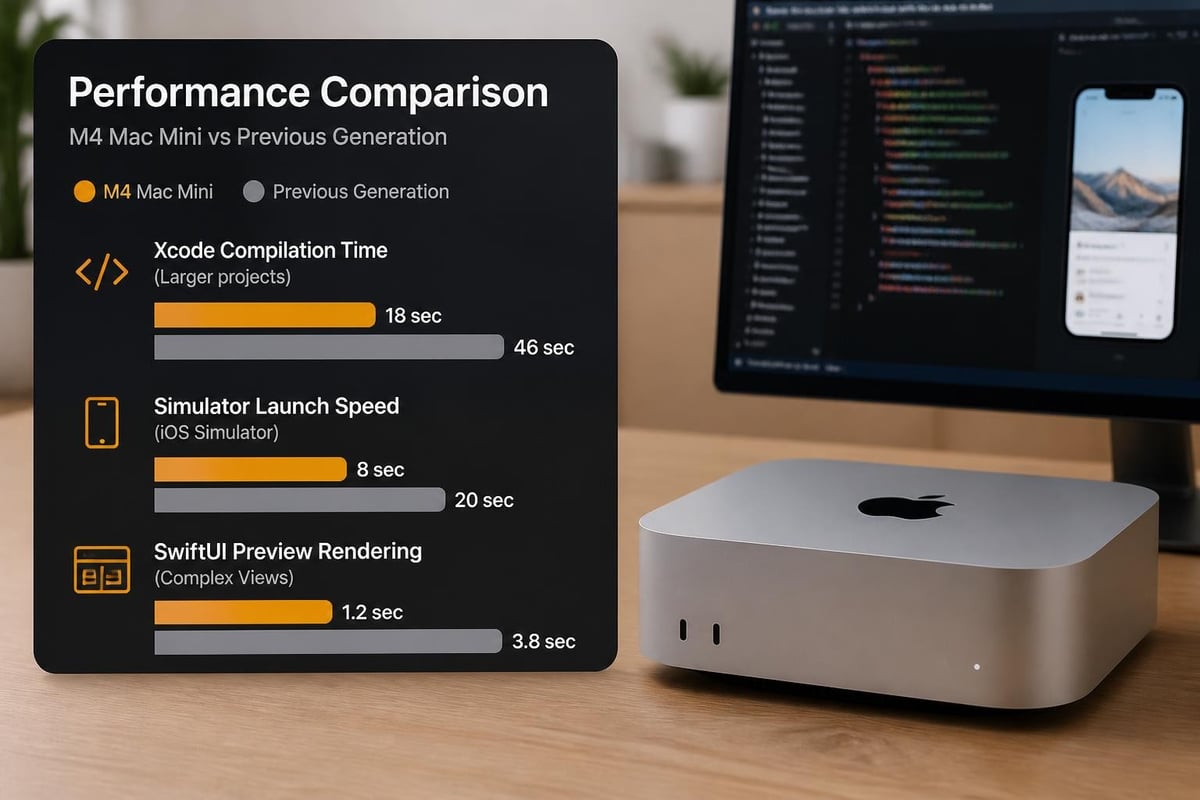
The Mac Mini M4's performance benchmarks demonstrate remarkable improvements in compilation times, with Xcode builds completing up to 40% faster compared to previous Intel-based models. In addition, the unified memory architecture eliminates traditional bottlenecks associated with discrete graphics solutions.
Cost-Effectiveness for Development Teams
Budget considerations remain paramount for development teams, especially those scaling their operations. Consequently, the Mac Mini presents an attractive proposition compared to Mac Studio or Mac Pro alternatives.
| Configuration | Mac Mini M4 | Mac Studio M2 | Cost Difference |
|---|---|---|---|
| Base Model | £599 | £1,999 | £1,400 |
| 16GB RAM | £799 | £2,199 | £1,400 |
| 24GB RAM | £999 | £2,399 | £1,400 |
| 32GB RAM | £1,399 | £2,799 | £1,400 |
Furthermore, the Mac Mini's modularity allows developers to upgrade peripherals independently, extending the useful lifespan of their investment. Moreover, recent developments in external GPU support have expanded capabilities significantly. According to TechRadar's reporting, Apple's approval of TinyGPU drivers now enables external GPUs to function as AI accelerators, transforming the Mac Mini into a powerhouse for machine learning workloads.
Essential Setup Requirements for Mac Mini iOS Development
Proper configuration determines whether your development environment operates smoothly or becomes a source of frustration. Therefore, attention to detail during initial setup pays dividends throughout the project lifecycle.
Hardware Configuration Recommendations
Selecting appropriate specifications ensures your mac mini ios development workflow remains responsive even under demanding conditions.
Recommended minimum specifications:
- M4 chip with 10-core CPU
- 16GB unified memory (24GB for larger projects)
- 512GB SSD storage (1TB recommended)
- Gigabit Ethernet connection
- External display with at least 4K resolution
Nevertheless, teams working with extensive asset libraries or multiple simultaneous projects should consider upgrading to 32GB of memory. In addition, faster SSD options significantly reduce project load times and simulator deployment speed.
Network and Security Considerations
Developers working with remote repositories and continuous integration pipelines require robust network infrastructure. Furthermore, security considerations become increasingly important when handling sensitive code and client data.
For organisations prioritising secure development environments, implementing proper network segmentation and encrypted storage solutions proves essential. Moreover, businesses seeking comprehensive security infrastructure can explore solutions from providers specialising in secure cloud services, ensuring their development pipeline maintains the highest standards of data protection.
The best practices for Mac Mini iOS development emphasise establishing secure SSH connections, implementing VPN access for remote work, and maintaining encrypted Time Machine backups as fundamental security measures.
Optimising Xcode Performance on Mac Mini
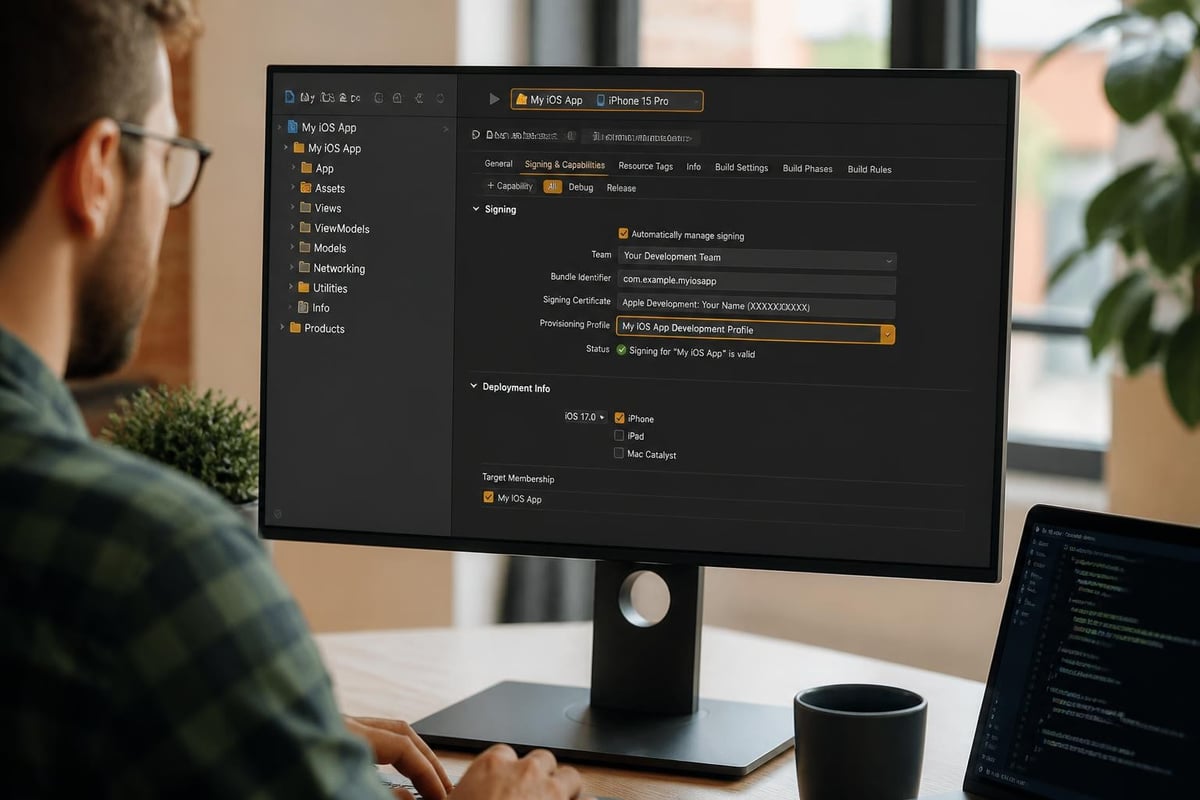
Xcode represents the cornerstone of mac mini ios development, and optimising its performance directly impacts developer productivity. Therefore, understanding configuration options and system resources becomes critical.
Memory Management Strategies
Xcode's memory requirements scale with project complexity, particularly when running multiple simulators or working with SwiftUI previews.
| Task | Memory Usage | Recommended RAM |
|---|---|---|
| Single simulator | 4-6GB | 16GB |
| Multiple simulators | 8-12GB | 24GB |
| SwiftUI previews | 2-4GB | 16GB |
| Full test suite | 6-8GB | 24GB |
| Combined workload | 12-16GB | 32GB |
Furthermore, enabling Xcode's build caching mechanisms reduces redundant compilation tasks. Nevertheless, developers should regularly clear derived data folders to prevent accumulation of obsolete build artefacts consuming valuable storage space.
Build Time Optimisation Techniques
Compilation speed directly affects iteration velocity during development cycles. Consequently, implementing strategic optimisations yields measurable productivity improvements.
Effective optimisation approaches include:
- Enabling whole module optimisation for release builds
- Implementing modular architecture to reduce incremental compilation scope
- Utilising precompiled frameworks for stable dependencies
- Configuring appropriate build settings for debug versus release configurations
- Leveraging distributed build systems for large codebases
Moreover, the comprehensive guide to building and publishing iOS apps provides detailed strategies for streamlining the entire development pipeline from initial commit through App Store deployment.
Remote Development Capabilities
The compact nature of the Mac Mini makes it particularly suitable for remote development scenarios. Furthermore, cloud-based development infrastructure offers flexibility for distributed teams.
Setting Up Remote Access
Configuring secure remote access enables developers to leverage Mac Mini hardware from any location. Therefore, implementing proper authentication and encryption protocols becomes essential.
Key configuration steps:
- Enable Screen Sharing through System Preferences
- Configure SSH access with key-based authentication
- Set up VPN tunnelling for enhanced security
- Implement firewall rules restricting unauthorised access
- Establish automated backup schedules
Nevertheless, remote development introduces latency considerations that affect responsiveness, particularly for graphically intensive tasks. In addition, network bandwidth limitations may impact large file transfers and repository synchronisation operations.
Continuous Integration and Deployment
Automated build pipelines leverage Mac Mini hardware efficiently, particularly when processing multiple commits from development teams. Moreover, the energy efficiency of Apple Silicon reduces operational costs for organisations running 24/7 CI/CD infrastructure.
According to research on iOS app development, developers report significant productivity gains when implementing automated testing frameworks that execute on dedicated Mac Mini hardware, freeing primary development machines for interactive work.
Advanced Development Scenarios
Modern iOS applications increasingly incorporate sophisticated features requiring additional computational resources. Therefore, understanding advanced capabilities ensures your mac mini ios development environment remains capable as project requirements evolve.
Machine Learning Integration
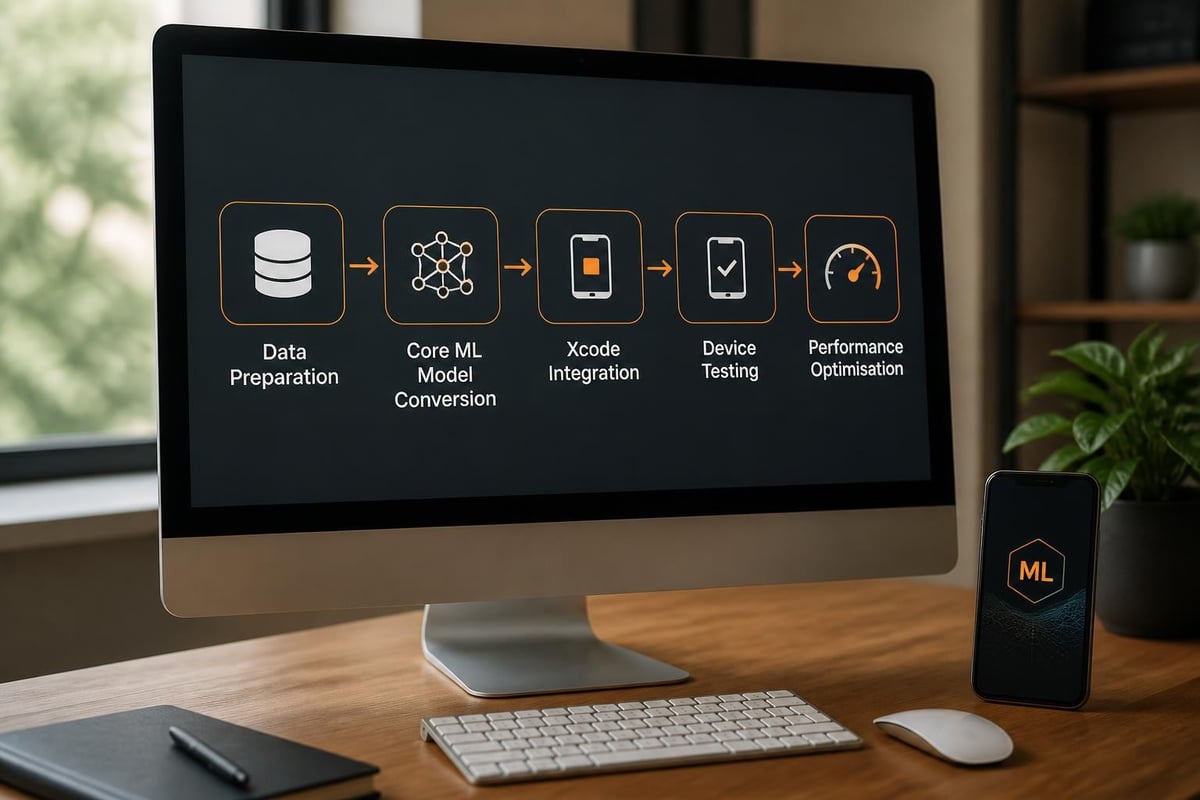
On-device machine learning has become ubiquitous in iOS applications, from image recognition to natural language processing. Furthermore, Core ML models require testing across various device configurations to ensure optimal performance.
The empirical study on on-device deep learning highlights the growing adoption of ML models in iOS applications, with researchers identifying both opportunities and security considerations developers must address. Moreover, DeepLearningKit research demonstrates optimisation techniques specifically designed for Apple's Metal framework, enabling efficient neural network execution.
Machine learning development considerations:
- Model conversion and optimisation workflows
- Performance profiling across different device generations
- Memory footprint analysis for on-device inference
- Privacy-preserving federated learning implementations
- Edge computing integration strategies
Nevertheless, the Mac Mini's unified memory architecture provides distinct advantages when prototyping and testing ML models before deployment. In addition, the enhanced Neural Engine in M4 chips accelerates model training and inference tasks significantly.
Multi-Platform Development
Developers increasingly target multiple Apple platforms simultaneously, requiring hardware capable of building, testing, and deploying across iOS, iPadOS, watchOS, and tvOS. Consequently, the Mac Mini's versatility becomes particularly valuable.
| Platform | Simulator Performance | Build Time | Testing Requirements |
|---|---|---|---|
| iOS | Excellent | Baseline | Primary focus |
| iPadOS | Excellent | +10% | Split view testing |
| watchOS | Good | +15% | Companion app integration |
| tvOS | Good | +20% | Focus engine validation |
Furthermore, SwiftUI's cross-platform capabilities streamline development across these ecosystems. Moreover, unified codebases reduce maintenance overhead whilst maximising market reach.
Managing Storage and Backups
Development projects accumulate considerable data over time, from source code repositories to built artefacts and test datasets. Therefore, implementing robust storage management practices prevents disruptions.
Storage Allocation Strategies
The Mac Mini's internal SSD provides excellent performance but limited capacity compared to traditional desktop workstations. Nevertheless, strategic use of external storage extends capabilities cost-effectively.
Recommended storage distribution:
- Internal SSD: Active projects, Xcode, simulators, system files
- External SSD: Archive projects, large asset libraries, video resources
- Network Storage: Shared resources, backup destinations, build artefacts
- Cloud Storage: Source control, documentation, distributed team collaboration
In addition, regularly auditing storage consumption identifies opportunities for optimisation. Moreover, automated cleanup scripts remove unnecessary simulator runtimes and derived data accumulation.
Backup and Disaster Recovery
Protecting intellectual property and development progress requires comprehensive backup strategies. Furthermore, recovery time objectives influence backup frequency and methodology selection.
Developers should implement the 3-2-1 backup principle: three copies of data, stored on two different media types, with one copy maintained off-site. Nevertheless, balancing backup comprehensiveness against storage costs requires careful planning.
Workspace Ergonomics and Productivity
The physical setup surrounding your mac mini ios development environment significantly impacts long-term productivity and wellbeing. Therefore, investing in appropriate peripherals and workspace organisation yields substantial returns.
Display Configuration
Visual real estate directly correlates with development efficiency, particularly when simultaneously viewing code, documentation, and simulator output.
Optimal display configurations include:
- Primary 4K or 5K display for code editing
- Secondary display for documentation and communication tools
- Portrait-oriented display for viewing long source files
- Ultra-wide display as single-screen alternative
- Built-in MacBook display when using Mac Mini remotely
Furthermore, according to minimalistic Mac Mini setup demonstrations, developers achieve optimal productivity with dual 27-inch 4K displays arranged symmetrically. Moreover, proper colour calibration ensures accurate interface design work.
Input Device Selection
Prolonged typing sessions demand ergonomic keyboards that reduce strain whilst maintaining responsiveness. Nevertheless, personal preference plays a significant role in input device selection.
Similarly, precision pointing devices facilitate efficient navigation through complex Xcode interfaces. In addition, programmable shortcuts accelerate common development tasks significantly.
Supply Chain Considerations for 2026
Current market dynamics affect Mac Mini availability and pricing across regions. Therefore, understanding supply constraints helps inform purchasing decisions and project timelines.
Recent reports on Mac Mini shortages indicate extended lead times driven by surging demand for local AI workloads and memory component constraints. Consequently, developers requiring immediate hardware access should consider alternative procurement strategies or rental options.
Furthermore, the growing adoption of edge computing and privacy-focused AI implementations continues driving demand beyond Apple's current manufacturing capacity. Moreover, organisations planning infrastructure expansion should secure hardware allocations well in advance of anticipated deployment dates.
Collaborative Development Workflows
Team-based development introduces coordination challenges that properly configured infrastructure helps address. Therefore, establishing shared standards and communication protocols proves essential.
Version Control Integration
Git remains the dominant version control system for iOS development, with platforms like GitHub, GitLab, and Bitbucket providing collaborative features. Furthermore, proper repository organisation facilitates parallel development efforts.
Essential version control practices include:
- Implementing consistent branching strategies (Git Flow, trunk-based development)
- Establishing pull request review processes
- Automating code quality checks through pre-commit hooks
- Maintaining comprehensive commit message standards
- Configuring appropriate .gitignore files for Xcode projects
Nevertheless, large binary assets require alternative storage solutions such as Git LFS to prevent repository bloat. In addition, regular repository maintenance preserves performance as project history expands.
Code Review and Quality Assurance
Maintaining code quality across distributed teams requires systematic review processes. Moreover, automated testing frameworks catch regressions before they reach production environments.
Teams implementing comprehensive testing strategies typically allocate 30-40% of development time to quality assurance activities. Furthermore, this investment reduces downstream maintenance costs and improves application stability.
Environmental Considerations
The Mac Mini's energy efficiency aligns with growing emphasis on sustainable computing practices. Therefore, organisations prioritising environmental responsibility find Apple Silicon particularly attractive.
Compared to traditional desktop workstations, the M4 Mac Mini consumes approximately 60-70% less power during typical development workloads. Furthermore, reduced thermal output decreases cooling requirements in shared office environments.
Moreover, businesses seeking to minimise their environmental footprint whilst maintaining robust development capabilities can explore web hosting solutions that emphasise sustainable infrastructure alongside security and performance.
Developer Experience and Productivity Metrics
Quantifying the impact of hardware choices on developer productivity helps justify infrastructure investments. Nevertheless, measuring developer experience requires both quantitative and qualitative assessments.
Key productivity indicators include:
- Average build time for standard project configurations
- Simulator launch latency across different device types
- Time required for full test suite execution
- SwiftUI preview refresh responsiveness
- Archive and upload duration to App Store Connect
In addition, developer satisfaction surveys provide valuable insights into perceived workflow efficiency. Moreover, tracking these metrics over time identifies degradation requiring intervention.
Future-Proofing Your Development Infrastructure
Technology evolution requires periodic infrastructure reassessment to maintain competitive advantage. Therefore, understanding emerging trends helps inform investment decisions.
The convergence of AI capabilities and mobile applications continues accelerating, with iOS 18 introducing enhanced on-device intelligence features. Furthermore, visionOS development for Apple Vision Pro introduces new platform requirements that developers must accommodate.
Nevertheless, the Mac Mini's architecture provides a foundation capable of adapting to these evolving requirements through software updates and peripheral expansion. Consequently, organisations investing in Mac Mini infrastructure today position themselves favourably for tomorrow's development challenges.
Establishing an efficient mac mini ios development environment requires careful attention to hardware configuration, software optimisation, and workflow integration. Moreover, the combination of Apple Silicon performance and compact design delivers exceptional value for development teams of all sizes. As your development infrastructure grows, partnering with providers who understand secure, sustainable cloud solutions becomes increasingly important. vBoxx delivers the robust hosting infrastructure and security-focused services that complement your development operations, ensuring your applications deploy reliably whilst maintaining the highest standards of data protection and environmental responsibility.