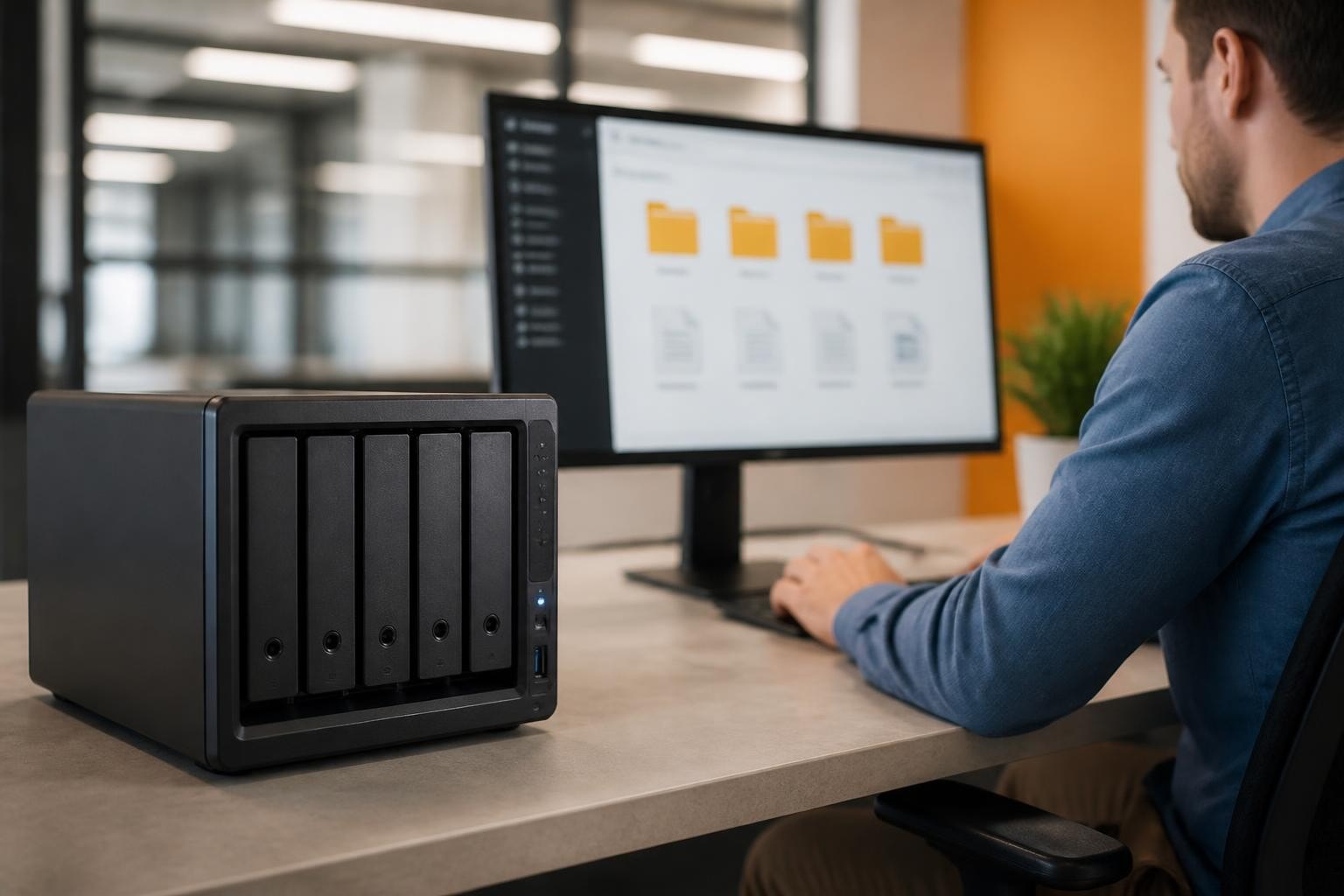
The Synology DS216j represents a compelling entry point into network-attached storage for small businesses and home offices seeking reliable, centralised data management without enterprise-level complexity or cost. Launched as part of Synology's value-oriented J-series lineup, this two-bay NAS device balances affordability with the robust DiskStation Manager (DSM) operating system that has become synonymous with user-friendly network storage. Furthermore, its compact footprint and straightforward setup make it particularly attractive for organisations taking their first steps toward professional data infrastructure, whilst its expandable architecture ensures room for growth as storage demands increase.
Hardware Specifications and Design Philosophy
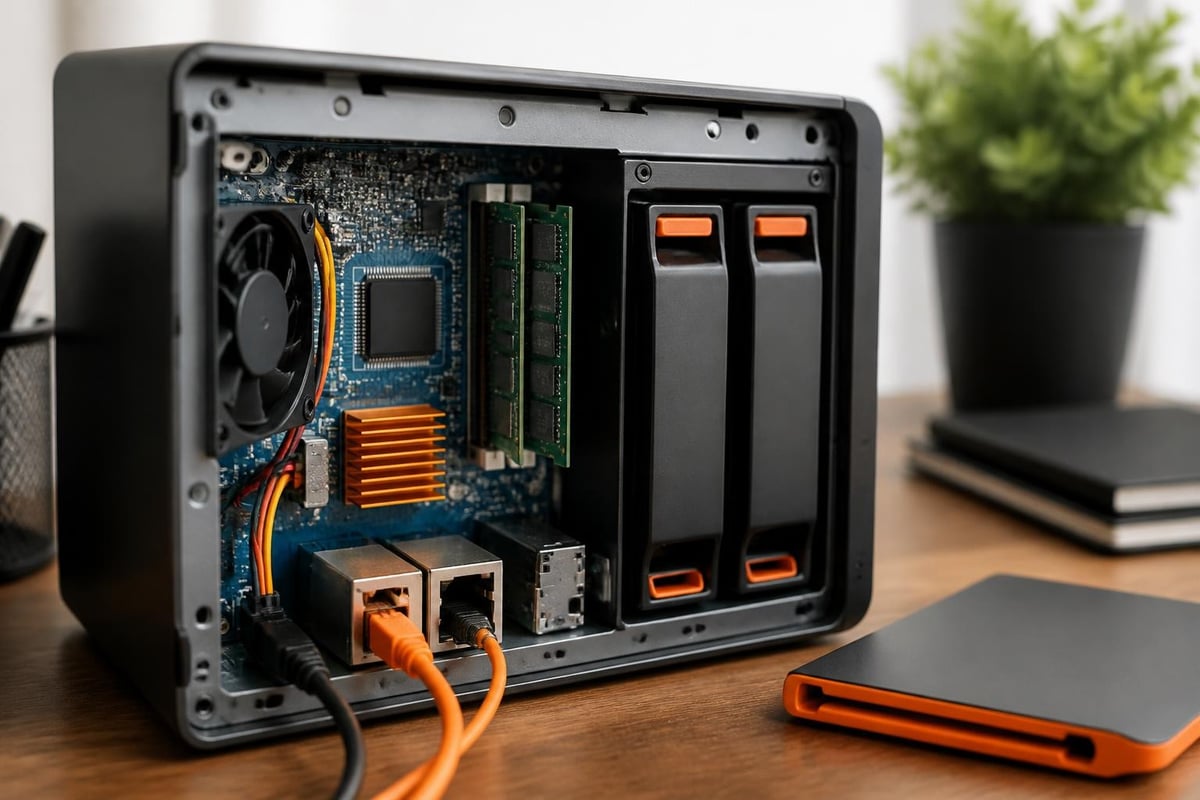
The Synology DS216j features a dual-core Marvell Armada 385 processor running at 1.0 GHz, paired with 512 MB of DDR3 RAM. Therefore, whilst these specifications position the device firmly in the entry-level segment, they prove sufficient for fundamental file serving, basic backup operations, and moderate media streaming tasks.
Physical Construction and Port Layout
The chassis measures 165 mm in height, 100 mm in width, and 225.5 mm in depth, making it one of the most compact two-bay solutions available. Moreover, the tool-free drive installation mechanism simplifies the initial setup process considerably.
Connectivity Options:
- One Gigabit Ethernet port (RJ-45)
- Two USB 3.0 ports for external storage expansion
- eSATA port for additional backup targets
- 60W external power adapter
Nevertheless, the single network interface may present a bottleneck in high-traffic environments, though for typical small office deployments, this limitation rarely manifests in practical performance issues. In addition, the official compatibility database provides comprehensive verification for drives and peripherals before purchase.
Performance Benchmarks and Real-World Throughput
Independent testing reveals that the Synology DS216j delivers sequential read speeds approaching 112 MB/s and write speeds near 108 MB/s under optimal conditions with Gigabit Ethernet connectivity. Furthermore, detailed performance analysis from StorageReview demonstrates how these figures translate to everyday usage scenarios.
| Operation Type | Speed (MB/s) | Use Case Suitability |
|---|---|---|
| Sequential Read | 110-112 | Document retrieval, media playback |
| Sequential Write | 106-108 | File backup, bulk transfers |
| Random Read (IOPS) | ~850 | Database access, multi-user |
| Random Write (IOPS) | ~600 | Logging, small file operations |
Practical Application Performance
In real-world testing environments, the DS216j handles simultaneous access from 5-8 concurrent users without significant degradation. Therefore, small teams collaborating on shared documents, spreadsheets, and presentations will find performance acceptable for daily workflows.
Moreover, video streaming capabilities extend to two simultaneous 1080p H.264 streams, though 4K content may require transcoding for reliable playback on non-native devices. In addition, SmallNetBuilder's comprehensive review highlights how the device performs across various workload patterns specific to small office environments.
DiskStation Manager: The Software Advantage
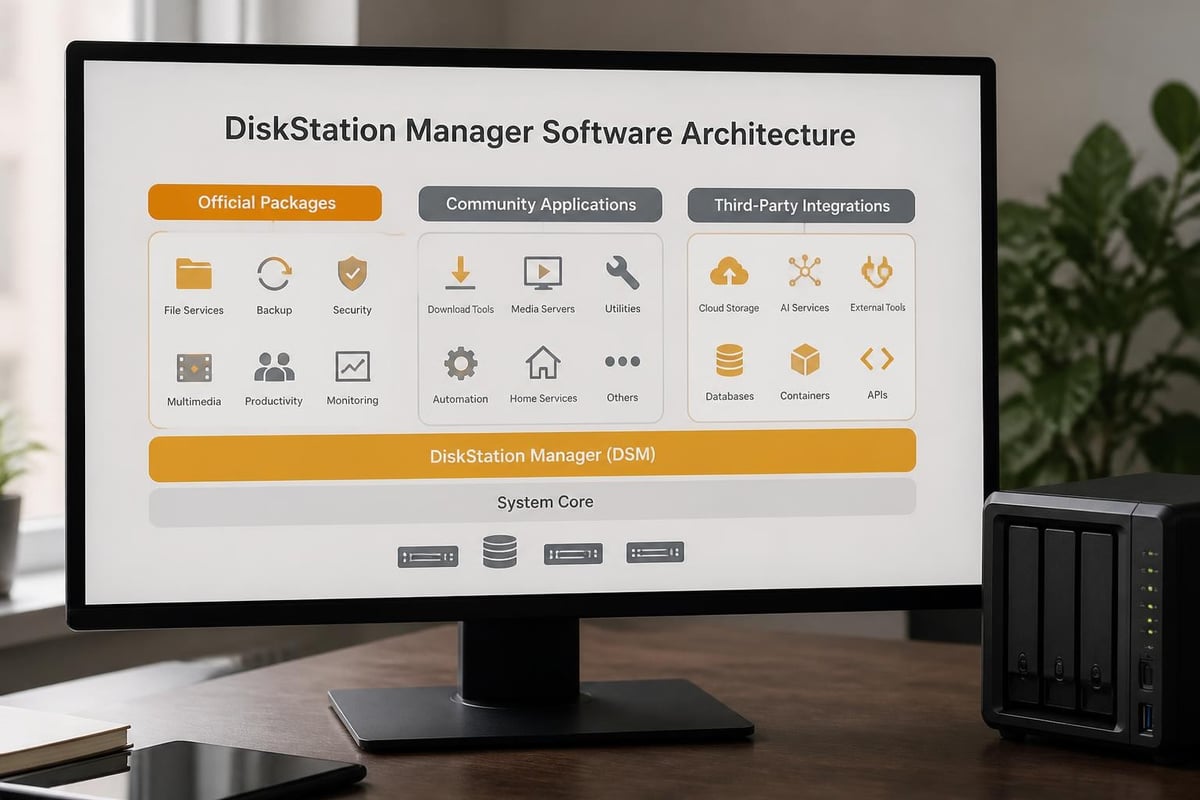
The true differentiator for any Synology device lies not in hardware specifications but in the DiskStation Manager operating system. Nevertheless, DSM transforms basic storage hardware into a comprehensive data management platform with enterprise-grade features delivered through an intuitive browser-based interface.
Core DSM Features and Applications
DSM provides a package ecosystem spanning hundreds of first-party and third-party applications. Furthermore, the following packages prove particularly valuable for business deployments:
Essential Business Packages:
- File Station: Web-based file browser with drag-and-drop functionality
- Cloud Station: Private cloud synchronisation across devices
- Snapshot Replication: Point-in-time recovery for shared folders
- Hyper Backup: Comprehensive backup solution supporting multiple destinations
- VPN Server: Secure remote access infrastructure
- Synology Drive: Team collaboration with file versioning
In addition, organisations can download the latest DSM releases and packages from the official Synology Download Center, ensuring access to security patches and feature enhancements throughout the device lifecycle.
Security and Access Control
DSM implements robust security frameworks including mandatory access control, two-factor authentication, and detailed activity logging. Moreover, the National Vulnerability Database tracks disclosed vulnerabilities affecting Synology systems, allowing administrators to maintain awareness of potential security considerations.
| Security Feature | Implementation | Business Benefit |
|---|---|---|
| Two-Factor Authentication | TOTP, SMS, hardware keys | Enhanced login protection |
| IP Auto-Block | Automatic blocking after failed attempts | Brute-force prevention |
| Account Protection | Password strength policies | Credential security |
| Security Advisor | Automated configuration scanning | Compliance verification |
For organisations prioritising cloud privacy and security, understanding these built-in protections becomes crucial when evaluating on-premises storage versus cloud-based alternatives.
Storage Configuration and RAID Options
The two-bay design of the Synology DS216j supports multiple storage configurations tailored to different risk tolerance and capacity requirements. Therefore, administrators must carefully consider their organisation's priorities when configuring the array.
RAID and SHR Configurations
Available Storage Modes:
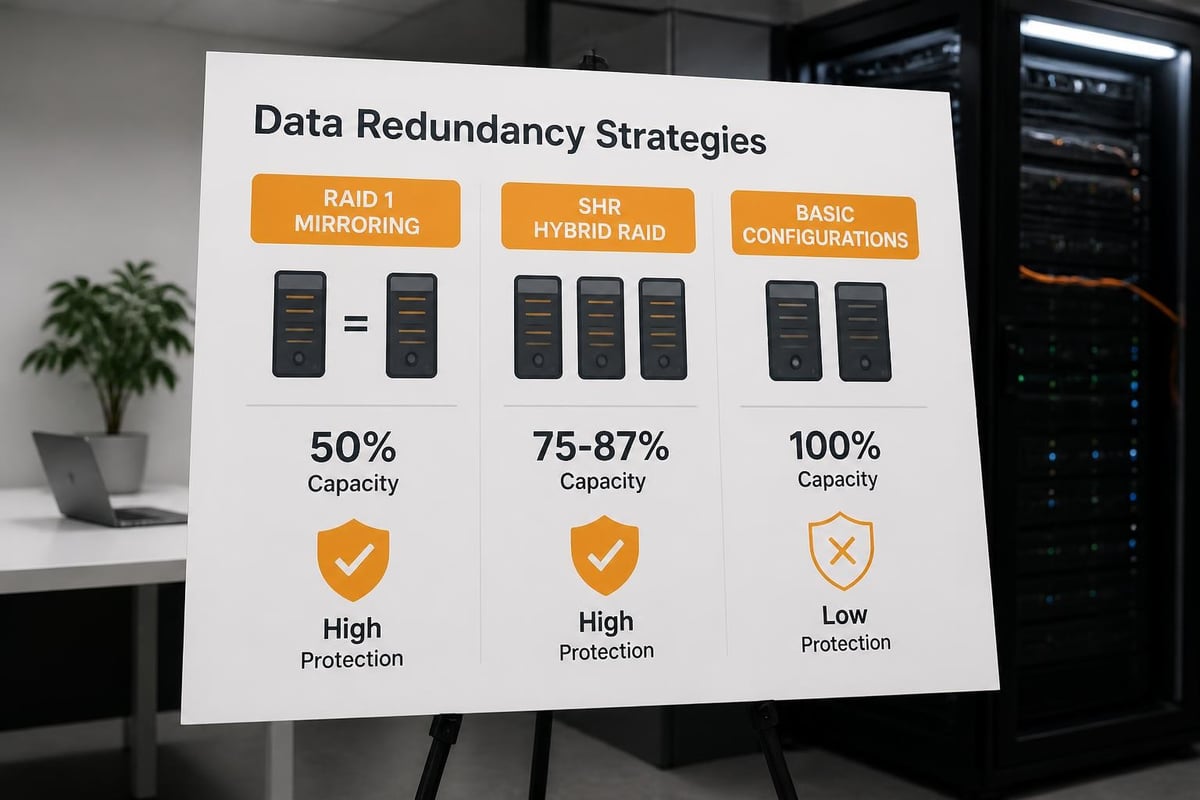
- Basic: Independent drives without redundancy (maximum capacity)
- JBOD: Concatenated storage spanning both drives
- RAID 1: Mirrored configuration (50% usable capacity, full redundancy)
- SHR: Synology Hybrid RAID (automated optimisation)
Nevertheless, for business-critical data, RAID 1 or SHR with redundancy represents the only prudent choice, sacrificing half the raw capacity to ensure continuous operation following a single drive failure. In addition, combining the DS216j with proper Synology backup strategies creates a comprehensive data protection framework.
Furthermore, the device supports drives up to 16 TB per bay (as of 2026 compatibility updates), yielding a maximum usable capacity of 16 TB in mirrored configuration. Moreover, organisations should consult verified compatibility lists before purchasing drives to ensure optimal performance and warranty coverage.
Business Use Cases and Deployment Scenarios
The Synology DS216j serves specific niches within the business technology landscape particularly effectively. Therefore, understanding where the device excels and where limitations emerge guides appropriate deployment decisions.
Ideal Deployment Scenarios
Small Office File Server: Teams of 5-10 users sharing documents, spreadsheets, and project files benefit from centralised storage with version control and access permissions. Furthermore, the device provides adequate performance for office productivity applications without requiring dedicated IT infrastructure.
Creative Team Collaboration: Photography studios, design agencies, and marketing teams managing moderate volumes of image and video assets find the DS216j suitable for current project storage, though archival of completed work may necessitate expansion or migration to higher-capacity solutions.
Remote Office Backup Target: Branch offices can implement the DS216j as a local backup destination for workstation data, with subsequent replication to central data centres or cloud storage creating a tiered backup architecture. Moreover, this approach balances local recovery speed with off-site protection.
Limitations and Scaling Considerations
Nevertheless, organisations should recognise scenarios where the DS216j proves inadequate. In addition, resource-intensive applications reveal the constraints of the hardware platform:
- 4K video editing: Insufficient throughput for real-time editing workflows
- Virtual machine hosting: Limited RAM prevents effective virtualisation
- High-concurrency databases: Processing power restricts simultaneous queries
- Surveillance recording: Maximum 15 IP cameras with reduced retention
Therefore, businesses anticipating rapid growth or deploying performance-sensitive applications should evaluate mid-range or enterprise Synology models from the Plus or XS series. Furthermore, ServeTheHome's hands-on review provides additional perspective on real-world administrative experiences.
Advanced Features and Package Ecosystem
Beyond basic file serving, the Synology DS216j supports numerous advanced applications through DSM's package ecosystem. Moreover, these capabilities extend the device's utility well beyond simple network storage.
Surveillance and Media Applications
Surveillance Station transforms the DS216j into a network video recorder, supporting up to 15 IP camera licenses (with additional licenses available for purchase). Nevertheless, continuous recording from multiple high-resolution streams quickly consumes available storage and processing resources.
Media Server packages including Plex Media Server, Emby Server, and Synology's native Video Station enable media library management and streaming. Furthermore, direct play of compatible formats avoids transcoding overhead, whilst incompatible formats may experience stuttering or buffering.
Cloud Integration and Hybrid Storage
DSM supports synchronisation and backup to major cloud storage providers including Amazon S3, Microsoft Azure, Google Cloud Storage, and various S3-compatible services. Therefore, organisations can implement hybrid storage strategies combining local NAS performance with cloud redundancy.
In addition, businesses seeking European cloud storage alternatives that prioritise GDPR compliance and data sovereignty may find value in solutions like vBoxxCloud, which complement on-premises NAS infrastructure with secure cloud capabilities hosted in ISO 27001-certified data centres in the Netherlands.
Community Resources and Third-Party Development
The Synology user community maintains extensive resources for extending device functionality beyond official packages. Moreover, the SynoCommunity project provides a repository of community-maintained packages unavailable through Synology's official channels.
SynoCommunity Package Source
The SynoCommunity compatibility documentation details third-party package support across Synology hardware, including older J-series devices. Furthermore, this resource proves invaluable when official package support ends for aging hardware.
Popular Community Packages:
- Development tools (Git, Python, Node.js)
- Media applications (CouchPotato, Sonarr, Radarr)
- Network utilities (WireGuard, Unbound DNS)
- Productivity tools (Gitea, Calibre)
Nevertheless, community packages lack official support and may introduce stability or security considerations. Therefore, production environments should carefully evaluate risks before deploying unofficial software.
Maintenance, Upgrades, and Longevity
The Synology DS216j benefits from the manufacturer's commitment to long-term software support, with DSM updates typically provided for 5-7 years following product launch. Furthermore, this extended support window ensures security patches and feature improvements continue well beyond the device's expected service life.
Software Update Lifecycle
| DSM Version | Release Date | DS216j Support | Notable Features |
|---|---|---|---|
| DSM 6.0 | 2016 | Full support | Initial release compatibility |
| DSM 6.2 | 2018 | Full support | Snapshot improvements |
| DSM 7.0 | 2021 | Full support | UI refresh, enhanced security |
| DSM 7.2 | 2023 | Full support | C2 integration, active insight |
Nevertheless, hardware limitations eventually restrict the device's ability to support newer DSM versions as resource requirements increase. Moreover, organisations should monitor Bit-Tech's technical analysis alongside other independent reviews to understand how the platform ages relative to contemporary alternatives.
Physical Maintenance and Drive Replacement
The DS216j's tool-free drive trays simplify maintenance procedures considerably. Furthermore, drive replacement following failure involves straightforward physical swap and automatic RAID reconstruction without requiring technical expertise.
Maintenance Best Practices:
- Monthly visual inspection of status LEDs
- Quarterly review of S.M.A.R.T. drive health data
- Semi-annual verification of backup integrity
- Annual firmware updates and security reviews
In addition, establishing maintenance schedules ensures proactive identification of potential issues before they escalate to data loss scenarios.
Cost Analysis and Total Ownership Considerations
The Synology DS216j typically retails between £150-£180 (diskless) in 2026, representing one of the most affordable entry points to Synology's ecosystem. Therefore, when combined with two consumer-grade 4 TB drives (approximately £80-£100 each), total initial investment approaches £300-£380.
Five-Year Total Cost of Ownership
| Cost Component | Year 1 | Years 2-5 | Total |
|---|---|---|---|
| Hardware | £180 | £0 | £180 |
| Drives (2×4TB) | £180 | £0 | £180 |
| Electricity (30W avg) | £26 | £104 | £130 |
| Camera Licenses | £0-£150 | £0 | £0-£150 |
| Total | £386-£536 | £104 | £490-£640 |
Furthermore, this total cost of ownership compares favourably to cloud storage alternatives for organisations with moderate storage requirements. Nevertheless, businesses must factor backup infrastructure costs, as the NAS itself represents only one component of a comprehensive data protection strategy.
Moreover, organisations requiring guaranteed uptime, advanced features, and professional support may find greater value in managed services. Therefore, solutions like those offered by vBoxx provide enterprise-grade infrastructure without the capital expenditure and ongoing maintenance responsibilities of self-managed hardware.
Network Integration and Protocol Support
The Synology DS216j supports comprehensive file-sharing protocols ensuring compatibility across heterogeneous network environments. Furthermore, this broad protocol support eliminates platform-specific limitations when integrating with existing infrastructure.
Supported Network Protocols
File Sharing Protocols:
- SMB/CIFS (Windows file sharing, versions 1-3)
- AFP (Apple Filing Protocol for macOS)
- NFS (Network File System for Linux/Unix)
- FTP/FTPS (File Transfer Protocol with SSL/TLS)
- SFTP (SSH File Transfer Protocol)
- WebDAV (Web-based file access)
In addition, the device supports rsync for efficient incremental backups and synchronisation tasks. Moreover, Time Machine compatibility enables macOS users to leverage built-in backup functionality without additional software.
Domain Integration and Directory Services
For businesses operating Active Directory or LDAP infrastructure, the DS216j integrates seamlessly as a domain member. Therefore, centralised user authentication eliminates duplicate credential management whilst enabling granular permission controls based on existing organisational structures.
Nevertheless, smaller organisations without directory services can leverage DSM's built-in user management, which provides sufficient capability for teams of 10-20 users without introducing enterprise directory complexity.
Energy Efficiency and Environmental Considerations
The Synology DS216j consumes approximately 14.49 watts during disk access operations and 4.69 watts in HDD hibernation mode. Furthermore, these modest power requirements translate to annual electricity costs of approximately £26-£30 (assuming £0.24/kWh and mixed usage patterns).
Environmental Impact Over Product Lifecycle
Energy Consumption Profile:
- Active operation: 14.49W
- HDD hibernation: 4.69W
- Estimated annual consumption: 108 kWh
- Five-year total consumption: 540 kWh
- Approximate CO₂ equivalent: 108 kg (UK grid average)
Moreover, organisations prioritising sustainability should consider the device's longevity and repair potential when evaluating environmental impact. In addition, Synology's extended software support enables continued use well beyond typical consumer electronics lifecycles, reducing electronic waste through delayed replacement.
Furthermore, businesses seeking infrastructure solutions with verified environmental credentials may explore providers emphasising green hosting practices, ensuring their digital infrastructure aligns with broader sustainability commitments whilst maintaining performance and security requirements.
Migration Strategies and Data Transfer Methods
Organisations transitioning from desktop storage, external drives, or competing NAS platforms face various migration pathways when deploying the Synology DS216j. Therefore, understanding available transfer methods and their relative efficiency ensures smooth transitions with minimal disruption.
Initial Data Population Methods
Network Transfer: The most common approach involves copying data across the existing network infrastructure. Nevertheless, Gigabit Ethernet limitations mean transferring 1 TB of data requires approximately 2.5-3 hours under optimal conditions, with real-world performance often extending this duration significantly.
USB Direct Copy: Connecting external USB drives directly to the DS216j's USB 3.0 ports bypasses network bottlenecks, enabling faster initial population. Furthermore, DSM's Copy & Sync application automates this process whilst providing progress monitoring and error handling.
eSATA Backup Recovery: For organisations migrating from existing backup infrastructure, the eSATA port enables high-speed restoration from compatible backup appliances. Moreover, this approach proves particularly effective when transitioning from legacy backup hardware to the DS216j.
In addition, businesses managing complex migrations may benefit from professional assistance. Therefore, service providers offering migration support can accelerate deployment whilst minimising risk of data loss or extended downtime during transition periods.
The Synology DS216j delivers reliable network storage functionality for small businesses and teams requiring centralised data management without enterprise complexity or cost. Nevertheless, organisations must carefully evaluate performance requirements, growth trajectories, and total ownership costs when selecting storage infrastructure. For businesses seeking European-hosted alternatives with guaranteed compliance, scalability, and professional support, vBoxx provides comprehensive cloud storage, communication, and security solutions backed by ISO 27001-certified infrastructure in the Netherlands, combining the accessibility of modern cloud platforms with the data sovereignty and privacy protections European organisations increasingly demand.