
Network-attached storage has evolved significantly over the past decade, and the introduction of NVMe solid-state drives has fundamentally transformed what businesses can expect from their file servers. Synology, a leading manufacturer in the NAS market, has progressively integrated M.2 NVMe slots into its product range, enabling organisations to supercharge read and write operations without sacrificing the cost-efficiency of traditional spinning drives. Furthermore, the technology addresses a critical bottleneck: when dozens of users access files simultaneously, mechanical hard drives struggle to keep pace, whereas a synology nvme nas configuration can deliver sub-millisecond latency for frequently accessed data. In this article, we examine how Synology implements NVMe technology, explore compatibility considerations, compare caching versus storage-pool configurations, and provide practical deployment advice for European businesses seeking performance improvements within their own infrastructure.
Understanding NVMe Technology in Network Storage
Non-Volatile Memory Express represents a paradigm shift from legacy storage protocols originally designed for spinning platters. Unlike SATA, which evolved from parallel ATA interfaces intended for mechanical drives, NVMe was engineered from the ground up for flash memory, leveraging the PCIe bus to deliver dramatically higher throughput and lower command overhead. Moreover, NVMe drives communicate directly with the CPU through dedicated lanes, bypassing the SATA controller entirely and reducing protocol translation penalties.
Why NVMe Matters for Business NAS
When multiple users request files concurrently, queue depth and input/output operations per second become the limiting factor. Traditional SATA SSDs, despite their speed advantage over hard drives, are constrained by the SATA III interface ceiling of approximately 600 MB/s. In addition, SATA SSDs typically handle around 10,000 IOPS in random read scenarios. NVMe drives, by contrast, can exceed 1,000,000 IOPS and sustain sequential reads beyond 7,000 MB/s on PCIe Gen4 models.
Key advantages of NVMe in NAS environments include:
- Reduced latency: Sub-100 microsecond access times improve responsiveness for databases and virtual-machine workloads
- Higher concurrency: Deep queue depths allow the drive to process hundreds of simultaneous requests
- Lower CPU overhead: Streamlined command sets free processor resources for other tasks
- Scalability: Multiple NVMe drives can be aggregated without saturating the PCIe bus
Nevertheless, the raw performance of NVMe only translates into real-world benefits when workloads exhibit sufficient parallelism and access patterns that benefit from caching or dedicated fast-tier storage.
Synology's Implementation of M.2 NVMe Slots
Synology has progressively introduced M.2 slots across its DiskStation and RackStation portfolios, typically offering two or four slots depending on the model. These slots accommodate 2280-form-factor NVMe drives, and most recent units support PCIe Gen3 x4 or Gen4 x4 interfaces. Therefore, buyers should consult the official Synology compatibility database before purchasing drives to ensure firmware support and validated endurance ratings.

Cache vs. Storage Pool: Two Deployment Models
Initially, Synology restricted M.2 NVMe drives to SSD cache roles, where the NVMe units act as an accelerated read or read-write buffer for the primary HDD volume. In 2022, Synology expanded DSM functionality to permit storage pools built entirely on M.2 NVMe drives, transforming the synology nvme nas into a high-performance all-flash array for latency-sensitive applications. StorageReview reported on this evolution, noting that the feature unlocked new use cases for virtualization hosts and database servers.
| Deployment Mode | Use Case | Pros | Cons |
|---|---|---|---|
| SSD Cache (Read-only) | File shares with repeated reads | Low cost, simple setup, protects primary data integrity | No write acceleration, cache misses still hit HDDs |
| SSD Cache (Read-Write) | Mixed workloads, virtual machines | Accelerates both reads and writes, adaptive algorithm | Requires redundant SSDs (RAID1), write endurance considerations |
| NVMe Storage Pool | Databases, high-concurrency apps | Maximum IOPS, consistent low latency | Higher cost per terabyte, limited capacity on M.2 slots |
Furthermore, Synology's DSM operating system dynamically manages SSD cache algorithms, learning access patterns over time and pinning hot data blocks in the cache tier. The Synology SSD Cache white paper provides detailed guidance on sizing caches relative to working-set size and choosing appropriate RAID modes to balance performance with data protection.
Choosing Compatible NVMe Drives for Synology NAS
Selecting the correct NVMe drive involves balancing performance specifications, endurance ratings, and cost. Synology publishes a compatibility list that includes consumer-grade and enterprise-focused models, yet not all high-performance PCIe Gen4 drives receive official validation. In addition, certain third-party drives may function without issues but fall outside Synology's support matrix, a consideration that became particularly relevant following Synology's 2025 compatibility policy changes.
Key Selection Criteria
- Form Factor: Ensure the drive is M.2 2280; longer 22110 drives typically do not fit Synology's internal bays.
- Interface: Verify PCIe Gen3 or Gen4 x4 NVMe support; SATA M.2 drives are incompatible.
- Endurance (TBW): For read-write cache, choose drives rated for at least 600 TBW (terabytes written) to avoid premature wear.
- Power Consumption: High-performance Gen4 drives can exceed thermal envelopes in compact NAS enclosures, triggering throttling.
- Firmware Updates: Check whether the manufacturer provides regular firmware releases and whether Synology has validated the specific firmware version.
Popular drive families for synology nvme nas deployments include:
- Synology SNV3410/SNV3510 series: Officially supported, optimized for cache workloads, reviewed in depth by ServeTheHome
- Seagate IronWolf 525: NAS-focused Gen4 NVMe with enhanced endurance (StorageReview testing)
- Western Digital Red SN700: Purpose-built for 24/7 NAS operation with controlled power draw
- Samsung 980 PRO / 990 PRO: High-performance consumer drives with robust warranty coverage
Nevertheless, always cross-reference the Synology compatibility database before committing to a purchase, as DSM firmware updates occasionally expand or restrict drive support.
Performance Benchmarks and Real-World Impact
Theoretical specifications provide a starting point, but actual performance depends on workload characteristics and system configuration. Independent reviews, such as the ComputerBase analysis of Synology's DS425+, demonstrate that read-only SSD cache can reduce file-server response times by 40–60% when the working set fits within the cache tier. In addition, read-write cache configurations show even greater improvements for virtual-machine hosting, where frequent writes to VMDK files benefit from the synology nvme nas buffer layer.
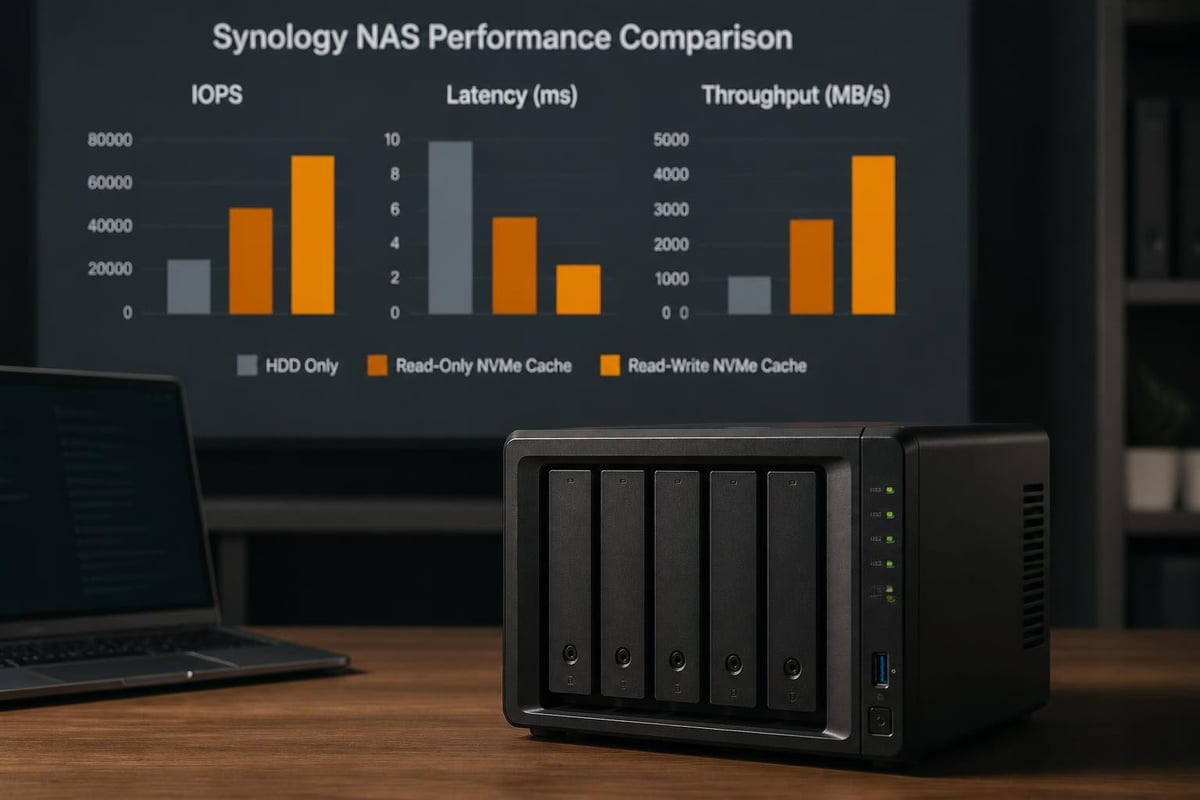
Cache Hit Ratio and Working Set Size
Cache effectiveness hinges on the hit ratio, the percentage of read requests satisfied from the cache tier rather than the underlying HDDs. DSM provides real-time monitoring, and successful deployments typically achieve hit ratios above 85% once the cache has warmed up. Therefore, cache sizing should match or exceed the active working set, generally 5–10% of the total storage capacity for office productivity workloads and 15–25% for virtualization or database applications.
Sizing guidelines for common scenarios:
| Workload Type | Total Capacity | Recommended Cache Size | Configuration |
|---|---|---|---|
| File sharing (SMB/NFS) | 10 TB | 500 GB – 1 TB | Read-only, RAID1 |
| Virtual machines | 20 TB | 2 TB – 4 TB | Read-write, RAID1 |
| Media editing | 50 TB | 2 TB – 4 TB | Read-only or dedicated NVMe pool |
| Databases (PostgreSQL, MySQL) | 5 TB | 1 TB – 2 TB | Dedicated NVMe storage pool |
Moreover, Synology's adaptive caching algorithm learns access patterns over time, automatically promoting frequently accessed blocks to the cache tier and demoting cold data. This intelligence reduces manual tuning requirements, although administrators should monitor DSM's cache statistics during the initial weeks to confirm that hit ratios meet expectations.
Deployment Strategies for European Businesses
European organisations face unique considerations around data sovereignty, GDPR compliance, and infrastructure resilience. A synology nvme nas deployed on-premises provides full control over data location, bypassing concerns associated with non-EU cloud providers. Furthermore, integrating NVMe acceleration into local infrastructure complements hybrid architectures where sensitive data remains on-site whilst less critical workloads leverage cloud services.
On-Premises NVMe NAS in Hybrid Architectures
Many businesses adopt a tiered storage approach: hot data resides on a synology nvme nas for immediate access, warm data sits on lower-cost HDD volumes, and archive data moves to cloud object storage. This strategy balances performance, cost, and compliance requirements. In addition, Synology's Hyper Backup and Cloud Sync applications simplify replication to secondary sites or off-site cloud repositories, ensuring business continuity without sacrificing speed for active workloads.
Integration patterns include:
- Primary file server: NVMe-cached Synology NAS serves as the central repository for active projects, with nightly backups to remote storage
- Virtual machine host: NVMe storage pool hosts VMware or Hyper-V virtual disks, whilst archival snapshots replicate to cost-effective HDD volumes
- Database backend: Dedicated NVMe pool runs PostgreSQL or MariaDB containers, achieving IOPS levels previously requiring SAN infrastructure
- Collaboration hub: Synology Drive with NVMe caching accelerates real-time document co-editing and synchronization across distributed teams
For organisations prioritising European data residency, it is worth noting that vBoxxCloud offers GDPR-compliant cloud storage hosted exclusively in ISO 27001-certified data centers in the Netherlands, providing an alternative or complement to on-premises NAS infrastructure with eIDAS-compliant e-signing and AI-assisted document search.
Configuration Best Practices for Maximum Reliability
Deploying a synology nvme nas requires attention to firmware versions, RAID configurations, and ongoing monitoring. Synology periodically releases DSM updates that refine SSD cache algorithms, add support for new drive models, and patch security vulnerabilities. Therefore, maintaining current firmware is essential not only for performance optimisation but also for data protection.

Firmware and Drive Health Monitoring
DSM includes built-in S.M.A.R.T. monitoring that tracks NVMe endurance metrics such as percentage used, available spare, and unsafe shutdowns. Setting up email alerts when endurance thresholds are exceeded prevents unexpected failures. In addition, Synology's Storage Analyzer package provides detailed insights into file types, folder sizes, and access patterns, helping administrators validate cache sizing decisions and identify opportunities for data archival.
Recommended maintenance tasks:
- Monthly: Review cache hit ratios and adjust cache size if hits fall below 80%
- Quarterly: Check NVMe drive health metrics and plan replacements when endurance exceeds 80% of rated TBW
- Bi-annually: Update DSM firmware to the latest stable release and verify compatibility list for installed drives
- Annually: Perform full disaster-recovery drills, restoring critical shares from backup to validate RTO/RPO targets
Nevertheless, even the most robust NAS requires off-site backup. Synology's native tools support replication to remote Synology units, public cloud (AWS S3, Azure Blob), and third-party services, ensuring that local hardware failures or ransomware incidents do not result in data loss.
Cost-Benefit Analysis for NVMe Upgrades
Upgrading a Synology NAS with NVMe drives involves upfront investment in compatible SSDs and, potentially, a newer NAS model featuring M.2 slots. For budget-conscious organisations, the question becomes whether performance gains justify the expenditure compared to alternative approaches such as adding more RAM, upgrading network infrastructure, or migrating to cloud storage.
Calculating Return on Investment
Factors influencing ROI include:
- User productivity: Reducing file-access latency from seconds to milliseconds can save minutes per user per day, translating into tangible labour-cost savings
- Infrastructure consolidation: A synology nvme nas with sufficient IOPS can replace multiple legacy servers, reducing power consumption, rack space, and maintenance overhead
- Application responsiveness: Database query times and virtual-machine boot speeds directly impact customer-facing services and internal workflows
- Scalability: NVMe caching defers the need to migrate to more expensive SAN or all-flash array solutions, extending the useful life of existing HDD investments
For example, consider a 50-user firm spending an average of 10 minutes per day waiting for file operations. At a blended hourly rate of €40, daily productivity loss totals €333. An NVMe upgrade costing €1,200 (two 1 TB drives) recovers its investment within four working days if latency reductions halve wait times. Moreover, the performance headroom accommodates business growth without requiring additional capital expenditure for several years.
Advanced Topics: NVMe Over Fabrics and Future Roadmaps
Whilst Synology currently focuses on local M.2 NVMe slots, the broader storage industry is exploring NVMe over Fabrics (NVMe-oF), which extends NVMe's low-latency benefits across network connections. The Storage Networking Industry Association publishes white papers on NVMe-oF architectures, and AnandTech's NVMe coverage tracks evolving standards. Although Synology has not announced NVMe-oF support in its SMB/enterprise lines, the technology represents a potential future direction for high-performance distributed storage.
Emerging Trends in NAS NVMe Integration
- PCIe Gen5 adoption: Doubling bandwidth again to support next-generation SSDs exceeding 14 GB/s sequential throughput
- Computational storage: Offloading data processing tasks (compression, encryption, deduplication) directly to NVMe drives, reducing CPU load
- Tiered caching algorithms: Machine-learning models predicting access patterns and pre-fetching data into cache tiers before requests arrive
- Disaggregated storage: Separating compute and storage nodes, with NVMe pools shared across multiple NAS units via RDMA or NVMe-oF
Furthermore, Synology's long-term roadmap likely includes tighter integration with containerized applications, allowing Docker and Kubernetes workloads to leverage dedicated NVMe storage pools with Quality of Service guarantees. This evolution positions the synology nvme nas as a versatile platform capable of supporting both traditional file-sharing and modern cloud-native architectures.
Practical Deployment Checklist
Before purchasing drives and configuring cache tiers, organisations should systematically assess their requirements and validate compatibility. The following checklist consolidates best practices from industry reviews, vendor documentation, and field deployments.
Pre-deployment steps:
- Identify the primary workload (file sharing, virtualization, databases, or mixed)
- Measure baseline performance (IOPS, throughput, latency) to establish improvement targets
- Consult the official Synology compatibility database and select drives with appropriate endurance ratings
- Calculate required cache size based on working-set estimates (typically 5–25% of active data)
- Verify network infrastructure can sustain increased throughput (10GbE or faster recommended for NVMe-backed volumes)
Configuration steps:
- Install NVMe drives into M.2 slots and secure with provided screws
- Boot into DSM and navigate to Storage Manager > SSD Cache or Storage Pool
- Select read-only or read-write cache mode, or create a dedicated NVMe storage pool
- Configure RAID1 for redundancy (recommended for read-write cache and storage pools)
- Enable S.M.A.R.T. monitoring and set email alerts for drive health warnings
Post-deployment validation:
- Monitor cache hit ratios for one week to confirm they exceed 80%
- Benchmark IOPS and latency improvements using tools such as CrystalDiskMark or fio
- Schedule recurring firmware updates and drive health reviews
- Document configuration settings and performance metrics for future capacity planning
Moreover, organisations should establish a clear escalation path for hardware failures. Synology offers various support tiers, and maintaining spare NVMe drives on-site minimizes downtime when endurance limits are reached or unexpected failures occur.
Integration with European Cloud Infrastructure
Whilst a synology nvme nas excels at on-premises performance, many European businesses operate hybrid environments combining local NAS with cloud services for disaster recovery, remote collaboration, and application hosting. Synology's ecosystem integrates with leading cloud providers, and its APIs enable custom workflows for data synchronization and tiering.
Complementary cloud services include:
- Backup targets: Replicate critical volumes to European cloud storage for off-site protection
- Remote access: Synology QuickConnect and VPN tunnels provide secure access to NAS resources from any location
- Collaboration: Synology Drive clients sync files to laptops and mobile devices, with NVMe caching ensuring rapid synchronization
- Application hosting: Containerized applications run on the NAS, whilst cloud-based load balancers distribute traffic for scalability
For businesses seeking fully European infrastructure, vBoxx operates ISO 27001-certified data centers in the Netherlands and provides managed virtual and dedicated servers that complement on-premises NAS deployments. In addition, Mac mini hosting on Apple M4 hardware supports iOS build environments and creative workflows, whilst remaining within EU data residency boundaries and outside the reach of the US CLOUD Act. This compliance focus aligns with the privacy and security requirements of GDPR-regulated industries.
Monitoring and Optimisation Over Time
Deploying a synology nvme nas is not a set-and-forget operation. Performance characteristics evolve as data volumes grow, user behaviour changes, and applications impose new demands. Consequently, regular performance reviews and proactive capacity planning ensure that the NVMe investment continues to deliver value.
Key Performance Indicators to Track
- Cache hit ratio: Target above 85% for read-intensive workloads; below 70% indicates undersized cache or inappropriate workload
- Latency percentiles: Monitor 95th and 99th percentile latencies to identify outlier requests that degrade user experience
- IOPS utilization: Track peak and average IOPS relative to drive specifications to plan for capacity expansion
- NVMe endurance: Monitor percentage used and available spare metrics to schedule drive replacements before failures occur
- Network saturation: Ensure that 10GbE or faster links do not become bottlenecks as NVMe throughput increases
Optimization techniques include:
- Adjusting cache size: Add additional M.2 drives or upgrade to higher-capacity models when hit ratios decline
- Workload segmentation: Migrate latency-sensitive applications to dedicated NVMe storage pools whilst maintaining cached HDD pools for bulk data
- Quality of Service policies: Configure DSM's application priority settings to guarantee bandwidth for critical services
- Data lifecycle management: Automatically archive cold data to slower storage tiers, freeing cache capacity for active files
Furthermore, Synology's Active Insight portal aggregates telemetry from multiple NAS units, providing centralized visibility into performance trends and predictive failure warnings. This feature proves particularly valuable for managed-service providers and enterprises operating distributed infrastructure across multiple sites.
A synology nvme nas represents a pragmatic approach to enhancing storage performance without requiring wholesale infrastructure replacement, delivering substantial IOPS improvements and latency reductions that directly translate into productivity gains and improved application responsiveness. For European businesses prioritising data sovereignty, compliance, and sustainable infrastructure, combining on-premises NVMe-accelerated NAS with cloud services hosted in ISO 27001-certified data centers offers the best of both worlds. Whether you need secure file sharing, virtual machine hosting, or high-performance databases, vBoxx delivers GDPR-compliant hosting and cloud solutions running exclusively on European infrastructure, complemented by expert consultancy and free migration services to ensure a seamless transition.