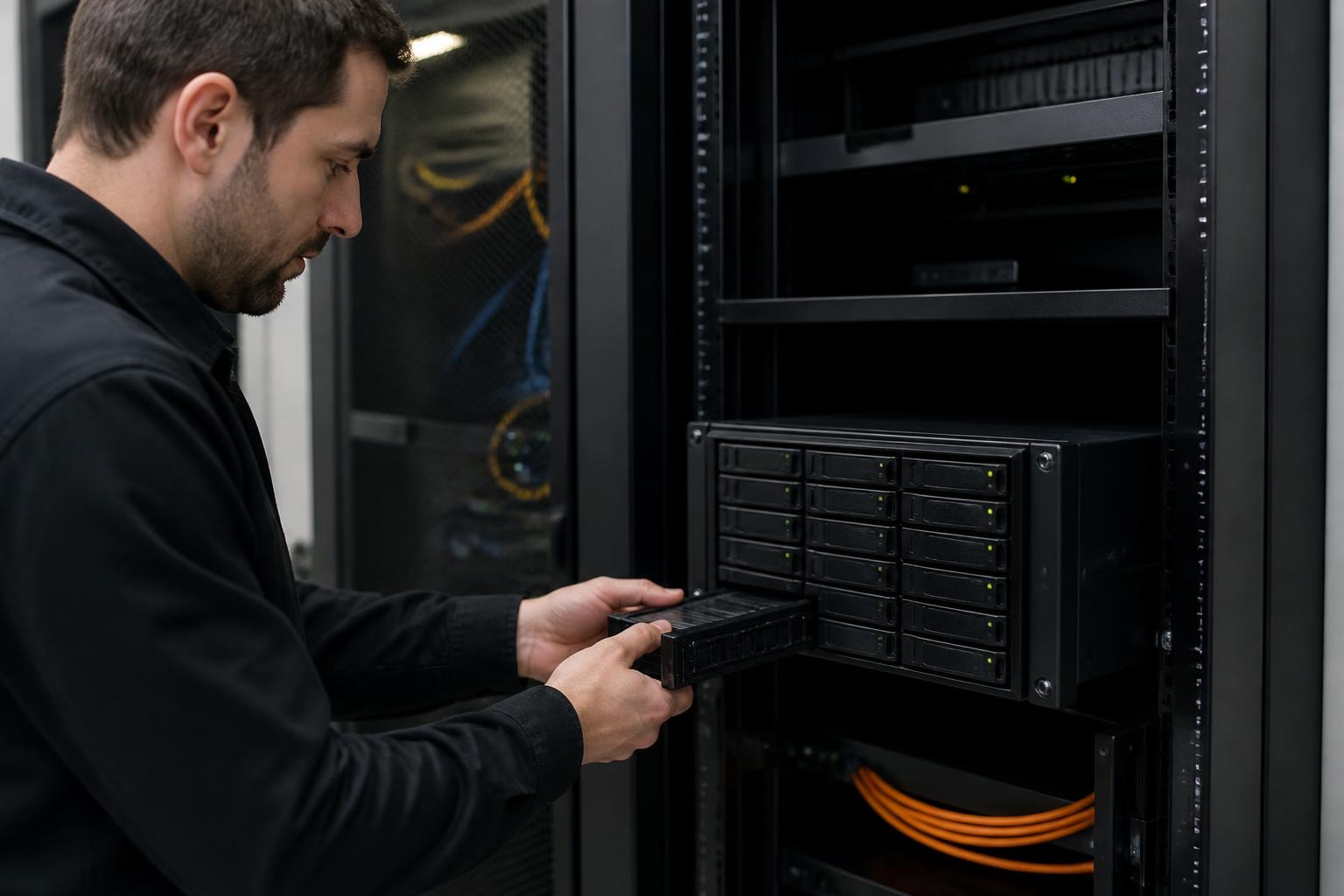

Businesses today face unprecedented challenges managing their growing volumes of data whilst maintaining security, accessibility, and cost-effectiveness. Synology NAS storage has emerged as a leading solution for organisations seeking reliable, scalable infrastructure that bridges the gap between consumer-friendly interfaces and enterprise-grade capabilities. With increasing concerns about data sovereignty and privacy, particularly within European markets, understanding the full potential of network-attached storage systems has become essential for IT decision-makers and business leaders alike.
Understanding Synology NAS Storage Architecture
Network-attached storage represents a paradigm shift from traditional storage methods. Unlike direct-attached storage or cloud-only solutions, synology nas storage provides a dedicated file-level data storage server that connects to your network, offering both local performance and remote accessibility.
The architecture comprises several key components working in harmony. At its foundation, the hardware enclosure houses multiple drive bays ranging from two-bay units for small offices to enterprise-grade systems supporting dozens of drives. The processing power, typically featuring Intel or AMD processors, handles simultaneous user connections, data encryption, and complex applications running atop the storage platform.
Hardware Considerations and Drive Compatibility
When evaluating synology nas storage solutions, drive compatibility has become an increasingly important consideration. Recent developments have seen Synology introduce validated drive requirements for certain Plus Series models, particularly within their enterprise-focused product lines.
This shift towards validated disks serves specific purposes:
- Performance optimisation: Synology-tested drives ensure consistent performance across workloads
- Reliability assurance: Validated components reduce compatibility-related failures
- Support simplification: Streamlined troubleshooting when issues arise
- Warranty protection: Full coverage when using recommended hardware configurations
However, businesses should note that Synology’s approach to drive validation differs across product tiers, with some consumer-oriented models maintaining broader compatibility with third-party storage solutions.
DiskStation Manager: The Software Foundation
DiskStation Manager (DSM) serves as the operating system powering Synology NAS storage devices. This web-based interface provides comprehensive control over your storage infrastructure through any modern browser, eliminating the need for dedicated management software.
The latest iteration, DSM 7.2, introduces sophisticated storage management capabilities that rival traditional server operating systems whilst maintaining accessibility for non-technical users. The platform supports multiple file systems including Btrfs and ext4, each offering distinct advantages for different deployment scenarios.
Key Software Features for Business Deployment
| Feature Category | Capabilities | Business Impact |
|---|---|---|
| Access Control | User authentication, Active Directory integration, LDAP support | Streamlined identity management |
| Data Protection | Snapshot technology, versioning, recycle bin | Recovery from accidental deletion or ransomware |
| Collaboration | File sharing, team folders, synchronisation | Enhanced productivity across distributed teams |
| Virtualisation | Virtual Machine Manager, Docker support | Consolidate workloads onto storage infrastructure |
The modular nature of DSM allows businesses to install only the applications they require. This package-based system includes everything from surveillance station software for security cameras to mail servers, database applications, and comprehensive backup solutions.
Building Resilient Storage Infrastructure
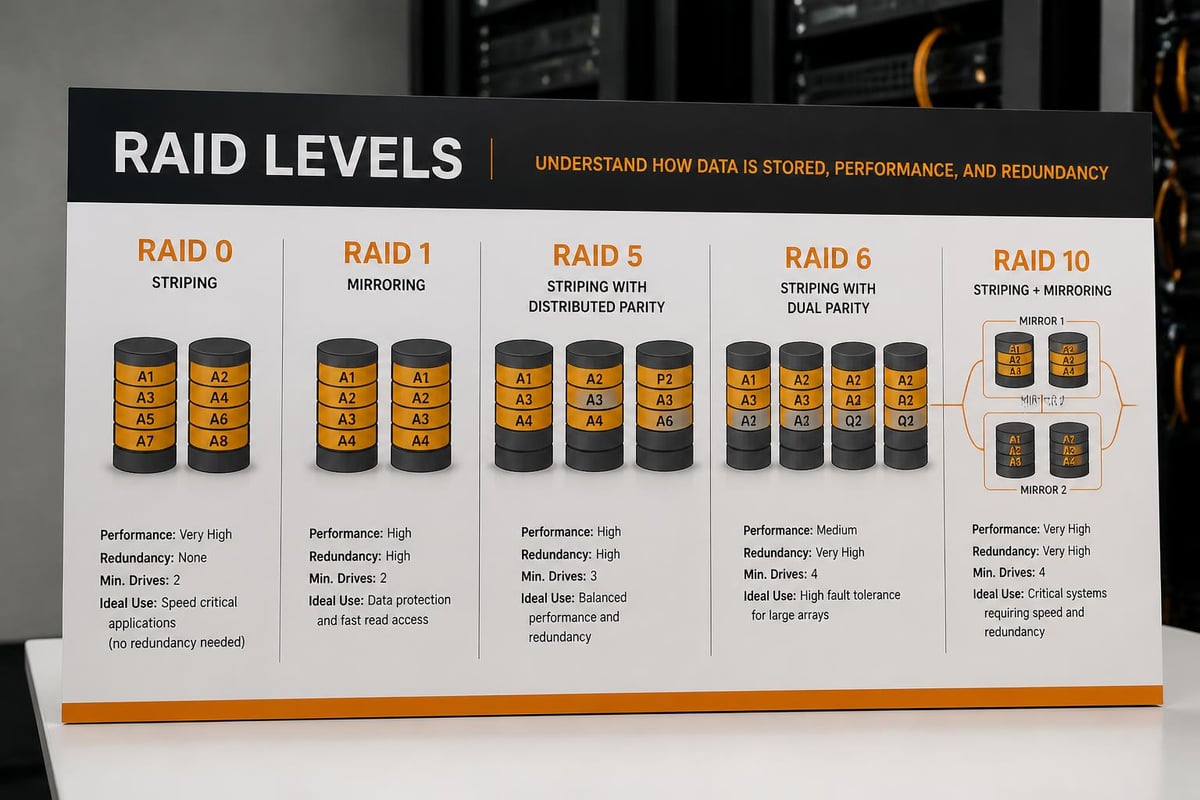
Implementing synology nas storage requires careful planning around redundancy and data protection. RAID configurations form the cornerstone of any resilient storage strategy, offering varying balances between capacity, performance, and fault tolerance.
RAID 1 mirrors data across two drives, providing complete redundancy but utilizing only 50% of total capacity. This configuration suits scenarios where data protection outweighs storage efficiency, such as critical financial records or legal documentation.
RAID 5 distributes data and parity information across three or more drives, allowing recovery from a single drive failure whilst maintaining reasonable storage efficiency. Many mid-sized businesses find this configuration optimal for general-purpose file storage.
RAID 6 extends RAID 5 principles to survive two simultaneous drive failures, essential for larger arrays where the probability of concurrent failures increases. Organisations managing sensitive information often mandate RAID 6 or higher for compliance purposes.
Beyond basic RAID, Synology Hybrid RAID (SHR) provides flexibility for businesses that anticipate growth. This proprietary technology allows mixing drive sizes whilst optimising capacity utilisation, particularly valuable when expanding storage incrementally rather than replacing entire arrays.
Snapshot Technology and Version Control
Modern synology nas storage leverages the Btrfs file system to provide advanced snapshot capabilities. Unlike traditional backup methods that copy entire file sets, snapshots capture the state of your data at specific points in time with minimal storage overhead.
Snapshots operate through copy-on-write mechanisms. When you modify a file, the system preserves the original blocks whilst writing changes to new locations. This approach enables:
- Rapid recovery: Restore entire folders or individual files within seconds
- Ransomware protection: Revert to clean snapshots if encryption malware strikes
- Testing safety: Create snapshots before major system changes
- Compliance: Maintain historical records for regulatory requirements
- Storage efficiency: Share unchanged blocks across multiple snapshots
Businesses should implement automated snapshot schedules aligned with their recovery point objectives. Hourly snapshots during business hours, combined with daily retention for weeks and monthly retention for quarters, provide comprehensive protection without excessive storage consumption.
Integration with Backup Ecosystems
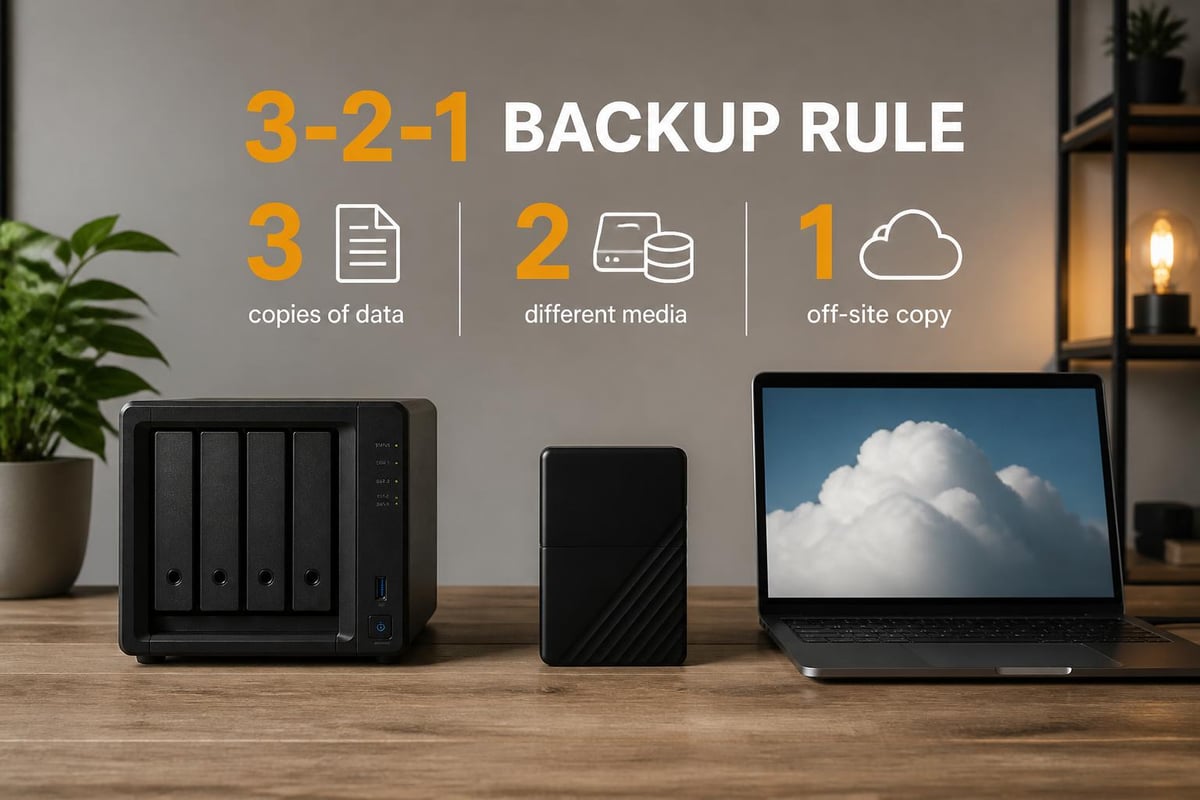
While synology nas storage provides robust local protection, comprehensive data security demands off-site backup capabilities. The platform integrates seamlessly with established backup software solutions, serving as both a backup target and source.
Building reliable backup repositories with Synology storage systems involves understanding the various protocols and connection methods available. The devices support SMB, AFP, NFS, and iSCSI protocols, ensuring compatibility with virtually any backup software or operating system environment.
For businesses evaluating secure cloud alternatives, understanding how encrypted cloud services complement local NAS infrastructure becomes crucial. Hybrid approaches combining on-premises synology nas storage with encrypted cloud replication offer geographical redundancy whilst maintaining direct access to frequently-used data.
Third-Party Software Integration
Professional backup applications from vendors like Veeam, Acronis, and Commvault recognise Synology devices as certified backup targets. This certification ensures optimal performance and compatibility for mission-critical data protection workflows.
The immutable backup feature within DSM creates write-once-read-many repositories, preventing even administrators from modifying or deleting backups during retention periods. This capability proves essential for defending against sophisticated ransomware attacks that attempt to compromise backup systems alongside production data.
Scalability and Performance Optimisation
As businesses grow, their storage infrastructure must adapt without requiring complete replacement. Synology NAS storage addresses scalability through multiple approaches, each suited to different growth patterns and budgetary constraints.
Vertical scaling involves adding drives to available bays within existing units. The Plus Series models typically offer four to twelve bays, allowing substantial capacity expansion before requiring additional hardware. When approaching capacity limits, volume expansion and RAID migration features enable seamless transitions to larger drives without downtime.
Horizontal scaling introduces expansion units that connect to primary NAS devices, effectively multiplying available drive bays. This approach suits scenarios where data volumes grow predictably, allowing incremental investment aligned with actual needs rather than over-provisioning capacity.
Cache and SSD Acceleration
Performance optimisation extends beyond raw drive capacity. SSD caching transforms synology nas storage performance by placing frequently accessed data on solid-state storage whilst maintaining bulk capacity on traditional hard drives.
Two caching modes serve different purposes:
- Read cache: Accelerates frequently accessed files, ideal for shared document repositories
- Read-write cache: Improves both read operations and write performance, beneficial for database workloads and virtualisation
NVMe SSD support in newer models delivers exceptional input/output operations per second (IOPS), critical for demanding applications like video editing workstations or multi-user database systems.
Security Frameworks and Access Control
Protecting data stored on synology nas storage requires layered security approaches addressing authentication, encryption, and network isolation. The platform provides enterprise-grade security features typically found only in considerably more expensive solutions.
Multi-factor authentication (MFA) serves as the first defence layer, requiring users to provide verification codes from mobile applications or hardware tokens alongside passwords. This simple measure dramatically reduces unauthorised access risks, particularly for systems with remote access enabled.
Encryption capabilities operate at multiple levels. Share-level encryption protects individual folders with separate passwords, useful when different departments require isolated data protection. Full-volume encryption secures entire storage volumes, ensuring data confidentiality even if drives are physically removed from the device.
Network Security and Firewall Configuration
Built-in firewall capabilities allow administrators to restrict access based on IP addresses, geographical locations, or specific protocols. For businesses operating across multiple locations, VPN Server packages transform synology nas storage into secure access gateways, eliminating the need for separate VPN appliances.
The auto-block feature monitors connection attempts and automatically blocklists IP addresses exhibiting suspicious behaviour. When combined with geographical restrictions that permit connections only from expected regions, this creates formidable barriers against automated attacks.
Security Advisor continuously scans system configurations, identifying potential vulnerabilities and recommending remediation steps. Regular security scans should form part of routine maintenance schedules, typically performed monthly or after significant configuration changes.

Deployment Scenarios Across Business Types
Different organisations leverage synology nas storage to address distinct challenges. Understanding common deployment patterns helps businesses identify configurations aligned with their specific requirements.
Small to medium businesses often deploy NAS systems as centralised file servers replacing scattered USB drives and inconsistent cloud storage subscriptions. A four or five-bay unit running RAID 5 provides ample capacity for document management, shared resources, and automated client data backups.
Creative agencies benefit from high-performance configurations optimised for large file workflows. Video production companies particularly value 10GbE network connectivity combined with SSD caching, enabling multiple editors to work simultaneously on 4K footage stored centrally.
Professional services firms utilise synology nas storage for client data segregation and secure collaboration. Separate encrypted volumes for each client, combined with granular access permissions and comprehensive audit logging, address confidentiality requirements inherent to legal, accounting, and consulting practices.
Healthcare providers deploy HIPAA-compliant configurations featuring encryption, detailed access logs, and immutable backups. The ability to integrate with existing Active Directory infrastructure simplifies compliance whilst maintaining security standards.
For organisations prioritising data sovereignty, particularly within the European Union, evaluating European cloud providers alongside local NAS infrastructure ensures comprehensive data protection aligned with GDPR requirements.
Cost Analysis and Total Ownership Considerations
Financial evaluation of synology nas storage extends beyond initial hardware acquisition. Comprehensive total cost of ownership analysis should encompass licensing, maintenance, power consumption, and administrative overhead across expected lifespan.
| Cost Component | Traditional Server | Synology NAS | Cloud Storage (3-year) |
|---|---|---|---|
| Initial Hardware | £3,000-£8,000 | £800-£3,000 | £0 |
| Operating System | £600-£1,200 | Included | N/A |
| Annual Maintenance | £500-£1,500 | £0-£300 | N/A |
| Storage (10TB) | £400 | £400 | £3,600 |
| Power (annual) | £200 | £80 | £0 |
| Administration | High | Low | Minimal |
The subscription-free nature of DSM eliminates ongoing software licensing costs that plague traditional server environments. Updates and new features arrive without additional charges, ensuring systems remain current throughout their operational lifespan.
Energy efficiency represents another often-overlooked advantage. Modern Synology units consume substantially less power than equivalent server infrastructure, with automatic hibernation features spinning down drives during periods of inactivity. For businesses emphasising sustainability, this aligns with broader environmental commitments.
Maintenance and Monitoring Best Practices
Proactive maintenance ensures synology nas storage delivers consistent performance and reliability. Establishing routine procedures prevents minor issues from escalating into data-threatening emergencies.
Health monitoring should include regular review of S.M.A.R.T. drive statistics, identifying degrading drives before failures occur. DSM provides comprehensive dashboards displaying drive health, system temperature, and resource utilisation patterns. Setting up email notifications for warning conditions enables rapid response to developing problems.
Firmware updates balance security improvements against operational stability. Whilst staying current with patches addresses vulnerabilities, critical production systems benefit from testing updates on non-production hardware before deployment. Scheduling updates during maintenance windows minimises disruption.
Scrubbing operations periodically verify data integrity across RAID arrays, detecting and correcting inconsistencies before they compound. Monthly scrubbing schedules suit most business environments, with increased frequency appropriate for systems storing particularly critical data.
Businesses seeking comprehensive support for their storage infrastructure might explore platforms offering guided demonstrations of integrated solutions. For instance, organisations evaluating how synology nas storage integrates with broader cloud ecosystems can benefit from detailed walkthroughs of secure collaboration platforms that demonstrate unified approaches to data management.
Migration Strategies and Data Transfer
Transitioning to synology nas storage from existing infrastructure requires careful planning to minimise disruption whilst ensuring data integrity. Migration complexity varies based on current systems, data volumes, and acceptable downtime windows.
Direct network transfer suits smaller datasets where gigabit Ethernet provides adequate throughput. Robocopy on Windows or rsync on Linux/macOS offer reliable transfer mechanisms with verification and resume capabilities. Schedule initial transfers during off-peak hours, maintaining production systems operational until final synchronisation completes.
Hybrid cutover approaches maintain both old and new systems temporarily, allowing gradual user migration and comprehensive testing before decommissioning legacy infrastructure. This method reduces risk but increases short-term complexity and resource requirements.
Physical drive migration offers the fastest path when upgrading from existing Synology units or compatible hardware. Simply moving drives to new enclosures and importing existing volumes eliminates transfer time entirely, though this approach requires compatible RAID configurations and filesystems.
For organisations managing substantial file repositories, understanding alternatives to mainstream cloud platforms becomes relevant. Comparing Dropbox alternatives alongside NAS capabilities helps businesses identify optimal combinations of local performance and cloud accessibility.
Future-Proofing Your Storage Investment
Technology investments should deliver value across multi-year horizons. Selecting synology nas storage configurations with future requirements in mind prevents premature obsolescence and expensive replacements.
Network infrastructure deserves particular attention. Whilst gigabit Ethernet suffices for many current workloads, selecting units supporting 10GbE or planning network upgrades ensures capacity for growing demands. The performance difference becomes immediately apparent when multiple users access large files simultaneously or backup windows must compress into limited timeframes.
Processor capabilities influence not only current performance but future functionality. Units featuring more powerful CPUs handle demanding applications like virtual machines, containerised applications, and real-time transcoding that may become requirements as business needs evolve.
Memory expandability provides another dimension of future-proofing. Many Synology models support RAM upgrades beyond factory configurations, delivering improved performance for caching, applications, and simultaneous user connections without replacing entire systems.
Synology NAS storage represents a sophisticated yet accessible solution for businesses seeking secure, scalable data infrastructure that balances local control with modern collaboration capabilities. By understanding the architecture, security frameworks, and deployment strategies outlined above, organisations can implement robust storage systems aligned with their specific requirements. vBoxx specialises in helping businesses navigate the complexities of secure data infrastructure, offering expert guidance on integrating local storage solutions with encrypted cloud services, comprehensive backup strategies, and sustainable hosting practices that protect your digital assets whilst supporting your operational objectives.