

The Synology DS1621+ represents a significant advancement in mid-tier network-attached storage solutions designed specifically for small to medium-sized businesses. Furthermore, this six-bay powerhouse combines robust hardware specifications with Synology’s renowned DiskStation Manager operating system, creating a versatile platform for data storage, backup, and collaborative workflows. Moreover, organisations seeking reliable on-premises storage infrastructure will find this device particularly compelling, as it balances performance, expandability, and enterprise-grade features without the premium pricing of top-tier models. Therefore, understanding the capabilities and limitations of this NAS system becomes essential for businesses evaluating their storage requirements.
Hardware Specifications and Build Quality
The Synology DS1621+ features an AMD Ryzen V1500B quad-core processor clocked at 2.2 GHz, providing substantial computational power for demanding tasks. In addition, the unit ships with 4GB DDR4 ECC memory, expandable to 32GB through two SODIMM slots, ensuring both reliability and future-proofing for growing workloads.
Physical Design and Connectivity
The chassis accommodates six 3.5-inch or 2.5-inch SATA drives in hot-swappable bays, allowing seamless maintenance without system downtime. Furthermore, the rear panel offers comprehensive connectivity options:
- Four Gigabit Ethernet ports supporting link aggregation and failover
- Three USB 3.2 Gen 1 ports for external storage or UPS connections
- Two eSATA ports for expansion units
- PCIe 3.0 x8 slot for network upgrades or NVMe cache acceleration
The all-metal construction ensures durability whilst dual 92mm cooling fans maintain optimal operating temperatures. Nevertheless, the unit measures 166mm x 282mm x 243mm, making it compact enough for office environments yet substantial enough to house enterprise-class drives.

Performance Benchmarks and Real-World Applications
According to the comprehensive review by StorageReview, the synology ds1621 delivers impressive throughput figures in various configurations. Sequential read speeds exceed 1,000 MB/s when utilising link aggregation across all four network ports, whilst write operations maintain consistent performance above 900 MB/s.
RAID Configuration Options
The system supports multiple RAID levels, each offering distinct advantages:
| RAID Level | Capacity Efficiency | Fault Tolerance | Performance |
|---|---|---|---|
| RAID 0 | 100% | None | Excellent |
| RAID 1 | 50% | 1 drive | Good |
| RAID 5 | 80-90% | 1 drive | Very Good |
| RAID 6 | 66-75% | 2 drives | Good |
| RAID 10 | 50% | 1 per mirror | Excellent |
| SHR-2 | Variable | 2 drives | Very Good |
Synology Hybrid RAID (SHR-2) presents particularly compelling advantages for businesses, as it optimises capacity whilst maintaining dual-drive redundancy. Moreover, this configuration simplifies drive upgrades, automatically rebalancing data across disks of varying sizes.
Virtualisation and Docker Support
The synology ds1621 excels in virtualisation scenarios through Virtual Machine Manager, supporting multiple concurrent Windows, Linux, and Virtual DSM instances. Therefore, organisations can consolidate server infrastructure, reducing hardware footprint and energy consumption. Additionally, Docker integration enables deployment of containerised applications, transforming the NAS into a comprehensive business platform.
DiskStation Manager: The Software Advantage
Synology’s DiskStation Manager (DSM) operating system distinguishes the DS1621+ from competing solutions. Furthermore, the intuitive web-based interface provides access to extensive functionality without requiring command-line expertise. Nevertheless, advanced users retain full SSH access for custom configurations.
Core Business Features
The Package Centre offers hundreds of first-party and third-party applications, addressing diverse business requirements:
- Synology Drive: Centralised file sharing and synchronisation across devices
- Active Backup for Business: Agent-based backup for Windows PCs, servers, and virtual machines
- Surveillance Station: Network video recorder supporting over 8,000 camera models
- MailPlus Server: Private email solution with spam filtering and encryption
In addition, detailed installation guidance ensures straightforward deployment even for organisations with limited IT resources. Moreover, automatic updates maintain security without interrupting operations.

Scalability and Expansion Capabilities
One distinguishing characteristic of the synology ds1621 involves its exceptional expansion potential. The two eSATA ports accommodate Synology DX517 expansion units, each adding five additional drive bays. Therefore, maximum raw capacity reaches 16 drives, supporting over 280TB with current 18TB enterprise drives.
Memory and Cache Upgrades
Upgrading from the standard 4GB to 32GB DDR4 ECC memory significantly enhances performance in multi-user environments. Furthermore, the PCIe slot enables installation of dual M.2 NVMe drives through Synology’s M2D20 adapter card, creating read-write cache pools that accelerate frequently accessed data.
Organisations running databases, virtual machines, or extensive file sharing benefit substantially from NVMe caching. Nevertheless, the TechRadar evaluation notes that cache implementation requires careful planning to maximise return on investment.
Network Performance Enhancement
The four Gigabit Ethernet ports support various configurations:
- Link Aggregation: Combine ports for increased bandwidth
- Failover Protection: Automatic switching upon network failure
- Multi-LAN: Separate networks for different services
- Load Balancing: Distribute traffic across connections
Additionally, installing a 10GbE network card in the PCIe slot eliminates bandwidth bottlenecks for organisations with high-speed infrastructure. Therefore, the synology ds1621 adapts seamlessly to evolving network requirements.
Data Protection and Business Continuity
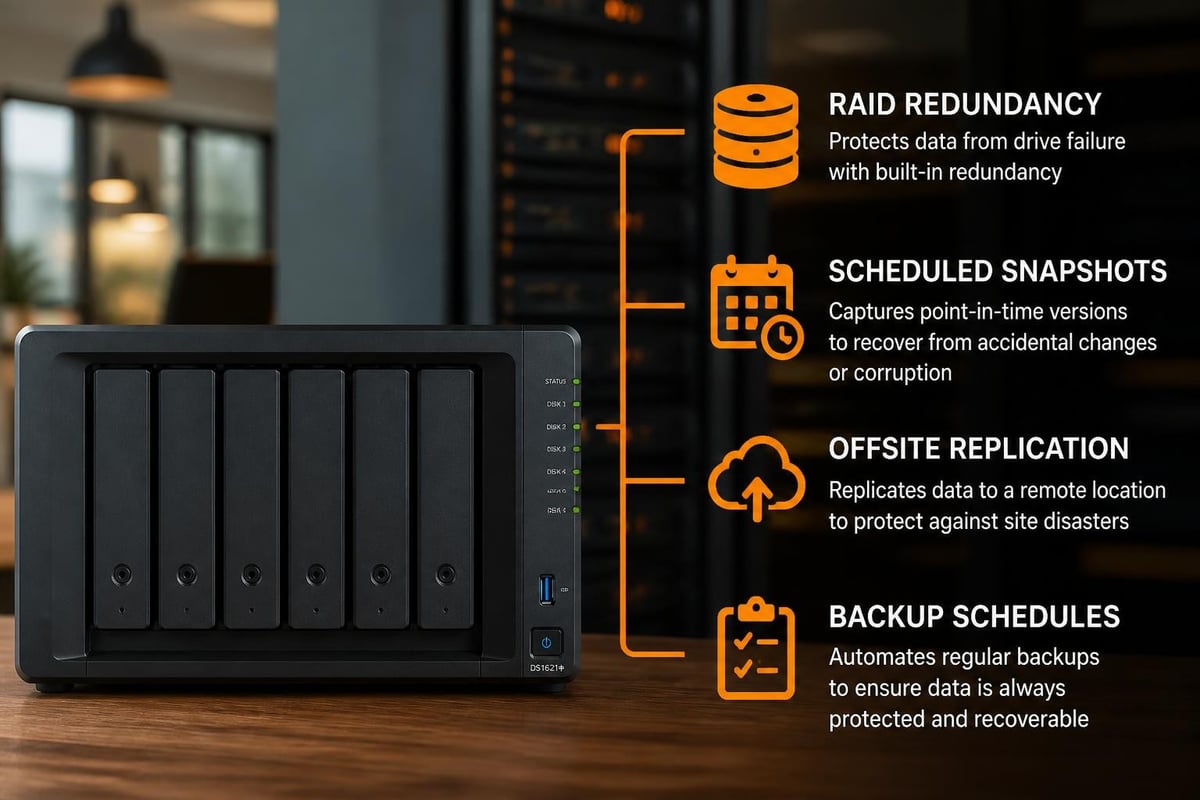
Enterprise-grade data protection mechanisms ensure business continuity across multiple failure scenarios. Furthermore, the combination of hardware redundancy, software features, and backup capabilities creates comprehensive protection layers.
Snapshot Replication
Btrfs filesystem support enables scheduled snapshots that capture point-in-time system states. Moreover, these snapshots consume minimal storage through copy-on-write technology, allowing thousands of recovery points. In addition, Snapshot Replication synchronises data to remote Synology units, providing geographic redundancy.
| Protection Method | Recovery Time | Storage Overhead | Complexity |
|---|---|---|---|
| RAID Redundancy | Immediate | 25-50% | Low |
| Snapshots | Minutes | 5-15% | Low |
| Active Backup | Hours | 100%+ | Medium |
| Cloud Sync | Variable | None local | Medium |
| Replication | Minutes | 100% | High |
The Windows Central assessment highlights how these layered approaches complement each other, addressing distinct failure scenarios from hardware malfunction to ransomware attacks.
Security Hardening
Built-in security features protect against unauthorised access and data breaches:
- Firewall: Customisable rules controlling network access
- Account Protection: Automatic blocking after failed login attempts
- SSL/TLS Certificates: Encrypted connections for all services
- Security Advisor: Automated vulnerability scanning and recommendations
- Two-Factor Authentication: Additional verification for administrative access
Nevertheless, organisations must actively configure these features rather than relying on defaults. Therefore, proper deployment planning becomes essential for maintaining security posture.
Comparing Cloud Solutions and On-Premises Storage
Businesses increasingly face decisions between cloud-based storage services and on-premises infrastructure like the synology ds1621. Furthermore, hybrid approaches combining both models offer compelling advantages whilst mitigating respective limitations.
Cost Analysis Over Time
| Time Period | Cloud Storage (5TB) | DS1621+ with Drives | Break-Even |
|---|---|---|---|
| Year 1 | £600 | £1,800 | – |
| Year 2 | £1,200 | £1,850 | – |
| Year 3 | £1,800 | £1,900 | ✓ |
| Year 5 | £3,000 | £2,000 | ✓ |
Initial investment in the synology ds1621 exceeds monthly cloud subscriptions. Nevertheless, operating costs remain minimal beyond electricity consumption and occasional drive replacements. Therefore, organisations with predictable storage requirements achieve significant savings over three to five years.
Sovereignty and Compliance Considerations
European organisations subject to GDPR and data residency requirements benefit from maintaining complete control over storage infrastructure. Moreover, choosing European cloud storage ensures compliance without sacrificing convenience. In addition, on-premises NAS systems eliminate concerns about third-party access, data mining, or jurisdictional conflicts.
For businesses requiring both local performance and cloud accessibility, the DS1621+ enables hybrid configurations. Furthermore, Cloud Sync packages replicate data to multiple cloud providers, whilst Synology C2 services offer native integration. Nevertheless, bandwidth limitations may constrain initial synchronisation of large datasets.
Use Cases Across Business Sectors
The versatility of the synology ds1621 accommodates diverse industry requirements, from creative agencies to professional services firms. Furthermore, specific applications demonstrate how hardware capabilities translate into practical business value.
Media Production and Creative Workflows
Video production companies require high-throughput storage for 4K and 8K footage. Therefore, the DS1621+ configured with 10GbE networking and NVMe caching delivers responsive editing performance. Moreover, Synology Drive enables collaborative workflows where multiple editors access shared project libraries simultaneously.
Professional Services and Documentation
Legal practices, accounting firms, and consultancies accumulate extensive document repositories requiring secure access and long-term retention. In addition, the synology ds1621 provides comprehensive audit trails tracking file access and modifications. Furthermore, integration with Active Directory simplifies permission management across organisational structures.
Small Office Infrastructure Consolidation
Organisations running multiple servers for file sharing, email, and backups can consolidate infrastructure onto a single synology ds1621. Nevertheless, appropriate resource allocation ensures virtual machines receive adequate CPU and memory. Therefore, capacity planning becomes critical during migration.
Businesses exploring comprehensive cloud solutions might consider scheduling a demonstration of all-in-one platforms to understand how integrated services compare with self-hosted infrastructure.
Maintenance and Long-Term Considerations
Sustaining optimal performance requires ongoing attention to system health, software updates, and capacity management. Furthermore, proactive maintenance prevents unexpected failures whilst extending hardware lifespan.
Storage Pool Management
Regular monitoring of drive health through S.M.A.R.T. attributes identifies failing drives before complete failure. Moreover, scheduling RAID scrubbing operations verifies data integrity across arrays, correcting minor inconsistencies automatically. Additionally, the synology ds1621 sends email notifications when drives require replacement, enabling timely intervention.
Software Updates and Patches
Synology releases DSM updates addressing security vulnerabilities, bug fixes, and feature enhancements. Therefore, implementing updates during maintenance windows ensures systems remain protected. Nevertheless, testing updates in non-production environments reduces deployment risks for critical infrastructure.
Capacity Planning Guidelines
Implementing storage quotas prevents individual users from consuming disproportionate capacity. Furthermore, automatic alerts notify administrators when utilisation exceeds defined thresholds:
- 80% Capacity: Begin planning expansion or archival
- 85% Capacity: Initiate data cleanup procedures
- 90% Capacity: Deploy additional storage urgently
- 95% Capacity: Critical threshold requiring immediate action
In addition, understanding how cloud server hosting complements on-premises infrastructure helps organisations scale efficiently as requirements evolve.
Competitive Positioning and Alternatives
Within the business NAS market, the synology ds1621 competes against solutions from QNAP, Asustor, and enterprise vendors. Moreover, comparing specifications against alternative models clarifies positioning decisions.
Synology DS1621+ vs QNAP TVS-672XT
Both systems target similar markets with comparable specifications. Nevertheless, Synology’s software ecosystem and user experience generally receive higher marks, whilst QNAP offers more aggressive pricing and hardware specifications. Therefore, organisations prioritising ease of management favour Synology, whereas performance-focused buyers may prefer QNAP alternatives.
When to Consider Rackmount Solutions
The Synology RS1221+ provides equivalent hardware in rackmount format for datacentre deployment. Furthermore, rackmount units integrate seamlessly into existing server infrastructure whilst offering redundant power supplies. Nevertheless, tower configurations like the DS1621+ suit office environments better through quieter operation and smaller footprints.
Performance Optimisation Strategies
Extracting maximum performance from the synology ds1621 requires strategic configuration across hardware, software, and network layers. Furthermore, understanding performance bottlenecks enables targeted improvements delivering measurable results.
SSD Cache Implementation
Read-only cache accelerates frequently accessed data without risking data loss, whilst read-write cache improves both operations but requires redundant SSDs. Moreover, monitoring cache hit ratios determines effectiveness:
- Above 80%: Excellent cache utilisation
- 60-80%: Good performance improvement
- Below 60%: Reconsider cache strategy
Therefore, analysing workload patterns before implementing cache ensures appropriate investment returns.
Network Configuration Best Practices
Link aggregation requires compatible switches supporting IEEE 802.3ad LACP protocols. Additionally, enabling jumbo frames (9000 MTU) across the entire network path reduces overhead, increasing effective throughput. Nevertheless, mismatched MTU settings create connectivity issues requiring careful validation.
The Synology DS1621+ delivers enterprise-grade storage capabilities tailored for growing businesses seeking reliable, scalable infrastructure. Furthermore, its combination of robust hardware, comprehensive software ecosystem, and extensive expansion options positions it as a compelling investment for organisations prioritising data sovereignty and long-term value. As a result, businesses can build a storage environment that supports both current requirements and future growth.
Additionally, organisations requiring cloud-based alternatives or hybrid solutions that combine on-premises and cloud infrastructure can benefit from complementary hosting services. For example, vBoxx provides secure European hosting solutions, including cloud storage, virtual servers, and backup services designed with privacy and sustainability at their core. Consequently, businesses can implement a flexible infrastructure strategy that balances performance, compliance, and long-term resilience.