The Synology DS418 represents a significant milestone in the evolution of small to medium-sized business network-attached storage (NAS) solutions. As organisations evaluate their data infrastructure in 2026, understanding the capabilities, lifecycle status, and strategic role of devices like the ds418 becomes essential for informed decision-making. Moreover, the broader context of European data sovereignty, GDPR compliance, and hybrid cloud strategies now shapes how businesses approach storage planning. This article examines the ds418 from a business perspective, exploring its technical specifications, support status, and how it fits within modern infrastructure strategies that prioritise security, compliance, and scalability.
Understanding the DS418 Platform and Its Variants
The ds418 designation actually encompasses several distinct models within Synology's DiskStation lineup, each targeting different business requirements and performance profiles. Consequently, understanding which variant suits your organisation requires careful evaluation of workload characteristics and growth projections.
DS418 Model Differentiation
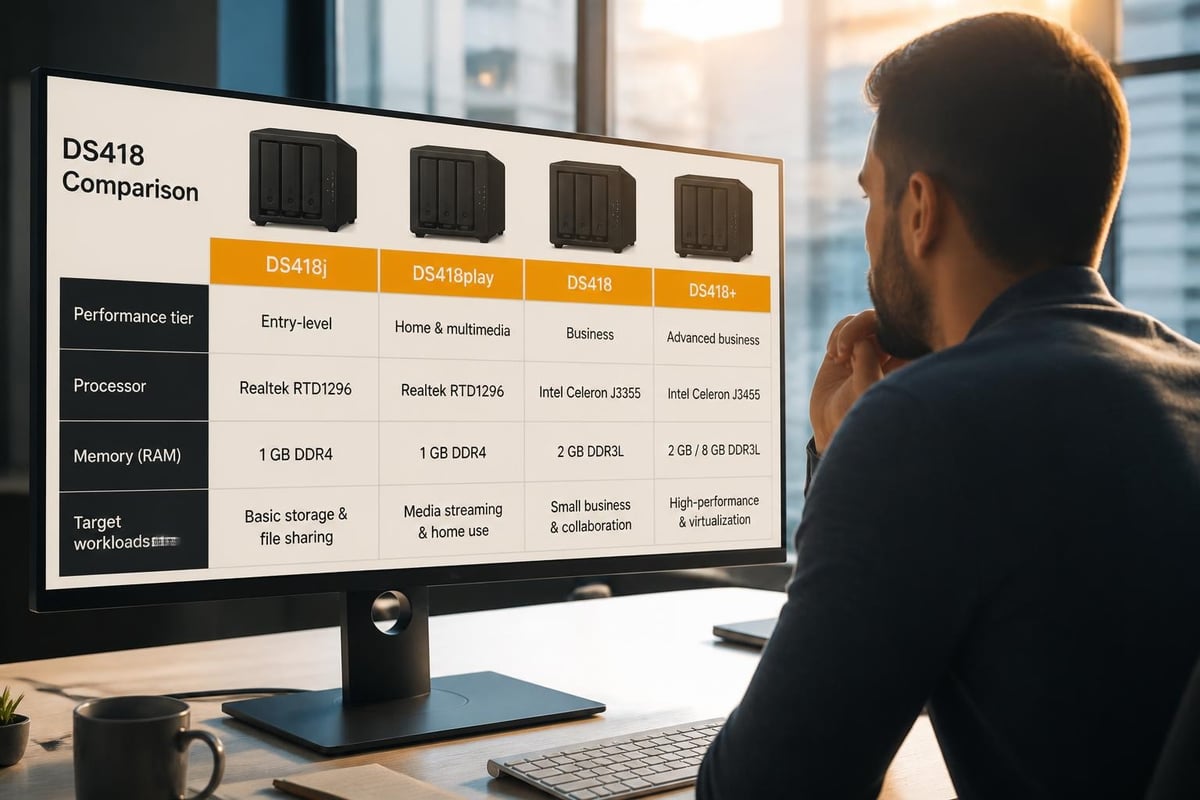
Synology released multiple ds418 variants, including the DS418play, DS418j, and the standard DS418. Furthermore, each model features different processors, memory configurations, and feature sets that directly impact performance and use cases.
| Model | Processor | RAM | Target Use Case | Hardware Transcoding |
|---|---|---|---|---|
| DS418play | Intel Celeron J3355 | 2GB | Media streaming, home office | Yes (4K) |
| DS418j | Realtek RTD1293 | 1GB | Basic file storage | No |
| DS418 | Intel Celeron J3455 | 2GB | Business workloads | Limited |
The DS418play, for instance, was specifically engineered for multimedia environments, featuring hardware transcoding capabilities that enable smooth 4K video streaming. Nevertheless, the DS418j prioritised cost-effectiveness for organisations with straightforward file-sharing requirements. In addition, the standard ds418 struck a balance between performance and affordability for small business deployments.
Technical Specifications and Capabilities
The ds418 family supports up to four drive bays, enabling various RAID configurations including RAID 0, 1, 5, 6, and 10, alongside Synology's proprietary Synology Hybrid RAID (SHR). Therefore, businesses gain flexibility in balancing storage capacity against redundancy requirements. The official Synology DS418 datasheet provides comprehensive technical specifications for capacity planning.
Key technical features include:
- Maximum raw capacity of 64TB (with 16TB drives)
- Dual Gigabit Ethernet ports with link aggregation and failover support
- USB 3.0 ports for external backup targets
- AES-NI hardware encryption acceleration
- Hot-swappable drive bays for maintenance without downtime
Moreover, the networking capabilities of the ds418 enable integration into existing business infrastructure through protocols including SMB, AFP, NFS, and FTP. In addition, the platform supports virtualisation environments through iSCSI target functionality, making it suitable for organisations running Hyper-V or VMware infrastructure.
DSM Software Ecosystem and Feature Set
The DiskStation Manager (DSM) operating system represents the software foundation that transforms the ds418 hardware into a versatile business tool. Furthermore, DSM's modular package architecture enables organisations to deploy specific functionality as requirements evolve.
Core Business Packages
DSM provides native support for collaboration, backup, surveillance, and virtualisation through its Package Centre. Nevertheless, the performance ceiling of the ds418 hardware means certain intensive workloads may require consideration of alternative approaches.
Essential packages for business deployment:
- Synology Drive for file synchronisation and team collaboration
- Active Backup for Business for agent-based backup of workstations and servers
- Snapshot Replication for point-in-time recovery and disaster preparedness
- Cloud Sync for integration with public cloud storage providers
- VPN Server for secure remote access to corporate resources
Therefore, organisations can build comprehensive data management solutions without relying entirely on subscription-based cloud services. However, compliance requirements, particularly under GDPR, necessitate careful evaluation of data residency and processing locations. The Synology Software Life Cycle Policy outlines support commitments and update schedules critical for long-term planning.
Performance Considerations in 2026
As noted in the TechRadar review of the DS418 family, these units excel in scenarios involving sequential read/write operations typical of file serving and media streaming. Nevertheless, heavily concurrent workloads or virtualised environments may encounter performance constraints given the processor and memory specifications.
Moreover, the ds418 models feature limited RAM expansion options, which constrains the number of simultaneous packages and users the system can efficiently support. In addition, organisations planning significant growth should assess whether the platform provides sufficient headroom or whether migration to higher-tier models will become necessary within their planning horizon.
Support Status and Lifecycle Planning
Understanding the support lifecycle of the ds418 proves essential for organisations with compliance obligations and security requirements. Furthermore, end-of-support dates directly impact patch availability, security updates, and compatibility with modern protocols.
Current Support Status
As of August 2026, the ds418 series has transitioned through several DSM generations. The Synology Product Support Status page provides official information regarding which models continue to receive security updates and feature enhancements.
Lifecycle considerations for 2026:
- DSM 7.x represented the final major version supporting most ds418 variants
- Security updates continue for devices on supported DSM versions
- Hardware age impacts drive availability and replacement sourcing
- Transition planning timelines should account for data migration complexity
Therefore, organisations operating ds418 units should establish clear upgrade or replacement roadmaps. Moreover, the availability of security patches directly affects audit compliance, particularly for environments subject to ISO 27001, SOC 2, or industry-specific regulations.

Migration and Upgrade Pathways
When ds418 devices approach end-of-support, businesses face strategic decisions regarding infrastructure evolution. Nevertheless, several pathways exist depending on organisational priorities, budget constraints, and operational requirements.
| Migration Option | Advantages | Considerations |
|---|---|---|
| Newer Synology NAS | Familiar DSM interface, straightforward data migration | Capital expense, ongoing hardware refresh cycle |
| European Cloud Platform | No hardware management, scalable capacity, GDPR compliance | Subscription costs, connectivity dependency |
| Hybrid Approach | Combines on-premises and cloud benefits | Complexity, integration requirements |
In addition, European businesses increasingly prioritise solutions that guarantee data sovereignty and protection from extraterritorial legal frameworks. Furthermore, platforms like vBoxxCloud deliver GDPR-compliant storage with 256-bit AES encryption hosted in ISO 27001-certified Dutch data centres, providing an alternative that addresses both technical and regulatory requirements.
Optimising DS418 Deployment for Business Use
Organisations currently operating ds418 devices can implement several strategies to maximise value and extend useful service life. Moreover, proper configuration and maintenance practices significantly impact reliability and performance.
Configuration Best Practices
Storage pool and volume design:
- Implement SHR or RAID 5/6 for balance between capacity and protection
- Configure separate volumes for distinct data classifications
- Enable Btrfs file system for snapshot and integrity features
- Schedule regular SMART tests and scrubbing operations
- Maintain spare drive inventory matching deployed models
Therefore, thoughtful initial configuration reduces operational friction and simplifies disaster recovery procedures. Nevertheless, organisations should document their RAID choices, network settings, and package configurations to accelerate restoration in failure scenarios.
Backup and Disaster Recovery Strategy
The ds418 should never serve as the sole repository for business-critical data. Furthermore, implementing the 3-2-1 backup principle (three copies, two media types, one off-site) remains essential for resilience.
Recommended backup architecture:
- Primary data resides on the ds418 with appropriate RAID protection
- Secondary backup to external USB drives or second NAS via Hyper Backup
- Off-site copy to European cloud storage for geographic diversity
Moreover, European businesses must ensure backup destinations comply with GDPR Article 44 requirements for international data transfers. In addition, selecting backup targets within the European Economic Area eliminates complex adequacy assessments and standard contractual clauses.
Security Hardening
Network-attached storage devices represent attractive targets for ransomware and unauthorised access attempts. Therefore, implementing defence-in-depth security controls proves essential for business deployments.
Security measures for ds418 protection:
- Disable default admin account and create named administrator users
- Enable auto-block for repeated failed login attempts
- Implement firewall rules restricting management access to trusted networks
- Configure two-factor authentication for all user accounts
- Disable unused services and protocols to reduce attack surface
- Apply security updates within established testing and change windows
Furthermore, regular security audits should verify that configurations align with organisational policies and industry best practices. The SmallNetBuilder technical review provides insights into networking and security aspects particularly relevant for technical teams.
Integration with Modern Business Workflows
The ds418 can integrate effectively with contemporary productivity and collaboration tools when properly configured. Nevertheless, understanding its capabilities and limitations ensures realistic expectations and optimal user experiences.
File Sharing and Collaboration
Synology Drive transforms the ds418 into a private cloud platform, enabling team file sharing, synchronisation across devices, and collaborative editing. Moreover, organisations concerned about data sovereignty find this approach appealing compared to US-based alternatives.
Collaboration features available:
- Real-time file synchronisation across Windows, macOS, iOS, and Android
- Shared team folders with granular permission controls
- File versioning with configurable retention policies
- Office document preview and basic editing capabilities
- Mobile access through native applications
However, advanced collaboration features such as simultaneous co-authoring and integrated communication tools may require supplementary platforms. In addition, organisations seeking comprehensive unified communications should evaluate dedicated solutions like vBoxxConnect, which combines email, calendar, and video conferencing in a GDPR-compliant European infrastructure.
Integration Points and Limitations
The ds418 supports integration with various business systems through APIs, WebDAV, and standard protocols. Nevertheless, performance constraints may impact responsiveness in scenarios involving numerous concurrent users or complex workflows.
| Integration Type | DS418 Capability | Recommended Approach |
|---|---|---|
| File server (SMB/AFP) | Excellent | Primary use case |
| iSCSI target | Limited by CPU/RAM | Small VM workloads only |
| Surveillance station | Moderate | Max 2-4 cameras |
| Docker containers | Constrained | Simple services only |
Therefore, organisations with demanding integration requirements should carefully test performance under realistic load conditions before production deployment. Furthermore, the NotEnoughTech prosumer review offers detailed analysis of advanced use cases and power user scenarios.

The European Data Sovereignty Context
For European businesses, decisions regarding data infrastructure increasingly incorporate regulatory compliance, jurisdictional concerns, and privacy considerations. Moreover, the ds418 as on-premises infrastructure inherently addresses certain sovereignty requirements whilst creating others.
GDPR Compliance Considerations
Deploying a ds418 within European facilities ensures processing occurs under GDPR jurisdiction. Nevertheless, organisations must still implement appropriate technical and organisational measures as required by Articles 25 and 32.
GDPR-relevant technical measures:
- Encryption at rest using built-in AES-NI capabilities
- Access logging and audit trail generation
- User authentication and authorisation controls
- Network segmentation and traffic encryption
- Regular backup and disaster recovery testing
Furthermore, processors and controllers must maintain records of processing activities, conduct Data Protection Impact Assessments for high-risk processing, and implement breach notification procedures. In addition, on-premises infrastructure requires internal expertise or managed services to maintain compliance posture.
US CLOUD Act and Jurisdictional Risks
The US CLOUD Act grants American authorities potential access to data held by US companies regardless of storage location. Therefore, European organisations in regulated sectors increasingly prioritise providers outside this legal framework.
Whilst Synology maintains headquarters in Taiwan, businesses should evaluate the complete service ecosystem including backup destinations, monitoring platforms, and support infrastructure. Moreover, hybrid approaches combining on-premises ds418 storage with European cloud platforms for backup and disaster recovery can optimise both convenience and compliance.
Organisations seeking comprehensive European alternatives can explore solutions like those offered by vBoxx, which operates entirely within Dutch ISO 27001-certified data centres beyond US CLOUD Act jurisdiction whilst delivering comparable functionality through vBoxxCloud, vBoxxConnect, and vBoxxVault platforms.
Advanced Deployment Scenarios
Beyond basic file sharing, the ds418 supports several advanced scenarios that extend its utility for specific business requirements. Nevertheless, technical limitations necessitate careful workload assessment and realistic capacity planning.
Virtualisation and Development Environments
The ds418 can serve as an iSCSI target for virtualisation hosts, providing shared storage for development and testing environments. However, production virtualised workloads typically demand higher IOPS and throughput than the platform delivers.
Suitable virtualisation scenarios:
- Development and testing VMs with moderate I/O requirements
- Archive and cold storage for decommissioned virtual machines
- Backup targets for production virtualisation infrastructure
- Lab environments for training and experimentation
Moreover, organisations with intensive virtualisation requirements should evaluate dedicated solutions. Furthermore, alternatives such as hosted infrastructure eliminate hardware management whilst providing superior performance. Platforms like Mac mini hosting on Apple M4 hardware deliver managed environments for development workloads requiring specific architectures.
Package Management and Community Resources
The ds418 benefits from extensive community support through resources like SynoCommunity, which provides third-party packages extending functionality beyond official offerings. Nevertheless, organisations must balance capability expansion against supportability and security considerations.
The SynoCommunity compatibility documentation outlines package availability and known issues for various DiskStation models. Therefore, technical teams can identify whether specific community packages function reliably on ds418 hardware before committing to production deployment.
Community package categories:
- Development tools (Git servers, continuous integration platforms)
- Media management (beyond Synology's native applications)
- Monitoring and management utilities
- Productivity applications
- Network services and infrastructure tools
However, community packages typically lack the testing rigour and support commitments of official Synology offerings. In addition, organisations with strict change management or compliance requirements may find community packages unsuitable for production environments.
Cost-Benefit Analysis for 2026
As organisations evaluate whether to continue operating, upgrade, or replace ds418 infrastructure, comprehensive cost-benefit analysis informs optimal decision-making. Moreover, total cost of ownership extends beyond initial capital outlay to encompass ongoing operational expenses.
Direct and Indirect Costs
DS418 total cost of ownership components:
- Initial hardware acquisition and drive population
- Electricity consumption for continuous operation
- Network infrastructure and bandwidth allocation
- Administrative time for maintenance, updates, and monitoring
- Replacement drives as devices age and fail
- Potential data recovery services in disaster scenarios
- Hardware refresh capital when devices reach end-of-life
Therefore, organisations should compare on-premises NAS total costs against cloud storage alternatives over realistic planning horizons. Furthermore, indirect costs such as administrative burden and opportunity costs of capital allocation warrant inclusion in comprehensive analyses.
Value Proposition Considerations
Despite ongoing costs, on-premises storage delivers specific advantages that justify deployment for certain organisations and use cases.
| Benefit Category | Description | Quantification Approach |
|---|---|---|
| Data sovereignty | Guaranteed European processing | Compliance cost avoidance |
| Access speed | LAN performance vs internet latency | Productivity impact measurement |
| Capacity predictability | Fixed costs regardless of usage | Budget stability value |
| Customisation | Tailored configurations and packages | Feature parity comparison |
Nevertheless, cloud platforms increasingly address traditional NAS advantages whilst eliminating hardware management burdens. Moreover, modern European cloud providers deliver sovereignty guarantees, GDPR compliance, and competitive pricing that narrows the gap considerably.
Strategic Recommendations for DS418 Operators
Organisations currently operating ds418 infrastructure should adopt proactive strategies addressing both near-term optimisation and medium-term evolution planning. Furthermore, the specific approach depends on organisational size, technical capabilities, and regulatory environment.
Near-Term Optimisation Actions
- Verify current DSM version and apply available security updates via the Synology download centre
- Audit backup configurations to ensure off-site copies exist and restoration procedures undergo regular testing
- Review user access permissions to implement least-privilege principles and remove obsolete accounts
- Monitor storage capacity trends to project when expansion or migration becomes necessary
- Document current configurations including network settings, package versions, and integration points
Therefore, these actions extend useful service life whilst preparing for eventual transition. Moreover, thorough documentation accelerates migration processes and reduces knowledge-loss risks.
Medium-Term Evolution Planning
Strategic pathway considerations:
- Timing: Plan migrations before support termination rather than in crisis response mode
- Workload assessment: Identify which data and applications truly require on-premises infrastructure
- Hybrid evaluation: Consider combinations of retained local storage for latency-sensitive workloads and cloud for backup, archive, and collaboration
- Vendor assessment: Evaluate European providers prioritising GDPR compliance and data sovereignty
- Migration complexity: Account for data transfer timelines, testing requirements, and user training needs
Furthermore, organisations should initiate planning conversations 12 to 18 months before anticipated hardware refresh or support termination dates. In addition, pilot projects with cloud platforms enable practical evaluation before full commitment.
The ds418 represents a capable platform for organisations with appropriate use cases and realistic expectations regarding its capabilities and limitations. Nevertheless, evolving support lifecycles, advancing alternatives, and heightened compliance requirements mean businesses should actively plan infrastructure evolution rather than maintain static deployments. For European organisations prioritising data sovereignty, GDPR compliance, and security alongside modern collaborative capabilities, evaluating comprehensive platforms that eliminate hardware management whilst guaranteeing regulatory alignment proves increasingly valuable. vBoxx delivers precisely this combination through its suite of cloud storage, communication, and security solutions hosted entirely within ISO 27001-certified Dutch data centres, supported by expert consultation and seamless migration services that simplify infrastructure modernisation.