

The importance of cloud services lies in giving businesses flexible, secure and cost-efficient access to computing, storage and software without owning the underlying hardware. For European companies, however, the question is not only whether to adopt the cloud, but also where the data is hosted and under which legal framework. Therefore, the right provider can strengthen productivity and resilience while keeping the organisation firmly within GDPR boundaries.
What Are Cloud Services and How Do They Work?
Cloud services are computing resources, such as storage, servers, software and communication tools, delivered over the internet by a provider instead of being run on in-house hardware. Consequently, a business pays for what it uses and reaches its data from any authorised device.
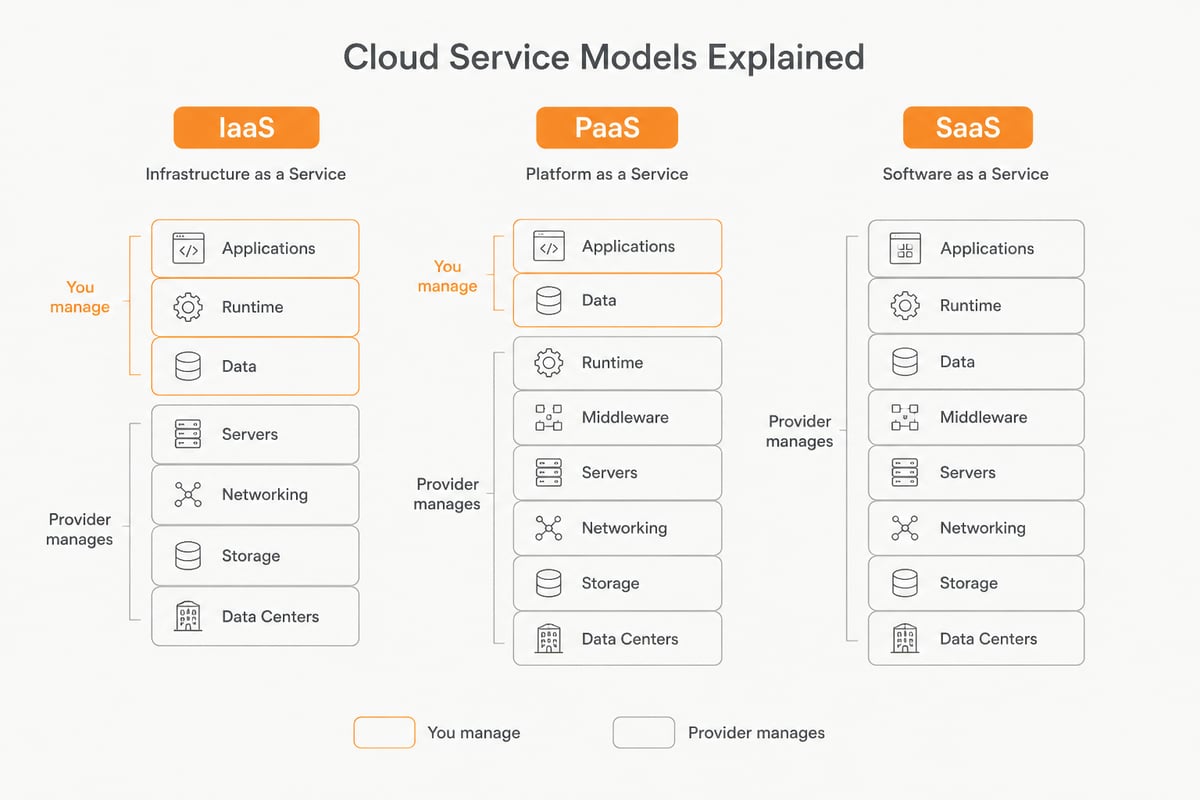
Most offerings fall into three models:
- Infrastructure as a Service (IaaS): virtual or dedicated servers and networking that the customer configures.
- Platform as a Service (PaaS): a managed environment in which developers build and run applications.
- Software as a Service (SaaS): ready-to-use applications such as email, file sharing or document signing, accessed through a browser.
In addition, deployment can be public, private or hybrid. A private environment suits sensitive workloads, whereas a hybrid setup combines both approaches. If you wish to compare the options in more depth, our overview of the advantages of hybrid cloud explains where each model fits.
Why Is the Importance of Cloud Services Growing for Modern Businesses?
The importance of cloud services is growing because they let organisations scale quickly, work from anywhere and shift spending from large capital purchases to predictable operating costs. Remote and hybrid working have made centralised, always-available tools a practical necessity rather than a convenience.
Several pressures drive this shift. Customers expect fast digital service, teams are distributed across locations, and internal IT departments are asked to deliver more with limited headcount. Nevertheless, many businesses still run ageing on-premises servers that demand constant maintenance, patching and replacement.
Cloud adoption also supports clearer governance. Microsoft's Cloud Adoption Framework recommends aligning cloud initiatives with measurable business objectives and defining priorities, guardrails and investment decisions. In other words, the cloud works best when it is tied to concrete goals, such as reducing downtime or accelerating document workflows, rather than adopted for its own sake.
What Are the Benefits of Using Cloud Computing Services?
The main benefits of cloud computing services are lower upfront cost, easy scalability, stronger security, better collaboration and improved business continuity. Each of these advantages compounds as the organisation grows.
Cost efficiency and predictability
Instead of buying servers, cooling and licences in advance, a business subscribes to the capacity it needs. Therefore, budgeting becomes simpler, and unused hardware no longer sits idle. In addition, maintenance, hardware replacement and monitoring move to the provider.
Scalability on demand
Seasonal peaks, new hires or a new project can be absorbed by adding capacity within minutes. Conversely, resources can be reduced when demand falls, so the business does not pay for surplus.
Collaboration and productivity
Shared files, calendars and meetings keep teams aligned, regardless of location. Consequently, version conflicts and email attachment chains decrease, and decisions are made faster.
Security and recovery
Professional providers invest in monitoring, encryption and redundancy that few small and mid-sized companies can match internally. Similarly, backups stored away from the primary system protect against ransomware, accidental deletion and hardware failure. Our article on cloud services and security describes these safeguards in more detail.
Why Is the Cloud So Important for Data Security and Compliance?
The cloud is important for security and compliance because a well-chosen provider combines certified infrastructure, encryption and clear legal protections that individual businesses rarely build alone. However, the protection depends heavily on who operates the infrastructure and where it is located.
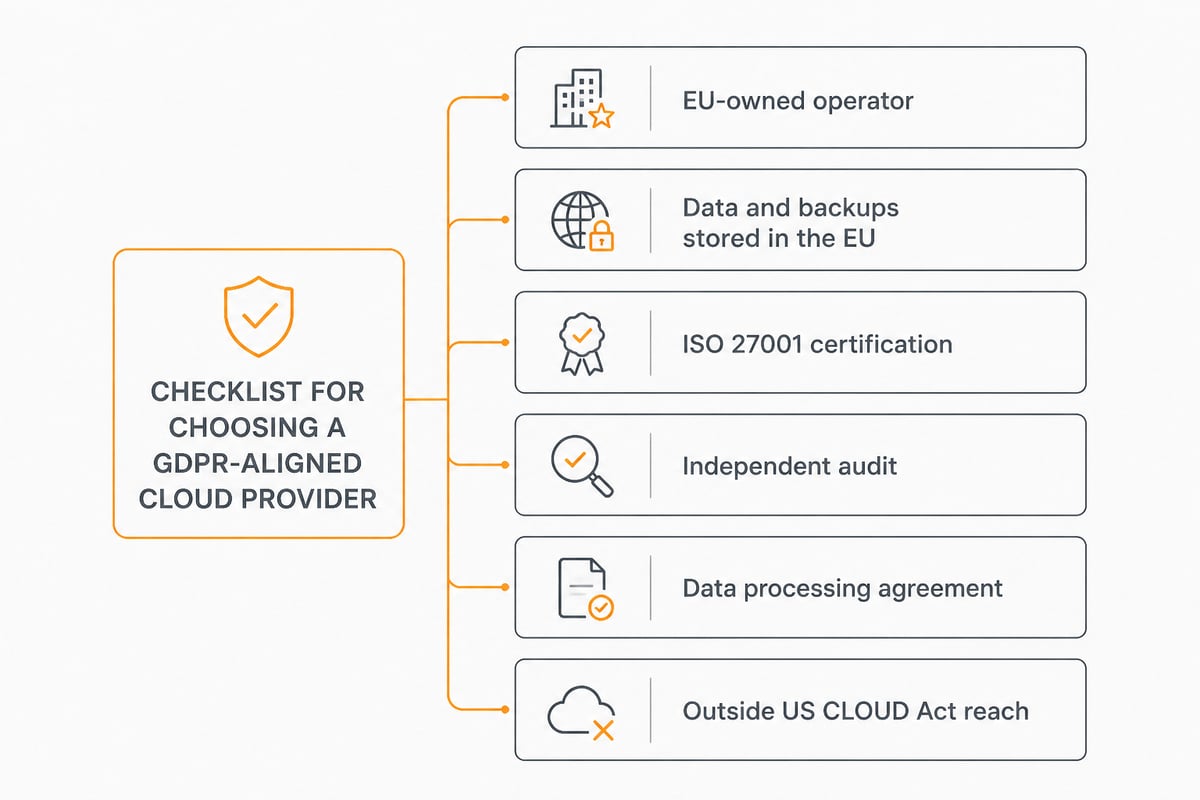
For European organisations, three questions matter most:
- Where is the data stored? Data, metadata, backups and support tooling should remain inside the EU.
- Who owns and operates the infrastructure? An EU-owned operator is not subject to the US CLOUD Act, which can compel American companies to hand over data regardless of its physical location.
- Which certifications and agreements apply? Look for ISO 27001 certification, independent audits and a data processing agreement that supports GDPR obligations.
Encryption in transit and at rest, access controls and audit trails help demonstrate accountability to regulators. For a closer look at protective measures, see our guide to encrypted cloud services.
Data Sovereignty: A European Reason to Choose Cloud Services Carefully
Data sovereignty means that your data remains subject to the laws of the jurisdiction you choose, and for European businesses this makes the provider's ownership and location as important as its features. In practice, a server in Europe operated by a non-European parent company may still fall under foreign legal reach.
This matters for sectors such as healthcare, legal services, finance, education and public administration. Nevertheless, it is increasingly relevant for any company that handles customer, employee or contract data. Choosing a provider that runs its own infrastructure within the EU reduces legal uncertainty and simplifies GDPR documentation.
Recent outages at large hyperscalers have also shown the risk of concentration. Our analysis of the Amazon Web Services outage illustrates how a single regional failure can disrupt thousands of dependent services. Consequently, many organisations now consider a European provider, or a mix of providers, as part of their continuity planning.
What Is the Importance of Cloud Storage for Business Continuity?
Cloud storage matters because it keeps business-critical files available, versioned and recoverable even when a device, office or server fails. It replaces scattered USB drives and local network shares with a single, controlled location.
The practical gains are easy to recognise:
- Access from anywhere: employees open the latest file on a laptop, tablet or phone.
- Version history: earlier versions of a document can be restored after an error.
- Recovery of deleted files: accidental deletion no longer means permanent loss.
- Controlled sharing: links and permissions replace uncontrolled email attachments.
For businesses that want these capabilities within the EU, vBoxxCloud offers GDPR-compliant storage with 256-bit AES encryption, hosted in ISO 27001-certified data centres in the Netherlands, together with eIDAS-compliant digital signing and AI-assisted document search. Therefore, file storage, signing and retrieval can sit in one environment rather than across several tools. If you are comparing solutions, our overview of secure cloud storage services outlines the criteria worth checking.
How Do Cloud Services Help Small and Mid-Sized Businesses?
Cloud services give smaller organisations access to enterprise-grade infrastructure and software without a dedicated IT department or large capital outlay. Consequently, a company of ten people can use the same categories of tools as a much larger competitor.
A small accounting firm, for example, can centralise client documents, collect signatures electronically and restrict access by role. Similarly, a property management business, such as those using digital rental administration platforms like Tomappart, relies on online systems to track leases, payments and accounts without maintaining its own servers. The principle applies across industries: the less time spent maintaining systems, the more time is available for clients.
In addition, free migration and personal support, such as the phone, chat and remote sessions vBoxx provides, help teams without in-house specialists make the move with confidence.

Which Business Areas Gain the Most From the Cloud?
The areas that gain most are communication, document management, backup, application hosting and web infrastructure. Nevertheless, the right starting point depends on where your current processes create the most friction.
| Business area | Typical cloud use | Main benefit |
|---|---|---|
| Communication | Email, calendars, tasks, online meetings | Consistent collaboration across locations |
| Documents | Storage, sharing, e-signing, search | Faster approvals, fewer lost files |
| Security | Password management, encrypted storage | Reduced risk of credential and data theft |
| Backup | Backup for Microsoft 365 and Google Workspace | Recovery after deletion or ransomware |
| Infrastructure | Virtual and dedicated servers, app hosting | Flexible capacity without hardware ownership |
Backup deserves particular attention. Software-as-a-service platforms generally protect their own availability, yet they do not always protect against user error or malicious deletion. Therefore, an independent backup of Microsoft 365 or Google Workspace data is a sensible safeguard.
Event and travel organisers show a different pattern. A company such as Ensemble Tours, which coordinates concert tours for musical groups across Europe, depends on shared itineraries, contracts and contact lists that many people must edit in real time. Cloud-based collaboration suits that workload well, because everyone sees the same current information.
How Do You Adopt Cloud Services Successfully?
A successful adoption follows a structured sequence: define objectives, assess current systems, choose a provider, migrate in phases and review results. Furthermore, Microsoft's Cloud Adoption Framework organises the journey into methodologies such as Strategy, Plan, Ready, Adopt, Govern, Secure and Manage. Smaller businesses can apply the same logic in a lighter form.
- Set measurable goals. Examples include shorter document turnaround, lower hardware spend or faster recovery after an incident.
- Inventory your data and applications. Identify what is sensitive, what is regulated and what can move first.
- Define compliance requirements. Confirm GDPR obligations, retention rules and any sector-specific demands.
- Select a provider. Evaluate certifications, data location, ownership, support quality and exit options.
- Migrate in phases. Start with lower-risk workloads, verify results, then continue.
- Train and monitor. Staff habits, access rights and costs need regular review.
Finally, plan for the exit as carefully as the entry. Portable formats and clear contract terms prevent lock-in and keep your options open as the business evolves.
What Should You Look for in a Cloud Provider?
Look for a provider that is transparent about ownership, infrastructure, certification and support, since these factors determine how well the service protects your data over time. In addition, track record and responsiveness often matter more than feature lists.
Consider the following criteria:
- Jurisdiction and ownership: an EU-based, EU-operated provider outside the reach of the US CLOUD Act.
- Own infrastructure: hosting on in-house systems rather than resold hyperscaler capacity.
- Certification: ISO 27001, preferably audited by an independent body such as TÜV NORD.
- Reliability: a documented uptime record and proactive monitoring.
- Support: real people reachable by phone, chat or remote session.
- Sustainability: green hosting practices that align with corporate responsibility goals.
vBoxx, for instance, operates its own infrastructure maintained by its own engineers, and has over 20 years of experience serving more than 50,000 active end users. It was also awarded best cloud services company in the Netherlands 2025 by Global 100. Our article on cloud services offers further background on how providers differ.
FAQ
What is the importance of cloud storage?
Cloud storage keeps files accessible, versioned and recoverable from any authorised device, which protects against hardware failure and accidental deletion. It simplifies controlled sharing across teams and external partners.
What is cloud salary?
The phrase is not a defined term, but it usually refers to the pay levels of cloud professionals such as engineers, architects and administrators. Salaries vary widely by country, experience and specialisation, so current job market data for your region is the most reliable guide.
Are cloud services safe for sensitive business data?
They can be, provided the provider holds recognised certifications, encrypts data and stores it within a jurisdiction that matches your legal needs. Therefore, check ISO 27001 status, data location and the availability of a data processing agreement before committing.
Start by listing your five most important data types and noting where each is stored today, because that single exercise shows where a move to the cloud would reduce risk fastest. From there, vBoxx can help you migrate at no cost and host your files, communication and servers in EU-owned data centres under GDPR. If you would like to see how this works for your team, get a free trial of vBoxx and explore it on your own data, including vBoxxCloud for secure storage and e-signing.
{"@context":"https://schema.org","@type":"Article","headline":"Importance of Cloud Services for Modern Businesses","description":"Discover the importance of cloud services for European businesses: cost, security, GDPR compliance and resilience, with practical guidance on adoption.","image":["/assets/img/blog/13684b53995ee1da.jpg