The Synology DS214 represents a pivotal solution for small businesses and home offices seeking reliable network-attached storage without breaking the budget. Furthermore, this two-bay NAS device offers a compelling balance between functionality and affordability, making it particularly relevant for organisations transitioning from basic external drives to centralised storage infrastructure. In addition, the DS214's design philosophy centres on accessibility, providing essential features without the complexity that often accompanies enterprise-grade systems. Therefore, understanding its capabilities and limitations becomes crucial for businesses evaluating their storage strategy in 2026.
Understanding the Synology DS214 Architecture
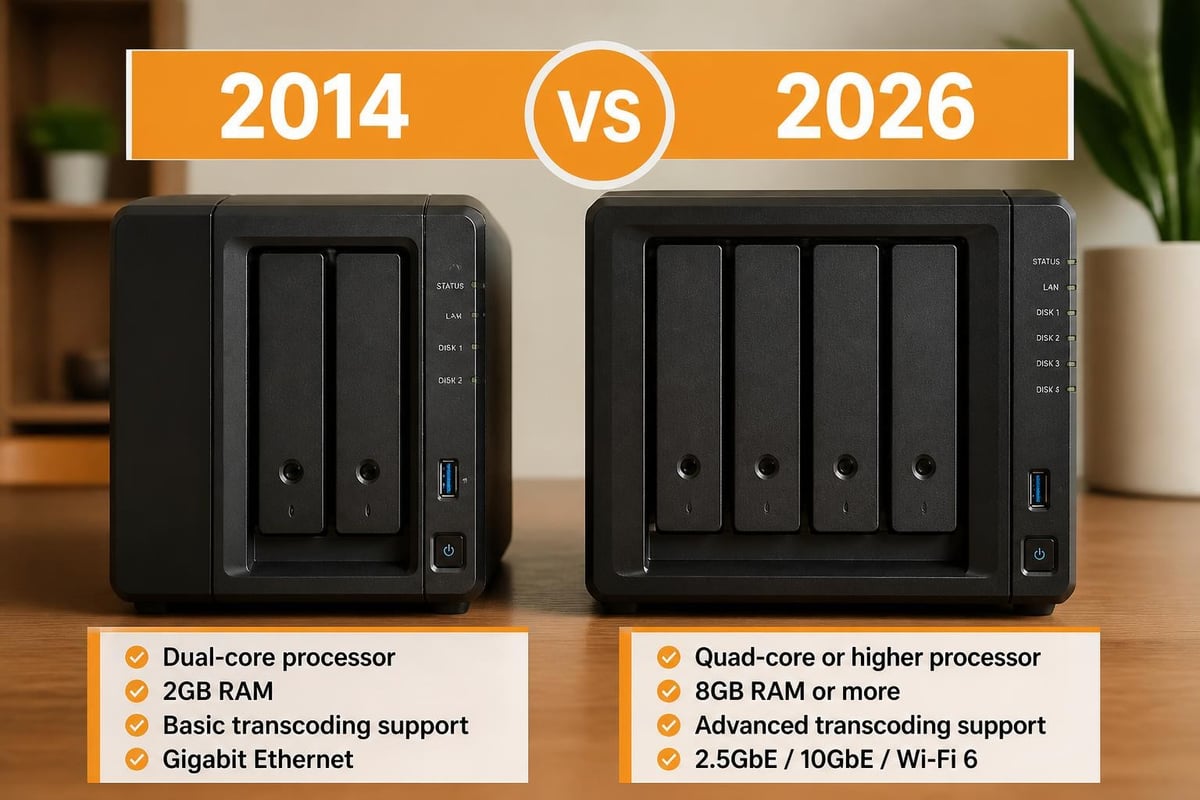
The Synology DS214 features a dual-core processor running at 1.067GHz, coupled with 512MB of DDR3 RAM. Moreover, this hardware configuration delivers adequate performance for fundamental file serving tasks, although it falls short of the processing power found in more recent models. Nevertheless, the device supports two 3.5-inch or 2.5-inch SATA hard drives, offering flexibility in storage capacity configuration.
The physical design emphasises simplicity and accessibility. The device measures compact enough for desk placement whilst maintaining proper ventilation through strategically positioned air vents. In addition, the front panel provides LED indicators for system status, network activity, and individual drive health, enabling quick visual diagnostics without software intervention.
Network Connectivity and Performance
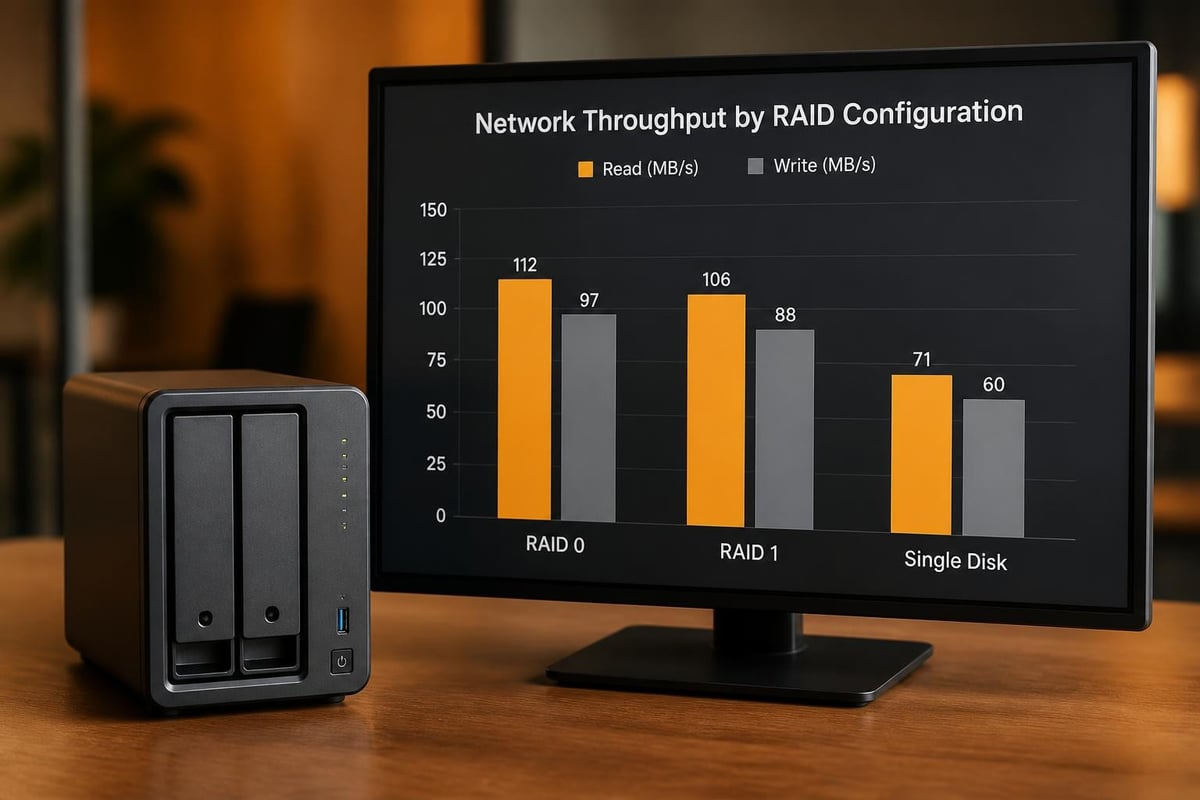
Network connectivity remains a critical consideration for any NAS device. The Synology DS214 includes a single Gigabit Ethernet port, which theoretically supports transfer speeds up to 112 MB/s for reading and 108 MB/s for writing operations. However, real-world performance varies significantly based on network infrastructure, drive configuration, and concurrent user access patterns.
According to comprehensive testing by StorageReview, the device performs admirably in small office environments with fewer than ten concurrent users. Furthermore, the single network port limitation means that link aggregation for enhanced throughput isn't available, which may concern businesses anticipating rapid growth.
Storage Configuration and RAID Options
Configuring storage properly determines both performance and data protection levels. The Synology DS214 supports several RAID configurations, each offering distinct advantages:
| RAID Type | Capacity | Redundancy | Performance | Best For |
|---|---|---|---|---|
| Basic | 100% per drive | None | Standard | Non-critical data |
| JBOD | Combined | None | Standard | Maximum capacity |
| RAID 0 | Combined | None | Enhanced | Speed priority |
| RAID 1 | 50% total | Full mirror | Standard | Data protection |
RAID 1 configuration provides the most sensible approach for business environments, offering complete data mirroring across both drives. Consequently, if one drive fails, the system continues operating whilst you arrange replacement. Nevertheless, this redundancy comes at the cost of usable capacity, effectively halving your total storage space.
Drive Compatibility and Capacity Planning
The Synology DS214 accommodates drives up to 6TB each, supporting a maximum raw capacity of 12TB. Moreover, businesses should carefully consider future growth when selecting initial drive capacity, as the two-bay limitation means fewer upgrade paths compared to four-bay or larger units.
Drive selection impacts not only capacity but also reliability and performance. Furthermore, enterprise-grade NAS drives typically offer superior durability compared to standard desktop drives, particularly regarding vibration tolerance and continuous operation ratings. Therefore, the initial investment in quality drives often proves economical over the device's operational lifespan.
DiskStation Manager: The Software Foundation
Synology's DiskStation Manager (DSM) operating system transforms the DS214 from basic hardware into a versatile platform. The web-based interface provides intuitive access to configuration, monitoring, and package installation. In addition, DSM receives regular updates, improving security and adding functionality even to older hardware like the DS214.
The package ecosystem represents DSM's greatest strength. Users can install applications for:
- File synchronisation and sharing across multiple devices and platforms
- Backup management with incremental and versioned copies
- Media streaming to compatible devices throughout the network
- Surveillance station for IP camera recording and monitoring
- Database hosting for lightweight applications
Nevertheless, the DS214's limited processing power restricts the number of simultaneous packages that can run effectively. Therefore, businesses should prioritise essential applications rather than attempting to deploy every available package.
User Management and Permissions
Proper user management ensures security whilst maintaining accessibility. The Synology DS214 supports comprehensive user and group configurations, allowing administrators to implement granular permissions across shared folders. Moreover, integration with existing directory services, including Windows Active Directory, simplifies deployment in established IT environments.
Furthermore, quota management enables administrators to prevent individual users from consuming excessive storage space. This feature proves particularly valuable in collaborative environments where multiple departments or teams share the same infrastructure.

Business Applications and Use Cases
The Synology DS214 serves multiple business functions effectively within its performance envelope. Small businesses typically deploy the device for centralised file storage, eliminating the inefficiency of files scattered across individual computers. Additionally, the DS214 provides a foundation for basic backup strategies, protecting critical business data against hardware failures.
Backup and Data Protection Strategies
Implementing proper backups requires more than simply copying files to the NAS. The 3-2-1 backup rule suggests maintaining three copies of data, on two different media types, with one copy off-site. Therefore, whilst the DS214 provides excellent primary storage and one backup copy through RAID 1, businesses should implement additional backup layers.
Synology's Hyper Backup package enables scheduled backups to external USB drives, remote Synology devices, or cloud storage providers. Moreover, versioning capabilities allow recovery of previous file versions, protecting against accidental deletions or unwanted modifications.
For businesses seeking comprehensive cloud solutions with enhanced security, platforms like vBoxxCloud provide complementary off-site protection whilst maintaining European data sovereignty. In addition, such services integrate seamlessly with existing NAS infrastructure through standard protocols.
Collaboration and File Sharing
Modern businesses require efficient collaboration tools. The DS214 facilitates file sharing through multiple protocols:
- SMB/CIFS for Windows network integration
- AFP for macOS environments
- NFS for Unix and Linux systems
- FTP/SFTP for remote access
- WebDAV for cross-platform compatibility
Furthermore, Synology's Cloud Station package enables Dropbox-like synchronisation across devices, maintaining file consistency without manual intervention. Nevertheless, the DS214's limited processing power may struggle with numerous simultaneous synchronisation clients, particularly during initial sync operations with large file collections.
Performance Considerations and Limitations
Understanding performance boundaries prevents disappointment and enables realistic deployment planning. The official specifications provide baseline expectations, but real-world performance depends on numerous factors.
Transcoding and Media Capabilities
Media enthusiasts often consider NAS devices for centralised media libraries. However, the Synology DS214 lacks hardware transcoding support, severely limiting its effectiveness as a media server. Consequently, streaming high-resolution video to devices requiring format conversion proves problematic.
Therefore, businesses primarily interested in media serving should consider newer models with dedicated transcoding hardware. Nevertheless, the DS214 adequately handles direct streaming of compatible formats to devices capable of native playback.
| Feature | DS214 | Modern Alternative |
|---|---|---|
| Hardware transcoding | No | Yes |
| 4K video support | Limited | Full |
| Concurrent streams | 2-3 | 10+ |
| Plex performance | Basic | Excellent |
Security Features and Considerations
Security represents a paramount concern for business storage solutions. The Synology DS214 implements multiple security layers, beginning with encrypted network connections for administrative access. Moreover, administrators can enable firewall rules, limiting access to specific IP addresses or ranges.
Furthermore, shared folder encryption protects data at rest, requiring proper credentials for access even if drives are physically removed. Nevertheless, encryption impacts performance, and the DS214's limited processing power makes this trade-off more pronounced than on contemporary hardware.
Regular Maintenance and Updates
Maintaining security requires ongoing attention rather than one-time configuration. Synology regularly releases DSM updates addressing security vulnerabilities and improving functionality. In addition, enabling automatic updates ensures timely protection against emerging threats, although administrators should test updates in non-production environments when possible.
Drive health monitoring through SMART (Self-Monitoring, Analysis, and Reporting Technology) provides early warning of potential failures. Therefore, establishing regular checks and maintaining spare drives minimises downtime when inevitable failures occur.
Cost-Benefit Analysis for 2026
Evaluating the Synology DS214 in 2026 requires acknowledging its age. Originally released in 2014, the device now represents twelve-year-old technology. Nevertheless, the used market offers these units at attractive prices, potentially justifying deployment for specific use cases.
Advantages of choosing the DS214 include:
- Lower initial investment compared to current-generation models
- Mature, stable software with extensive community support
- Adequate performance for basic file serving requirements
- Proven reliability with numerous long-term deployment examples
However, significant disadvantages warrant consideration:
- Limited upgrade path due to soldered RAM and two-bay design
- Reduced processing power restricts advanced features and concurrent users
- Older network standards without multi-gig Ethernet options
- Potential parts availability concerns as the platform ages
Comparing Alternatives
Businesses evaluating storage solutions should compare the DS214 against both newer Synology models and alternative approaches. Hardware comparisons highlight significant performance improvements in subsequent generations, particularly regarding processor capabilities and memory capacity.
Cloud-native solutions present another alternative, eliminating on-premises hardware entirely. Moreover, managed hosting providers offer infrastructure without the maintenance burden, although subscription costs accumulate over time compared to one-time hardware purchases.
Migration and Data Transfer Strategies
Businesses upgrading from basic storage to the DS214 require careful migration planning. Furthermore, understanding data transfer methods prevents extended downtime during the transition. The most straightforward approach involves connecting the DS214 to the existing network and systematically copying data whilst maintaining original file structures.
For businesses currently using external drives or individual computer storage, the migration process includes:
- Inventory existing data across all locations
- Establish folder structure reflecting organisational needs
- Configure user permissions before data transfer
- Perform initial data copy during off-peak hours
- Verify data integrity through checksums or sampling
- Update user shortcuts and mappings to new locations
In addition, maintaining temporary access to old storage during the transition period allows users to retrieve any overlooked files without disrupting operations.
Long-Term Viability and Support
Synology's commitment to long-term software support distinguishes the company within the NAS market. The DS214 continues receiving DSM updates despite its age, although newer features may require hardware capabilities beyond the device's specifications. Nevertheless, this extended support provides confidence in deploying older hardware for appropriate use cases.
Community resources supplement official support channels. Furthermore, extensive documentation, user forums, and third-party guides address virtually any configuration scenario or troubleshooting need. Therefore, even IT teams without prior Synology experience can successfully deploy and maintain the DS214.
However, businesses should establish realistic expectations regarding the device's remaining service life. Moreover, planning for eventual replacement ensures minimal disruption when the hardware ultimately requires retirement. Creating detailed documentation of configurations, user permissions, and installed packages facilitates future migration to replacement hardware.
Integration with Existing IT Infrastructure
Successful NAS deployment requires seamless integration with existing systems rather than creating isolated storage islands. The Synology DS214 supports standard networking protocols, enabling compatibility with diverse IT environments. Furthermore, active directory integration allows centralised user management, preventing the administrative burden of maintaining separate credential systems.
Backup software compatibility represents another integration consideration. The DS214 functions effectively as a backup target for popular solutions, including Veeam, Acronis, and native operating system tools. In addition, the device can initiate backups of connected computers, providing centralised backup management.
For businesses operating macOS environments, dedicated Mac hosting solutions complement local storage by providing specialised services beyond the DS214's capabilities. Moreover, hybrid approaches combining local NAS storage with cloud services deliver both performance and off-site protection.
The Synology DS214 remains a capable network storage solution for specific business requirements, particularly where budget constraints limit options or performance demands align with its capabilities. Nevertheless, organisations should carefully evaluate whether twelve-year-old technology adequately serves their current needs and future growth projections. For businesses seeking modern, secure cloud infrastructure without hardware maintenance concerns, vBoxx delivers comprehensive solutions including encrypted storage, collaboration tools, and backup services, all whilst maintaining European data sovereignty and sustainable hosting practices.