The nas synology ds220 (officially DS220+) has maintained its position as a dependable two-bay network-attached storage solution for small businesses and professional users since its launch. Despite the emergence of newer models, this device continues to serve organisations that require reliable local storage, straightforward backup capabilities, and centralised file management. Furthermore, understanding how a NAS like the DS220+ fits into a broader data protection strategy helps businesses balance on-premises control with the compliance and redundancy advantages of cloud infrastructure. In addition, evaluating this hardware in the context of 2026's security landscape reveals both its strengths and the complementary services required for comprehensive data protection.
Hardware Specifications and Performance Profile
The nas synology ds220 ships with an Intel Celeron J4025 dual-core processor clocked at 2.0 GHz (burst up to 2.9 GHz), paired with 2 GB of DDR4 non-ECC memory. This combination delivers adequate performance for file sharing, media streaming, and lightweight virtualisation tasks within small office environments.
Drive Compatibility and Capacity
Each bay supports 3.5-inch SATA HDDs or 2.5-inch SATA SSDs, with a maximum single-volume capacity of 108 TB when populated with two 54 TB drives. Nevertheless, choosing the right drives matters as much as the chassis itself. Moreover, Backblaze's quarterly drive reliability statistics provide valuable, data-driven insights into which manufacturers and models exhibit the lowest annualised failure rates.
| Specification | Details |
|---|---|
| Processor | Intel Celeron J4025 (2.0 GHz base, 2.9 GHz burst) |
| Memory | 2 GB DDR4 (non-expandable) |
| Drive Bays | 2× 3.5" or 2.5" SATA |
| RAID Support | Basic, JBOD, RAID 0, RAID 1 |
| Ethernet | 2× 1GbE |
| USB Ports | 2× USB 3.0 |
The dual Gigabit Ethernet ports enable link aggregation or failover configurations, whilst the USB 3.0 ports support direct-attached storage for quick backups or capacity expansion. Therefore, organisations requiring higher throughput should consider the network infrastructure surrounding the NAS, as the 1GbE ceiling may bottleneck workflows involving large video files or intensive database operations.
RAID Configuration Options
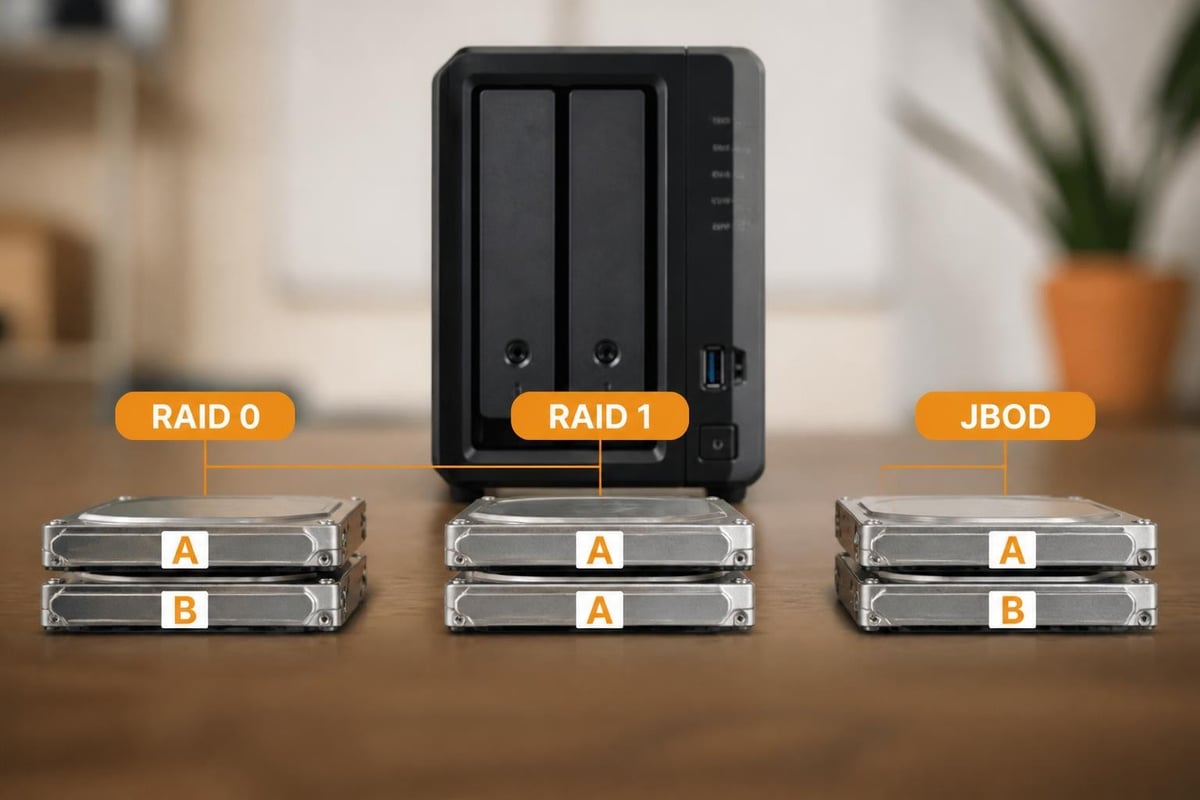
With only two bays, the nas synology ds220 offers limited but functional RAID choices. RAID 1 mirrors data across both drives, sacrificing half the raw capacity to protect against single-drive failure. In addition, RAID 0 stripes data for improved read/write speeds but offers zero redundancy. Most business deployments favour RAID 1 to ensure continuity if one drive fails, accepting the capacity trade-off as a necessary insurance policy.
- RAID 1: Full redundancy, 50% usable capacity, survives one drive failure
- RAID 0: No redundancy, 100% usable capacity, total data loss if either drive fails
- JBOD: Drives treated independently, no redundancy or striping
- Basic: Single-drive volume without RAID benefits
Nevertheless, relying solely on local RAID for data protection remains insufficient in 2026. Furthermore, ransomware attacks, fire, theft, or simultaneous multi-drive failures can compromise even mirrored arrays. Therefore, layering additional backup strategies becomes essential.
DiskStation Manager: Software Capabilities and Ecosystem
Synology's DiskStation Manager (DSM) operating system transforms the nas synology ds220 from simple network storage into a versatile platform. DSM 7.3, released in early 2026, introduced improved drive compatibility and security patches addressing vulnerabilities such as those tracked by NIST's National Vulnerability Database.
Package Centre and Application Versatility
The Package Centre offers hundreds of first-party and third-party applications, enabling the DS220+ to function as:
- File server with SMB, AFP, NFS, and FTP protocols
- Media server via Plex, Emby, or Synology's own Video Station
- Surveillance station supporting up to 8 camera licences (2 included)
- Docker host for containerised applications
- VPN server using OpenVPN or L2TP/IPsec
Moreover, the Moments app provides facial recognition and automatic photo organisation, whilst Note Station delivers collaborative document editing. Nevertheless, the 2 GB RAM ceiling limits the number of simultaneous packages and concurrent users. Therefore, businesses planning to run multiple services should monitor resource utilisation closely and consider whether a higher-tier model better suits their requirements.
Drive Compatibility and Vendor Policy Changes
In early 2025, Synology temporarily restricted third-party drives in new DSM releases, sparking significant user backlash. Following industry pressure, the company reversed course, and DSM 7.3 restored third-party HDD and SSD support, ensuring customers retain freedom of choice. Furthermore, this episode highlights the importance of vendor policies in total cost of ownership calculations.
Real-World Performance and Use Cases
Independent testing from StorageReview demonstrates that the nas synology ds220 achieves sequential read speeds of approximately 112 MB/s and write speeds of 109 MB/s in RAID 1 configuration over a single Gigabit connection. These figures prove adequate for:
- Document sharing across teams of 5-15 users
- Time Machine backups for Mac fleets
- Media libraries serving 1-2 simultaneous 1080p streams
- SMB access for Windows-based office suites
Nevertheless, organisations handling 4K video editing, large database operations, or serving 20+ concurrent users will encounter performance constraints. In addition, enabling multiple services simultaneously (Docker containers, surveillance, media transcoding) taxes the CPU and RAM, resulting in slower response times.
Backup Strategies for the DS220+
Synology's official backup guide outlines multiple approaches:
| Method | Description | Use Case |
|---|---|---|
| Hyper Backup | Incremental backups to local USB, remote NAS, or cloud (C2, S3, Azure) | Primary backup solution for most users |
| Snapshot Replication | Point-in-time file system snapshots with versioning | Ransomware recovery and accidental deletion |
| Cloud Sync | Bi-directional sync with Dropbox, Google Drive, OneDrive | Hybrid cloud workflows |
| Active Backup for Business | Agent-based backup of PCs, servers, VMs | Centralised device backup |
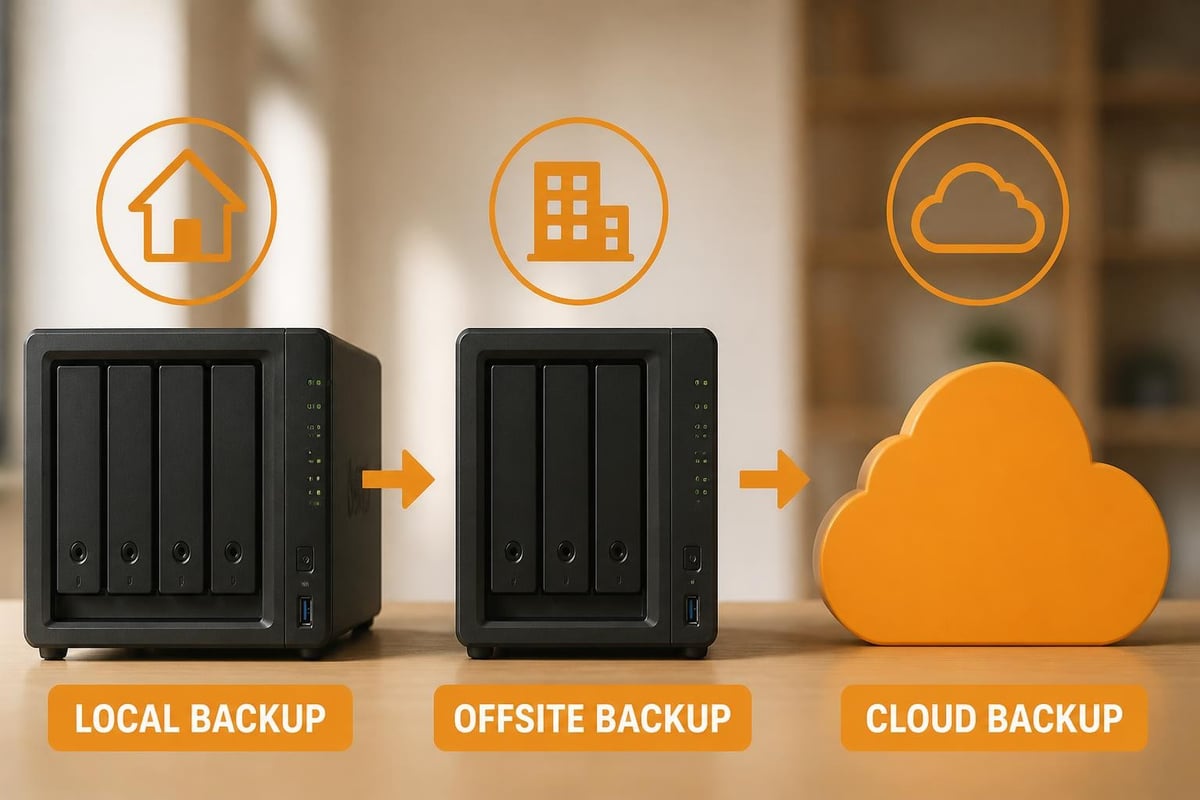
Moreover, the 3-2-1 backup rule (three copies, two media types, one offsite) remains the gold standard. Therefore, combining local RAID 1 on the nas synology ds220 with offsite cloud backup satisfies this requirement. Furthermore, businesses subject to GDPR or sector-specific regulations should verify that their backup destination complies with data residency mandates.
For European organisations seeking GDPR-compliant backup solutions, vBoxx's Microsoft 365 and Google Workspace backup service stores data in ISO 27001-certified Dutch datacentres with AES-256 encryption, protecting against accidental deletion, ransomware, and retention policy gaps whilst remaining outside the reach of the US CLOUD Act.
Security Considerations and Patch Management
Network-attached storage devices represent attractive targets for threat actors due to their role as centralised data repositories. In addition, recent PHP security issues affecting web-based interfaces demonstrate how upstream vulnerabilities cascade into NAS platforms. Therefore, maintaining current DSM versions and enabling automatic security updates proves essential.
Hardening the DS220+ Against Threats
- Disable default admin account and create individual user credentials
- Enable two-factor authentication for all accounts with external access
- Configure firewall rules to restrict access by IP range or VPN tunnel
- Disable unused services (FTP, Telnet, AFP if not required)
- Enable auto-block to prevent brute-force login attempts
- Implement snapshot schedules for rapid ransomware recovery
Nevertheless, perimeter security alone cannot guarantee protection. Moreover, as Windows Central's review notes, home and small business users often underestimate the importance of network segmentation. Therefore, isolating the nas synology ds220 on a separate VLAN and controlling access via firewall rules reduces the attack surface significantly.
Furthermore, businesses should audit their NAS configurations quarterly, reviewing shared folder permissions, user access logs, and installed packages. In addition, penetration testing or vulnerability scanning of internet-facing NAS devices helps identify misconfigurations before adversaries exploit them.
Comparing Business Storage Approaches
Small and medium-sized enterprises face a fundamental decision: deploy on-premises NAS hardware, migrate entirely to cloud storage, or adopt a hybrid model. Each approach presents distinct trade-offs in cost, control, compliance, and scalability.
| Factor | On-Premises NAS (DS220+) | Cloud Storage (e.g., vBoxxCloud) | Hybrid Approach |
|---|---|---|---|
| Initial Cost | Moderate (hardware + drives) | Low (subscription only) | Moderate to high |
| Ongoing Cost | Electricity, drives, time | Monthly per-user or per-TB fees | Both hardware and subscriptions |
| Data Sovereignty | Full local control | Depends on provider location | Balanced |
| Scalability | Limited by bays (2 on DS220+) | Elastic, unlimited | Flexible |
| Disaster Recovery | Requires separate backup strategy | Built-in redundancy across datacentres | Multi-layer protection |
| Compliance (GDPR) | Owner's responsibility | Provider's infrastructure matters | Shared responsibility |
For organisations prioritising data sovereignty, the nas synology ds220 offers complete control over physical storage location. Nevertheless, this control comes with operational responsibility: hardware maintenance, security patching, backup verification, and replacement planning all fall to internal IT teams or external consultants.
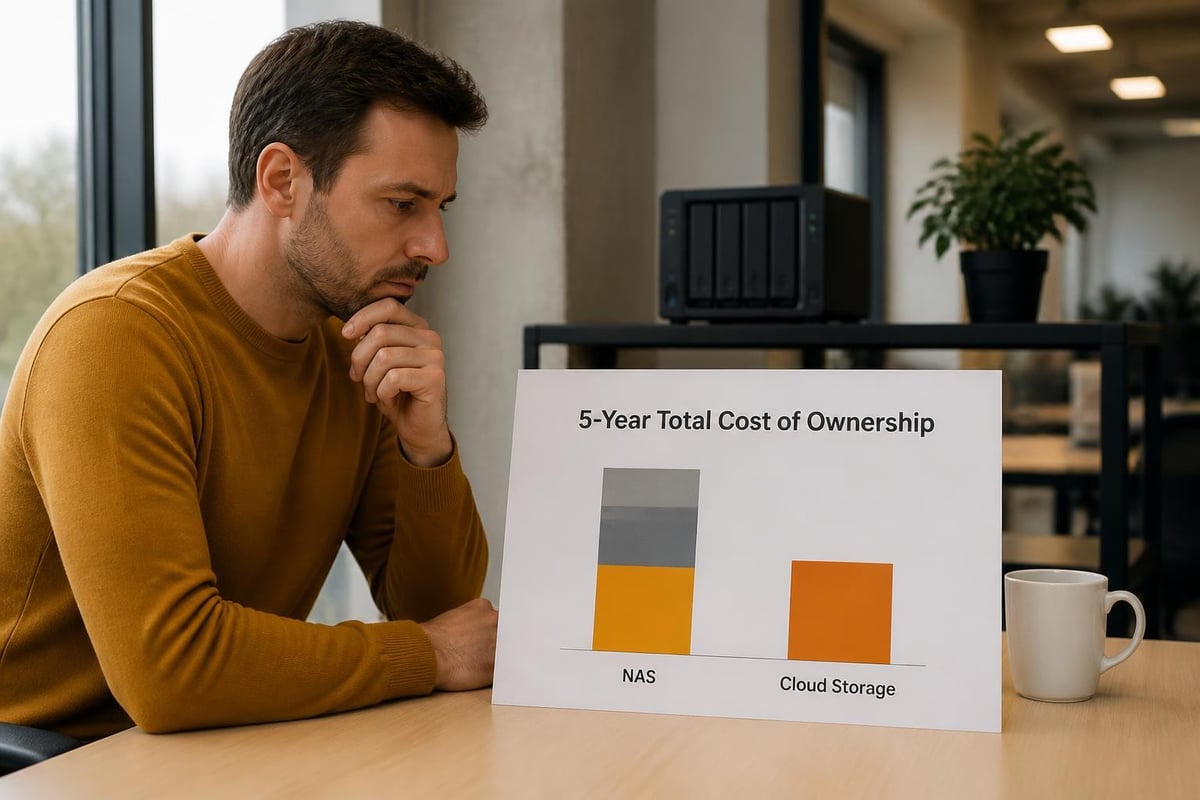
Conversely, European cloud storage solutions shift these burdens to specialist providers whilst maintaining GDPR compliance through EU-based datacentres. Therefore, businesses should evaluate not just purchase price but total cost of ownership, including staff time, electricity, and risk exposure.
Long-Term Viability and Upgrade Considerations
As 2026 progresses, the nas synology ds220 occupies an interesting position in the market. Launched in 2020, this six-year-old platform continues to receive DSM updates and security patches, yet newer models offer tangible improvements in processor performance, memory capacity, and expansion options.
When to Upgrade or Supplement
Organisations should consider moving beyond the DS220+ when:
- User count exceeds 15-20, causing performance degradation during peak access periods
- Data growth requires more than two drive bays, necessitating four-bay or larger enclosures
- 10GbE networking becomes standard across the infrastructure, rendering 1GbE a bottleneck
- Virtualisation workloads demand more RAM and CPU cores than the J4025 provides
- Compliance requirements mandate features unavailable in consumer-grade NAS hardware
Nevertheless, rather than replacing functional hardware, many businesses adopt a hybrid storage architecture. In this model, the nas synology ds220 continues serving local file access and Time Machine backups whilst cloud platforms handle collaboration, external sharing, and offsite disaster recovery. Furthermore, this approach preserves existing hardware investments whilst addressing scalability and compliance gaps.
Moreover, businesses exploring this hybrid path should verify that their chosen cloud provider offers seamless integration with on-premises infrastructure. Therefore, evaluating synchronisation clients, WebDAV compatibility, and API access becomes crucial during provider selection.
Performance Optimisation Tips
Extracting maximum value from the nas synology ds220 requires attention to configuration details beyond initial setup. Furthermore, small adjustments yield measurable improvements in throughput, reliability, and user experience.
Network Configuration
- Enable link aggregation across both Gigabit ports for 802.3ad bonding (requires compatible switch)
- Configure jumbo frames (MTU 9000) if all network devices support them
- Prioritise NAS traffic via QoS rules on managed switches
- Use wired connections for workstations performing intensive file operations
Storage Optimisation
- Enable SSD cache by installing M.2 SSDs in compatible USB adapters (requires DSM setup)
- Schedule resource-intensive tasks (antivirus scans, indexing) during off-peak hours
- Disable thumbnail generation for folders containing thousands of files
- Monitor S.M.A.R.T. data monthly to anticipate drive failures before they occur
Nevertheless, these optimisations only delay inevitable capacity and performance limits. Therefore, businesses should establish monitoring thresholds (e.g., 75% capacity, average CPU above 80%) that trigger expansion planning discussions rather than reactive crisis responses.
Integration with Business Infrastructure
Modern organisations rarely operate storage in isolation. Instead, the nas synology ds220 must integrate with authentication systems, backup platforms, collaboration tools, and mobile access requirements. Moreover, the quality of these integrations often determines whether NAS deployment succeeds or frustrates users.
Active Directory and LDAP
DSM supports joining Windows Active Directory domains or connecting to LDAP directories, enabling centralised user management. Furthermore, this integration allows employees to access network shares using existing corporate credentials rather than maintaining separate NAS passwords. Nevertheless, proper configuration requires understanding of domain trusts, DNS resolution, and service account permissions.
Mobile Access and External Sharing
Synology's QuickConnect service provides secure remote access without configuring firewall rules or dynamic DNS. In addition, the Drive mobile app syncs folders to iOS and Android devices, whilst the Moments app backs up photos automatically. Therefore, businesses gain consumer-grade convenience without sacrificing security, provided two-factor authentication remains enforced.
Moreover, understanding data protection compliance requirements becomes essential when enabling external access. Furthermore, businesses must document where data resides, who can access it, and how long it persists to satisfy GDPR Article 30 processing records.
Environmental and Operational Costs
Beyond acquisition price, the nas synology ds220 incurs ongoing electricity, cooling, and maintenance costs. Furthermore, organisations increasingly factor environmental impact into infrastructure decisions, both for corporate responsibility and cost control.
Power Consumption Profile
- Idle: approximately 15.87W
- Under load: approximately 22.83W
- Sleep mode: approximately 8.76W
Therefore, running the DS220+ continuously costs roughly £35-50 annually in electricity at typical UK commercial rates (assuming 20p per kWh). Moreover, adding drives increases consumption proportionally, as does enabling intensive services like Plex transcoding or Docker containers.
For businesses committed to sustainability, evaluating providers who prioritise green hosting practices and renewable energy-powered datacentres offers an alternative path. Nevertheless, local NAS devices remain more energy-efficient than running equivalent file server virtual machines on larger infrastructure.
Alternative Deployment Models
Whilst purchasing and managing a nas synology ds220 suits many small businesses, alternative models warrant consideration. Furthermore, understanding the full spectrum of options enables informed decisions aligned with business priorities.
Managed NAS Hosting
Some providers offer dedicated Synology NAS hosting in professional datacentres, delivering NAS benefits without physical hardware management. Therefore, businesses gain redundant power, multi-gigabit connectivity, and expert support whilst retaining DSM's familiar interface. Moreover, this approach addresses disaster recovery concerns inherent in single-location deployments.
Nevertheless, monthly hosting fees typically exceed the annualised cost of on-premises hardware, making this option most attractive for organisations lacking IT staff or facing high connectivity costs. In addition, evaluating hosting providers requires scrutiny of datacentre certifications, backup policies, and support response times.
Cloud-Native Alternatives
For teams prioritising collaboration over traditional file serving, cloud storage platforms offer fundamentally different architectures. Furthermore, features like eIDAS-compliant digital signing, AI-assisted document search, and granular sharing permissions exceed typical NAS capabilities. Therefore, businesses should map their actual workflows rather than defaulting to familiar file server paradigms.
The Synology DS220+ remains a capable foundation for small business storage needs in 2026, offering reliable local access, flexible backup options, and extensive application support through DSM. Nevertheless, comprehensive data protection demands layering cloud backup, implementing robust security practices, and planning for eventual capacity or performance limits. For organisations seeking GDPR-compliant European infrastructure, vBoxx delivers secure hosting, cloud storage, and backup solutions from ISO 27001-certified Dutch datacentres, complementing on-premises hardware with professional-grade redundancy and expertise. Whether deploying local NAS, migrating to cloud platforms, or adopting hybrid architectures, partnering with providers who prioritise privacy, compliance, and sustainability ensures your data infrastructure supports business growth without compromising security or regulatory obligations.