

The digital transformation of business operations has fundamentally changed how organisations manage, store, and distribute information. As a result, file sharing cloud services have emerged as essential infrastructure for companies of all sizes, enabling seamless collaboration whilst reducing dependency on physical storage systems. Moreover, these platforms offer far more than simple file storage; they provide comprehensive ecosystems for managing workflows, controlling access, and maintaining regulatory compliance.
Consequently, for businesses prioritising security and sustainability, understanding the nuances of these services becomes critical when selecting solutions that align with operational requirements and corporate values. In an increasingly data-driven landscape, making informed decisions about file sharing cloud services is therefore a strategic necessity rather than a purely technical choice.
The Evolution of Enterprise File Sharing
Traditional file sharing methods relied heavily on physical media, email attachments, and FTP servers. These approaches created significant bottlenecks in productivity and introduced substantial security vulnerabilities. Modern file sharing cloud services have revolutionised this landscape by providing centralised, accessible platforms that maintain robust security protocols whilst facilitating instantaneous collaboration.
The shift towards cloud-based solutions reflects broader trends in digital infrastructure. Businesses now demand platforms that integrate seamlessly with existing workflows, support remote workforces, and scale effortlessly as organisational needs evolve. According to research presented in innovative file sharing methodologies, contemporary systems employ dual deduplication techniques to enhance both security and efficiency.

Key Components of Modern Cloud File Sharing
Effective file sharing cloud services incorporate multiple layers of functionality. Understanding these components helps organisations evaluate platforms against specific requirements.
Core Infrastructure Elements:
- Storage architecture: Distributed systems that replicate data across multiple geographical locations
- Synchronisation engines: Real-time updates ensuring consistency across all connected devices
- Access control frameworks: Granular permissions defining user capabilities at file and folder levels
- Encryption protocols: End-to-end security protecting data during transit and at rest
- Version control systems: Historical tracking enabling recovery and audit trails
The architecture supporting these services determines performance, reliability, and security outcomes. Enterprise-grade platforms typically employ redundant storage systems, automated backup protocols, and sophisticated caching mechanisms to optimise access speeds regardless of user location.
Security Considerations for Business File Sharing
Security remains paramount when evaluating file sharing cloud services. Indeed, data breaches can carry severe consequences, including financial penalties, reputational damage, and operational disruption. For this reason, organisations must scrutinise security features carefully, looking beyond surface-level encryption claims. In particular, it is essential to assess access controls, monitoring capabilities, compliance certifications, and incident response procedures to ensure comprehensive protection.
Authentication and Access Management
Multi-factor authentication (MFA) represents the minimum acceptable standard for business file sharing. Advanced platforms extend beyond basic password protection by implementing:
- Biometric verification systems
- Hardware token integration
- Time-based access restrictions
- IP address allowlisting
- Device authentication protocols
Studies on secure cloud storage access mechanisms demonstrate how properly implemented authentication systems prevent unauthorised access whilst maintaining user convenience. The balance between security and usability determines adoption rates within organisations.
| Security Feature | Business Benefit | Implementation Complexity |
|---|---|---|
| Zero-knowledge encryption | Complete data privacy | High |
| Granular permissions | Controlled information flow | Medium |
| Activity logging | Comprehensive audit trails | Low |
| Data loss prevention | Compliance adherence | High |
| Automated backups | Business continuity | Low |
Encryption Standards and Data Protection
Encryption quality directly impacts data security. Therefore, file sharing cloud services should employ AES-256 encryption as standard, while also adding additional layers to protect metadata and file structures. Furthermore, client-side encryption ensures data remains encrypted before leaving organisational networks, thereby preventing providers from accessing unencrypted information.
Taking security a step further, zero-knowledge architectures ensure that service providers cannot decrypt customer data under any circumstances. As a result, this approach is particularly appealing to organisations operating in regulated industries, where data sovereignty and strict privacy requirements demand absolute control over information assets.

Collaborative Features and Workflow Integration
Beyond basic file storage, modern platforms now serve as comprehensive collaboration hubs. In fact, file sharing cloud services integrate seamlessly with productivity suites, project management tools, and communication platforms. As a result, they create unified digital workspaces that centralise information and streamline workflows. Moreover, this integration reduces the need to switch between multiple systems, thereby improving efficiency and team coordination.
Real-Time Collaboration Capabilities
Contemporary platforms enable multiple users to work simultaneously on shared documents, spreadsheets, and presentations. This functionality eliminates version conflicts and reduces email exchanges, accelerating project completion whilst maintaining document integrity.
Essential collaboration features include:
- Concurrent editing: Multiple contributors working simultaneously with live updates
- Comment threads: Contextual discussions attached to specific document sections
- Change tracking: Transparent visibility into modifications and contributors
- Notification systems: Automated alerts for updates, comments, and sharing activities
- Preview capabilities: In-browser viewing eliminating download requirements
Integration with existing business systems determines how effectively file sharing cloud services enhance workflows. APIs and pre-built connectors enable organisations to incorporate cloud storage into custom applications, automated processes, and existing software ecosystems.
Platform Selection Criteria
Choosing appropriate file sharing cloud services requires systematic evaluation against organisational requirements. Different providers emphasise varying aspects of functionality, security, and performance.
Performance and Reliability Metrics
Upload and download speeds directly impact productivity, particularly for organisations handling large media files or datasets. Latency, throughput, and connection stability vary significantly between providers based on infrastructure distribution and network optimisation.
Critical performance indicators:
- Average upload/download speeds across geographical locations
- Service uptime guarantees (typically 99.9% or higher)
- Maximum file size limitations
- Concurrent user capacity
- Synchronisation delay thresholds
Research from cloud storage for scientific collaboration highlights how performance requirements differ based on use cases. Scientific computing demands differ substantially from standard business document sharing, necessitating tailored solutions.
Cost Structure and Scalability
Pricing models for file sharing cloud services vary considerably. Understanding total cost of ownership requires examining multiple factors beyond headline per-user pricing.
| Pricing Component | Consideration | Budget Impact |
|---|---|---|
| User licences | Per-seat versus unlimited models | Primary cost driver |
| Storage capacity | Included allocation and overage rates | Variable based on usage |
| Bandwidth | Transfer limits and excess charges | Often overlooked |
| Advanced features | Premium capabilities requiring upgrades | Incremental costs |
| Support tiers | Standard versus priority assistance | Quality of service factor |
Scalability extends beyond simply adding users. Organisations should evaluate how platforms accommodate growth in storage requirements, feature needs, and integration complexity without necessitating disruptive migrations.
Open-Source Alternatives and Self-Hosted Solutions
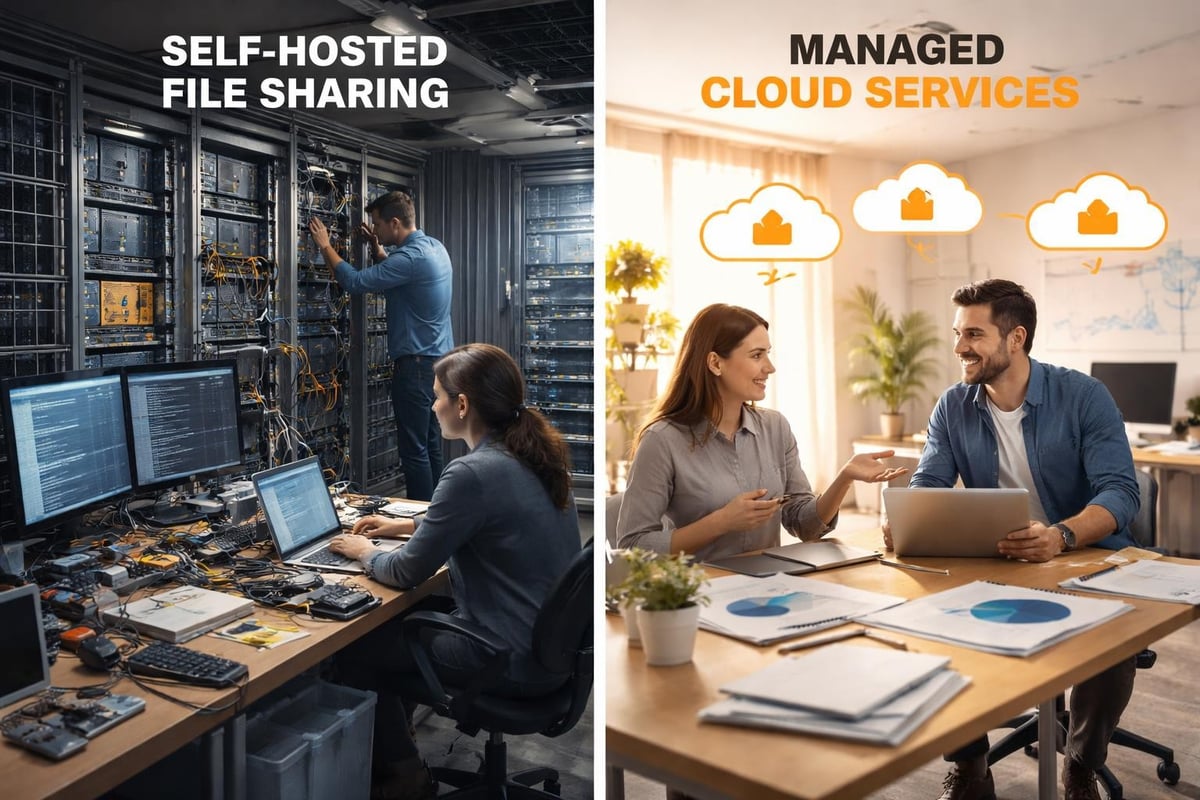
Not all organisations, however, opt for commercial file sharing cloud services. Instead, some turn to open-source platforms to gain greater customisation and full control over their infrastructure. In particular, solutions such as ownCloud and Seafile enable businesses to deploy self-hosted file sharing systems. As a result, organisations can maintain flexibility in configuration, strengthen security implementation, and tailor the environment to their specific operational requirements.
Benefits of Self-Hosted Platforms
Self-hosting provides several advantages for organisations with specific requirements or regulatory constraints:
- Complete data sovereignty with files never leaving organisational infrastructure
- Customisation freedom to modify functionality matching unique workflows
- Independence from vendor pricing changes or service discontinuation
- Enhanced privacy through elimination of third-party access
- Integration flexibility with legacy systems and proprietary applications
However, self-hosted solutions require technical expertise, ongoing maintenance, and infrastructure investment. Organisations must weigh these operational demands against the benefits of provider-managed services. The architectural considerations for enterprise file shares demonstrate how hybrid approaches combine on-premises control with cloud scalability.
Compliance and Regulatory Frameworks
Regulated industries, in particular, face stringent requirements governing data handling, storage, and transmission. Consequently, organisations operating in these sectors must apply heightened scrutiny when selecting technology partners. File sharing cloud services, therefore, must not only deliver strong technical safeguards but also actively support compliance with recognised regulatory and security frameworks.
For example, this often includes alignment with standards such as General Data Protection Regulation, Health Insurance Portability and Accountability Act, SOC 2, and ISO/IEC 27001. Moreover, providers should offer documented controls, audit reports, and clear data processing agreements. In doing so, they enable organisations to demonstrate accountability, mitigate risk, and maintain ongoing regulatory compliance.
Data Residency and Sovereignty
Regulatory requirements often mandate data storage within specific geographical boundaries. As a result, organisations must carefully evaluate where and how their data is hosted. File sharing cloud services, therefore, should provide transparent information about data centre locations and clearly outline their data residency policies. In addition, they should offer options to restrict storage to compliant jurisdictions, thereby helping businesses meet legal and industry-specific obligations.
Compliance-critical features:
- Configurable data residency controls
- Detailed audit logs tracking all access and modifications
- Data retention policies matching legal requirements
- Secure deletion capabilities ensuring complete data removal
- Regular third-party security assessments and certifications
Documentation and reporting capabilities support compliance officers in demonstrating adherence to regulatory standards. Platforms generating detailed activity reports, access logs, and security event summaries simplify audit processes whilst reducing administrative burden.
Migration Strategies and Implementation
Transitioning to new file sharing cloud services, however, requires careful planning to minimise disruption. In particular, successful implementations follow structured approaches that address technical, operational, and human factors. For instance, assessing existing workflows, training staff, and ensuring system compatibility are all critical steps. Moreover, phased rollouts and continuous monitoring can help identify and resolve issues early. Ultimately, a well-planned transition ensures smooth adoption and maximises the benefits of the new cloud environment.
Planning Your Cloud Migration
Effective migration begins with comprehensive assessment of existing file structures, user requirements, and integration dependencies. Organisations should inventory current storage systems, identify critical workflows, and establish success criteria before selecting platforms.
Migration planning checklist:
- Audit existing file structures and identify redundant or obsolete data
- Map user roles and permission requirements to new platform capabilities
- Identify integration points with business applications and workflows
- Establish data transfer methods and bandwidth requirements
- Develop user training programmes and support resources
- Create rollback procedures addressing potential implementation issues
Phased deployments reduce risk by allowing organisations to validate functionality with limited user groups before broader rollout. This approach identifies configuration issues, integration gaps, and usability concerns whilst minimising impact on business operations.
Performance Optimisation Techniques
Maximising value from file sharing cloud services, therefore, requires ongoing optimisation. In particular, organisations should regularly review usage patterns, while also identifying bottlenecks and adjusting configurations as needed. Furthermore, continuous monitoring and performance tuning help ensure the system operates efficiently. As a result, businesses can maintain optimal performance, enhance user experience, and fully leverage the capabilities of their file sharing cloud services.
Caching and Synchronisation Strategies
Intelligent caching reduces bandwidth consumption whilst improving access speeds. Modern platforms employ sophisticated algorithms predicting file access patterns and pre-loading frequently accessed content to local storage.
Selective synchronisation allows users to designate which folders remain continuously synchronised whilst others remain cloud-only. This approach optimises local storage utilisation on devices with limited capacity whilst maintaining access to complete file libraries.
| Optimisation Strategy | Performance Impact | User Experience Benefit |
|---|---|---|
| Predictive caching | 40-60% faster access | Near-instant file opening |
| Differential sync | 70-80% bandwidth reduction | Faster updates |
| Compression | 30-50% storage savings | Lower costs |
| CDN integration | 50-70% latency reduction | Global accessibility |
Research into optimised cloud data transfer scheduling demonstrates how intelligent scheduling algorithms significantly improve transfer efficiency, particularly for organisations regularly moving large datasets between systems.
Green Hosting and Environmental Considerations
Environmental sustainability increasingly influences technology procurement decisions. File sharing cloud services hosted in data centres powered by renewable energy align with corporate sustainability commitments whilst reducing carbon footprints.
Providers committed to green hosting implement multiple environmental initiatives:
- Renewable energy purchasing agreements for data centre power
- Energy-efficient cooling systems reducing overall consumption
- Hardware lifecycle management including responsible recycling
- Carbon offset programmes compensating unavoidable emissions
- Transparent environmental reporting demonstrating measurable impact
Organisations prioritising sustainability should evaluate provider environmental credentials alongside technical capabilities. Third-party certifications and published sustainability reports provide verification of environmental claims.
Enterprise-Grade Support and Service Level Agreements
Technical support quality significantly impacts operational continuity. File sharing cloud services should offer responsive, knowledgeable assistance through multiple channels including phone, email, and live chat.
Service Level Agreements (SLAs) establish contractual commitments regarding uptime, performance, and support responsiveness. Enterprise agreements typically guarantee 99.95% or higher availability with financial penalties for shortfalls. Response time commitments ensure critical issues receive immediate attention, minimising potential business disruption.
Evaluating Provider Reliability
Provider track record offers insight into future performance. Organisations should research incident histories, read independent reviews, and request customer references before committing to platforms. Established providers with proven reliability records reduce implementation risk whilst ensuring long-term platform viability.
Integration Ecosystem and API Capabilities
Modern business environments employ diverse software systems requiring seamless data flow. File sharing cloud services with robust API capabilities enable custom integrations supporting unique workflows and business processes.
Integration considerations:
- RESTful API availability with comprehensive documentation
- Webhook support for event-driven automation
- Pre-built connectors for common business applications
- Developer resources including SDKs and code libraries
- Sandbox environments for testing integrations safely
Platforms supporting standards-based protocols facilitate integration with existing systems whilst reducing custom development requirements. WebDAV compatibility, for example, enables file sharing cloud services to function as network drives within legacy applications expecting traditional file server interfaces.
Mobile Access and Cross-Platform Compatibility
Workforce mobility demands file sharing cloud services accessible from any device. Native mobile applications for iOS and Android should offer full functionality rather than limited subsets available through web interfaces.
Cross-platform synchronisation ensures consistent experiences regardless of device type. Users should access identical file structures, permissions, and collaborative features whether working from desktop computers, tablets, or smartphones. Offline access capabilities maintain productivity during connectivity interruptions by caching files locally and synchronising changes once connections restore.
Selecting appropriate file sharing cloud services requires balancing security, functionality, performance, and cost considerations against specific organisational requirements. As businesses increasingly depend on cloud infrastructure for critical operations, partnering with providers emphasising security, privacy, and sustainability becomes essential for long-term success. vBoxx delivers enterprise-grade cloud solutions combining robust security protocols with green hosting practices, offering businesses reliable file sharing infrastructure built on sustainable digital foundations that protect data whilst supporting environmental responsibility.