
The landscape of application development continues to evolve rapidly, and choosing the right hardware platform has become increasingly critical for businesses prioritising security, performance, and cost-effectiveness. Mac mini development has emerged as a compelling solution for organisations seeking robust development capabilities without the premium price tag of larger workstations. Furthermore, the compact nature of this hardware makes it particularly suitable for cloud-based development environments where physical space and energy consumption matter significantly. Therefore, understanding how to leverage Mac Mini systems for development workflows can provide substantial benefits for businesses operating in secure cloud services and related industries.
Why Mac Mini Development Matters for Modern Businesses
The Mac Mini has transformed from a consumer-oriented compact computer into a serious development platform, particularly with Apple's transition to their custom silicon architecture. Moreover, the latest Mac Mini models deliver exceptional performance-per-watt ratios, which aligns perfectly with sustainable computing practices. In addition, businesses focused on developing applications for Apple ecosystems find that Mac mini development provides the necessary native environment for iOS, iPadOS, macOS, and watchOS application creation.

Nevertheless, the appeal extends beyond Apple platform development. Many organisations utilise Mac Mini systems for cross-platform development, leveraging containerisation and virtualisation technologies that run efficiently on Apple silicon. Furthermore, the security features built into modern Mac Mini hardware, including the Secure Enclave and hardware-verified secure boot, provide foundational protections that complement secure development practices.
Performance Specifications and Development Capabilities
The current generation Mac Mini configurations offer varying performance levels suitable for different development scenarios. Therefore, selecting the appropriate specification requires understanding your specific workload requirements.
| Configuration | Processor | RAM Options | Storage | Best For |
|---|---|---|---|---|
| Base Model | M4 | 16GB-32GB | 256GB-2TB SSD | Web development, scripting |
| Mid-Range | M4 Pro | 24GB-48GB | 512GB-4TB SSD | Mobile app development, testing |
| High-End | M4 Pro | 48GB-64GB | 1TB-8TB SSD | ML workloads, complex builds |
In addition, the unified memory architecture in Apple silicon provides significant advantages for development workflows that require rapid context switching between IDEs, simulators, and testing environments. Moreover, detailed performance analyses demonstrate that even base configurations handle multiple simultaneous build processes efficiently.
Setting Up Mac Mini Development Environments
Establishing an optimal development environment requires careful consideration of both software tooling and security configurations. Furthermore, organisations must balance productivity requirements with security policies that protect intellectual property and customer data.
Initial Configuration and Security Hardening
The first steps in preparing a Mac Mini for development work involve establishing baseline security measures. Therefore, implementing FileVault encryption, configuring firewall rules, and establishing secure authentication mechanisms should precede any development tool installation. In addition, comprehensive setup guides provide detailed procedures for establishing secure development foundations.
Essential security configurations include:
- System Integrity Protection (SIP): Maintains kernel and system file protections
- Gatekeeper policies: Controls application installation sources
- Sandboxing: Isolates development environments from system resources
- Credential management: Implements secure storage for API keys and certificates
Nevertheless, security measures must not impede development productivity. Consequently, establishing clear policies regarding development tool exceptions whilst maintaining overall system hardening creates the optimal balance.
Development Tool Installation and Configuration
Mac mini development requires a curated selection of tools tailored to your specific development focus. Moreover, package managers like Homebrew simplify installation and maintenance of command-line utilities, programming languages, and development frameworks.
Core development tools typically include:
- Xcode and Command Line Tools for native Apple platform development
- Docker Desktop for containerised development environments
- Version control systems including Git with secure credential helpers
- IDE or text editors configured with appropriate extensions and plugins
- Database management tools for local development and testing
Furthermore, organisations should establish standardised configuration templates that ensure consistency across development teams whilst incorporating security best practices. Therefore, infrastructure-as-code approaches to development environment setup reduce configuration drift and improve onboarding efficiency.
Remote Mac Mini Development Workflows
The compact footprint and efficient power consumption of Mac Mini systems make them exceptionally well-suited for remote development scenarios. In addition, hosting Mac Mini hardware in secure data centres enables distributed teams to access consistent development environments regardless of their physical location.

Cloud-Hosted Development Infrastructure
Organisations increasingly deploy Mac Mini systems in co-location facilities or cloud provider data centres, creating centralised development infrastructure accessible to distributed teams. Moreover, this approach provides several compelling advantages:
- Centralised backup and disaster recovery procedures
- Consistent development environments across team members
- Reduced hardware costs for individual developers
- Enhanced security through controlled network access
- Simplified compliance with data residency requirements
Nevertheless, implementing remote development workflows requires careful attention to network security, authentication mechanisms, and session management. Therefore, establishing VPN connectivity, implementing certificate-based authentication, and deploying session recording for compliance purposes become essential components.
Integration with Secure Cloud Services
Mac mini development environments benefit significantly from integration with enterprise-grade cloud infrastructure. Furthermore, connecting development systems to secure cloud storage, virtual servers, and backup solutions ensures that source code, build artifacts, and development data receive appropriate protection.
Businesses operating secure cloud services can leverage their existing infrastructure to support Mac Mini development workflows. In addition, implementing automated backup schedules that capture both system configurations and development work products protects against data loss whilst supporting disaster recovery objectives. Moreover, understanding these cloud integration possibilities might benefit from a comprehensive overview, which organisations like vBoxx can provide through their consultation services, helping development teams architect secure, efficient workflows.
Optimising Mac Mini Development Workflows
Maximising productivity whilst maintaining security requires thoughtful workflow design and tool selection. Therefore, organisations should evaluate their specific development processes to identify optimisation opportunities.
Build and Continuous Integration Systems
Mac mini development platforms excel at hosting continuous integration and deployment pipelines for Apple platform applications. Furthermore, the ability to run multiple simultaneous build jobs on a single Mac Mini makes these systems cost-effective CI/CD runners.
| CI/CD Approach | Setup Complexity | Resource Efficiency | Security Considerations |
|---|---|---|---|
| Jenkins | Moderate | High | Requires hardening |
| GitLab Runner | Low | Moderate | Built-in security features |
| GitHub Actions Self-Hosted | Low | Moderate | Token management critical |
| Xcode Cloud | Very Low | High | Apple ecosystem only |
In addition, containerising build environments using Docker ensures consistency across development, testing, and production deployments. Nevertheless, organisations must carefully manage container image security, regularly scanning for vulnerabilities and maintaining updated base images.
Testing and Quality Assurance Environments
Mac Mini systems provide excellent platforms for automated testing frameworks, supporting both unit testing and UI automation for Apple platform applications. Moreover, the ability to run iOS and iPadOS simulators alongside macOS testing environments streamlines quality assurance processes.
Testing workflow optimisations include:
- Parallel test execution across multiple simulator configurations
- Automated screenshot capture for visual regression testing
- Integration with test case management systems
- Performance profiling using Instruments and third-party tools
- Security scanning integrated into build pipelines
Furthermore, establishing dedicated testing Mac Mini systems separate from active development machines improves reliability and ensures test environment consistency. Therefore, organisations should consider multi-system architectures that allocate specific Mac Mini units to development, testing, and production support roles.
Advanced Mac Mini Development Scenarios
Beyond traditional application development, Mac Mini systems support increasingly sophisticated workloads including machine learning model training, data processing pipelines, and specialised development scenarios.
Machine Learning and AI Development
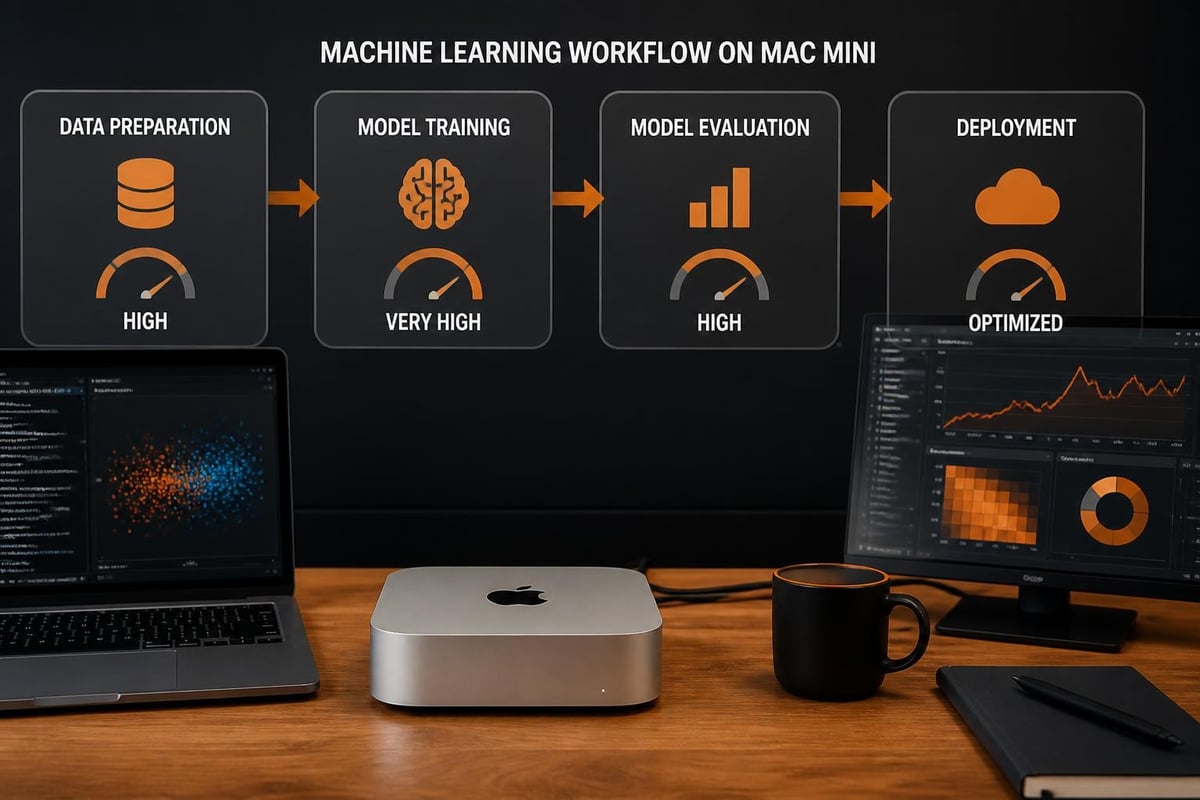
The Neural Engine incorporated into Apple silicon provides hardware acceleration for machine learning workloads, making Mac mini development viable for certain AI development tasks. In addition, frameworks like Core ML, Create ML, and TensorFlow with Metal acceleration leverage this specialised hardware effectively.
Nevertheless, research applications demonstrate that Mac Mini systems can handle sophisticated neural network training for specific use cases, particularly when model sizes remain within available memory constraints. Moreover, the unified memory architecture eliminates traditional CPU-GPU data transfer bottlenecks that limit training performance on discrete GPU systems.
Specialised Development Workflows
Certain development scenarios benefit particularly from Mac Mini hardware characteristics. Furthermore, audio development, video processing applications, and graphics-intensive software leverage the media engines built into Apple silicon for hardware-accelerated encoding and decoding operations.
Specialised development areas include:
- Audio plugin development with low-latency testing capabilities
- Video codec development utilising hardware acceleration
- Graphics API development for Metal and cross-platform rendering
- IoT device development requiring macOS development tools
- Cross-platform desktop application development
Therefore, organisations should evaluate whether their specific development requirements align with Mac Mini capabilities before committing to this platform. In addition, understanding pricing considerations helps establish accurate budget projections for development infrastructure investments.
Maintenance and Lifecycle Management
Establishing effective maintenance procedures ensures Mac mini development infrastructure remains secure, performant, and reliable throughout its operational lifecycle. Moreover, proactive system management reduces unexpected downtime that disrupts development workflows.
System Updates and Patch Management
Apple regularly releases macOS updates containing security patches, performance improvements, and new features. Nevertheless, development environments require careful update testing to prevent disrupting established workflows or breaking tool compatibility.
Recommended update procedures:
- Monitor Apple security bulletins and update release notes
- Test updates in isolated development environments before broad deployment
- Maintain rollback procedures using Time Machine or system snapshots
- Schedule updates during low-activity periods to minimise disruption
- Document compatibility issues with specific development tools
Furthermore, organisations should establish clear policies regarding update timing, balancing security requirements against stability considerations. Therefore, maintaining at least one generation behind current releases for production development systems whilst testing newer versions in parallel provides appropriate risk mitigation.
Hardware Lifecycle and Upgrade Planning
Mac Mini systems typically provide excellent longevity, with many units remaining viable for development work well beyond standard three-year depreciation cycles. In addition, the lack of user-serviceable components in modern Mac Mini designs requires upfront specification planning rather than incremental upgrades.
Nevertheless, planning hardware refresh cycles around Apple silicon generation transitions ensures development teams access current performance capabilities and security features. Moreover, anticipated future releases provide visibility into upgrade timing considerations for long-term infrastructure planning.
Training and Team Onboarding
Maximising Mac mini development platform value requires ensuring team members possess appropriate skills and knowledge. Furthermore, organisations should invest in training resources that accelerate developer productivity whilst promoting security best practices.
Developer Onboarding Resources
New team members benefit from structured onboarding processes that introduce development environment configuration, security policies, and workflow standards. In addition, video tutorials and documentation repositories provide self-service learning resources that reduce onboarding time.
Effective onboarding programmes include:
- Environment setup documentation with automated configuration scripts
- Security policy training covering data handling and access controls
- Workflow tutorials demonstrating build, test, and deployment processes
- Tool-specific training for IDEs, version control, and collaboration platforms
- Mentorship pairing with experienced team members
Moreover, maintaining up-to-date documentation that reflects current development environment configurations prevents knowledge gaps as team composition evolves. Therefore, organisations should allocate time for documentation maintenance as part of regular development workflow reviews.
Continuous Learning and Skill Development
The rapidly evolving nature of development technologies requires ongoing learning initiatives. Furthermore, encouraging team members to explore new capabilities within the Mac Mini platform, experiment with emerging tools, and share knowledge across the organisation strengthens overall development capabilities.
Nevertheless, balancing exploration time against delivery commitments requires thoughtful management support and clear expectations. Consequently, establishing dedicated time allocations for skill development, attending conferences, and participating in developer communities contributes to long-term team effectiveness.
Cost Analysis and Return on Investment
Understanding the total cost of ownership for Mac mini development infrastructure enables informed decision-making regarding hardware investments and deployment strategies. Moreover, comparing various deployment models reveals optimisation opportunities that reduce costs whilst maintaining or improving capabilities.
| Cost Factor | On-Premises | Co-Location | Cloud Provider |
|---|---|---|---|
| Initial Hardware | £800-£2,400 | £800-£2,400 | £0 (rental) |
| Monthly Operating | £20-£40 power | £80-£150 | £120-£200+ |
| Backup Infrastructure | Additional cost | Included/extra | Typically included |
| Maintenance | Internal staff time | Reduced burden | Provider managed |
| Scalability | Limited by space | Moderate | High flexibility |
Furthermore, organisations must consider hidden costs including network infrastructure, physical security measures, and disaster recovery capabilities when evaluating deployment options. Therefore, partnering with providers offering comprehensive solutions that include backup systems, security monitoring, and maintenance support often delivers better value than fragmented service relationships.
Security Considerations for Development Infrastructure
Protecting development infrastructure requires comprehensive security measures addressing physical security, network security, access controls, and data protection. In addition, development environments often contain sensitive intellectual property, customer data used for testing, and credentials providing access to production systems.
Critical security measures include:
- Multi-factor authentication for all system access
- Network segmentation isolating development infrastructure
- Encryption for data at rest and in transit
- Regular security audits and vulnerability assessments
- Incident response procedures specific to development environments
Moreover, establishing clear policies regarding acceptable use, data handling, and security incident reporting creates the cultural foundation supporting technical security controls. Nevertheless, security measures must remain practical and usable to ensure developer compliance rather than workarounds that undermine protections.
Mac mini development provides businesses with powerful, efficient, and secure application creation capabilities that align particularly well with sustainable computing practices and distributed team workflows. Furthermore, integrating Mac Mini infrastructure with enterprise-grade cloud services, backup solutions, and security measures establishes robust development environments supporting business-critical application delivery. Whether establishing new development capabilities or optimising existing workflows, organisations benefit from partnering with providers who understand both development requirements and security imperatives. vBoxx delivers the secure hosting infrastructure, backup solutions, and consultancy services that complement Mac Mini development platforms, ensuring your development teams operate with confidence, reliability, and the security your business demands.