

In today's digital landscape, businesses rely on an ever-expanding array of devices to conduct operations, communicate with clients, and store critical information. From smartphones and tablets to laptops and workstations, each device contains valuable data that could prove catastrophic to lose. A robust device backup strategy isn't merely a technical consideration; it represents a fundamental pillar of business continuity planning. Understanding how to protect data across multiple devices whilst maintaining accessibility and security has become essential for organisations of all sizes.
Understanding Device Backup Fundamentals
Device backup encompasses the systematic process of duplicating data from various endpoints to secure storage locations. This practice ensures that information remains recoverable following hardware failures, cyberattacks, accidental deletions, or natural disasters.
Modern businesses must protect data across diverse device ecosystems. Mobile devices present unique challenges due to their portability and susceptibility to loss or theft. Desktop computers and laptops contain substantial amounts of work-related data that requires regular protection. Servers and network-attached storage devices often hold the most critical business information, demanding rigorous backup protocols.
The 3-2-1 Backup Methodology
The industry-standard approach to comprehensive data protection follows a simple yet effective principle. Maintain at least three copies of your data, store them on two different media types, and keep one copy offsite. This methodology provides resilience against various failure scenarios.
Key benefits of the 3-2-1 approach include:
- Protection against simultaneous failures of multiple storage systems
- Insurance against location-specific disasters affecting primary data centres
- Flexibility to restore from the most convenient backup source
- Reduced risk of total data loss from any single event

Following established backup best practices strengthens your organisation's resilience. These principles apply regardless of organisation size or industry sector.
Mobile Device Backup Strategies
Smartphones and tablets have evolved into primary computing devices for many professionals. These portable endpoints contain emails, documents, contacts, photographs, and application data that support daily business operations.
Automated Cloud Synchronisation
Modern mobile operating systems offer native backup capabilities that automatically synchronise data to cloud storage. iOS devices utilise iCloud, whilst Android devices leverage Google's backup infrastructure. These systems capture application data, device settings, messages, and media files without requiring manual intervention.
However, businesses must carefully evaluate what data syncs to consumer cloud services. Sensitive client information, proprietary documents, and confidential communications may require enterprise-grade solutions with enhanced security controls. Security recommendations for mobile backups emphasise implementing appropriate safeguards to prevent unauthorised access.
Local Backup Alternatives
Creating local backups provides an additional layer of protection independent of internet connectivity. Both iOS and Android platforms support direct backups to connected computers. These local copies offer faster restoration speeds and greater control over backup data.
| Backup Method | Advantages | Limitations |
|---|---|---|
| Cloud Automatic | Continuous protection, remote access, minimal user effort | Requires internet, potential privacy concerns, storage costs |
| Local Computer | Fast restoration, complete control, no ongoing fees | Requires manual initiation, vulnerable to local disasters |
| Hybrid Approach | Maximum protection, flexible recovery options | Higher complexity, resource investment |
Organisations should establish clear policies governing mobile device backup configurations. Standardising backup methods across company-owned devices simplifies management whilst ensuring consistent protection levels.
Computer and Workstation Protection
Desktop computers and laptops serve as primary workstations where employees create documents, analyse data, develop software, and manage projects. The volume and value of data residing on these devices necessitate comprehensive backup strategies.
File-Level Versus Image-Level Backups
Two fundamental approaches exist for backing up computer systems. File-level backups selectively copy individual documents and folders, offering granular recovery options and efficient storage utilisation. Image-level backups capture complete system snapshots, including operating systems, applications, and configurations.
File-level advantages:
- Quick recovery of specific documents
- Efficient use of storage capacity
- Easy verification of backup contents
- Platform-independent restoration
Image-level advantages:
- Complete system restoration capability
- Faster recovery from total system failure
- Preservation of application settings
- Simplified disaster recovery procedures
Many organisations implement both approaches simultaneously. File-level backups run frequently to protect current work, whilst image-level backups occur weekly or monthly to enable complete system recovery.
Implementing Continuous Data Protection
Continuous data protection represents an advanced backup methodology that captures changes in real-time or near-real-time. Rather than waiting for scheduled backup windows, this approach monitors file modifications and immediately replicates them to backup storage.
This technology particularly benefits organisations with minimal tolerance for data loss. Financial services, healthcare providers, and legal practices often require recovery point objectives measured in minutes rather than hours. The trade-off involves increased storage consumption and network bandwidth utilisation.

Scheduling and Retention Policies
Effective device backup extends beyond technology selection to encompass thoughtful planning around timing and duration. Strategic backup scheduling ensures data protection without disrupting productivity.
Optimal Backup Windows
Determining when backups occur requires balancing data protection needs against system performance impacts. Traditional approaches scheduled backups during evening hours when devices sat idle. However, modern work patterns involving remote teams and flexible schedules complicate this assumption.
Incremental backups that capture only changed data since the last backup run more frequently with minimal performance impact. These might occur every few hours during business operations. Full backups consuming more resources can run overnight or during weekends.
Consider employee work patterns when establishing schedules. Marketing teams might work intensively before campaign launches, requiring more frequent protection during those periods. Development teams might prefer backups aligned with code commits and releases.
Data Retention Considerations
Effective retention policies determine how long backup copies remain available for recovery. Various factors influence appropriate retention periods:
- Regulatory compliance requirements specific to your industry
- Business operational needs for historical data access
- Storage capacity and budget constraints
- Recovery scenarios you must support
A common retention strategy maintains daily backups for one week, weekly backups for one month, monthly backups for one year, and annual backups for several years. This approach balances accessibility of recent data against long-term archival requirements.
| Backup Type | Frequency | Retention Period | Purpose |
|---|---|---|---|
| Incremental | Every 4 hours | 7 days | Recent file recovery |
| Full | Weekly | 4 weeks | Weekly restoration points |
| Monthly | Monthly | 12 months | Historical data access |
| Annual | Yearly | 7 years | Compliance archiving |
Security Measures for Backup Data
Protecting backup data itself represents a critical security consideration. Backups contain complete copies of sensitive information, making them attractive targets for attackers. Comprehensive backup security measures prevent unauthorised access whilst maintaining recovery capabilities.
Encryption Implementation
Encrypting backup data protects confidentiality during storage and transmission. Modern backup solutions support encryption both in-transit (whilst data moves to backup storage) and at-rest (whilst stored in backup repositories).
Encryption key management poses challenges requiring careful planning. Lost encryption keys render backups unrecoverable, defeating their protective purpose. Organisations must implement secure key storage, maintain key backups separately from data backups, and document key recovery procedures.
Consider regulatory requirements when implementing encryption. GDPR, HIPAA, and similar frameworks often mandate encryption for personal or health information. Industry standards like AES-256 provide robust protection against unauthorised decryption attempts.
Access Control and Authentication
Restricting who can initiate backups, access backup data, or perform restorations prevents malicious actions. Role-based access control limits permissions based on job responsibilities. Backup administrators might create and manage backup policies, whilst help desk staff restore individual files, and only senior IT personnel perform complete system restorations.
Multi-factor authentication adds an additional verification layer beyond passwords. Requiring both a password and a time-based code or biometric verification significantly reduces unauthorised access risks.
Maintain detailed audit logs recording all backup and restoration activities. These logs support security investigations, compliance audits, and operational troubleshooting. Regular review of audit logs can identify suspicious patterns indicating potential security incidents.
Enterprise Device Backup Solutions
Businesses operating at scale require centralised management capabilities that consumer solutions cannot provide. Enterprise backup platforms offer unified interfaces for protecting diverse device types whilst maintaining security and compliance standards.
Centralised Management Benefits
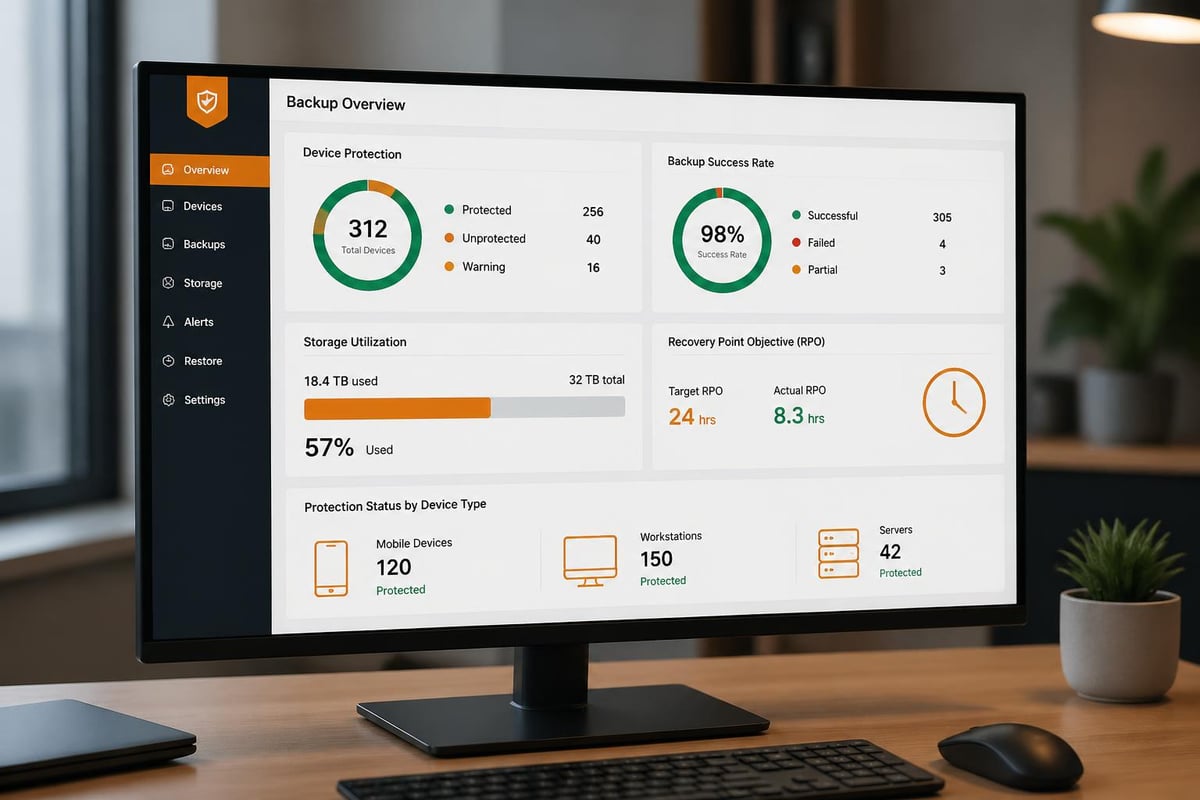
Managing backup across hundreds or thousands of devices manually becomes impractical. Enterprise solutions provide centralised dashboards showing backup status, storage consumption, and recovery readiness across the entire device fleet.
Centralisation enables:
- Consistent backup policies applied automatically to new devices
- Rapid identification of devices with failed or outdated backups
- Centralised reporting for compliance verification
- Simplified software updates and security patches
- Coordinated disaster recovery testing
These platforms typically support Windows, macOS, Linux, iOS, and Android devices from a single management interface. This heterogeneous support proves essential for organisations with diverse technology environments.
Cloud-Based Backup Services
Cloud backup services eliminate the need for on-premises backup infrastructure whilst providing scalable storage capacity. Providers like vBoxx specialise in secure cloud solutions that prioritise privacy and data protection, offering businesses reliable backup capabilities without substantial capital investment.
Cloud backup advantages include automatic scaling as data volumes grow, geographic redundancy protecting against regional disasters, and simplified offsite backup implementation. The subscription-based pricing model converts capital expenses into predictable operational costs.
Organisations must evaluate cloud providers carefully, considering data sovereignty requirements, security certifications, service level agreements, and recovery time capabilities. European businesses particularly benefit from providers maintaining data centres within EU jurisdictions, ensuring GDPR compliance.
Testing and Validation Procedures
Creating backups provides false security if those backups cannot actually restore data when needed. Regular testing validates backup integrity and confirms recovery procedures function correctly.
Restoration Drills
Conducting periodic restoration drills reveals problems before actual emergencies arise. These exercises might involve recovering individual files, restoring complete devices, or simulating disaster recovery scenarios.
Document restoration procedures in detail, including required credentials, access methods, estimated timeframes, and responsible personnel. During drills, time each restoration phase to establish realistic recovery time expectations.
Schedule drills quarterly or semi-annually, rotating through different scenarios and device types. Include various team members in these exercises to build organisational recovery capability beyond a single expert.
Verification Automation
Modern backup solutions offer automated verification features that periodically test backup integrity without manual intervention. These systems might restore random files to temporary storage, comparing them against originals to confirm accuracy.
Automated monitoring alerts administrators to backup failures, missing backup windows, or storage capacity concerns. Proactive notification enables corrective action before backup gaps compromise data protection.
Addressing Ransomware Threats
Ransomware attacks specifically target backup systems, understanding that organisations with functional backups can recover without paying ransoms. Protecting backups against these threats requires specific countermeasures.
Immutable Backup Copies
Immutable backups cannot be modified or deleted for a specified retention period, even by administrators with full system access. This protection prevents ransomware from encrypting or destroying backup data alongside production systems.
Implementing immutability involves either specialised storage systems with write-once-read-many capabilities or cloud services offering object lock features. Once created, these backup copies remain untouchable until their retention period expires.
Air-Gapped Backups
Maintaining backup copies completely disconnected from networks provides ultimate protection against remote attacks. Traditional tape backups stored offsite represent the classic air-gap approach. Modern alternatives include removable drives rotated to secure locations or cloud storage accessed through tightly controlled, temporarily enabled connections.
The trade-off involves reduced convenience and potentially longer recovery times. However, for critical data requiring absolute protection, air-gapped copies provide invaluable insurance against sophisticated attacks.
Mobile Device Management Integration
Organisations deploying mobile device management platforms can integrate backup capabilities within broader device governance frameworks. This integration ensures consistent security policies, simplified deployment, and coordinated incident response.
MDM platforms enforce backup configurations automatically when devices enrol in management. Administrators define backup schedules, allowed backup destinations, and data categories requiring protection. Devices automatically comply with these policies without requiring end-user configuration.
Integration enables coordinated responses during security incidents. If a device shows signs of compromise, administrators can remotely trigger backups before wiping the device, preserving evidence whilst protecting the organisation.
Monitoring and Reporting
Continuous monitoring ensures backup systems function as intended, whilst comprehensive reporting demonstrates compliance with internal policies and external regulations.
Key Performance Indicators
Tracking specific metrics provides visibility into backup system health:
- Backup success rate: Percentage of scheduled backups completing successfully
- Recovery point objective achievement: How current are the most recent backups
- Storage efficiency: Deduplication ratios and compression effectiveness
- Backup window compliance: Whether backups complete within allocated timeframes
- Restoration success rate: Percentage of restore attempts succeeding
Establish acceptable thresholds for each metric and investigate when performance falls below targets. Trending these indicators over time reveals developing issues before they cause failures.
Compliance Documentation
Many industries require documented evidence of data protection capabilities. Financial services regulations, healthcare privacy laws, and data protection frameworks mandate specific backup and recovery capabilities.
Generate regular reports demonstrating backup coverage across all devices, retention policy compliance, encryption implementation, and successful restoration testing. These reports support both internal governance reviews and external audits.
Automated reporting reduces administrative burden whilst ensuring consistency and completeness. Schedule reports to generate monthly or quarterly, distributing them to relevant stakeholders including IT leadership, compliance officers, and executive management.
Balancing Cost and Protection
Device backup strategies must balance comprehensive protection against budgetary constraints. Understanding cost drivers enables informed decisions maximising value whilst controlling expenses.
Storage represents the most obvious cost component. Cloud backup services charge based on capacity consumed, whilst on-premises solutions require upfront hardware investments. Deduplication and compression technologies significantly reduce storage requirements, potentially cutting costs by 50-80% depending on data characteristics.
Network bandwidth affects both backup and restoration operations. Uploading substantial data volumes to cloud storage consumes internet capacity, potentially impacting business operations. Initial backups of large datasets might require physical data shipping to avoid bandwidth saturation.
Management overhead includes personnel time configuring, monitoring, and maintaining backup systems. Automated solutions reduce ongoing operational costs despite higher initial licensing fees. Calculate total cost of ownership across multiple years when comparing alternatives.
Future-Proofing Your Backup Strategy
Technology evolution continuously introduces new device types, data sources, and storage technologies. Designing flexible backup architectures accommodates future requirements without requiring complete system replacements.
Select backup solutions supporting diverse device types and operating systems rather than single-platform tools. As your organisation adopts new technologies, extensible platforms adapt without forcing parallel backup infrastructure.
Consider emerging data sources requiring protection. Internet of Things devices, edge computing systems, and software-as-a-service applications generate business-critical data increasingly stored outside traditional devices. Ensure backup strategies can expand to encompass these non-traditional endpoints.
Evaluate vendor roadmaps and technology directions when selecting backup platforms. Providers actively developing cloud integration, artificial intelligence for backup optimisation, and enhanced security features demonstrate commitment to evolving alongside customer needs.
Protecting business data across diverse devices demands comprehensive strategies encompassing technology selection, policy development, security implementation, and ongoing management. By establishing robust device backup practices aligned with your organisation's risk tolerance and operational requirements, you create resilience against the inevitable data loss scenarios every business eventually faces. vBoxx delivers secure cloud solutions purpose-built for businesses prioritising data protection, privacy, and sustainability. Explore how our backup services, cloud storage, and expert consultancy can strengthen your organisation's digital infrastructure whilst supporting environmentally responsible practices.