

Google Cloud Platform web hosting means running a website or web application on Google's infrastructure, using services such as Cloud Storage, Compute Engine, Google Kubernetes Engine (GKE) or Cloud Run, and paying for the resources you consume rather than a fixed hosting plan. It suits teams with technical skills who need scalability, although European businesses should also weigh data location, legal jurisdiction and operating effort. Therefore, this guide explains the available options, their costs and the practical steps involved, so that you can decide whether the platform fits your organisation.
Which Google Cloud hosting options exist?
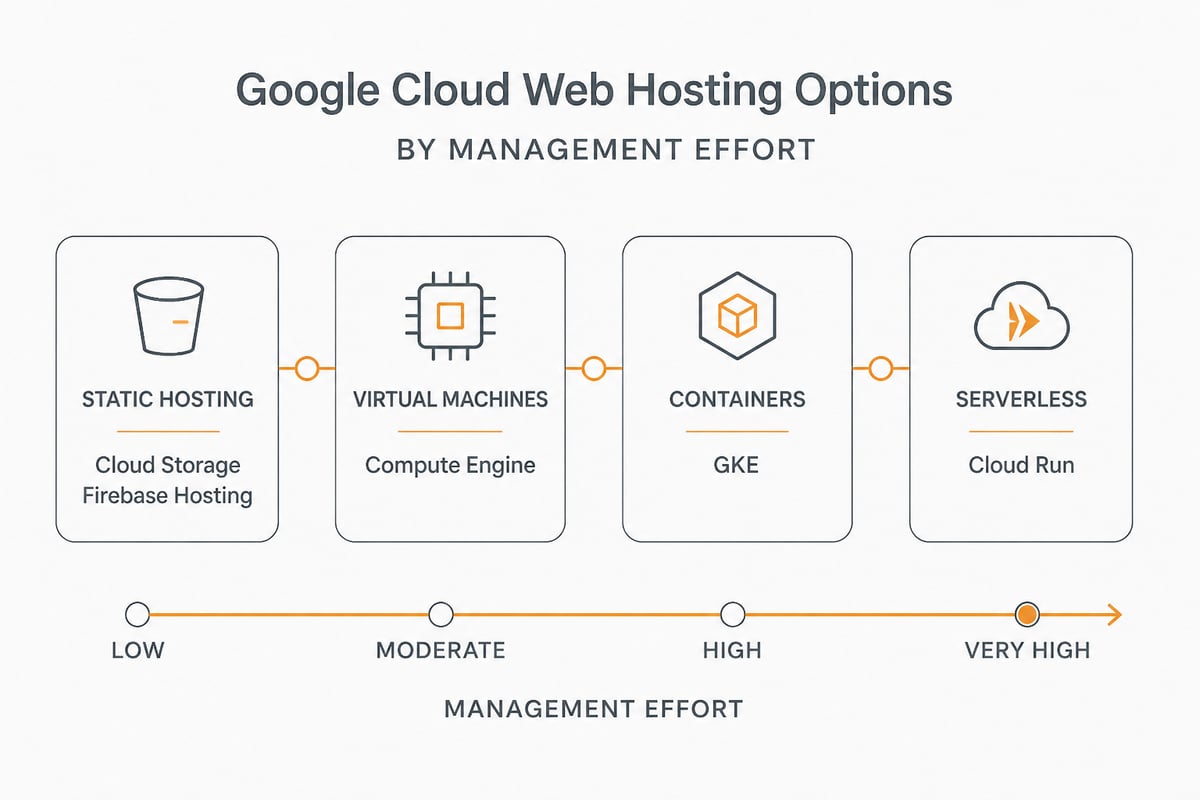
Google Cloud offers four main routes for hosting a website. According to the Google Cloud Architecture Center, these are static hosting with Cloud Storage or Firebase Hosting, virtual machines with Compute Engine, containers with GKE, and serverless hosting with Cloud Run.
Each route suits a different type of project. The choice determines how much of the underlying system your team must manage.
| Option | Best suited to | Management effort |
|---|---|---|
| Cloud Storage or Firebase Hosting | Static sites, brochure pages, documentation | Low |
| Compute Engine | Traditional stacks such as WordPress or custom applications | High |
| GKE | Multi-service applications that need orchestration | Very high |
| Cloud Run | Containerised apps with variable traffic | Moderate |
In addition, you can combine these services. A typical arrangement places static assets in Cloud Storage behind a content delivery network, while the dynamic application runs on Cloud Run.
How do you host a static website on Google Cloud?
Hosting a static website on Google Cloud is the simplest route: you upload HTML, CSS, JavaScript and images to a storage bucket or to Firebase Hosting and serve them over HTTPS. Firebase Hosting, as the same architecture overview notes, can deploy static content and web apps to a global content-delivery network with a single command.
The typical process follows these steps:
- Create a Google Cloud project and enable billing.
- Create a Cloud Storage bucket, ideally in an EU region such as europe-west4 (Netherlands).
- Upload your site files and set the main page and error page.
- Place an external HTTPS load balancer with a managed certificate in front of the bucket.
- Point your domain's DNS records to the load balancer's IP address.
Nevertheless, a bucket alone does not serve a custom domain over HTTPS. Consequently, the load balancer and certificate step is essential for any professional site. Finally, test the redirect from HTTP to HTTPS before launch.
When should you choose Compute Engine?
Choose Compute Engine when you need full control over the operating system, web server and installed software, for example to run WordPress, a legacy application or a custom stack. A virtual machine behaves much like a conventional server, which means you install, patch and secure it yourself.
A common production design uses these building blocks:
- Instance templates that define the machine type, image and startup script.
- Managed instance groups that create identical VMs and replace failed ones automatically.
- Autoscaling based on CPU load or request volume.
- A load balancer that distributes traffic and handles TLS.
- A separate database service, so that the web tier remains replaceable.
However, this flexibility carries a cost in time. Your team becomes responsible for operating system updates, firewall rules, backups and monitoring. Therefore, Compute Engine rewards organisations with in-house engineers, while smaller teams often find the effort disproportionate.
Is Cloud Run a better fit for modern web apps?
Cloud Run is often the better fit for containerised web applications because Google manages the servers, scaling and patching of the underlying platform. The Google Cloud hosting overview describes it as a fully managed platform for scalable containerised applications, with customers paying for the time their code runs.
This model has clear advantages:
- Instances scale up with demand and can scale down when traffic stops.
- You deploy a container image, so any language or framework works.
- Billing follows actual request processing rather than idle capacity.
On the other hand, cold starts can add latency after quiet periods, and long-running background tasks need careful design. In addition, a database, caching layer and file storage still require separate services, which adds to the architecture you must understand.
What does Google Cloud web hosting cost?
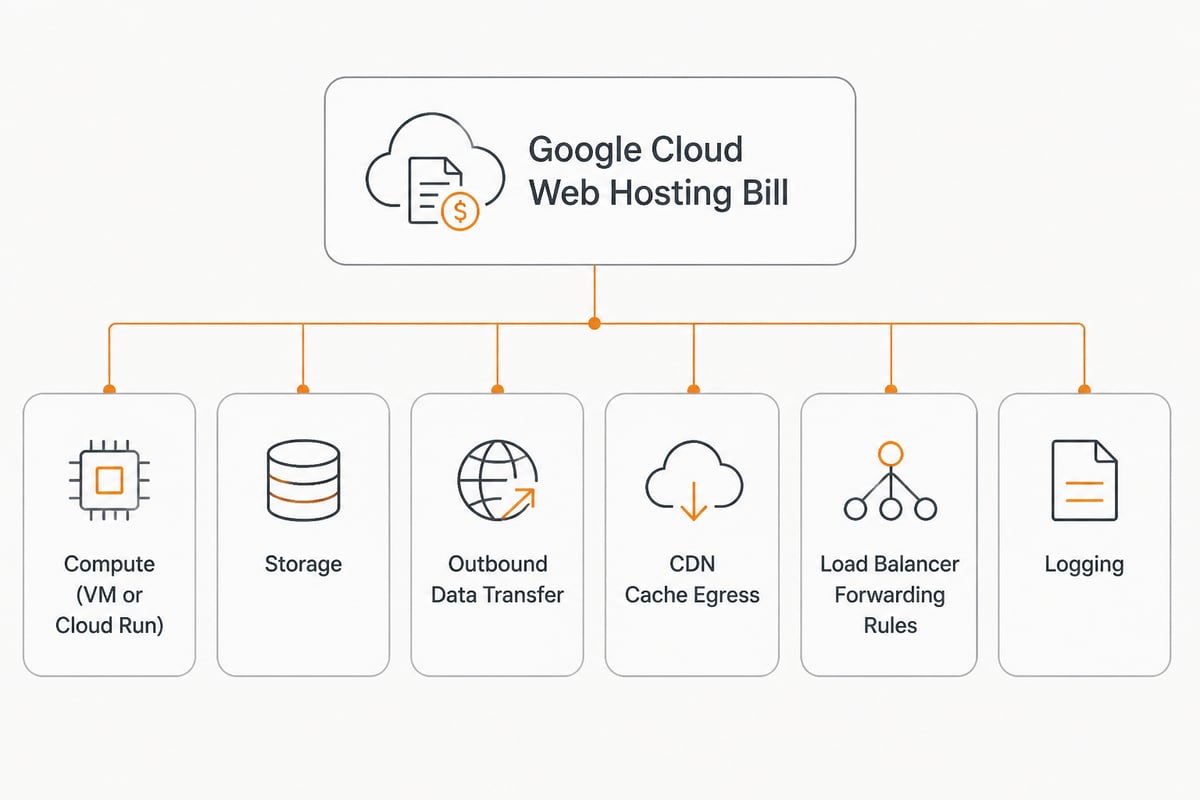
Costs depend on compute time, storage, network traffic and supporting services, so a precise figure requires a usage estimate. Google does provide a free allowance, although it has limits that matter for European users.
According to the Google Cloud Free Program, the Free Tier includes one non-preemptible e2-micro VM per month in eligible US regions, 30 GB-months of standard persistent disk and 1 GB of outbound data transfer from North America to eligible destinations. Its Cloud Run allowance covers 2 million requests per month, 180,000 vCPU-seconds and 360,000 GiB-seconds of memory for request-based billing. Cloud Storage adds 5 GB-months of regional storage in eligible US regions, 5,000 Class A operations and 50,000 Class B operations per month.
Notice that these allowances refer to eligible US regions. Consequently, a business that wants its data to remain in the EU may not be able to use the free e2-micro VM or free storage as described.
Supporting services also add up. Google Cloud CDN pricing lists cache data transfer out from $0.02 to $0.20 per GiB, with HTTP/HTTPS cache lookup requests at $0.0075 per 10,000 requests, and rates vary by destination and usage. Likewise, Cloud Load Balancing pricing lists $0.025 per hour for the first five global forwarding rules, with additional rules charged at a lower hourly rate. For Firebase's own hosting product, the Firebase App Hosting cost breakdown explains its no-cost allowances and charges for bandwidth, builds, storage and logging.
Can you use Google Cloud web hosting without paying?
You can use Google Cloud for small projects at no charge within the Free Tier limits, but a new account still requires billing details and usage beyond the allowance is charged. The free allowances suit experiments, prototypes and very low-traffic sites.
For a business website, however, "free" rarely lasts. A production setup typically needs a load balancer, a certificate, monitoring and backups, and several of these services carry hourly charges. Regional restrictions on the free resources can conflict with GDPR-driven location requirements. Therefore, treat the Free Tier as a testing ground and build a realistic monthly estimate before committing.
What should European businesses consider about data sovereignty?
European businesses should consider where data is stored, who operates the infrastructure and which legal regime can compel access to it. Choosing an EU region keeps data physically in Europe, but the provider remains a US company, and that affects the legal analysis.
Several questions deserve an answer before you commit:
- Jurisdiction: Is the provider subject to US legislation such as the CLOUD Act?
- Metadata and support access: Do logs, backups and support tooling also remain inside the EU?
- Contracts: Is a data processing agreement available and sufficient for your regulator?
- Exit strategy: Can you move workloads away without being locked into proprietary services?
In addition, regulated sectors, public bodies and firms handling sensitive client data often face stricter internal policies. Nevertheless, many organisations use hyperscale platforms successfully after documenting a risk assessment. The point is to decide deliberately rather than by default. For a broader view of the EU landscape, see this overview of European cloud hosting.
Is Google Cloud Platform better than AWS?
Neither platform is universally better, because the right choice depends on your workload, skills and budget. Both offer mature compute, storage, networking and managed database services, and both run extensive global infrastructure. Google Cloud is often valued for its container and data tooling, while the largest competitor offers the broadest service catalogue.
For web hosting specifically, the differences matter less than three practical factors. First, consider your team's existing expertise, since familiarity reduces errors and operating time. Second, compare the pricing of the specific services you will actually use, including network egress. Third, examine how each provider's legal position fits your compliance obligations. Consequently, a structured comparison of costs and requirements will serve you better than a general ranking.
What are the practical drawbacks of hosting on a hyperscale platform?
The main drawbacks are complexity, unpredictable billing and the operating responsibility that comes with infrastructure services. A hyperscale platform offers hundreds of products, and assembling a simple website from separate components can take far more time than ordering a hosting package.
Typical pain points include:
- Bill variability: Usage-based pricing makes monthly costs harder to forecast, particularly when traffic spikes.
- Configuration risk: Misconfigured firewall rules or public buckets can expose data.
- Skill requirements: Networking, identity management and TLS configuration demand experience.
- Support: Faster, personal support usually requires a paid plan.
You must handle your own backups, monitoring and patching on virtual machines. Therefore, ask honestly whether your organisation wants to operate infrastructure or simply to publish a reliable website.

How does managed European hosting compare?
Managed European hosting trades some architectural flexibility for simplicity, predictability and clear jurisdiction. Instead of assembling load balancers, certificates and storage yourself, you work with a provider that operates the stack and supports you directly.
vBoxx, for example, runs its own in-house infrastructure in EU data centres that are EU-owned and EU-operated, rather than relying on US hyperscalers. Its data, metadata, backups and support tooling stay inside the EU, and the company is ISO 27001 certified, audited by TÜV NORD. A data processing agreement is available, and its own engineers maintain and proactively monitor the servers. In addition, support is personal, by phone, chat or remote session, which matters when a small team has no dedicated cloud engineer. Details of the hosting range are on the vBoxx web hosting page, and a deeper discussion of the topic appears in this article on Google Cloud website hosting.
Nevertheless, Google Cloud remains a sensible choice for applications that need elastic scaling, container orchestration or advanced data services. The decision is not about one platform being superior, but about matching the tool to the workload.
FAQ
What is the Google Cloud Platform?
Google Cloud Platform is Google's suite of cloud services, covering computing, storage, networking, databases, analytics and machine learning. Businesses rent these resources on demand instead of buying and maintaining their own hardware. Web hosting is only one of many uses.
Does Google offer server hosting?
Yes, Google Cloud offers virtual servers through Compute Engine, as well as managed alternatives such as Cloud Run and GKE. You choose a region, configure the machine and pay for the resources you use. Unlike a traditional hosting plan, you are responsible for configuring and securing the server yourself.
How do you decide between a VM and Cloud Run?
Choose a virtual machine when you need full control over the operating system or must run software that is not containerised. Choose Cloud Run when your application is already packaged as a container and traffic varies over time. Cloud Run usually requires less maintenance, whereas a VM offers more flexibility.
Start by listing your site's requirements, including expected traffic, data location, compliance obligations and the engineering time you can realistically commit, so that you can compare any platform against facts rather than assumptions. If those requirements point towards EU-hosted infrastructure with personal support and free migration, vBoxx can walk you through the options and help you test the environment with your own workloads before making a decision.