
Cloud based storage for business means keeping company files on remote servers that staff reach over the internet, and for European organisations the safest choice is a provider whose infrastructure, support and backups all remain inside the EU under GDPR. Therefore, the decision is no longer only about price per terabyte. It is also about who can legally compel access to your data, how the provider protects it, and whether you can recover it after an incident.
This guide explains how businesses use cloud storage, what it costs, how to access it, whether it can be hacked, and which GDPR checks to complete before you sign a contract. In addition, it sets out a practical selection checklist for IT managers and small business owners.
How do businesses use cloud storage?
Businesses use cloud storage to hold shared documents, exchange files with colleagues and clients, protect data through backup, and keep a single authoritative copy of every file. Most organisations combine several of these uses on one platform.
The most common applications are:
- Central document storage: contracts, invoices, project files and HR records in one searchable location.
- Team collaboration: several people working on the same file with version history, so earlier drafts can be restored.
- External file sharing: sending large files to clients and suppliers through expiring links instead of email attachments.
- Backup and recovery: copies of critical data kept separately from office hardware, so a failed laptop or server does not mean lost work.
- Remote and hybrid working: access from home, from client sites and from mobile devices, with the same permissions everywhere.
- Digital signing: approving agreements without printing, provided the signing method meets eIDAS requirements.
For a closer look at how the technology works underneath, vBoxx explains the mechanics in its article on how cloud storage works.
Why GDPR changes how you choose cloud storage
GDPR makes your business, as the data controller, responsible for personal data even when a third party hosts it, so the location and legal jurisdiction of your storage provider matter as much as its features. Consequently, a provider with servers in Europe is not automatically sufficient.
The key issue is jurisdiction. A company headquartered outside the EU may be subject to foreign laws, such as the US CLOUD Act, that can require it to hand over data regardless of where the servers stand. Nevertheless, many businesses assume that an "EU region" setting on a global platform resolves the matter. It does not always, because metadata, backups and support tooling may sit elsewhere.
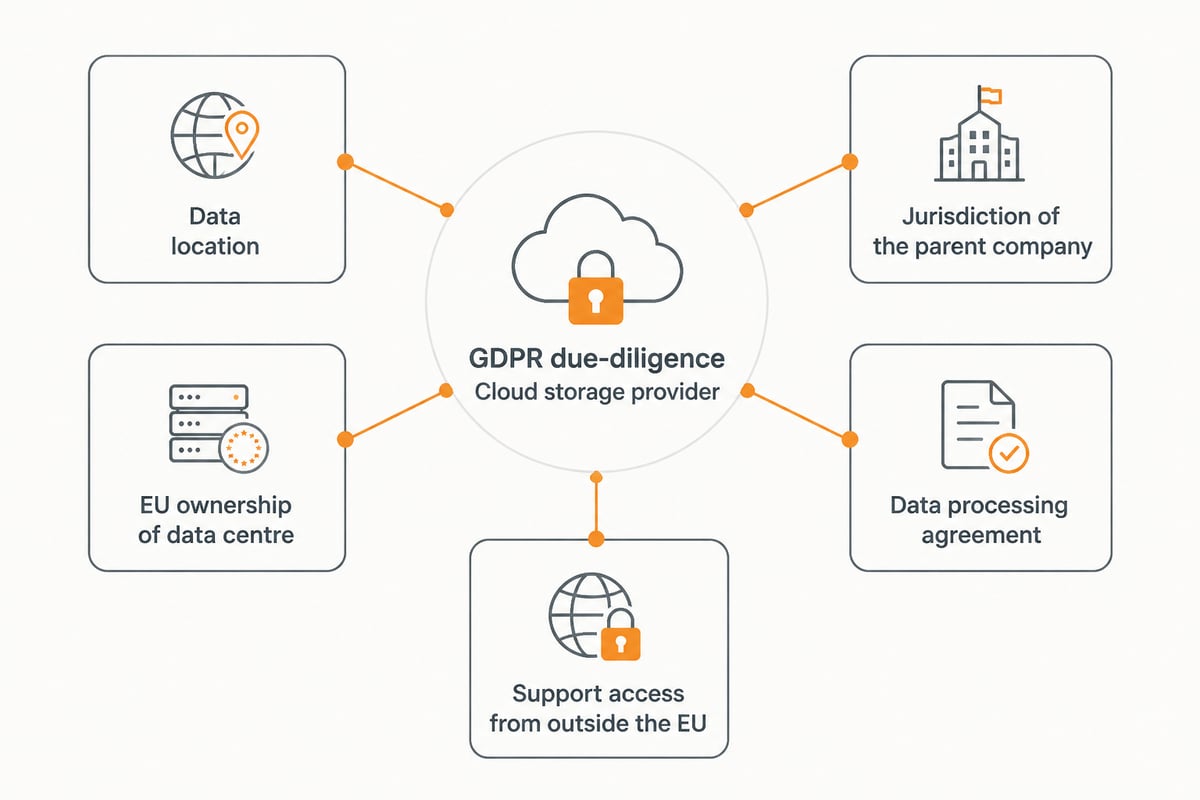
Therefore, ask any provider these questions before purchase:
- Where are the primary data, backups and metadata stored?
- Is the data centre owned and operated by an EU entity?
- Is the provider itself, including its parent company, outside the reach of non-EU disclosure laws?
- Is a data processing agreement available?
- From which countries can support staff access your data?
For a wider view of the options, see this overview of EU cloud storage and the comparison of the best European cloud storage approaches.
How secure is cloud based storage for business? Can hackers access it?
Yes, hackers can attempt to access cloud storage, but a well-configured service with strong encryption, multi-factor authentication and access controls makes a successful breach far less likely. In practice, most incidents originate from weak or stolen credentials rather than from the provider's infrastructure.
The protective measures that matter most are:
- Encryption: data encrypted in transit and at rest, for example with 256-bit AES.
- Multi-factor authentication (MFA): a second verification step on every account.
- Role-based permissions: staff see only the folders they need.
- Audit logs: a record of who opened, shared or deleted what.
- Certified infrastructure: independent audits such as ISO 27001.
Regulators point in the same direction. Commission Implementing Regulation (EU) 2024/2690 identifies multi-factor authentication as a measure to consider, particularly for remote access, sensitive information, privileged accounts and system administration accounts. The same text says security policies should be reviewed at least annually and whenever significant incidents or changes in risk occur. Although the regulation applies to specific in-scope entities, it offers a sensible benchmark for any business.
A password manager closes one of the most common gaps. For guidance on that topic, read vBoxx's article on a password manager for businesses. In addition, the article on data security in cloud storage covers encryption and access controls in more depth.
How much does 1TB of cloud storage cost for a business?
The cost of 1TB of business cloud storage varies widely by provider, licence model and included features, so there is no single reliable price. Prices are typically quoted per user per month, with storage allowances bundled into each plan, or per terabyte for infrastructure-style services.
Instead of comparing headline figures, compare what each plan includes. A low price can conceal extra charges that raise the real total.
| Cost factor | What to check |
|---|---|
| Pricing model | Per user, per terabyte, or a bundle of both |
| Storage allowance | Included capacity per user and pooled capacity |
| Version history | How many versions are kept, and for how long |
| Deleted file recovery | Whether recovery is included or charged separately |
| Egress and transfer fees | Charges for downloading or moving data out |
| Support | Whether personal support is included or a paid tier |
| Migration | Whether moving existing data is free or billed |
For current vBoxx pricing and storage allowances, please consult the vBoxx product pages or contact the team directly, as figures are best confirmed at source. Meanwhile, the guide to cloud services for small business helps you estimate the overall budget beyond storage alone.
Where do I access my cloud storage?
You access cloud storage through a web browser, a desktop app that syncs folders to your computer, or a mobile app, and your administrator controls which of these are permitted. Therefore, the same files are reachable from the office, from home and on the move.
Each method suits a different need:
- Web browser: no installation required, ideal for occasional access or shared devices.
- Desktop sync client: files appear in a normal folder and update automatically, which suits daily work.
- Mobile app: quick viewing, approving and sharing from a phone or tablet.
- Integrations: some platforms connect to email, calendars and office tools.
In addition, administrators can restrict access by device, location or authentication method.

Backup, recovery and continuity: what regulation expects
Cloud storage is not a substitute for backup, because synced files can be deleted or overwritten in every location at once, so a separate, tested backup remains essential. Nevertheless, many small businesses treat a shared drive as if it were a backup.
The regulation referenced above is explicit about continuity. Commission Implementing Regulation (EU) 2024/2690 requires in-scope entities to maintain backup copies of data and provide sufficient resources for redundancy as part of business continuity and disaster recovery planning. Consequently, even businesses outside its scope would be wise to follow the same principle.
A workable continuity routine includes:
- Keeping version history switched on, so earlier file states can be restored.
- Confirming that deleted files can be recovered within a defined period.
- Backing up Microsoft 365 or Google Workspace data separately, since those services do not replace a dedicated backup.
- Testing a restore at least once a year, and after any significant change.
- Documenting who is responsible for recovery and how quickly it must happen.
The same regulation also sets a user-impact threshold for cloud service incidents involving compromised data integrity, confidentiality or authenticity: more than 5% of the service's EU users or more than 1 million users, whichever is smaller. Although that threshold concerns providers, it shows why you should ask a provider how it detects and reports incidents. Finally, ENISA's SME cybersecurity resources offer practical guidance on risk assessment and business continuity for smaller organisations.
Choosing cloud based storage for business: a selection checklist
A good selection process weighs jurisdiction, security, usability and support together, rather than choosing on price or brand recognition alone. Therefore, score each candidate against the same criteria and record the answers.
Use this checklist:
- Jurisdiction: EU-owned provider and EU-operated data centres, with no exposure to non-EU disclosure laws.
- Certification: an independent ISO 27001 certification, ideally audited by a recognised body.
- Encryption and MFA: both available and enforceable for all users.
- Data processing agreement: provided and clear about sub-processors.
- Collaboration features: sharing controls, version history and file recovery.
- Search and organisation: tagging and full-text search that save staff time.
- Signing and audit trail: eIDAS-compliant e-signing if you handle contracts.
- Support: reachable humans, by phone, chat or remote session, not only a ticket form.
- Migration: help moving existing files without downtime.
- Exit terms: a clear way to export your data if you leave.
Sector requirements can raise the bar further. Firms handling sensitive records may find the guides on cloud storage for law firms and cloud storage for healthcare useful, since both address confidentiality duties in detail.
A European option worth shortlisting
vBoxxCloud is a business cloud storage service with 256-bit AES encryption, hosted in ISO 27001-certified data centres in the Netherlands and not subject to the US CLOUD Act. It combines team sharing, version history and recovery of deleted files with eIDAS-compliant digital signing, smart tagging, full-text and semantic search, and an AI assistant that summarises and drafts from your own documents. VBoxx runs its own in-house infrastructure maintained by its own engineers, reports 99.99% uptime over the past years, and was named best cloud services company in the Netherlands for 2025 by Global 100.
Planning a migration without disruption
A smooth migration depends on auditing your files first, setting permissions before moving data, and running old and new systems side by side briefly. Consequently, staff continue working throughout the change.
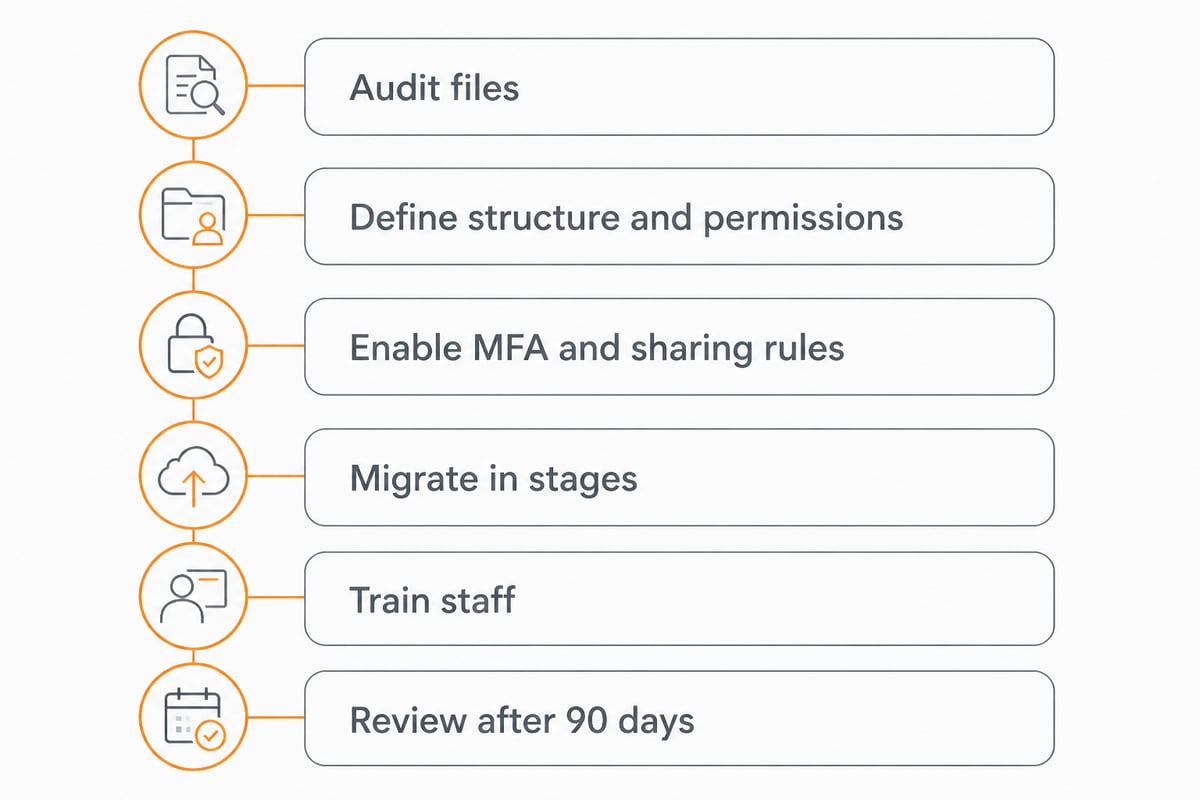
Follow these steps:
- Audit existing files: remove duplicates, outdated records and anything past its retention period.
- Define the folder structure and permissions: decide who owns, edits and views each area.
- Enable MFA and sharing rules: configure security before any data arrives.
- Migrate in stages: begin with one department, gather feedback, then continue.
- Train staff: a short session on sharing, version history and safe links prevents mistakes.
- Review after 90 days: check usage, permissions and any gaps, then repeat the review annually.
In addition, ask whether the provider includes migration support. vBoxx offers free migration services, which can reduce both cost and risk. For businesses weighing a broader move, the article on cloud hosting for business shows how storage fits within the wider infrastructure.
For teams that also handle marketing assets, outside tools can complement storage. For example, CMeIn offers AI-generated photos based on your reference images, which suits staff profiles and social media visuals that you can then store and share centrally.
FAQ
Is cloud storage legal under GDPR?
Yes, cloud storage is legal under GDPR provided you have a data processing agreement with the provider, a lawful basis for processing, and appropriate security measures. Hosting within the EU with an EU-owned provider also removes most international transfer concerns.
Is cloud storage better than a local server?
Cloud storage reduces the burden of maintaining hardware, patching and physical security, and makes remote access simpler. A local server can still suit specific needs, but it requires your own backup, monitoring and continuity planning.
What happens to my data if I leave a provider?
A reputable provider lets you export your files and then deletes your data according to the contract. Check these exit terms, including formats and deletion timelines, before you sign.
Your next step is to list the data your business stores, mark which of it is personal data, and check each candidate provider against the jurisdiction questions above. From there, vBoxx can help you move to storage hosted entirely within the EU, using vBoxxCloud for secure sharing, signing and search, with personal support and free migration. To see how it fits your team, Get a free trial and test it with your own documents.