Knox cloud services are Samsung's cloud-based tools for enrolling, securing and managing business mobile devices, delivered mainly through Knox Suite and its Knox Admin Portal. In short, they let an IT team control fleets of phones, tablets and other endpoints remotely, whereas the storage of company files, e-mail and backups remains a separate question that European businesses should answer deliberately.
Many organisations treat device management and data hosting as one decision. They are, however, two distinct layers. Therefore, this guide explains what Knox offers, how to set it up and stop it, and where an EU-hosted platform fits alongside it.
What Are Knox Cloud Services?
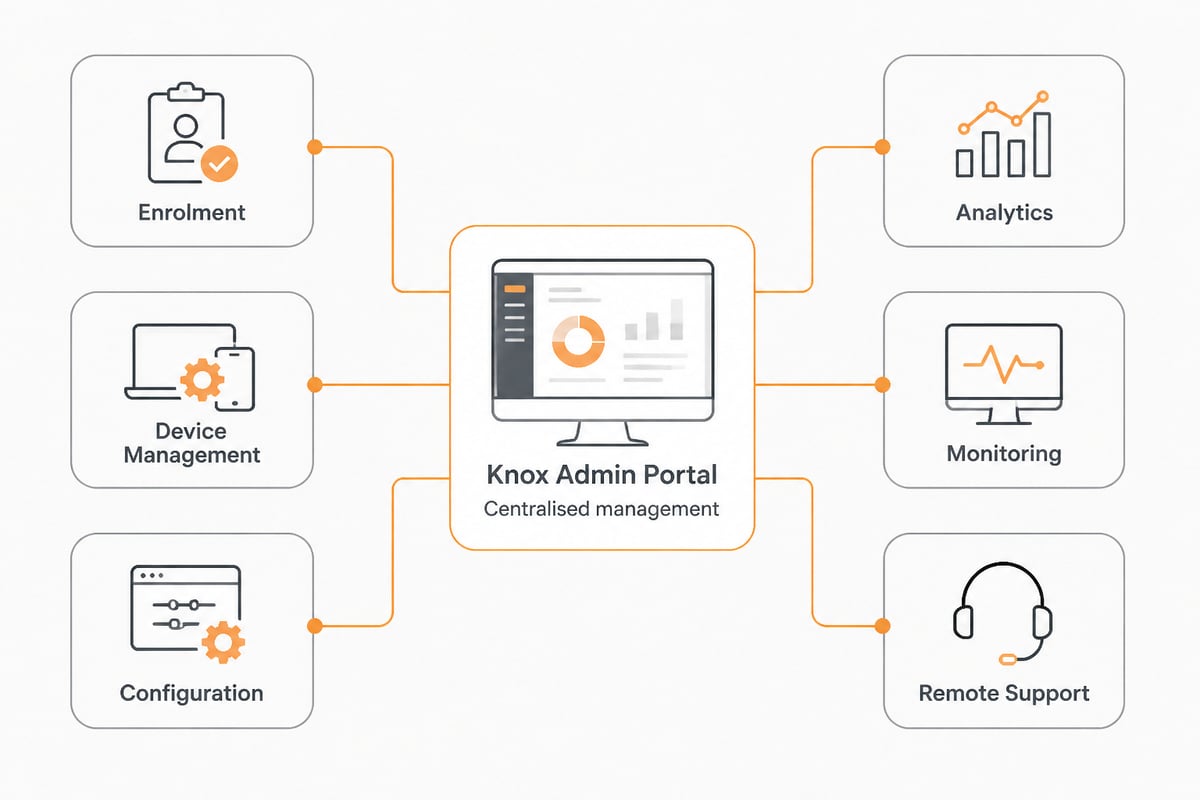
Knox cloud services are a bundle of Samsung-operated management products that secure and administer enterprise devices from a web console. According to Samsung Knox Documentation, Knox Suite combines services for securing, enrolling, managing, monitoring and supporting enterprise devices, all accessed through the Knox Admin Portal.
The word "Knox" also refers to the security platform built into Samsung hardware. In other words, there are two layers to understand:
- Knox platform security: a defence-in-depth architecture embedded in Samsung devices, from the chipset upwards, which protects the operating system and sensitive data on the device itself.
- Knox cloud management: the cloud-delivered services administrators use to configure, monitor and support those devices at scale.
This answers a common question: Knox security in Samsung is the built-in hardware and software protection layer, whereas Knox cloud services are the administrative tools sitting on top of it. In addition, the two work together, because policies set in the cloud console are enforced by the security features on the device.
Which Knox Suite Components Matter Most?
Knox Suite is made up of several services, and the ones most relevant to a business are enrolment, device management, configuration and remote support. Samsung's documentation describes these as the main building blocks of the suite, all accessed through the Knox Admin Portal.
The following list summarises how these pieces are commonly understood:
- Enrolment: devices are registered so that they can receive company settings when they connect, which can reduce manual set-up.
- Mobile device management: policies, applications and restrictions can be applied and updated remotely.
- Configuration: a service for preparing and provisioning devices, which can suit dedicated-purpose hardware.
- Analytics and monitoring: usage data helps administrators track how devices are used.
- Remote support: technicians can assist users without physically handling the device.
How Do You Access Samsung Knox Manage?
You access Samsung Knox Manage by signing in to the Knox Admin Portal with a business Samsung account after your organisation has been registered. The setup path, according to Samsung Knox Documentation, includes these steps:
- Create a business Samsung account.
- Register the company.
- Check the licences that apply to your organisation.
- Add devices to the portal.
- Configure the services you intend to use.
- Enrol the devices.
Consequently, a realistic rollout starts with administration rather than hardware. Licence checks and company registration should be completed before any devices reach employees, because enrolment depends on them. Assigning more than one administrator can reduce the risk of being locked out if one person leaves the organisation.
In addition, the order of the last three steps deserves attention. Adding devices first gives the portal an inventory to work from, and configuring services before enrolment means each handset receives its policies, applications and restrictions the first time it connects. Therefore, a small pilot group is a sensible starting point: enrol a handful of devices, confirm that the conditional policies behave as intended, and only then extend the rollout. Finally, because the portal is the single entry point for securing, enrolling, managing, monitoring and supporting devices, access to the business Samsung account should be protected with strong, unique credentials.
What Can Knox Suite Actually Control?
Knox Suite can manage a broad range of platforms and enforce conditional policies, which makes it useful for mixed device estates. Samsung Knox states that the suite supports management across Android, iOS, Windows, macOS, ChromeOS, iPadOS and Wear OS.
Policy control goes beyond simple on and off switches. Knox Suite can enforce policies based on conditions such as time, location, network status and SIM changes. For example, an organisation could restrict certain applications outside working hours or when a device connects to an untrusted network. In addition, analytics can report on app battery consumption, screen time, app launches, data use, storage and network usage, giving administrators evidence for decisions about licences, data plans and replacement cycles.
Remote troubleshooting is the final major capability. Knox Suite supports device access, screen capture or recording, file transfer and the collection of device logs, which can help resolve support issues without a device being posted back to the office.
Where Does Business Data Live Alongside Knox?
Business data lives wherever your storage, communication and backup platforms host it, and Knox does not replace that decision. Device management governs the handset. By contrast, documents, contracts, mailboxes and archives need a hosting location with clear legal protection.
This distinction matters for European organisations. A well-managed device that syncs files to a provider subject to the US CLOUD Act still exposes data to foreign legal demands. Therefore, a sensible architecture pairs device control with EU-hosted storage, so that policies on the phone and jurisdiction over the data point in the same direction. Readers who want the wider picture can consult vBoxx's explanation of cloud services and security and its overview of encrypted cloud services.

For the storage layer, vBoxxCloud offers GDPR-compliant business cloud storage with 256-bit AES encryption, held in ISO 27001-certified European data centres in the Netherlands and outside the reach of the US CLOUD Act. It also includes eIDAS-compliant digital signing with a full audit trail and AI-assisted document search, which suits teams that open and sign files from managed mobile devices.
How Do You Stop Knox Manage?
You stop Knox Manage by removing devices from management in the Knox Admin Portal, which releases them from the policies applied to them. The sequence below is a practical outline, although the exact options depend on your licence and configuration, so confirm each step in the official documentation before acting:
- Inventory the enrolled devices and decide which will be retired, reassigned or kept unmanaged.
- Back up any business data held on those devices to a central, controlled location.
- Remove or unenrol the devices through the portal, and check that restrictions and managed applications are cleared.
- Review licences and notify affected staff before the change takes effect.
- Record the date and the data handled, since GDPR accountability favours a written audit trail.
Nevertheless, ending management is rarely a one-click affair for an organisation. A device that has carried company e-mail and files should be wiped or verified as clean before a new user receives it. In addition, any credentials stored on it should be rotated, which is where a dedicated password manager reduces the effort considerably.

Is Samsung Knox Still Used?
Yes, Samsung Knox is still actively used and developed, as Knox Suite continues to receive new capabilities and now supports a wide range of operating systems beyond Samsung's own. Its breadth, covering Android, iOS, Windows, macOS, ChromeOS, iPadOS and Wear OS, reflects a platform aimed at mixed estates rather than Samsung-only fleets.
In practice, this means the suite appeals to organisations that run several device types under one policy framework. For example, an IT team can apply time, location, network status or SIM-change conditions to handsets, while analytics on battery consumption, screen time, app launches, data use, storage and network usage inform replacement and data-plan decisions. In addition, remote troubleshooting, including screen capture, file transfer and log collection, reduces the number of devices returned to the office.
Nevertheless, continued use is not the same as suitability. Organisations should weigh three questions before committing: whether their devices are predominantly Samsung, whether the management console's data handling satisfies their GDPR obligations, and whether their file, mail and backup services are hosted under European jurisdiction. Consequently, Knox is best assessed as one component in a wider compliance picture.
What Should European Businesses Check Before Adopting Knox?
European businesses should verify data processing terms, hosting jurisdiction and exit options before adopting any cloud management service. The checklist below applies equally to Knox and to the platforms around it:
- Data processing agreement: confirm that one exists and that it covers the categories of device and user data the console collects.
- Data location: establish where management data, logs and support data are stored and who can access them.
- Role separation: limit administrator rights, so that no single account can wipe or reconfigure every device.
- Exit plan: document how devices are released and data returned if you leave the service.
- Surrounding services: confirm that e-mail, files and backups are hosted in the EU, preferably by providers with ISO 27001 certification.
Small and mid-sized companies often underestimate how much of their security posture depends on these surrounding services. For an accessible primer, vBoxx's guide to cloud services for small business covers the fundamentals in plain terms.
Why Pair Knox Cloud Services With an EU Provider?
Pairing Knox cloud services with an EU-based hosting provider keeps device control and data sovereignty aligned, which simplifies GDPR documentation. The management console secures the endpoint; the European platform secures the information that endpoint touches.
vBoxx is an ISO 27001-certified provider, audited by TÜV NORD, that runs its own in-house infrastructure in EU-owned and EU-operated data centres in the Netherlands. Data, metadata, backups and support tooling stay inside the EU, a data processing agreement is available, and servers are maintained by vBoxx's own engineers and monitored proactively. In addition, the company reports 99.99% uptime over the past years, over 50,000 active end users and more than 20 years of experience, and it was named best cloud services company in the Netherlands 2025 by Global 100.
Finally, support matters during a migration. vBoxx offers personal support by phone, chat or remote session, which is valuable when device policies, mail accounts and file storage change at the same time.
FAQ
What is the difference between Knox Suite and Knox Manage?
Knox Suite is the full bundle of services for enrolling, securing, managing, monitoring and supporting devices, whereas Knox Manage is the device management component within it. Administrators reach both through the Knox Admin Portal.
Can Knox Suite manage devices that are not made by Samsung?
Yes, according to Samsung Knox, Knox Suite supports management across Android, iOS, Windows, macOS, ChromeOS, iPadOS and Wear OS. Capabilities can vary by platform, so check the documentation for the operating systems in your fleet.
Does using Knox mean my company files are stored in the EU?
No. Knox governs device policy, not the location of your documents, mail or backups. Therefore, you should select an EU-hosted platform for those services separately and confirm it with a data processing agreement.
Begin by listing every service that holds company data today, then mark which of them are hosted inside the EU and which are not. Once that gap is visible, vBoxx can help close it, because vBoxxCloud provides GDPR-compliant storage, e-signing and AI-assisted search in Dutch data centres, and its engineers will assist with migration. To see how it fits alongside your device management, get a free trial of vBoxx and test the platform with your own team.