

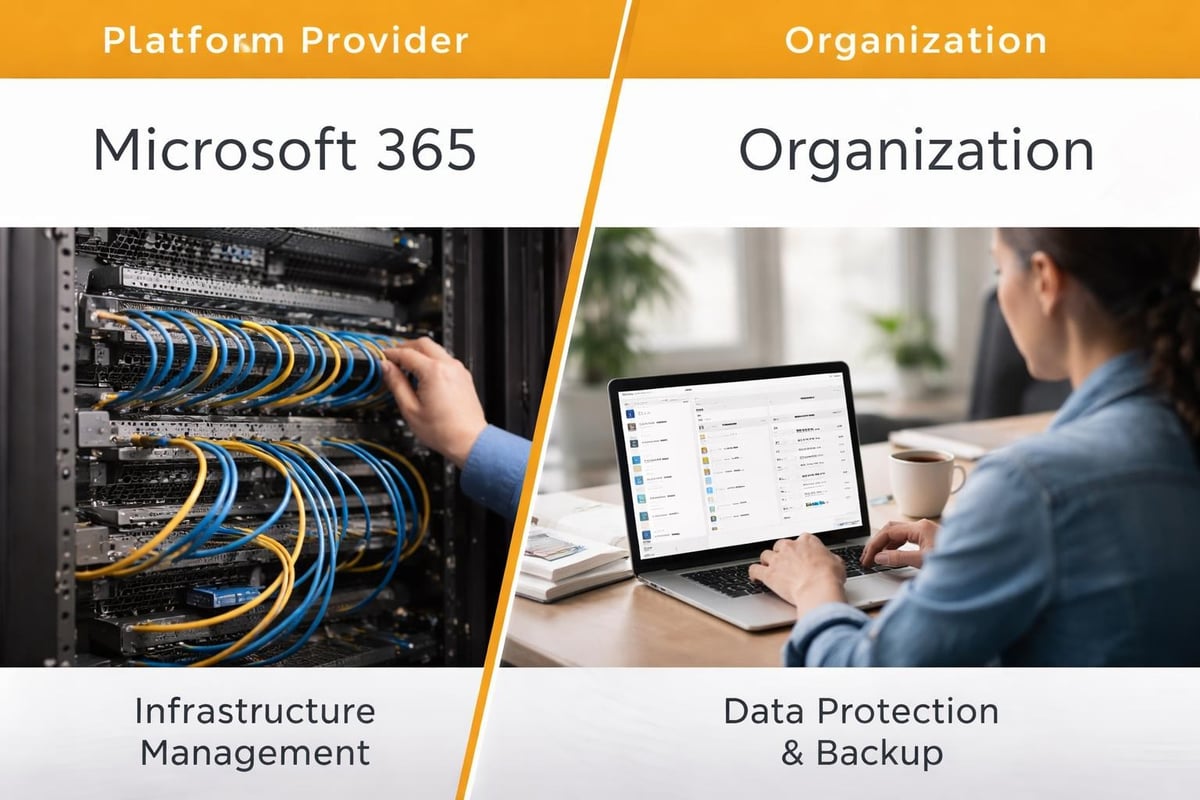
Businesses worldwide depend on Microsoft 365 for email, document collaboration, and cloud storage. However, many underestimate the critical importance of implementing a robust Microsoft 365 backup solution. In particular, whilst Microsoft provides exceptional uptime and infrastructure reliability, the platform operates under a shared responsibility model, thereby placing the onus of data protection squarely on the organisation. As a result, understanding this distinction between service availability and data retention is fundamental to safeguarding your business-critical information against accidental deletion, cyber threats, and compliance violations. Moreover, it enables organisations to adopt a more proactive and resilient data protection strategy.
Understanding the Shared Responsibility Model
Microsoft ensures that its infrastructure remains operational and accessible, but this guarantee does not extend to protecting your organisation’s data from user error, malicious actions, or retention gaps. The shared responsibility model outlined by Microsoft clearly delineates where the provider’s obligations end and yours begin.
What Microsoft Protects
Microsoft 365’s service level agreements cover infrastructure availability, hardware failures, and platform security. The technology giant maintains redundant systems across multiple data centres to ensure minimal downtime during catastrophic events.
However, Microsoft does not protect against:
- Accidental deletion by users or administrators
- Malicious data corruption from insider threats
- Ransomware attacks targeting user data
- Retention gaps after the limited recovery window expires
- Compliance requirements specific to your industry
The 30-Day Limitation Challenge
Most Microsoft 365 services offer only 30 to 93 days of retention for deleted items, depending on the specific application and configuration. In practice, once this window closes, data becomes permanently irretrievable through native Microsoft tools. As a result, for organisations subject to regulatory requirements or those needing historical data access, this limitation presents substantial risk. Moreover, it can hinder compliance efforts and compromise long-term data governance.
Critical Data Types Requiring Protection
A comprehensive microsoft 365 backup solution must address multiple data repositories across the platform. Each service stores unique information types that demand specific protection strategies.
| Microsoft 365 Service | Data Types | Native Retention | Recovery Complexity |
|---|---|---|---|
| Exchange Online | Emails, contacts, calendars | 30 days (soft delete) | Moderate |
| SharePoint Online | Sites, lists, libraries | 93 days (recycle bin) | High |
| OneDrive for Business | Personal files, shared documents | 93 days (recycle bin) | Moderate |
| Microsoft Teams | Chats, files, channels, tabs | Varies by component | Very High |
Exchange Online Email Data
Email communications represent the lifeblood of business operations, containing contractual agreements, financial records, and sensitive client information. According to key Microsoft 365 backup considerations, organisations frequently underestimate the volume of critical business data residing in mailboxes until facing a recovery scenario.
Protecting Exchange Online requires capturing not just current mailbox content but also calendar appointments, task lists, and contact databases. Legal holds and compliance requirements often mandate retention periods extending years beyond Microsoft’s native capabilities.
SharePoint and OneDrive Content
Document repositories in SharePoint and OneDrive house intellectual property, project documentation, and collaborative workspaces. Version history provides some protection, but malicious actors or accidental bulk deletions can cascade through multiple versions simultaneously.
Key protection challenges include:
- Complex site hierarchies with nested permissions
- Metadata and custom columns requiring precise restoration
- Workflow configurations and automation rules
- External sharing relationships and access controls
Microsoft Teams Data Complexity
Teams presents the most intricate backup challenge within the Microsoft 365 ecosystem. In particular, conversations stored in Exchange, files residing in SharePoint, and configuration data distributed across multiple services create interdependencies that complicate recovery efforts.
Moreover, channel structures, app integrations, and custom tabs must be preserved alongside message history to maintain operational continuity. As a result, when teams accidentally delete channels or entire team structures, reconstructing these environments manually proves extraordinarily time-consuming. Consequently, organisations require comprehensive backup solutions to ensure efficient and complete recovery.
Regulatory Compliance and Legal Requirements
Organisations operating within regulated industries face stringent data retention and recovery obligations that native Microsoft 365 capabilities cannot satisfy. Compliance considerations have become increasingly complex as data protection regulations evolve globally.
GDPR and Data Sovereignty
The General Data Protection Regulation mandates specific controls over personal data, including the ability to retrieve, export, and permanently delete information upon request. A proper microsoft 365 backup solution must support these requirements whilst maintaining data residency within approved geographical boundaries.
European organisations particularly require assurance that backup data remains within EU borders, necessitating careful selection of backup storage locations and provider infrastructure.
Industry-Specific Retention Requirements
Different sectors face varying retention mandates:
- Financial services: Seven years for transaction records and communications
- Healthcare: Six years minimum for medical records under various jurisdictions
- Legal firms: Indefinite retention for client matter files and correspondence
- Public sector: Extensive retention schedules based on record type and sensitivity

Essential Features of Effective Backup Solutions
Implementing a microsoft 365 backup solution requires careful evaluation of capabilities beyond simple data copying. Modern backup platforms must deliver granular recovery options, automation, and security features that match enterprise requirements.
Granular Recovery Capabilities
The ability to restore individual items without recovering entire mailboxes or site collections dramatically reduces recovery time objectives. Users need access to:
- Single email messages or calendar appointments
- Specific document versions from particular dates
- Individual Teams conversations or channel files
- Selective SharePoint list items or library folders
Administrative overhead decreases substantially when end users can self-service simple recovery requests through intuitive interfaces, freeing IT staff to address complex restoration scenarios.
Automated Backup Scheduling
Following Microsoft 365 backup best practices, organisations should implement automated backup schedules that capture data changes without manual intervention. Daily incremental backups minimise storage requirements whilst ensuring recovery point objectives remain within acceptable parameters.
Optimal scheduling strategies include:
- Multiple daily backups for high-transaction environments
- Immediate backup triggers following security incidents
- Pre-change snapshots before major system modifications
- Retention policies matching compliance requirements
Security and Encryption Standards
Backup repositories represent attractive targets for cyber criminals, containing consolidated copies of organisational data. Encryption both in transit and at rest forms the foundation of backup security, complemented by access controls and audit logging.
Multi-factor authentication for backup administrators, immutable backup copies resistant to ransomware encryption, and geographic distribution of backup storage all contribute to comprehensive protection strategies. The evolving security landscape demands continuous adaptation of backup security measures.
Implementation Best Practices
Successfully deploying a microsoft 365 backup solution requires methodical planning, stakeholder engagement, and ongoing refinement. Organisations that approach implementation systematically achieve faster time-to-protection and higher user adoption rates.
Assessment and Planning Phase
Begin by documenting current Microsoft 365 usage patterns, data volumes, and compliance requirements. Identify critical business functions dependent on each service and establish recovery time objectives for various scenarios.
Stakeholder interviews reveal hidden dependencies and usage patterns that technical assessments might overlook. Legal, compliance, and departmental leaders provide essential context about retention needs and recovery priorities.
Pilot Testing and Validation
Before organisation-wide deployment, conduct pilot testing with representative user groups across different departments. Test restoration processes for common scenarios including accidental deletion, user departures, and mailbox corruptions.
| Testing Scenario | Success Criteria | Documentation Requirements |
|---|---|---|
| Single item recovery | Item restored within 15 minutes | Step-by-step recovery guide |
| Full mailbox restoration | Complete mailbox available within 4 hours | Administrator runbook |
| SharePoint site recovery | Site structure and permissions intact | Validation checklist |
| Teams channel restoration | Messages, files, and tabs functional | Recovery time log |
User Education and Communication
Even the most sophisticated backup solution fails if users lack awareness of available protection and recovery options. Develop clear communication explaining what data receives protection, recovery request procedures, and user responsibilities.
Regular training sessions, knowledge base articles, and quick-reference guides empower users to recognise scenarios requiring backup recovery. Transparency about the microsoft 365 backup solution builds confidence and reduces anxiety about data loss.

Monitoring and Maintenance Requirements
Deploying backup infrastructure represents only the beginning of effective data protection. Continuous monitoring, testing, and optimisation ensure that backup systems perform reliably when recovery becomes necessary.
Proactive Monitoring Protocols
Automated monitoring systems should alert administrators to backup failures, capacity constraints, or performance degradation before these issues impact recoverability. Best practices for automated backups emphasise the importance of regular verification and testing.
Critical monitoring metrics include:
- Backup completion rates and duration trends
- Data change rates across different services
- Storage consumption and growth projections
- Failed backup job analysis and resolution
- Recovery time measurements for various scenarios
Regular Recovery Testing
Scheduled recovery tests validate that backup data remains restorable and that recovery procedures function as documented. Quarterly full-scale recovery drills involving multiple services and user types reveal gaps in processes or training before genuine emergencies occur.
Testing should encompass various failure scenarios including complete tenant loss, ransomware encryption, and long-term data retrieval from archived backups. Documentation of test results and identified improvements creates institutional knowledge valuable during actual recovery events.
Capacity Planning and Scaling
Microsoft 365 adoption typically grows over time as organisations expand usage of collaboration features and migrate additional workloads to the cloud. Backup infrastructure must scale proportionally to accommodate increasing data volumes and user populations.
Regular capacity reviews identify trends requiring infrastructure expansion before storage exhaustion or performance degradation occurs. Planning for growth prevents emergency procurement and hasty architectural decisions made under pressure.
Integration with Broader Data Protection Strategies
A microsoft 365 backup solution functions most effectively when integrated within comprehensive data protection frameworks encompassing on-premises systems, alternative cloud platforms, and hybrid environments. Unified approaches to backup management reduce complexity and improve recovery coordination.
Multi-Platform Backup Management
Organisations rarely rely exclusively on Microsoft 365, typically operating mixed environments including on-premises file servers, alternative SaaS applications, and local databases. Centralised backup management consoles providing visibility across all platforms simplify administration and reporting.
Unified interfaces enable consistent policy application, consolidated compliance reporting, and streamlined recovery workflows regardless of data source. This integration becomes particularly valuable during disaster recovery scenarios requiring coordination across multiple systems.
For businesses seeking to streamline their approach to secure cloud services and data protection, participating in a demonstration of comprehensive cloud solutions can provide valuable insights into integrated backup strategies alongside secure email and password management.
Disaster Recovery Planning
Backup systems form essential components of broader disaster recovery capabilities. Recovery time objectives and recovery point objectives established during business impact analysis directly inform backup frequency and retention requirements.
Documented disaster recovery procedures should reference backup systems as primary data sources for service restoration. Regular testing validates that backup infrastructure possesses sufficient capacity and performance to support large-scale recovery operations within defined timeframes.
Cost Considerations and Optimisation
Implementing enterprise-grade backup protection involves balancing comprehensive coverage against budgetary constraints. Understanding cost drivers and optimisation opportunities enables organisations to achieve appropriate protection levels within financial parameters.
Pricing Models and Variables
Microsoft 365 backup solutions typically employ per-user or per-gigabyte pricing structures, sometimes combined with base platform fees. Careful analysis of organisational usage patterns helps identify the most economical licensing approach.
Key cost variables include:
- Number of protected users across different service tiers
- Total data volume under protection
- Retention period duration and archival storage requirements
- Recovery service level agreements and support options
- Geographic distribution and redundancy requirements
Storage Optimisation Strategies
Intelligent deduplication and compression technologies significantly reduce storage consumption without compromising data integrity. Modern backup platforms achieve compression ratios exceeding 50% for typical Microsoft 365 workloads, directly reducing storage costs.
Tiered storage approaches move older backups to lower-cost archival storage whilst maintaining recent backups on high-performance systems. Automated lifecycle policies enforce retention requirements whilst minimising unnecessary storage consumption beyond compliance obligations.
Vendor Selection Criteria
The microsoft 365 backup solution market offers numerous options ranging from Microsoft’s native backup capabilities to specialist third-party platforms. Systematic evaluation ensures selected solutions align with organisational requirements and constraints.
Technical Capability Assessment
Evaluate platforms based on supported Microsoft 365 services, granularity of recovery options, automation capabilities, and integration with existing infrastructure. Request demonstration environments allowing hands-on testing of critical workflows before commitment.
Performance benchmarks should reflect realistic workloads including backup windows that fit within operational constraints and recovery speeds meeting defined objectives. Scalability testing validates that platforms accommodate projected growth without architectural redesign.
Vendor Viability and Support
Long-term data protection relationships require vendor stability and commitment to product development. Research vendor financial health, customer retention rates, and investment in Microsoft 365 integration as partnership indicators.
Support quality significantly impacts recovery success during stressful incidents. Evaluate support availability, escalation procedures, and expertise levels through reference checks with existing customers operating similar environments.
Emerging Trends and Future Considerations
The Microsoft 365 backup landscape continues evolving as Microsoft enhances platform capabilities and security threats become increasingly sophisticated. Forward-thinking organisations monitor emerging trends to anticipate future requirements.
AI-Enhanced Recovery and Ransomware Detection
Artificial intelligence increasingly assists in identifying anomalous deletion patterns indicative of ransomware attacks or malicious insider activity. Early detection enables faster response and minimises data loss before backups become compromised.
Intelligent recovery assistants guide administrators through complex restoration scenarios, suggesting optimal recovery approaches based on incident characteristics and historical patterns. These capabilities reduce recovery time and minimise errors during high-pressure situations.
Enhanced Microsoft Native Capabilities
Microsoft continues expanding native backup and retention features within Microsoft 365, including Windows Backup for Organizations and enhanced retention policies. Organisations must balance leveraging native capabilities against limitations that necessitate third-party augmentation.
Staying informed about Microsoft’s roadmap helps anticipate when native features might satisfy requirements currently addressed through third-party solutions. However, specialised backup platforms typically maintain advantages in granular recovery, extended retention, and cross-platform management.
Data Residency and Sovereignty Evolution
Geopolitical considerations increasingly influence cloud data storage decisions as governments implement data localisation requirements. Backup solutions must accommodate these constraints through flexible storage location options and transparent data flow documentation.
Organisations operating internationally require backup architectures supporting different regional requirements whilst maintaining centralised management visibility. This complexity demands careful vendor selection based on global infrastructure footprint and compliance certifications.
Protecting Microsoft 365 data requires proactive planning, appropriate technology selection, and ongoing vigilance to ensure business continuity and regulatory compliance. By implementing comprehensive backup strategies that extend beyond Microsoft’s native capabilities, organisations safeguard their most valuable digital assets against diverse threats and operational failures. vBoxx delivers secure cloud solutions with emphasis on privacy, security, and sustainable infrastructure, providing businesses with reliable backup and data protection services built on green hosting principles. Our expertise in secure hosting and cloud solutions ensures your critical data remains protected whilst supporting your environmental commitments.