

The most useful cloud storage reviews judge a provider on security, legal jurisdiction, pricing and support, not only on storage size or interface polish. For a European business, therefore, the right choice is the one that encrypts your data, keeps it inside the EU and can prove its claims through independent certification. In addition, a trustworthy review should explain how a provider handles metadata, backups and access requests, because these details determine whether your files are genuinely protected.
What Cloud Storage Reviews Should Actually Tell You
A good review answers four questions: where the data is stored, who can legally access it, how it is protected and what it costs over time. Many reviews, however, concentrate on headline storage allowances and feature lists. Consequently, buyers often compare gigabytes while overlooking the factors that carry real business risk.
When you read any review, check whether it covers the following points:
- Data location and ownership: which country hosts the servers, and which company owns and operates the data centres.
- Legal exposure: whether foreign legislation, such as the US CLOUD Act, can compel the provider to hand over data.
- Certification: whether security claims are backed by independent audits, such as ISO 27001.
- Support quality: whether you can reach a person when something fails.
- Exit options: how easily you can migrate your files elsewhere.
Treat reviews that rank providers purely by price or user numbers with caution. Such rankings rarely explain compliance obligations, and these obligations are precisely what matter when a Dutch or European company handles client data, contracts or personnel files.
Is Cloud Storage Really Secure?
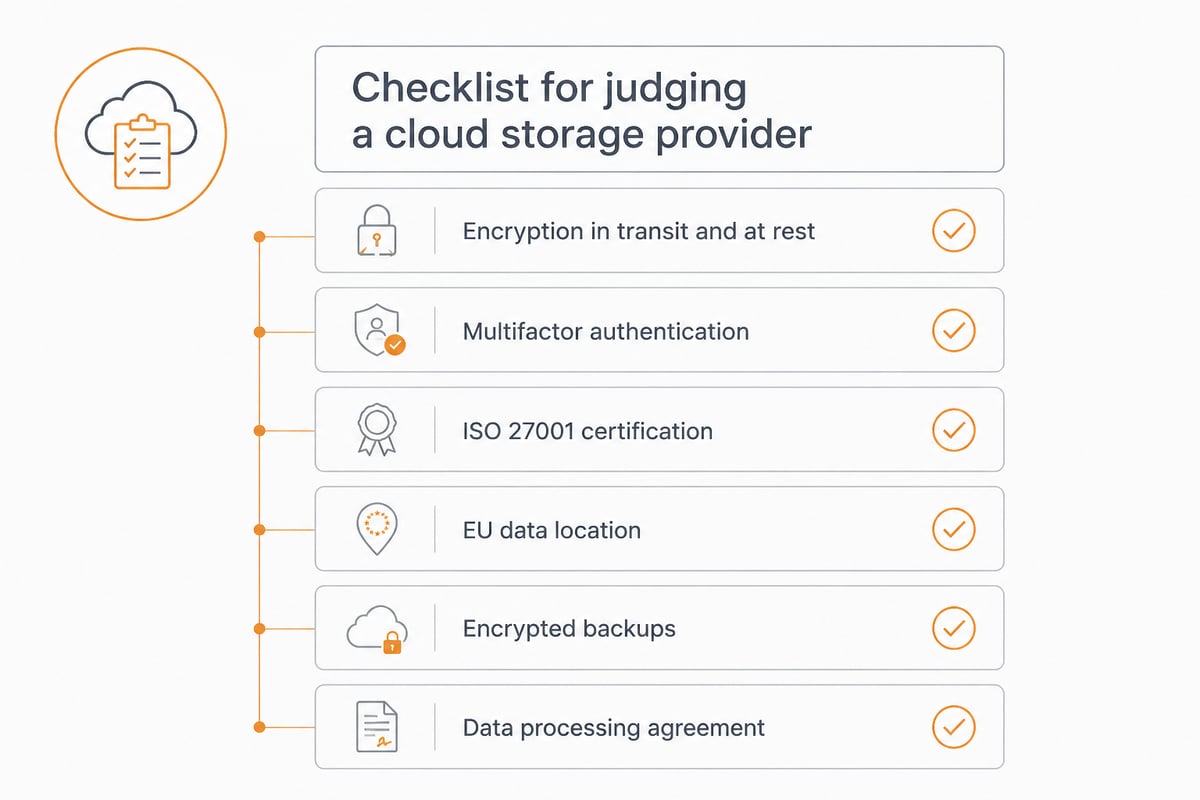
Cloud storage can be secure, provided the provider encrypts data properly, enforces strong authentication and operates under privacy law that protects you. The US Cybersecurity and Infrastructure Security Agency (CISA) recommends choosing a cloud service that encrypts data in transit and at rest, supports strong passwords and multifactor authentication, and is subject to privacy and security laws in its home country.
That final point deserves attention. In other words, security is not only technical; it is also legal. A provider may use excellent encryption, yet if its parent company sits under a foreign jurisdiction with broad disclosure powers, your data remains exposed to requests you cannot control.
The technical baseline
Look for 256-bit AES encryption at rest, TLS for data in transit, two-factor authentication, detailed access logs and version history. Confirm that encryption applies to backups and not merely to primary storage. Many incidents occur at the backup layer, since that copy is frequently the least protected.
The organisational baseline
Technical controls only matter if the provider operates them reliably. Therefore, prefer providers that maintain their own infrastructure, employ their own engineers and hold audited certifications. Our guide to secure cloud storage services explains how to verify these claims in practice.
Why Jurisdiction Matters More Than Most Reviews Admit
Jurisdiction decides which government can demand access to your files, so it should weigh as heavily as encryption strength. A provider headquartered outside the EU may store data in Frankfurt or Amsterdam, yet still answer to foreign law through its corporate parent.
For European organisations, this affects GDPR compliance directly. Consequently, three questions should appear on every shortlist:
- Is the provider a European company, or a subsidiary of a non-European one?
- Are the data centres owned and operated by EU entities?
- Do metadata, backups and support tooling also remain inside the EU?
The third question is frequently ignored. Files may sit in an EU data centre while logs, metadata or support systems are processed elsewhere. As a result, a provider that keeps all of these inside the EU offers a materially stronger compliance position. If this topic is new to you, our overview of EU cloud storage sets out what genuine EU hosting involves.
Request a data processing agreement before signing anything. A provider that cannot supply one promptly is, in effect, telling you how it regards compliance.
Comparing Providers: The Criteria That Separate Them
Providers differ most on jurisdiction, certification, support model and collaboration tooling, so compare them on these attributes side by side. The table below shows a practical scoring frame you can apply to any shortlist.
| Criterion | What to verify | Why it matters |
|---|---|---|
| Jurisdiction | Company HQ, ownership of data centres | Determines exposure to foreign access laws |
| Certification | ISO 27001, independent auditor named | Proves security controls are tested |
| Encryption | AES-256 at rest, TLS in transit | Protects files from interception and theft |
| Data scope | Metadata, backups, support tooling location | Avoids hidden transfers outside the EU |
| Support | Phone, chat or remote session | Reduces downtime when problems occur |
| Recovery | Version history, deleted-file recovery | Limits damage from errors and ransomware |
| Exit | Export options, migration help | Prevents long-term lock-in |
Nevertheless, no table replaces a trial. Upload realistic files, invite a colleague, test sharing permissions and attempt a restore. Finally, ask support a technical question and observe how quickly and competently it is answered.
Which Cloud Storage Service Is the Cheapest?
The cheapest service on paper is rarely the cheapest in practice, because per-gigabyte pricing ignores support, compliance and migration costs. Free tiers in particular come with limited capacity, fewer security controls and unclear data handling, which is why they suit private experiments better than business records. Our article on free cloud storage explains these trade-offs in more detail.
For a business, a more honest comparison considers total cost of ownership:
- Licence cost per user per month
- Charges for extra storage, versioning or recovery
- Time spent on administration and user support
- Cost of a compliance breach or an unplanned migration
In addition, a provider offering free migration and personal support can offset a higher monthly fee through saved staff hours. Therefore, request a quote covering your actual headcount and storage needs instead of comparing advertised entry prices.
Backblaze or Google Drive: How Do They Compare?
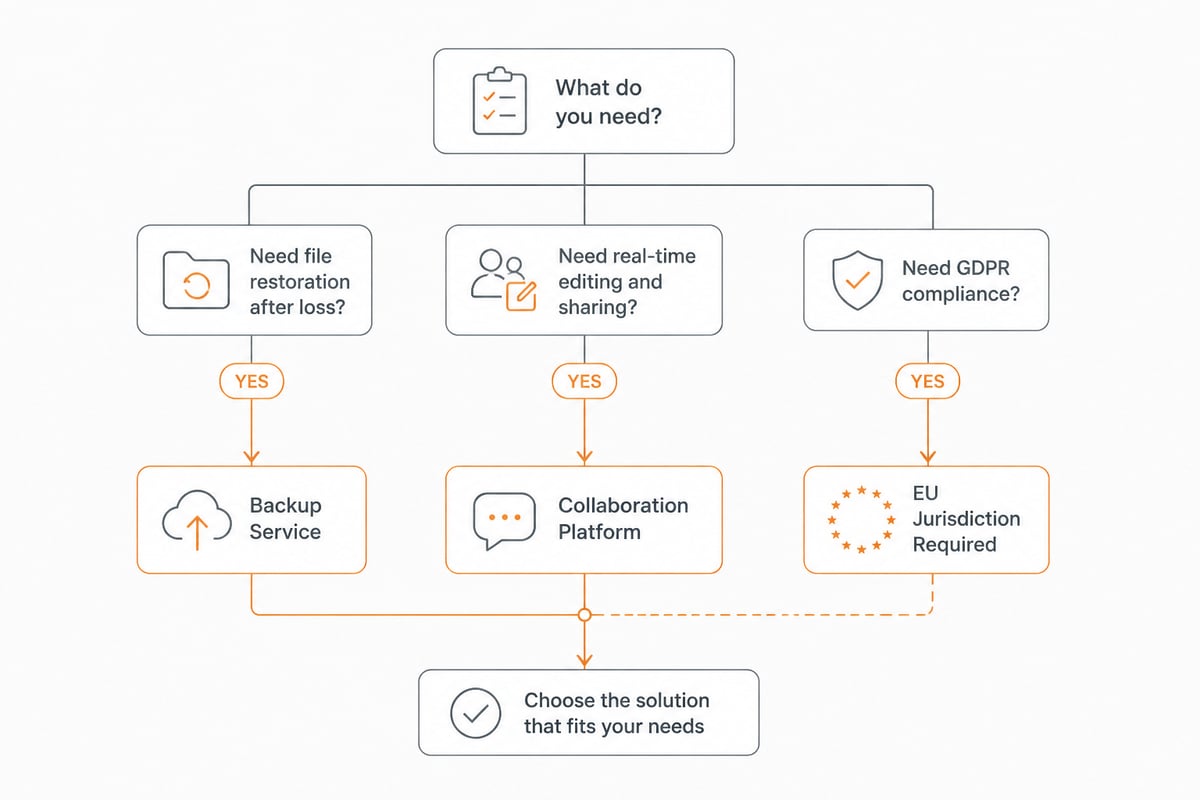
Backblaze and Google Drive serve different purposes, so neither is simply better. Backblaze is primarily a backup service, whereas Google Drive is a collaboration platform tied to Google Workspace documents and sharing.
That distinction is useful beyond these two brands. Before reading any comparison, decide whether you need a backup tool, a collaboration platform or both. Backup services excel at restoring lost data, whereas collaboration platforms excel at real-time editing and sharing. Subsequently, check where each stores data and under which law it operates, since both are US companies and therefore subject to US legal reach. For European businesses prioritising GDPR compliance, a European alternative that combines storage, sharing and signing often fits better. Our comparison of the best European cloud storage options covers this in depth.
Storage Is Not a Backup: Applying the 3-2-1 Rule
Synchronised cloud storage is not a backup, because deleting or encrypting a file on one device can propagate to every connected copy. This is why reviews that treat storage and backup as interchangeable can mislead you.
CISA recommends the 3-2-1 backup rule: keep three copies of important files, on two types of storage media, with one copy off-site. The same guidance advises testing backup procedures to confirm that data can be restored and that you can roll back at least seven days if needed. Moreover, CISA notes that ransomware figures prominently in breaches, which illustrates why restoration capability matters.
A separate CISA resource recommends keeping updated copies of critical data on devices or media under your physical control. In practice, this means:
- Use version history and deleted-file recovery inside your cloud storage.
- Keep an independent, encrypted copy outside the platform.
- Schedule restore tests, rather than assuming backups work.
If your team works in Microsoft 365 or Google Workspace, remember that those platforms do not replace a dedicated backup. A separate backup of mailboxes and documents closes that gap. CISA's broader business cybersecurity guidance reinforces the same priorities of data prioritisation, tested recovery and encryption.
What Are Good Places to Store Photos and Documents?
For personal photos, consumer services with generous free tiers are adequate, whereas business documents belong on a platform with governance, audit trails and EU hosting. The distinction matters because company files, such as contracts, invoices and client records, carry legal obligations that holiday photographs do not.
Business documents benefit from features that consumer services rarely provide:
- Role-based sharing and expiry dates on links
- Full audit trails showing who accessed what
- Digital signing that holds up legally
- Search that finds content inside documents, not only file names
Our guide to cloud storage for documents shows how to structure folders and permissions so that growth does not create chaos.
Where vBoxxCloud Fits Among Secure Options
vBoxxCloud is a business cloud storage platform that stores data in ISO 27001-certified data centres in the Netherlands, uses 256-bit AES encryption and sits outside the reach of the US CLOUD Act. It combines team sharing, version history, recovery of deleted files, eIDAS-compliant digital signing with a full audit trail, and AI-assisted search and summarisation of your own documents.
Beyond the product, the operating model supports the criteria discussed above. vBoxx runs its own infrastructure, maintained by its own engineers, rather than outsourcing to US hyperscalers. Data, metadata, backups and support tooling remain inside the EU, a data processing agreement is available, and support is available by phone, chat or remote session. The company was named best cloud services company in the Netherlands for 2025 by Global 100.
How to Run Your Own Evaluation in Five Steps
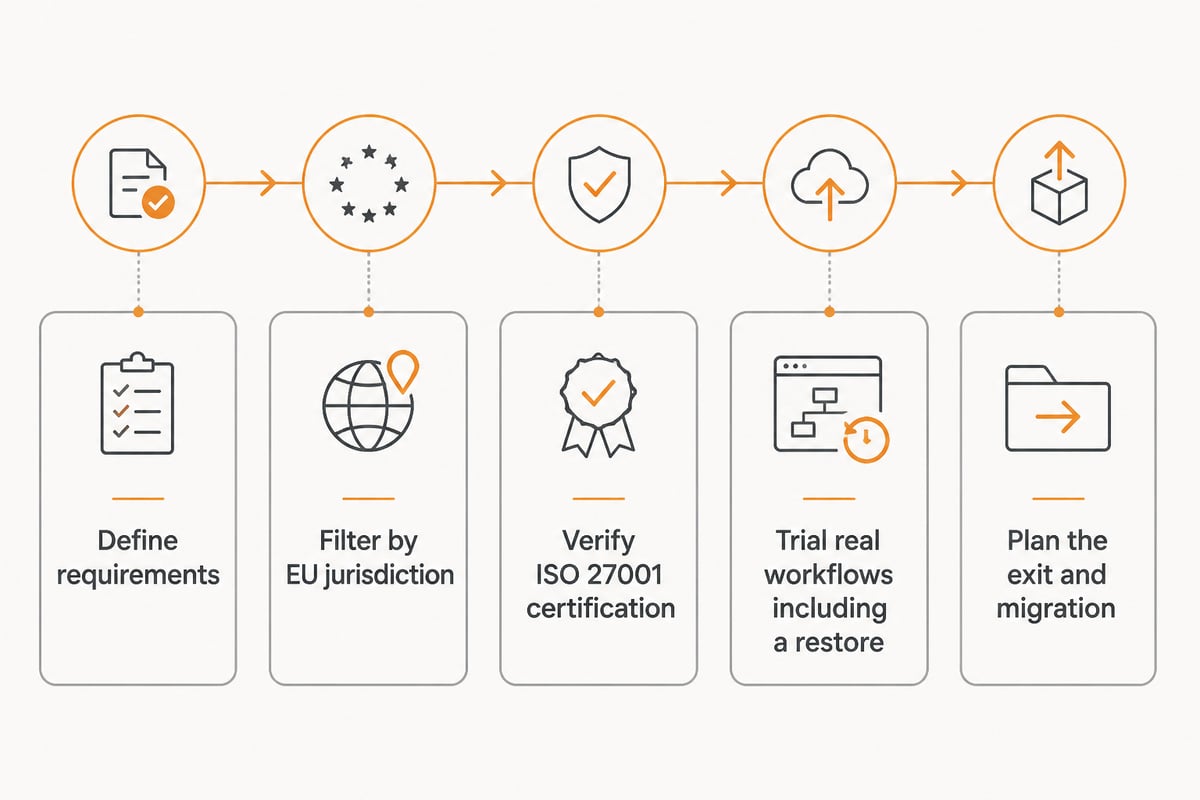
You can turn any set of cloud storage reviews into a defensible decision by running a short, structured evaluation. Follow these steps in order:
- Define requirements. List the data types, user numbers, compliance obligations and integrations you need.
- Filter by jurisdiction. Remove providers that fail your EU-hosting and ownership criteria before comparing features.
- Verify certification. Ask for the ISO 27001 certificate and the name of the auditor.
- Trial with real workflows. Test sharing, permissions, signing, search and a full restore.
- Plan the exit. Confirm export formats and migration support before committing.
Consequently, you will compare providers on evidence rather than marketing claims. For organisations in regulated sectors, additional guidance on cloud storage for law firms and cloud storage for healthcare addresses confidentiality duties specific to those fields.
FAQ
Do cloud storage reviews stay reliable over time?
Not indefinitely, because providers change ownership, pricing and security features regularly. Check the publication date, confirm the review covers the current year, and verify key claims such as certification directly with the provider.
Is a free cloud storage plan safe for business files?
Generally not. Free plans typically offer limited capacity, fewer administrative controls and less transparency about data handling, so they are better suited to non-sensitive personal use than to client or financial records.
How much storage does a small business need?
It depends on file types and user numbers, so audit your current data before choosing a plan. Allow for growth and version history, and ask the provider how additional capacity is added so that you are not forced into an abrupt upgrade.
Your next step is to write down your three non-negotiable criteria, such as EU hosting, a signed data processing agreement and tested recovery, and measure every shortlisted provider against them. If those criteria point you towards a European provider with its own infrastructure, vBoxxCloud is worth examining alongside the wider vBoxx suite, including free migration support from your current platform. You can get a free trial to test sharing, signing and restore on your own documents before committing.