
Fortinet SASE is Fortinet's cloud-delivered secure access service edge offering, sold as FortiSASE, which combines security service edge functions such as a secure web gateway, zero trust network access and firewall-as-a-service with Fortinet's SD-WAN and firewall products. Therefore, it lets organisations apply one security policy to remote users, branch offices and cloud applications. This guide explains the architecture, the main deployment models and the planning decisions that matter for European businesses that must keep data under GDPR.
What Is Fortinet SASE and How Does It Work?
Fortinet SASE is a platform that delivers networking and security from the cloud, so that users are protected wherever they connect from. In addition, it extends the policies of an on-premises FortiGate firewall to roaming staff, which helps avoid maintaining two separate rule sets.
The platform rests on three ideas:
- Cloud points of presence (PoPs): traffic from users is steered to the nearest FortiSASE location, where it is inspected before it reaches the internet or a private application.
- A unified agent: FortiClient is installed on the endpoint and sends traffic to the service, while also reporting device posture.
- Shared intelligence: threat data from FortiGuard Labs feeds the inspection engines in every PoP.
Furthermore, FortiSASE is usually described as having two halves. The security service edge (SSE) half covers inspection and access control. The connectivity half, built on SD-WAN, links branches and data centres to that same fabric. Consequently, an organisation can adopt the SSE half first and add the connectivity half later.
Core Components of the Fortinet SASE Architecture
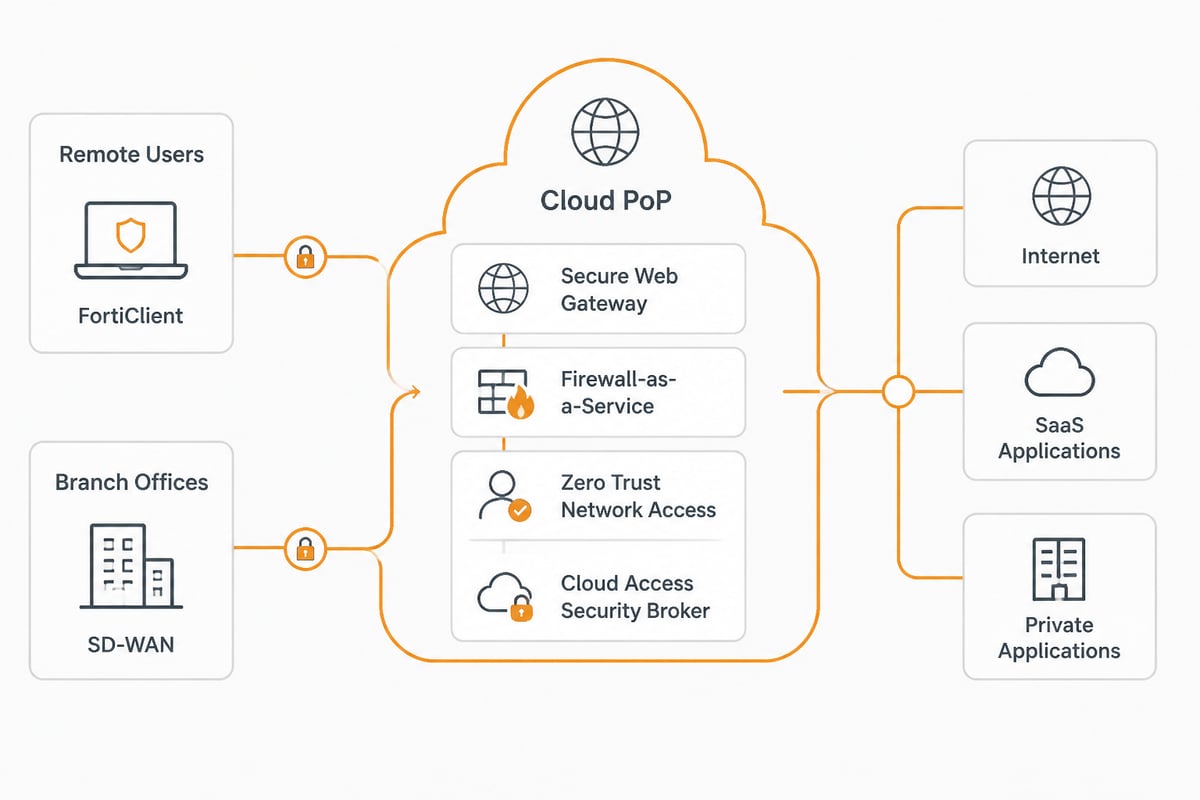
The architecture consists of six functional building blocks, each of which addresses a different type of traffic or risk. In addition, they are managed together, which is what separates a SASE platform from a collection of point products.
- Secure web gateway (SWG): filters web traffic, blocks malicious sites and enforces acceptable-use policy.
- Firewall-as-a-service (FWaaS): applies next-generation firewall inspection, including intrusion prevention, to non-web traffic.
- Zero trust network access (ZTNA): grants access to individual applications based on user identity and device posture rather than network location.
- Cloud access security broker (CASB): controls the use of SaaS applications and helps detect unsanctioned services.
- Data loss prevention (DLP): inspects content to stop sensitive information leaving the organisation.
- SD-WAN: connects sites with performance-aware path selection, replacing or supplementing MPLS circuits.
The ZTNA component deserves particular attention because it embodies the zero trust principle that no connection is trusted by default. The CISA zero trust resource page is a sound reference for the underlying architecture guidance, and its zero trust maturity model offers a roadmap built on five pillars and three cross-cutting capabilities.
Agent-Based and Agentless Access Models
Fortinet SASE supports two ways of connecting users: an agent on the device, or a browser-only method for devices where an agent cannot be installed. According to Fortinet's FortiSASE design examples, agent-based remote-user secure internet access maps to FortiClient and FortiSASE firewall-as-a-service, whereas browser-based or web-only access maps to an explicit web proxy and the FortiSASE secure web gateway.
The practical difference is considerable, as the table below shows.
| Attribute | Agent-based (FortiClient) | Browser-based (web proxy) |
|---|---|---|
| Traffic covered | All traffic, web and non-web | Web traffic only |
| Inspection engine | FortiSASE FWaaS | FortiSASE secure web gateway |
| Device posture checks | Yes | Limited |
| Typical use | Managed laptops and phones | Contractors, unmanaged or shared devices |
Therefore, a sensible approach is to deploy the agent on every managed device and reserve the browser-based model for third parties. Nevertheless, an organisation should confirm in the current Fortinet documentation which features each model supports, since this changes between releases.
Fortinet SASE Deployment: A Practical Sequence
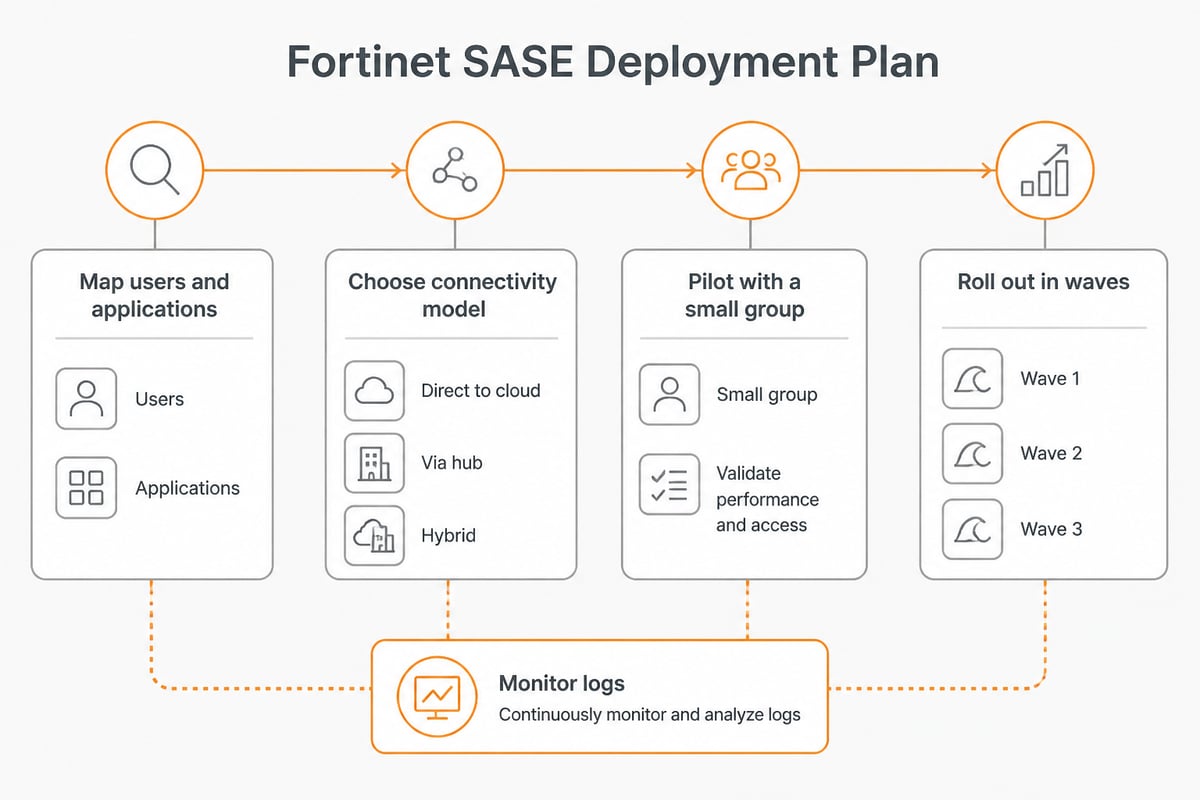
A successful Fortinet SASE deployment follows a staged sequence that starts with inventory and ends with optimisation. Rushing straight to the agent rollout is the most common cause of avoidable support tickets.
Step 1: Map users, applications and data flows
List who needs access to what, and from where. In addition, record which applications are SaaS, which sit in a data centre and which are hosted with a European provider. This inventory determines your ZTNA rules and your DLP priorities.
Step 2: Choose the connectivity model
Decide whether branches will connect through SD-WAN, through an IPsec tunnel to the nearest PoP, or not at all initially. Consequently, a smaller organisation with mostly remote staff may begin with agent-based access only.
Step 3: Pilot with a small group
Select a representative group of users, ideally including staff who travel and staff who use unusual applications. A pilot exposes policy gaps before they affect the whole company.
Step 4: Roll out and monitor
Deploy FortiClient in waves, using your existing endpoint management tooling. Finally, review logs weekly during the first month to tune policies and reduce false positives.
Does SASE Replace Firewalls?
SASE does not remove the need for firewalls; it moves much of the firewall function into the cloud and keeps on-premises firewalls where they still make sense. In other words, the inspection capability remains, but its location changes.
For a site with a data centre, manufacturing equipment or a large local user base, a physical or virtual FortiGate often remains the better option. In addition, Fortinet's design allows a FortiGate to act as the on-premises edge while FortiSASE protects roaming users, which is why existing Fortinet customers often find it an incremental step rather than a replacement project. Therefore, the realistic question is not whether to keep firewalls, but how much traffic still needs to pass through hardware.
Is SASE the Same as SD-WAN?
SASE is not the same as SD-WAN; SD-WAN is one component of a SASE architecture. SD-WAN optimises how traffic travels between sites and the internet, while SASE adds the security services that inspect and control that traffic.
An organisation can run SD-WAN without any cloud security, and it can use SSE without SD-WAN. However, combining them gives a single policy framework for both connectivity and protection. Consequently, Fortinet markets the pairing as Unified SASE, in which a common platform and agent serve both functions.
Choosing the Best SASE Solution for Your Organisation
There is no single best SASE solution; the right choice depends on existing infrastructure, staff skills and regulatory requirements. Nevertheless, a short list of criteria makes the comparison manageable.
- Existing estate: organisations that already run FortiGate firewalls benefit from reusing policies and skills.
- Single-vendor or multi-vendor preference: a unified platform reduces integration effort, whereas a best-of-breed approach offers more choice per function.
- PoP locations: confirm that inspection happens in locations compatible with your data residency requirements.
- Management overhead: consider whether your team can operate the platform or needs a managed service.
- Licensing model: compare per-user and bandwidth-based pricing against your headcount and traffic.
In addition, independent analyst evaluations, such as the Gartner Magic Quadrant for SASE platforms, can inform a shortlist. Nevertheless, a proof of concept with your own users will tell you more than any report.

Data Residency and GDPR Considerations
For European businesses, the most important question about any SASE service is where inspected traffic and logs are processed and stored. Cloud-delivered inspection means that user traffic passes through third-party infrastructure, so data residency becomes a compliance matter rather than a technical detail.
Fortinet offers a sovereign variant of FortiSASE aimed at customers with strict data sovereignty needs. You should ask any provider the following before signing:
- In which countries are the PoPs that will handle your traffic?
- Where are logs, metadata and analytics stored, and for how long?
- Is a data processing agreement available, and which sub-processors are named?
- Under which jurisdiction does the provider fall, including exposure to non-EU access laws?
Furthermore, SASE protects the path to your data, but it does not decide where the data itself lives. A business can secure its connections perfectly and still store files with a provider subject to non-EU legislation. Therefore, pairing a SASE service with EU-hosted storage and collaboration tools completes the picture. vBoxx, for example, is a European provider that runs its own infrastructure in ISO 27001-certified data centers in the Netherlands and offers a data processing agreement. Its managed cloud computing overview describes how that approach works in practice.
Integrating Fortinet SASE With Your Wider Infrastructure
Fortinet SASE works best when it is treated as one layer of a broader architecture that also includes identity, backup and storage decisions. In addition, a hybrid environment, with some workloads on premises and some hosted externally, is the norm for most small and mid-sized organisations. The advantages of hybrid cloud explain why this mixed model is so common, and why consistent access policy across it matters.
Several integration points deserve planning:
- Identity provider: connect FortiSASE to your single sign-on and multi-factor authentication so that ZTNA decisions use real user identity.
- Endpoint management: use your existing tooling to distribute FortiClient and enforce updates.
- Private applications: publish internal applications through ZTNA rather than exposing them to the internet.
- Backup and recovery: SASE does not back up your data, so keep independent backups of Microsoft 365 and Google Workspace.
Likewise, hardware choices at the edge matter. Organisations that keep local storage or network equipment can source components from specialist suppliers, while those that prefer to avoid hardware entirely can move workloads to a hosted platform. Consequently, the right balance depends on how much infrastructure your team wants to maintain.
Common Deployment Mistakes to Avoid
Most SASE problems stem from planning gaps rather than product faults. Therefore, it pays to anticipate the following issues:
- Migrating policies one-to-one: copying a legacy firewall rule base into the cloud carries over years of unused rules. Review and simplify first.
- Ignoring latency: test application performance from the locations where your staff actually work, not only from head office.
- Skipping the unmanaged-device question: contractors and personal devices need a defined access path, usually browser-based.
- Underestimating change management: users notice a new agent immediately, so communicate the change and provide support.
- Forgetting log retention: align log storage with your GDPR obligations and your incident response needs.
In addition, set measurable success criteria before the pilot, such as support ticket volume, application response times and the share of managed devices running the agent. Without them, it is difficult to judge whether the deployment has met its goals.
FAQ
What is SASE Fortinet?
SASE Fortinet refers to FortiSASE, Fortinet's cloud-delivered service that combines a secure web gateway, firewall-as-a-service, zero trust network access, CASB and DLP with SD-WAN connectivity. It extends the protection of a FortiGate firewall to remote users and branches through cloud points of presence.
Can a small business use Fortinet SASE?
Yes, a small business can start with agent-based secure internet access for its remote staff and add further components later. However, a team without dedicated security staff should consider whether a managed service would reduce the operational burden.
Does Fortinet SASE require FortiGate firewalls?
No, FortiSASE can protect remote users on its own. Nevertheless, organisations that already operate FortiGate devices gain the most, because policies and management can be shared between the cloud service and the on-premises firewalls.
Your next step is to list every application your staff use and note where each one stores its data, because that inventory decides which SASE components you need and where residency risks sit. Once the access layer is planned, the data layer deserves the same attention, and vBoxx can help with EU-hosted cloud storage, secure collaboration, backup for Microsoft 365 and Google Workspace, and free migration services. To see how this fits your environment, get a free trial of vBoxx and test the platform with your own team.