
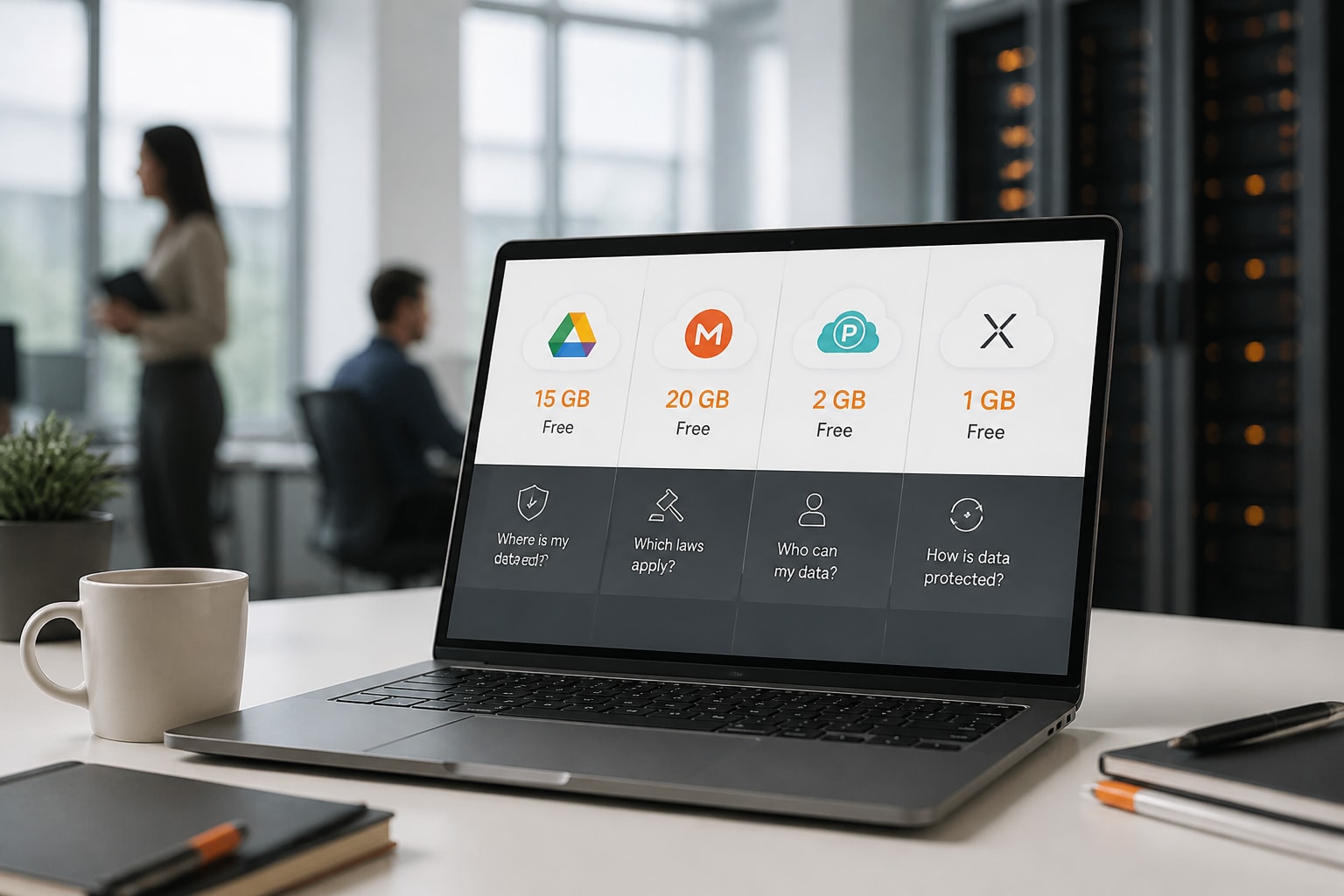
Free cloud storage gives you between 1 GB and 20 GB at no cost, but the allowance, the encryption and the legal jurisdiction differ sharply between providers. For a European business, therefore, the headline gigabytes matter less than where the data is held, who can access it and what happens when the free tier runs out. This review covers four widely used free plans, their limits, their privacy position and the catches that tend to appear later.
How Much Free Cloud Storage Do the Main Providers Offer?
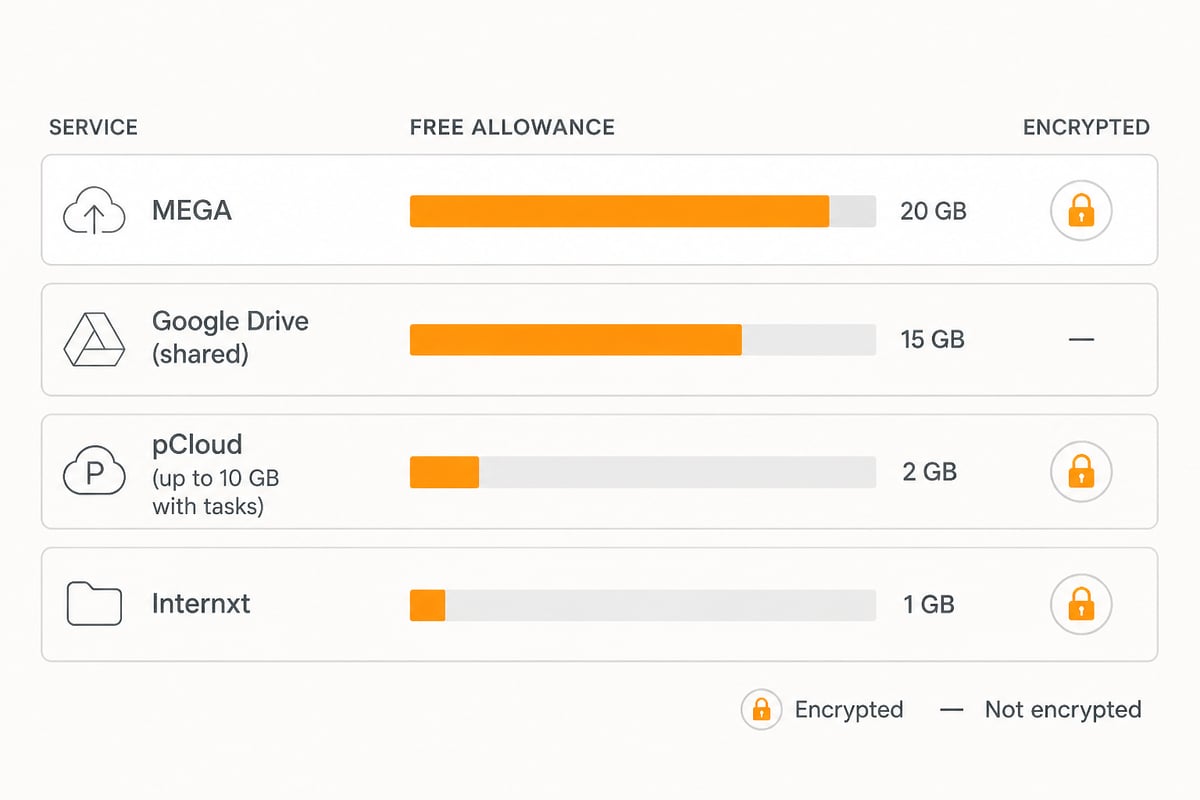
The main providers offer between 1 GB and 20 GB for free, and the spread is wide enough to affect which service suits a given task. The figures below are those listed by the providers and in published UK comparisons, so treat them as approximate.
| Provider | Free allowance | Encryption on free tier | Paid entry point |
|---|---|---|---|
| Google Drive | 15 GB, shared with Gmail and Photos | Not listed as end-to-end | Google One from 100 GB |
| MEGA | 20 GB, limited transfer | Encrypted storage | Plans up to 20 TB |
| pCloud | 2 GB, up to 10 GB via tasks | Not listed for the free tier | About £4.99/month for 500 GB |
| Internxt | 1 GB | Encrypted | About £1.26/month for 1 TB |
In addition, the allowance is only one dimension. Transfer caps, shared quotas and the terms attached to unused accounts shape how usable a plan is in practice.
Google Drive: 15 GB Shared Across Three Services
Google Drive offers the most familiar free tier, with 15 GB that is shared rather than dedicated to files. According to Google One, a Google Account includes up to 15 GB of storage shared across Google Drive, Gmail and Google Photos. Consequently, a busy mailbox or a photo backup can consume the allowance before a single document is stored.
Key points:
- 15 GB free, pooled across Drive, Gmail and Photos
- Paid storage begins at 100 GB, and Google Support notes that available options vary by location
- Storage on eligible plans can be shared with up to five other people
- Strong integration with Gmail and Google Photos
The practical catch is jurisdiction. Google is a US company, so its services may fall within the reach of the US CLOUD Act, which matters for organisations with GDPR obligations. Nevertheless, for personal files, drafts and low-sensitivity material, the convenience is hard to dispute.
MEGA: The Largest Free Allowance with Encryption
MEGA provides the biggest free allowance in this comparison, at 20 GB of encrypted storage. MEGA states that its free plan includes 20 GB of encrypted cloud storage and limited transfer. The transfer limit is the main constraint, because large downloads or frequent sharing can reach the cap well before the storage is full.
Moreover, MEGA says its paid plans offer storage up to 20 TB, with its Pro Flexi and Business plans starting at 3 TB. That is a large jump from the free tier, so teams that outgrow 20 GB face a considerable step in both capacity and cost. GBP prices for the paid plans are not listed in the research used here, so check the provider directly.
MEGA suits people who want a generous free allowance and encryption, and who can work within a transfer cap. It is less suited to a team that needs predictable, uncapped access every day.
pCloud: A Small Start with Tasks to Earn More
pCloud begins modestly, with 2 GB free and a way to earn more. The Internxt blog reports that pCloud starts accounts with 2 GB of free storage, with tasks available to unlock up to 10 GB. Completing these tasks is required to reach the larger figure.
For paid storage, the same type of UK comparison lists pCloud monthly plans at £4.99 for 500 GB and £9.99 for 2 TB. Prices are approximate and may change. In addition, the listed tiers suggest pCloud is aimed at people who expect to outgrow the free plan and prefer clearly stated capacity bands.
The catch is that the free allowance is the smallest of the group before tasks are completed. Therefore, it works as a trial of the service more than a place to keep a working archive.
Internxt: Only 1 GB, but Privacy Comes First
Internxt gives the smallest free allowance, yet it positions privacy as the core of its offer. The Internxt free plan provides 1 GB of cloud storage for as long as the account exists, requires no payment card and includes encrypted storage. A card-free sign-up removes the risk of an unnoticed conversion to a paid plan.
The UK comparison cited earlier lists a 1 TB plan at roughly £1.26 per month, and paid plans run from 1 TB to 5 TB. Consequently, Internxt is a low-cost route to a large encrypted allowance, though 1 GB free is only enough for a handful of documents.
What Are the Real Catches of Free Cloud Storage?
The real catches of free cloud storage are shared quotas, transfer limits, thin support and unclear data jurisdiction. Each is manageable for personal use, whereas several become serious problems for a business. Specifically, watch for these:
- Shared quotas. A pooled allowance, as with Google, shrinks as email and photos grow.
- Transfer caps. Generous storage can still be difficult to use if bandwidth is restricted.
- Limited support. Free tiers rarely include a named contact, which matters during an outage or a recovery.
- Business features held back. Audit trails, branding, team administration and signing tend to sit on paid plans.
- Jurisdiction. The country of the provider decides which legal requests can reach your data.
A free plan is a funnel. The provider expects to convert a share of users to paid plans, so evaluate the paid price before you commit files to the free tier.
Is Free Cloud Storage Private Enough for Business Data?
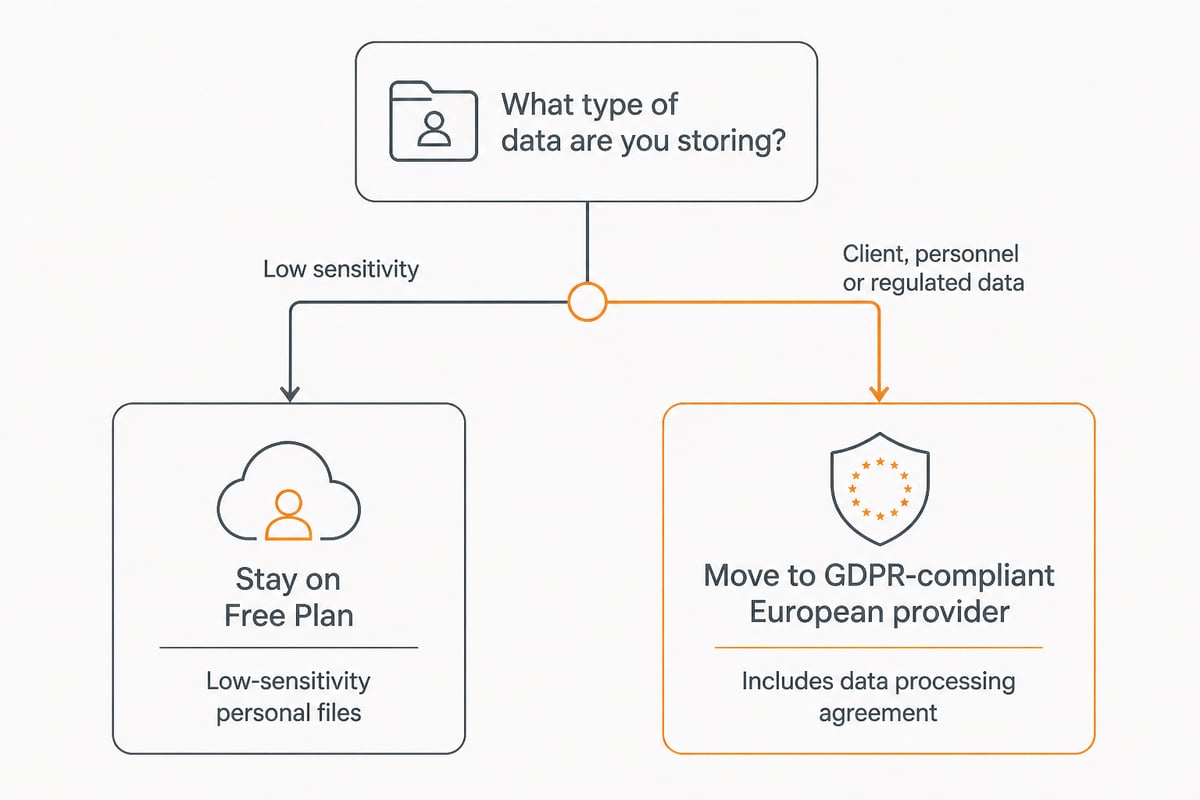
Free cloud storage can be adequate for non-sensitive files, but it is rarely sufficient for client, personnel or financial data under GDPR. Encryption helps, yet it does not settle the question of who operates the infrastructure and under which law. For a deeper treatment of the legal side, vBoxx has a guide to EU cloud storage, and another on data security in cloud storage.
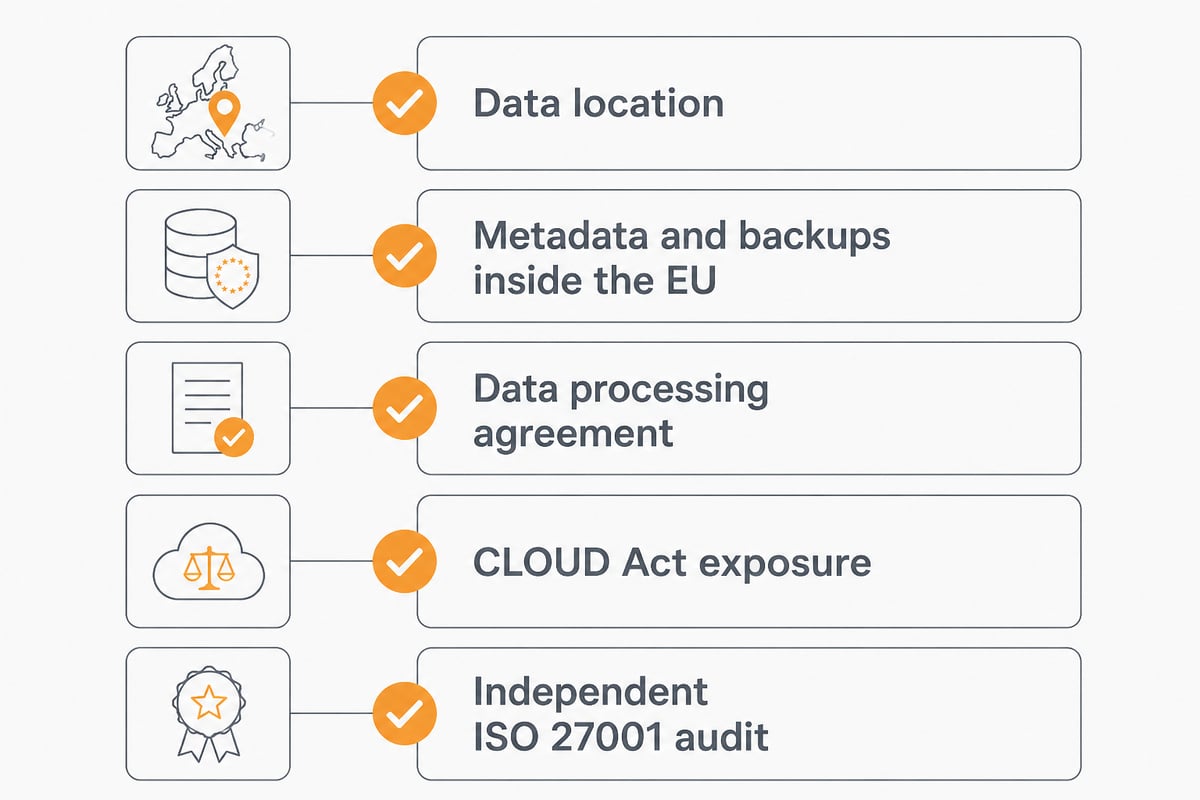
Consider the questions an IT manager would normally ask:
- Where are the servers, and who owns the data centre?
- Are metadata, backups and support tooling also kept in the EU?
- Is a data processing agreement available?
- Is the provider subject to the US CLOUD Act?
- Is there an independent audit, such as ISO 27001?
Free tiers from consumer services seldom answer all of these. In addition, a data processing agreement is usually tied to paid or business contracts. Therefore, the safest approach is to keep sensitive material off personal free accounts altogether.
How Do I Get 100 GB of Cloud Storage Free?
You generally cannot get 100 GB free on a permanent basis from the providers reviewed here. The largest permanent free allowance in this comparison is MEGA's 20 GB, and Google's paid storage starts at 100 GB. Some providers run time-limited promotions or referral bonuses, but these expire, so rely on them only for temporary needs.
A more sensible approach is to combine allowances for non-sensitive material, for example Google's 15 GB for general documents and a small encrypted account for private files. However, managing several accounts adds friction and creates more places where data can be lost or forgotten. For anything beyond light use, a modest paid plan is easier to govern than a patchwork of free ones.
vBoxxCloud: When Free Is No Longer the Right Answer
vBoxxCloud is not a free consumer service, but it addresses the gaps that free plans leave open for a business. It is GDPR-compliant business cloud storage with 256-bit AES encryption, held in ISO 27001-certified European data centres in the Netherlands and not subject to the US CLOUD Act. For pricing and plan details, consult the vBoxxCloud product pages or contact vBoxx directly.
The product includes:
- eIDAS-compliant digital signing with a full audit trail
- Smart tagging with full-text and semantic search
- A built-in AI assistant that summarises, extracts and drafts from your own documents
- Team sharing, version history and recovery of deleted files
- Customisable branding
Beyond the product itself, vBoxx states that its infrastructure is in-house rather than outsourced to US hyperscalers, with data, metadata, backups and support tooling kept inside the EU. It also reports ISO 27001 certification audited by TÜV NORD, a data processing agreement, and personal support by phone, chat or remote session. The company cites more than 20 years of experience.
For a closer look at how it fits an organisation, vBoxx's page on secure business cloud storage explains the requirements in more detail. Alternatively, the guided demonstration described under the next heading shows the platform in practice.
Demonstration All-in-One: A Guided Look Before You Decide
The all-in-one demonstration is a one-to-one guided tour led by a vBoxx employee. During the session, the vBoxx team explains vBoxxCloud for storing files online, vBoxxConnect as a secure mail solution and vBoxxVault for storing passwords securely. You can book through the vBoxx demonstration page.
This is not storage in itself, so it suits a different purpose. It lets an IT manager or small business owner test the questions raised above, namely jurisdiction, support and administration, against a live walkthrough rather than a feature list. Therefore, it works best as a low-effort step for teams that already suspect a free plan will not hold up.
Which Free Plan Fits Which User?
The right free plan depends on what you store and how much you share. As a summary:
- Google Drive: best if you already live in Gmail and Photos and the files are low sensitivity.
- MEGA: best if you want the largest free allowance with encryption and can accept limited transfer.
- pCloud: best if you expect to upgrade and like defined paid tiers, since the free start is only 2 GB.
- Internxt: best if encryption and a card-free sign-up matter more than capacity.
Who should skip free tiers altogether? Any business handling client files, contracts, personal data or regulated records. In that case a managed European service, with a data processing agreement and a named support route, is the more defensible choice. For a broader comparison, vBoxx has a guide to the best European cloud storage.
Finally, if you want to see how the same capacity is handled when stored cleanly and securely, the partner site Doghouse Nordic is a reminder that quality and transparency in sourcing matter in every product category, and cloud services are no exception.
FAQ
What is the free storage limit on MEGA?
MEGA's free plan includes 20 GB of encrypted cloud storage, according to the provider. It also applies a limit on data transfer, so heavy downloading or sharing can reach the cap before the storage is full.
How much does 50 GB of cloud storage cost?
None of the providers in this review list a 50 GB tier in the figures used here. Google One paid storage starts at 100 GB, pCloud lists 500 GB at about £4.99 per month, and Internxt lists 1 TB at about £1.26 per month. Prices are approximate and vary by region.
How do I free storage on my phone using the cloud?
Back up photos and documents to a cloud account, confirm the upload has finished, and then delete the local copies. Check the remaining allowance first, because a shared quota such as Google's 15 GB can fill quickly with photos and email. For work files, use a provider whose data location and terms suit your business obligations.
Start by listing which of your files are sensitive, because that single step shows whether a free plan is acceptable or whether you need a GDPR-compliant European provider. If you want to see how a business-grade setup looks in practice, vBoxxCloud combines encrypted EU storage, e-signing and AI-assisted search under one roof. vBoxx runs its own infrastructure in the Netherlands and supports migration, so you can get a free trial and judge it against the free plans you use today.