
Microsoft OneDrive has become an integral component of modern business operations, offering seamless file synchronisation across devices and convenient cloud storage. However, many organisations mistakenly believe that using OneDrive alone provides adequate data protection. Therefore, understanding the critical distinction between cloud synchronisation and proper backup solutions is essential for maintaining business continuity and protecting valuable digital assets. In this context, this comprehensive exploration examines how businesses can implement robust onedrive backup strategies while also addressing common misconceptions about cloud storage security.
Understanding OneDrive's Core Functionality
Microsoft OneDrive operates primarily as a synchronisation service rather than a traditional backup solution. In particular, when you save files to OneDrive, they synchronise across all connected devices, thereby creating identical copies in multiple locations. While this synchronisation provides convenience and accessibility, it also introduces specific vulnerabilities that businesses must recognise. Therefore, organisations should implement dedicated backup strategies to ensure comprehensive data protection.The Sync Versus Backup Distinction
Synchronisation creates mirror images of your data across devices. As a result, when you delete a file from one location, OneDrive removes it from all connected devices. Similarly, if ransomware encrypts files on your computer, those corrupted files synchronise across your entire OneDrive environment. Therefore, this behaviour fundamentally differs from true backup solutions, which maintain independent, versioned copies of your data that remain unaffected by changes to the original files.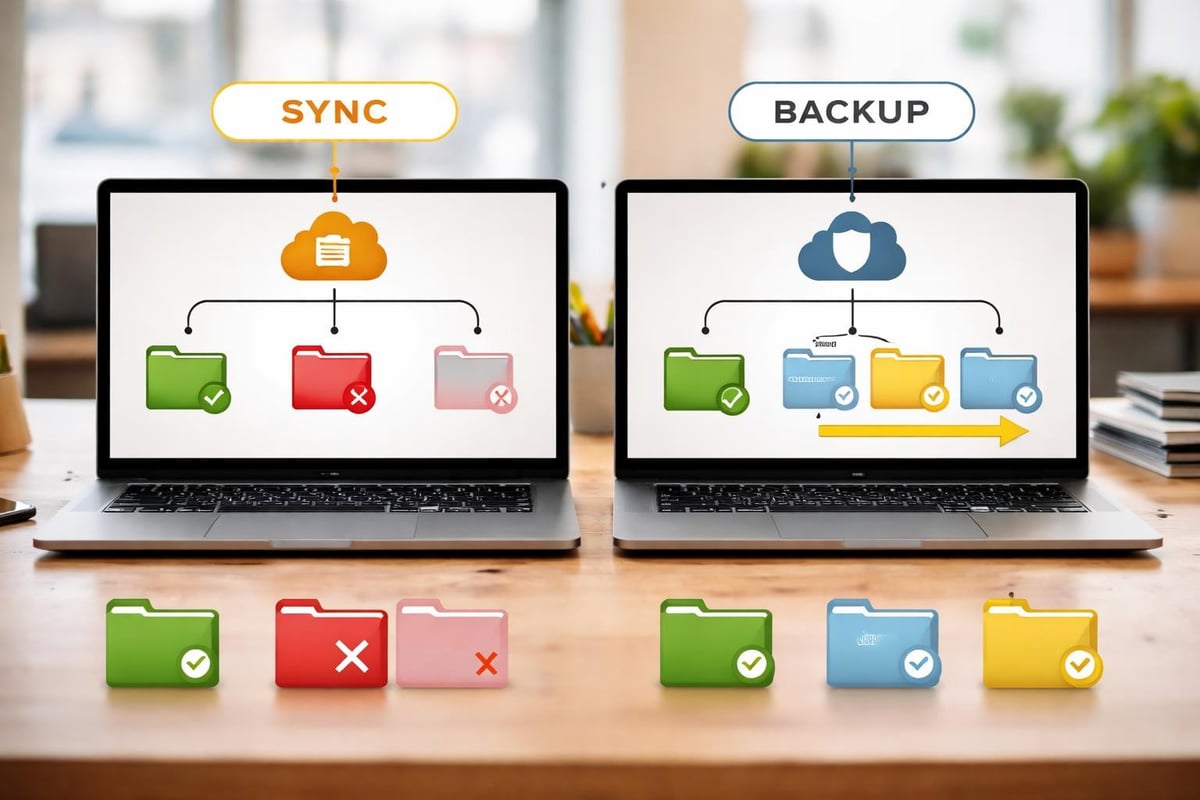
Key differences include:
- Synchronisation mirrors current file states across devices instantaneously
- Backup creates independent snapshots at specific points in time
- Recovery options in sync are limited to version history windows
- Protection scope differs significantly between the two approaches
Common Misconceptions About OneDrive Security
Several prevalent myths about onedrive backup capabilities lead businesses to underestimate their vulnerability. Five critical misconceptions frequently create false confidence in cloud storage as a complete backup solution.Myth One: Cloud Storage Equals Automatic Backup
Many organisations assume that storing data in OneDrive automatically provides backup protection. This assumption overlooks the synchronisation nature of cloud storage services. When users accidentally delete files or folders, those deletions propagate through OneDrive unless recovered within the version retention period.| Misconception | Reality | Risk Level |
|---|---|---|
| OneDrive backs up everything automatically | OneDrive syncs files, doesn't create independent backups | High |
| Deleted files are permanently safe | Retention periods limit recovery options | Medium |
| Ransomware can't affect cloud files | Encrypted files sync to OneDrive | Critical |
| Microsoft handles all data protection | Shared responsibility model applies | High |
Myth Two: Version History Provides Complete Protection
Microsoft OneDrive offers version history, typically retaining previous file versions for 30 days. While this feature is valuable, it also has significant limitations. For example, the retention window may prove insufficient for detecting subtle data corruption or sophisticated attacks that remain dormant for extended periods.Furthermore, version history also consumes storage quota and applies differently across file types. As a result, large organisations with substantial data volumes may find version history management challenging without dedicated tools.
Critical Vulnerabilities in Sync-Only Approaches
Relying exclusively on OneDrive synchronisation exposes businesses to several significant risks. Therefore, understanding these vulnerabilities helps organisations develop comprehensive protection strategies that address gaps in cloud storage services. In particular, recognising these risks enables businesses to implement additional safeguards and ensure more resilient data protection.Ransomware and Malware Propagation
Modern ransomware variants specifically target cloud synchronisation services. As a result, once malware encrypts files on a connected device, those encrypted versions synchronise to OneDrive, thereby potentially replacing clean copies. While OneDrive's version history may allow recovery, the process requires immediate detection and manual restoration across potentially thousands of files. Therefore, relying solely on synchronisation increases risk, making additional backup strategies essential for comprehensive protection.Attack propagation occurs through:
- Initial device infection via phishing or exploit
- Local file encryption by ransomware
- Automatic synchronisation of encrypted files to OneDrive
- Propagation of corrupted files to all connected devices
- Potential version history exhaustion as encrypted versions accumulate
Accidental Deletion and Human Error
User mistakes represent one of the most common causes of data loss. For example, employees might accidentally delete entire folders, overwrite critical files, or make bulk changes that corrupt data integrity. Therefore, without proper onedrive backup procedures, recovery options depend entirely on version history retention periods and user awareness of the deletion. As a result, implementing dedicated backup solutions significantly improves recovery capabilities and reduces the risk of permanent data loss.Implementing Comprehensive OneDrive Backup Strategies
Effective data protection requires layering OneDrive's capabilities with dedicated backup solutions. This approach, known as the 3-2-1 backup strategy, ensures data resilience across multiple failure scenarios.
The 3-2-1 Rule Applied to OneDrive
This proven methodology recommends maintaining three copies of data, stored on two different media types, with one copy offsite. For OneDrive users, this translates to specific implementation requirements.Implementation framework:
- Primary copy: Active working files in OneDrive
- Secondary copy: Dedicated cloud-to-cloud backup service
- Tertiary copy: Local or alternative cloud backup solution
- Media diversity: Combine cloud storage with physical or separate cloud infrastructure
- Geographic separation: Ensure backup locations differ from primary data centres
Cloud-to-Cloud Backup Solutions
Cloud-to-cloud backup services specifically address OneDrive's limitations by creating independent copies of your data. These solutions connect to your Microsoft 365 environment and regularly capture snapshots of your OneDrive contents, storing them in separate infrastructure beyond Microsoft's ecosystem.These specialised services offer extended retention periods, granular recovery options, and protection against account compromises. When evaluating cloud backup services, businesses should prioritise solutions offering OneDrive-specific features and compliance certifications.
Essential Features for OneDrive Backup Solutions
Selecting appropriate backup tools requires understanding which features provide genuine business value. Not all backup solutions offer equivalent protection levels or operational capabilities.Automated Scheduling and Continuous Protection
Manual backups inevitably fail due to human inconsistency. Robust onedrive backup solutions implement automated scheduling, capturing data changes at predetermined intervals. Advanced options provide continuous data protection, monitoring for changes and backing up modified files within minutes.| Feature | Business Benefit | Priority |
|---|---|---|
| Automated scheduling | Consistent protection without manual intervention | Critical |
| Continuous backup | Minimal data loss in recovery scenarios | High |
| Incremental backups | Reduced storage costs and faster backup completion | High |
| Retention policies | Compliance with regulatory requirements | Critical |
| Encryption | Data security during transit and storage | Critical |
Point-in-Time Recovery Capabilities
The ability to restore data to specific moments provides invaluable flexibility during recovery operations. Whether addressing ransomware attacks, accidental deletions, or corruption events, point-in-time recovery allows administrators to select exactly when data should be restored from.This granularity extends beyond simple version history, enabling recovery of entire folder structures, user accounts, or organisational units to previous states. For businesses subject to regulatory compliance requirements, this capability often proves mandatory.
Advanced Protection Strategies
Beyond basic backup implementation, sophisticated organisations layer additional security measures to protect their OneDrive environments comprehensively.Immutable Backup Storage
Immutability prevents anyone, including administrators and attackers, from modifying or deleting backup data for specified periods. This protection proves particularly valuable against ransomware that attempts to destroy backups before encrypting production data.
Immutability benefits include:
- Protection against deliberate or accidental backup deletion
- Ransomware resistance through unchangeable backup copies
- Regulatory compliance for data retention requirements
- Forensic capabilities for security investigations
- Enhanced confidence in recovery point availability
Multi-Factor Authentication and Access Controls
Securing backup systems with multi-factor authentication adds critical protection layers. Even if primary credentials become compromised, backup data remains protected behind additional authentication requirements. Granular access controls ensure only authorised personnel can initiate restores or modify backup configurations.Hybrid Backup Approaches
Many organisations benefit from combining cloud and local backup strategies. Hybrid approaches balance the convenience of cloud storage with the speed and control of local backups, as discussed in offline backup benefits.Local Backup Integration
Maintaining local copies of critical OneDrive data provides rapid recovery options when internet connectivity proves problematic or immediate access to large datasets becomes necessary. Network-attached storage devices or dedicated backup servers can synchronise with OneDrive whilst maintaining independent backup copies.This approach combines OneDrive's accessibility with local recovery speed. Businesses using cloud hosting services can integrate these systems seamlessly into existing infrastructure.
Geographic Redundancy
Distributing backup copies across multiple geographic regions protects against regional disasters, data centre failures, or service disruptions. Whilst OneDrive itself replicates data across Microsoft's global infrastructure, independent backups in separate geographic locations provide additional resilience.Monitoring and Testing Backup Systems
Implementing onedrive backup solutions represents only the first step. Ongoing monitoring and regular testing ensure backups function correctly when recovery becomes necessary.Automated Verification Processes
Backup verification confirms that captured data remains intact and restorable. Automated verification processes periodically test backup integrity, checking for corruption, incomplete transfers, or configuration errors that might compromise recovery capabilities.Verification checklist includes:
- Confirming backup job completion and success rates
- Testing random file restoration from recent backups
- Validating backup data integrity through checksums
- Reviewing storage consumption against retention policies
- Monitoring backup system performance metrics
- Documenting verification results for compliance purposes
Disaster Recovery Planning
Comprehensive backup strategies integrate with broader disaster recovery planning. Organisations should document recovery procedures, establish recovery time objectives, and conduct regular drills testing their ability to restore operations from backup copies.Recovery time objectives define acceptable downtime following data loss events. Understanding how quickly your onedrive backup solution can restore various data volumes helps set realistic expectations and guides infrastructure investment decisions.
Compliance and Regulatory Considerations
Many industries face specific data retention and protection requirements. Healthcare organisations must comply with regulations governing patient data, whilst financial services face stringent record-keeping mandates. Understanding how OneDrive backup strategies support compliance proves essential.Data Sovereignty and Location Controls
Regulatory frameworks often mandate that specific data types remain within particular geographic boundaries. When implementing backup solutions, organisations must verify where backup data physically resides and whether that location satisfies applicable requirements.Cloud-to-cloud backup providers should offer transparent data location controls, allowing organisations to specify backup storage regions. This capability becomes particularly important for businesses operating across multiple jurisdictions with varying data protection laws.
Audit Trail and Reporting Capabilities
Compliance often requires demonstrating data protection measures through detailed audit logs. Effective backup solutions maintain comprehensive records of backup operations, restoration activities, and administrative actions. These logs support both compliance audits and security investigations.| Compliance Requirement | Backup Solution Feature | Implementation Priority |
|---|---|---|
| Data retention periods | Configurable retention policies | Critical |
| Geographic restrictions | Location-specific storage options | High |
| Access documentation | Comprehensive audit logging | Critical |
| Encryption standards | End-to-end encryption | Critical |
| Recovery verification | Automated testing and reporting | Medium |
Cost Optimisation Strategies
Implementing robust onedrive backup solutions involves balancing protection requirements against budget constraints. Strategic approaches can deliver comprehensive protection whilst managing costs effectively.Tiered Storage Approaches
Not all data requires identical protection levels. Implementing tiered backup strategies allows organisations to apply different retention periods, backup frequencies, and storage types based on data criticality and regulatory requirements.Archive data might receive monthly backups with extended retention, whilst active project files benefit from continuous protection with shorter retention windows. This granularity optimises storage consumption whilst maintaining appropriate protection levels.
Retention Policy Optimisation
Indefinite data retention rapidly increases storage costs without proportional benefits. Carefully designed retention policies balance recovery needs against storage expenses. Consider regulatory requirements, business processes, and practical recovery scenarios when establishing retention periods.Retention policy factors:
- Regulatory minimum retention periods for specific data types
- Business cycle durations requiring historical data access
- Storage cost implications of extended retention
- Technical limitations of backup infrastructure
- Recovery point objectives for different data categories
Integration with Business Workflows
Effective onedrive backup solutions integrate seamlessly with existing business processes rather than creating additional administrative burdens. Modern backup platforms offer APIs, automation capabilities, and management interfaces that complement Microsoft 365 workflows.Administrative Automation
Backup administration benefits significantly from automation capabilities. Automated user provisioning ensures new OneDrive accounts receive immediate backup protection. Similarly, automated deprovisioning handles employee departures by preserving data according to retention policies whilst removing unnecessary ongoing backup operations.Organisations managing complex Microsoft 365 environments appreciate backup solutions that integrate with administrative tools, providing centralised visibility and control. If you're interested in exploring how comprehensive cloud solutions can streamline these processes, scheduling a demonstration of all-in-one cloud services can provide valuable insights into integrated approaches.
User-Initiated Recovery
Empowering users to recover their own accidentally deleted files reduces IT support burden whilst improving recovery speed. Self-service portals allow users to browse backup snapshots, search for specific files, and initiate restorations without administrative intervention.This capability particularly benefits organisations with distributed workforces or limited IT resources. Clear user interfaces and intuitive search functions encourage adoption whilst maintaining security through appropriate access controls.
Evaluating OneDrive Backup Providers
Selecting appropriate backup solutions requires systematic evaluation of provider capabilities, reliability, and support offerings. Comprehensive backup software reviews provide valuable starting points, but organisations should conduct specific assessments aligned with their requirements.Technical Capabilities Assessment
Provider evaluation should examine technical features supporting your specific OneDrive environment. Consider the scale of your deployment, complexity of permissions structures, and any customisations affecting backup requirements.Evaluation criteria include:
- Support for your Microsoft 365 subscription tier
- Scalability to accommodate organisation growth
- Backup frequency options and continuous protection
- Granular recovery capabilities at file and folder levels
- Retention policy flexibility matching compliance needs
- Encryption standards for data protection
- Integration with existing security infrastructure
Service Level Agreements
Backup providers should offer clear service level agreements defining uptime commitments, support response times, and recovery point objectives. Understanding these commitments helps set realistic expectations and provides recourse when service falls short.Future-Proofing Your Backup Strategy
Technology environments continually evolve, introducing new capabilities and potential vulnerabilities. Effective onedrive backup strategies anticipate future requirements whilst addressing current needs.Emerging Threats and Protections
Cybersecurity threats constantly evolve, with attackers developing increasingly sophisticated methods. Backup strategies must adapt to address emerging risks, including AI-powered malware, supply chain attacks, and novel ransomware variants.Regular strategy reviews ensure backup capabilities remain aligned with the current threat landscape. Staying informed about common backup myths helps organisations avoid complacency and maintain vigilant protection postures.
Scalability Planning
Business growth typically increases data volumes and complexity. Backup solutions should scale efficiently without requiring complete reimplementation. Evaluating provider scalability, pricing models, and technical architectures helps ensure long-term viability.Consider how backup solutions accommodate additional users, increased storage requirements, and expanded geographic presence. Solutions that grow seamlessly with your organisation provide better long-term value than those requiring periodic replacement.
Protecting your organisation's OneDrive data requires understanding the fundamental differences between synchronisation and backup, implementing layered protection strategies, and maintaining vigilant monitoring of backup systems. The convenience of cloud storage should never create false confidence in data protection, as comprehensive backup solutions remain essential for business continuity. Whether you're exploring secure cloud storage alternatives or seeking to enhance your current infrastructure, vBoxx delivers enterprise-grade backup solutions emphasising privacy, security, and sustainable hosting practices that protect your critical business data whilst supporting your organisation's growth and compliance requirements.