
Businesses across the globe rely on Google Workspace (formerly G Suite) to manage their daily operations, from email communications and document collaboration to cloud storage and scheduling. Whilst Google provides robust infrastructure and reliability, many organisations mistakenly assume their data is fully protected against all forms of loss. The reality is that Google's shared responsibility model means businesses must take ownership of protecting their own data. Understanding the necessity of g-suite backup has become critical as organisations face increasing risks from accidental deletions, cyber threats, and compliance requirements.
Why Your Organisation Needs G Suite Backup
Google Workspace offers impressive uptime and infrastructure resilience, but this doesn't protect against user errors, malicious actions, or security breaches. When an employee accidentally deletes an important email thread or a departing team member removes critical files, the built-in recovery options often prove insufficient. Google's retention policies have limitations that can leave your business vulnerable.
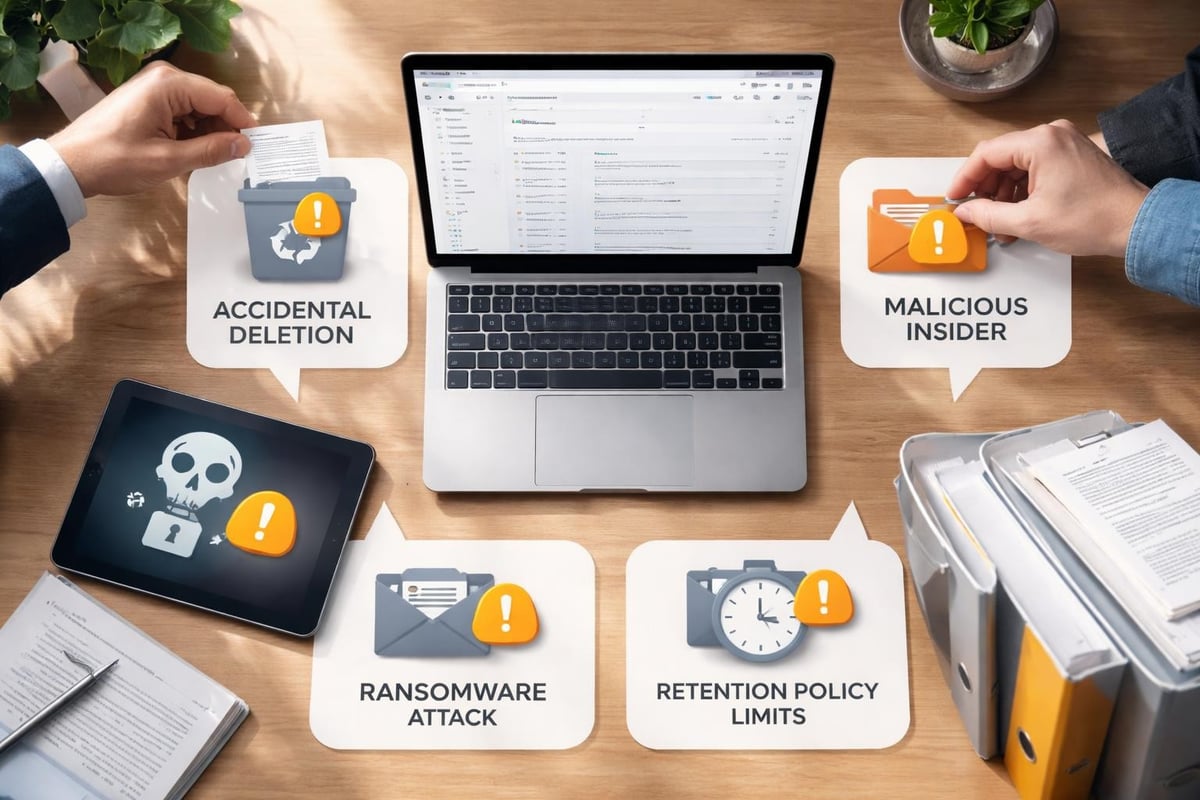
The risks your business faces without proper backup include:
- Permanent loss of critical business documents and emails
- Compliance violations resulting in substantial fines
- Inability to recover data after employee departures
- Extended downtime during security incidents
- Loss of intellectual property and competitive advantage
According to industry research on g-suite backup best practices, organisations without comprehensive backup strategies face significant operational disruptions. The average cost of data loss extends beyond immediate recovery efforts, impacting customer relationships, regulatory standing, and market reputation.
Understanding Google's Shared Responsibility Model
Google provides infrastructure reliability and security at the platform level, but data management remains the customer's responsibility. This distinction is crucial for businesses planning their data protection strategies. Whilst Google safeguards against hardware failures and ensures service availability, they don't protect against user-initiated deletions or account compromises.
The shared responsibility model means your organisation must implement additional protective measures. Google's native tools offer limited recovery windows, typically 25 days for deleted items in most services. Beyond this timeframe, data becomes unrecoverable through standard means, highlighting the importance of maintaining independent g-suite backup solutions.
Core Components Requiring Backup Protection
Gmail and Email Communications
Email remains the primary communication channel for most businesses, containing contracts, customer conversations, and critical business decisions. Gmail's vast storage capacity encourages users to retain extensive email histories, making comprehensive backup essential. When employees accidentally delete emails or entire folders, recovery becomes time-sensitive.
Beyond accidental deletions, email accounts face threats from compromised credentials and malicious attacks. Ransomware increasingly targets cloud-based email systems, encrypting or deleting messages to disrupt operations. A robust g-suite backup strategy ensures these communications remain accessible regardless of the incident.
| Email Backup Priority | Recovery Window | Business Impact |
|---|---|---|
| Executive communications | Immediate | Critical |
| Customer correspondence | 24 hours | High |
| Internal discussions | 48 hours | Medium |
| Automated notifications | 7 days | Low |
Google Drive and Shared Documents
Google Drive hosts your organisation's collaborative workspace, containing presentations, spreadsheets, and shared documents. The collaborative nature of Drive increases vulnerability, as multiple users can modify or delete files. Version history provides some protection, but it doesn't cover all scenarios, particularly when files are permanently deleted.
Shared drives (formerly Team Drives) require particular attention in backup strategies. These spaces often contain departmental knowledge bases and ongoing project files. Implementing data loss prevention measures alongside backup solutions creates comprehensive protection for these critical resources.
Calendar and Contacts Management
Business calendars coordinate operations, schedule client meetings, and track project milestones. Lost calendar data disrupts workflows and damages professional relationships. Contact databases represent years of relationship building and business development efforts. Losing this information impacts sales, customer service, and ongoing partnerships.
Many organisations overlook these components when planning backup strategies, focusing exclusively on email and documents. However, calendar and contact data prove equally valuable during recovery scenarios, particularly when reconstructing business relationships after incidents.
Implementing Effective G Suite Backup Strategies
Automated Backup Scheduling
Manual backup processes fail due to human oversight and competing priorities. Automated solutions ensure consistent data protection without relying on individual action. Modern g-suite backup systems can schedule incremental backups that capture changes throughout the day, minimizing potential data loss windows.
Key automation features to prioritise:
- Continuous backup intervals capturing changes in real-time or near-real-time
- Intelligent scheduling that avoids peak usage periods
- Automated verification confirming backup completeness and integrity
- Alert systems notifying administrators of backup failures or anomalies
- Resource optimization managing bandwidth and storage efficiently
The importance of regular g-suite backups cannot be overstated, particularly in fast-paced business environments where data changes constantly. Organisations processing customer data or financial information require more frequent backup intervals to meet compliance obligations.
Data Retention and Compliance Requirements
Different industries face varying regulatory requirements regarding data retention and protection. Financial services organisations might need seven-year retention periods, whilst healthcare providers must comply with patient data protection regulations. Your g-suite backup solution must accommodate these specific requirements whilst maintaining data accessibility.

Compliance extends beyond retention duration to include data sovereignty, encryption standards, and audit capabilities. Backup solutions must demonstrate where data resides, how it's protected, and who can access it. Documentation of backup procedures and recovery testing provides evidence of due diligence during regulatory audits.
Security and Encryption Standards
Backup data represents an attractive target for cyber criminals, potentially containing sensitive business information, customer data, and intellectual property. Your g-suite backup infrastructure requires security measures matching or exceeding your production environment protections. Encryption during transit and at rest prevents unauthorized access to backed-up information.
Access controls determine who can initiate backups, perform restorations, and view backed-up data. Role-based permissions ensure only authorized personnel interact with backup systems. Multi-factor authentication adds additional security layers, protecting against compromised credentials that could allow malicious actors to delete both production and backup data.
Recovery Scenarios and Testing Procedures
Granular Recovery Capabilities
Effective backup solutions enable precise recovery of specific items rather than requiring complete system restores. When a user accidentally deletes a single email or document, administrators should restore only that item without affecting other data. Granular recovery minimizes disruption and accelerates return to normal operations.
Recovery scenarios vary in scope and urgency. Sometimes organisations need individual file restoration, whilst other situations require complete mailbox recovery following security incidents. The ten reasons organisations need comprehensive backup include protection against ransomware, accidental deletions, and malicious insider actions, each requiring different recovery approaches.
Point-in-Time Recovery Options
Point-in-time recovery allows organisations to restore data to specific moments, crucial when determining exactly when data corruption or deletion occurred. This capability proves particularly valuable during security investigations, enabling teams to identify the precise point of compromise and restore clean data from before the incident.
| Recovery Type | Use Case | Typical Timeframe |
|---|---|---|
| Individual item | User error correction | Minutes |
| Mailbox restore | Account compromise | Hours |
| Department-wide | Ransomware recovery | Days |
| Complete organization | Disaster recovery | Days to weeks |
Regular Testing and Validation
Backup systems only provide value if they function correctly during crisis situations. Regular testing validates that backups complete successfully, data remains intact, and recovery procedures work as expected. Many organisations discover backup failures only when attempting emergency recoveries, a scenario that compounds crisis situations.
Testing schedules should include quarterly full-scale recovery drills simulating various disaster scenarios. These exercises identify gaps in procedures, train staff on recovery processes, and verify backup data integrity. Documentation of testing results demonstrates compliance readiness and highlights areas requiring improvement.
Integration with Security Frameworks
Data Loss Prevention Alignment
G-suite backup strategies complement broader data loss prevention (DLP) initiatives by providing recovery capabilities when prevention measures fail. Securing G Suite environments requires multiple protective layers, with backup serving as the final safety net. Whilst DLP policies prevent unauthorized sharing and data exfiltration, backups ensure recovery when users circumvent or accidentally violate these policies.
The relationship between DLP and backup creates comprehensive protection addressing both prevention and recovery. Understanding G Suite DLP capabilities helps organisations design complementary backup strategies that address gaps in preventive measures. For instance, whilst DLP might prevent sharing sensitive documents externally, backup ensures recovery if those documents are accidentally deleted internally.
Monitoring and Incident Response

Backup systems should integrate with security monitoring tools to provide comprehensive visibility into data protection status. When security systems detect suspicious activity, backup platforms can automatically increase backup frequency or create snapshots preserving current states before potential compromise. This integration accelerates incident response by ensuring clean recovery points exist.
Incident response plans must detail backup roles during security events. Teams should know when to isolate systems, how to verify backup integrity, and which recovery procedures to follow. Best practices for securing G Suite accounts emphasize the connection between preventive security measures and recovery capabilities, highlighting how comprehensive protection requires both elements.
Choosing the Right Backup Solution
Evaluation Criteria for Business Needs
Selecting appropriate g-suite backup solutions requires assessing your organisation's specific requirements, risk tolerance, and budget constraints. Small businesses might prioritize simplicity and cost-effectiveness, whilst enterprises need advanced features supporting complex organisational structures and compliance requirements. Understanding these differences prevents over-investing in unnecessary features or under-protecting critical data.
Essential evaluation factors include:
- Storage capacity and scalability accommodating business growth
- Recovery speed meeting operational requirements
- Compliance certification matching industry regulations
- Integration capabilities with existing security tools
- Support quality and response times
- Total cost of ownership including licensing and storage
For businesses seeking comprehensive cloud security solutions, platforms offering integrated services provide advantages over point solutions. A demonstration of unified cloud platforms can help organisations understand how backup integrates with other security and productivity services, creating cohesive data protection frameworks.
Vendor Assessment and Due Diligence
Third-party backup providers require thorough vetting to ensure they meet security, reliability, and compliance standards. Vendor assessment should examine their infrastructure security, data handling practices, and business continuity capabilities. Understanding where backup data resides, how it's protected, and who can access it prevents future compliance complications.
Service level agreements (SLAs) define vendor commitments regarding uptime, recovery times, and support availability. These contracts should specify clear metrics, penalties for non-compliance, and escalation procedures. Implementing proper DLP measures extends to backup vendor relationships, ensuring these partners maintain equivalent security standards.
Cost-Benefit Analysis
G-suite backup represents an insurance policy against data loss, requiring investment balanced against potential loss scenarios. Calculating the cost of downtime, regulatory fines, and business disruption helps justify backup expenditures. Organisations should consider both direct costs (licensing, storage) and indirect expenses (administration, testing, training).
The financial impact of data loss extends beyond immediate recovery costs. Customer trust degradation, competitive disadvantage from lost intellectual property, and regulatory penalties can exceed recovery expenses by orders of magnitude. When viewed through this lens, comprehensive backup solutions represent prudent risk management rather than optional expenses.
Migration and Long-Term Data Management
Legacy Data Considerations
Organisations migrating to Google Workspace from other platforms face unique backup challenges regarding legacy data. Historical emails, documents, and records require protection alongside current information. Backup strategies must accommodate these diverse data sources whilst maintaining accessibility and compliance with retention requirements.
Long-term data management extends beyond simple storage to include data lifecycle policies. Determining when to archive, delete, or migrate data prevents unnecessary storage costs whilst maintaining compliance. Backup systems should support these lifecycle policies, automatically managing data according to organisational rules and regulatory requirements.
Scalability and Future Planning
Business growth impacts backup requirements through increased data volumes, additional users, and expanded compliance obligations. Selecting scalable g-suite backup solutions prevents future migration challenges as organisations outgrow initial platforms. Evaluating vendor roadmaps and platform capabilities ensures chosen solutions accommodate anticipated growth.
Future planning should consider emerging technologies and changing business models. Remote work trends, increasing collaboration requirements, and evolving cyber threats all influence backup strategy development. Building flexibility into backup architectures allows organisations to adapt without complete system replacements.
Protecting your Google Workspace data requires comprehensive backup strategies addressing user errors, security threats, and compliance requirements. Understanding the shared responsibility model and implementing appropriate g-suite backup solutions safeguards your organisation's critical information assets. vBoxx provides secure cloud services designed to protect business data through robust backup solutions, encryption standards, and compliance-focused infrastructure. Contact our team to discuss how our privacy-centred, environmentally sustainable cloud solutions can strengthen your data protection framework.