

Apple developments are the software releases, developer tools, AI features and platform changes that Apple introduces across iPhone, iPad, Mac, Apple Watch, Apple TV and Apple Vision Pro. Together they form a yearly cycle in which Apple announces new capabilities, gives developers early access, and then ships them to the public as free updates. Therefore, anyone who manages Apple devices or builds software for them needs to understand how that cycle works. In addition, European businesses must weigh each new feature against their obligations under the GDPR.
What Apple Developments Include
Apple developments include four connected areas: operating system releases, developer frameworks, Apple Intelligence features and App Store services. Each area follows its own rhythm, but they are announced and released together. They share one aim, which is to make Apple hardware and software work as a single system.
The main categories are as follows:
- Operating system updates: new versions of iOS, iPadOS, macOS, watchOS, tvOS and visionOS.
- Developer frameworks and tools: the programming interfaces, design systems and testing tools that developers use to build apps.
- Apple Intelligence: on-device and cloud-assisted AI features for writing, translation, image understanding and search.
- Services and distribution: the App Store, subscriptions, payments and privacy controls that connect developers with users.
Apple publishes the technical side of these changes on its developer portal, which hosts platform updates, beta software, testing tools and distribution guidance. For an IT manager, this portal is the authoritative source for what will change on company devices before a release reaches staff.
How the Apple Release Cycle Works
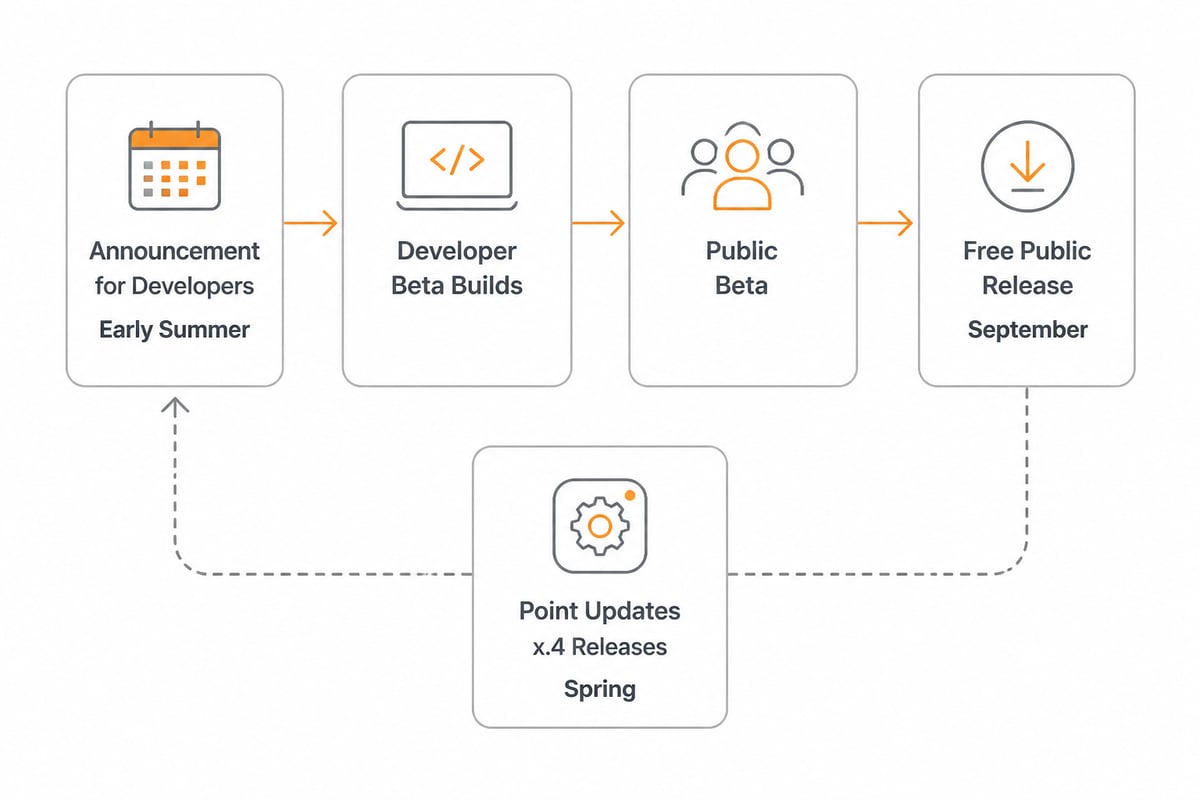
The Apple release cycle works in three stages: announcement, developer beta and public release. First, Apple presents new platform versions to developers in early summer. Next, developers and testers receive beta builds over several months, which allows them to adapt their apps and report faults. Finally, the stable versions arrive for everyone in the autumn.
The most recent complete cycle shows the pattern clearly. Apple released iOS 26, iPadOS 26, macOS 26, watchOS 26, tvOS 26 and visionOS 26 as free software updates on 15 September 2025, according to Apple Newsroom. The version numbers are aligned across all platforms, which makes it easier to see which releases belong together.
Between major versions, Apple also ships point updates. These deliver smaller features, security patches and regional expansions. For example, Apple Intelligence features expanded to French, German, Italian, Brazilian Portuguese, Spanish, Japanese, Korean and Simplified Chinese with iOS 18.4, iPadOS 18.4 and macOS Sequoia 15.4 on 31 March 2025, as Apple Newsroom reports. Consequently, a feature announced in June may reach your region or language only months later.
The Developer Side of Apple Developments
The developer side of Apple developments consists of frameworks, design guidelines and distribution tools that let outside companies build software for Apple platforms. Apple provides these through its developer programme, and they change with every platform release. Therefore, the tools a developer uses today differ from those of two years ago.
Several themes recur in recent releases:
- Platform design. Apple introduced a new design language called Liquid Glass, which applies a consistent visual style across its platforms.
- App Intents and widgets. Apps expose actions and information to the system, so that Siri, Spotlight and widgets can use them.
- Metal and graphics. Apple's graphics framework supports demanding games and creative software on Apple silicon.
- Foundation Models framework. Developers can call Apple's own language model from inside their apps.
The last point deserves attention. Apple said its on-device foundation model is available to developers for building intelligent features that can work offline and protect user privacy, as noted by Apple Newsroom. In practice, this means a company can add summarising or classification features to an internal app without sending text to an external AI service.
Apple Intelligence Explained
Apple Intelligence is Apple's suite of AI features, designed to run mostly on the device and to use a privacy-focused cloud service only for heavier requests. It covers writing tools, notification summaries, image generation, Live Translation and visual intelligence. In addition, it connects with apps through the developer frameworks described above.
Apple summarised the 2025 additions, including Live Translation and visual intelligence, in its Apple Intelligence announcement. However, availability depends on device generation and language. A business that rolls out Apple Intelligence therefore needs to check which employees have compatible hardware and which languages are supported.
For European organisations, a further question follows: where does the data go? Apple states that much of the processing happens on the device. Nevertheless, features that reach out to cloud services require a closer look at data flows, retention and the legal basis for processing. Our article on AI on the Mac explains how to approach these questions in a business setting.
Concrete Examples of Apple Developments in Daily Work
Concrete examples of Apple developments appear in almost every working day, from a translated phone call to a Mac that builds software overnight. The following cases show how the abstract cycle becomes practical.
A multilingual office
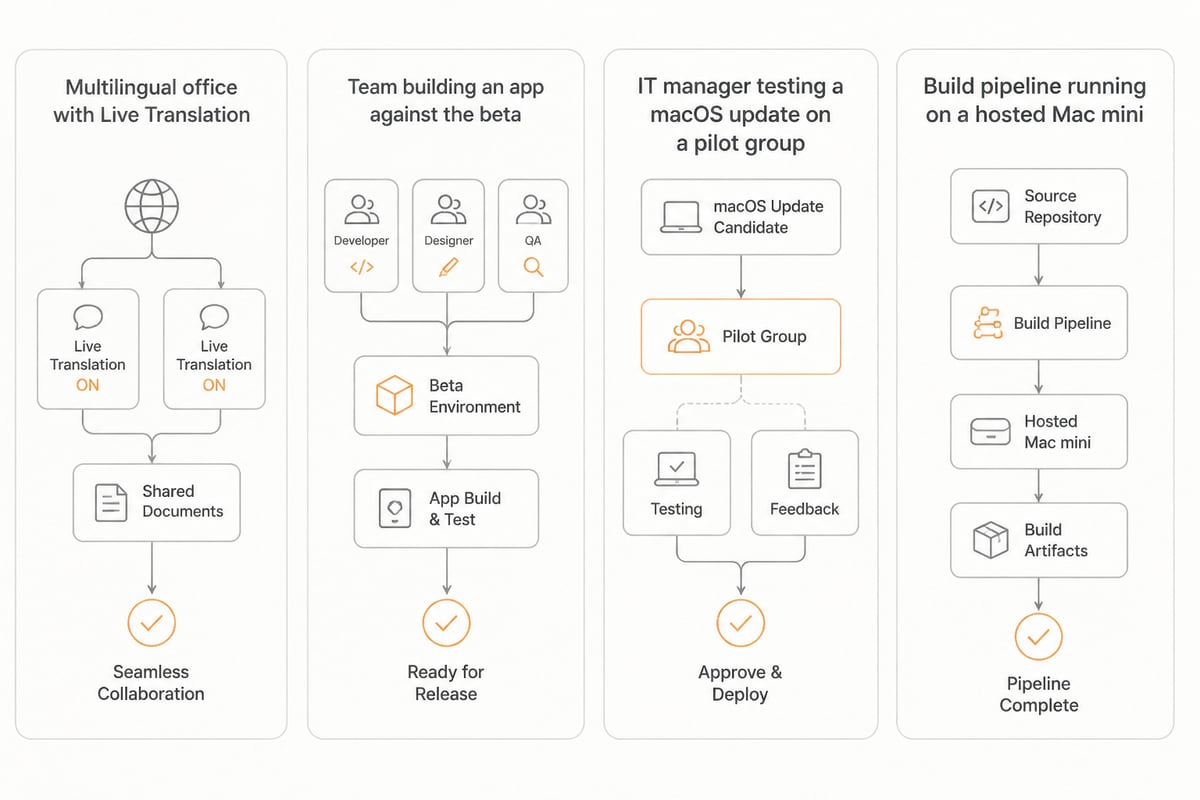
Live Translation lets colleagues who speak different languages communicate through messages and calls. Consequently, a Dutch company with partners in Germany, Italy and Spain can reduce reliance on separate translation tools. The language expansion in spring 2025 made this relevant for much of the European market.
A development team building an app
A small software team builds an inventory app for its customers. During the beta period, it tests the app against the upcoming macOS and iOS versions, adjusts the interface to the new design language, and exposes key actions through App Intents. In addition, it submits the app to the App Store once the stable versions ship.
An IT manager maintaining a Mac fleet
An IT manager responsible for forty Mac computers receives the new macOS beta. First, a test group installs it. Next, the manager checks whether critical business software still runs. Finally, the update is approved for the whole fleet. This staged approach prevents surprises on the day the public release arrives.
Continuous integration on Apple hardware
Building and signing Apple apps requires Apple hardware. Therefore, many teams run their build pipelines on Mac mini machines. vBoxx offers Mac mini hosting on Apple M4 hardware, which allows a team to run these builds in EU datacentres instead of keeping physical machines in an office cupboard.
Why Apple Developments Matter for Businesses
Apple developments matter because they change security, compatibility, costs and compliance at the same time. A new release can close vulnerabilities, but it can also break an older application. New features can alter what data leaves a device. Therefore, treating each release as a planned project is safer than reacting to it.
The commercial scale of the ecosystem also explains the attention these releases receive. Apple said its App Store had more than 850 million average weekly users across 175 countries and regions in 2025, according to Apple Newsroom. The same report states that developers have earned billions of dollars selling digital goods and services on the App Store since its 2008 launch. In addition, Apple reported that the App Store ecosystem has facilitated very large sums in developer billings and sales, with the great majority of that commerce going directly to developers. These figures show why software vendors prioritise Apple platforms, and why the tools your suppliers use are likely to follow Apple's schedule.
Four business reasons stand out:
- Security: timely updates close known vulnerabilities, so delayed rollouts carry risk.
- Compatibility: line-of-business software must be tested against each new version.
- Productivity: features such as translation and summarisation can save staff time.
- Compliance: every new cloud-connected feature needs a data protection assessment.
Data Protection and Hosting Considerations
The data protection impact of Apple developments depends on where information is processed, stored and backed up. Apple controls the device and its own services, but the files, email, passwords and backups that a business creates on those devices often live elsewhere. Consequently, the hosting choice is the part of the picture that a company controls most directly.
For European organisations, three questions apply to every Apple deployment:
- Where are company files stored, and under which jurisdiction?
- Are backups kept inside the EU, and who can access them?
- Which AI or cloud features are switched on, and is that covered by the data processing agreement?
The jurisdiction question matters because providers subject to the US CLOUD Act may be required to hand over data regardless of where it is stored. Our overview of European cloud storage explains how to compare providers on this point. In addition, a business that stores documents on a cloud storage platform hosted in the EU keeps a clear boundary between the devices it uses and the data it is accountable for.
vBoxx addresses this boundary with its own infrastructure. Data, metadata, backups and support tooling stay inside the EU, in EU-owned and EU-operated datacentres, and vBoxx is ISO 27001 certified, audited by TÜV NORD. A data processing agreement is available, which supports GDPR compliance for businesses that use Apple devices alongside it.
A Practical Approach to Following Apple Developments
A practical approach to following Apple developments rests on a short, repeatable routine rather than constant monitoring. The aim is to know what is coming, test it early and roll it out in stages. A routine makes the process easy to hand over when staff change.
- Watch the announcement period. Review the summer announcements and list the features that touch your business.
- Run a pilot group. Install the beta on a small number of non-critical devices.
- Test critical software. Confirm that accounting, communication and security tools still work.
- Review privacy settings. Check each new AI or cloud feature against your data protection policy.
- Roll out in stages. Move from the pilot group to the whole fleet after a defined waiting period.
- Document the result. Record what changed, so the next cycle starts with better information.
Apple also describes its planned fall changes in advance, for example in its announcement of service and software updates for fall 2025. Reading such announcements early gives an IT manager weeks, not days, to prepare.
Related Terms Worth Knowing
Several terms appear repeatedly in discussions of Apple developments, and knowing them makes release notes easier to read.
- Beta: a pre-release version made available for testing, usually in developer and public stages.
- Point release: a smaller update between major versions, such as iOS 18.4.
- Apple silicon: the processors, including the M-series, that Apple designs for its Mac computers and tablets.
- Foundation Models framework: the developer interface to Apple's on-device language model.
- App Intents: a framework that lets apps expose actions to Siri, Spotlight and widgets.
- Mobile device management (MDM): software that lets an organisation configure and update Apple devices centrally.
- Data processing agreement: the contract that governs how a provider handles personal data on a company's behalf.
Start by listing the Apple devices in your organisation and noting where their files, email and backups are stored, since that overview shows where a new release could affect your data. If you want those workloads hosted under EU jurisdiction, with Mac mini hosting on Apple M4 hardware, cloud storage, communication tools and backup from engineers who offer personal support by phone, chat or remote session, vBoxx can arrange it, and you can get a free trial to see how it fits your setup.