

The core aws security group best practice is to allow only the traffic a workload genuinely needs, to reference other security groups instead of broad IP ranges, and to review every rule on a regular schedule. Security groups act as stateful virtual firewalls attached to network interfaces, so a single careless rule can expose a database or administration port to the entire internet. Therefore, the guidance below focuses on practical steps that European businesses can apply to keep access tight, auditable and consistent with GDPR obligations.
How AWS Security Groups Work
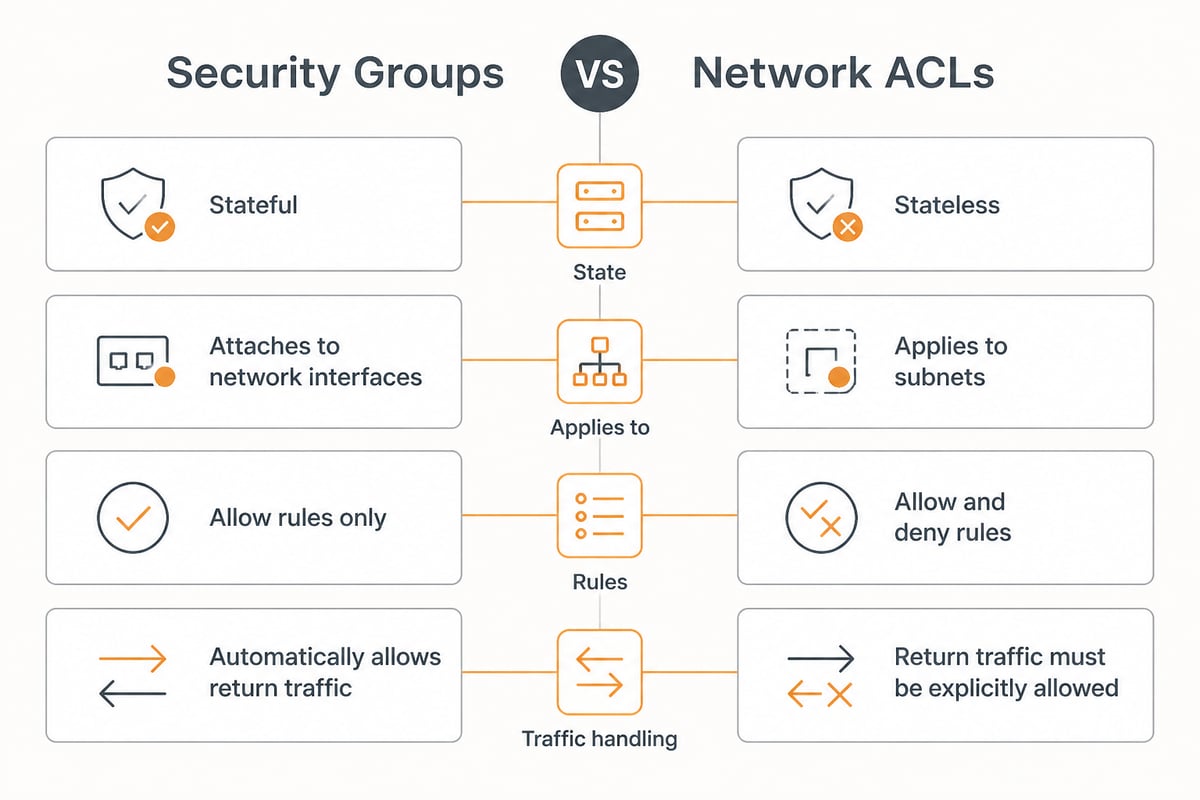
A security group is a stateful, allow-only set of rules that controls inbound and outbound traffic for the resources attached to it. Because the filtering is stateful, return traffic for an allowed connection is permitted automatically. In addition, there are no deny rules, which means that anything not explicitly allowed is blocked by default.
Several characteristics shape how you should design your rules:
- Rules are permissive only. You cannot write an explicit deny, so the absence of a rule is your restriction.
- Rules evaluate together. All rules from every attached group are combined, and the most permissive match applies.
- Groups attach to network interfaces. As a result, a single instance with several interfaces can carry several groups.
- Changes apply immediately. There is no commit step, so a mistake takes effect at once.
Security groups differ from network ACLs, which operate at the subnet level and support explicit deny rules. The Tufin overview of AWS security groups explains the distinction between the two layers well. In practice, security groups should be your primary control, while network ACLs serve as a coarse secondary barrier.
Apply the Principle of Least Privilege to Every Rule
Least privilege means that every inbound and outbound rule should name the narrowest protocol, port and source that the workload requires. This is the single most effective aws security group best practice, because it limits the damage when a credential leaks or a vulnerability is exploited.
Follow these guidelines when writing rules:
- Never open administrative ports to 0.0.0.0/0. SSH (22) and RDP (3389) should be reachable only from a defined management network or a bastion host.
- Specify exact ports. Open 443 for HTTPS rather than a range such as 0 to 65535.
- Avoid the "all traffic" protocol option. It is also one of the more frequent findings in cloud audits.
- Restrict sources to known CIDR ranges. Use your office or VPN egress addresses, and document why each range exists.
- Remove rules when a project ends. Temporary access that becomes permanent is a common source of exposure.
Treat IPv6 separately. A rule that permits ::/0 is just as open as one permitting 0.0.0.0/0, and teams often secure one while forgetting the other.
Use One Security Group per Role, Not per Instance
Create a security group for each functional role, such as web, application, database and management, and attach the relevant groups to instances according to what they do. This approach keeps rule sets small, readable and predictable.
A role-based layout also supports clean tiering. For example, a three-tier application might look like this:
| Tier | Inbound allowed from | Typical port |
|---|---|---|
| Load balancer | Internet (restricted by WAF or CDN where possible) | 443 |
| Application servers | Load balancer security group | 8080 |
| Database servers | Application security group | 5432 or 3306 |
| Management host | Corporate VPN range | 22 |
Consequently, each tier trusts only the tier directly in front of it. If an application server is compromised, the attacker still cannot reach the management network or any unrelated database.
Reference Security Groups Instead of IP Addresses
Where traffic flows between resources inside AWS, specify another security group as the source rather than an IP range. This is more maintainable and more secure, because membership follows the resource rather than a fixed address.
IP-based rules break down as soon as instances scale, restart or move. In contrast, a rule such as "allow port 5432 from the application security group" continues to work whatever addresses the application servers receive. It also prevents unrelated resources in the same subnet from reaching the database, even when they share the same address range.
Reserve CIDR-based sources for traffic that genuinely originates outside your VPC, such as a corporate VPN or a partner's fixed egress address. For a deeper look at the network layer that sits underneath these rules, connectivity planning matters too, and platforms such as Connectbase help enterprises compare and procure network services when designing private links.
Do Not Rely on the Default Security Group
The default security group should be left unused and stripped of all rules, because it allows all traffic between its members and all outbound traffic out of the box. Any resource launched without an explicit choice lands in this group, which creates an easy path for unintended exposure.
Take these steps in every VPC:
- Remove all inbound and outbound rules from the default group.
- Create named, purpose-built groups for each workload.
- Add automated detection for any resource that still uses the default group.
The discussion on inbound and outbound rules for the default security group on AWS re:Post shows why this behaviour surprises many teams. Therefore, treat an empty default group as a baseline control, not an optional hardening step.
Restrict Outbound Traffic as Well
Outbound rules deserve the same attention as inbound ones, even though the default allows all egress. Limiting egress reduces the chance that malware can reach command servers and prevents sensitive data from leaving your environment unnoticed.
For a database tier, outbound access may need to be nothing more than traffic to a patching endpoint or a backup target. For an application tier, it may be limited to specific API destinations. In addition, controlled egress supports data residency commitments: if your policy states that personal data must remain inside the EU, then outbound rules, combined with DNS and proxy controls, are a practical way to enforce it technically rather than relying on policy documents alone.
Nevertheless, egress restrictions require testing. Start in a non-production environment, observe the flows you actually need, and then tighten the rules gradually.

Control Administrative Access Without Open Ports
Where possible, remove inbound administrative ports entirely and use managed access methods instead. AWS Systems Manager Session Manager, for instance, allows shell access without opening port 22 or maintaining SSH keys.
If you must expose a management port, apply layered safeguards:
- Limit the source to a fixed VPN or office range.
- Require multi-factor authentication on the access path.
- Log every session and review the logs.
- Rotate credentials regularly and store them in a managed vault.
A password manager helps here, because shared administrative credentials are a frequent weak point. vBoxxVault is a business password manager with zero-knowledge encryption, hosted on Dutch servers, TÜV-audited and outside the reach of the US CLOUD Act, which makes it a sensible fit for teams that keep server credentials under European jurisdiction. In addition, our guide to password security best practices covers policy basics that complement network controls.

Adopt a Consistent Naming and Tagging Standard
Descriptive names and tags make security groups understandable months later, which is essential for audits. A name such as "prd-app-https-from-alb" tells a reviewer far more than "sg-launch-wizard-7".
Use these conventions:
- Include the environment, role and purpose in every name.
- Write a meaningful description for every rule, including a ticket reference or owner.
- Tag each group with owner, cost centre and data classification.
- Keep production and non-production groups strictly separate.
Consistent tagging allows automated checks to target the right resources. A rule that is acceptable in a development sandbox may be a critical finding in production, and tags make that distinction machine-readable.
Automate Auditing and Drift Detection
Manual reviews do not scale, so use automated tools to detect risky rules as soon as they appear. AWS Config provides managed rules that flag security groups allowing unrestricted access to common ports, while AWS Security Hub aggregates these findings centrally.
A practical monitoring routine includes:
- Alerting on change. Capture security group modifications through CloudTrail and notify the responsible team.
- Scheduled reviews. Examine every group quarterly and remove unused rules and groups.
- Unused group clean-up. Delete groups that are not attached to any interface.
- Infrastructure as code. Define groups in Terraform or CloudFormation so that changes pass through review before deployment.
- Drift detection. Compare the live configuration with the code and correct any manual deviations.
In addition, enable VPC Flow Logs for sensitive subnets. Flow logs show which connections were accepted or rejected, and therefore reveal rules that are broader than the real traffic requires. Our overview of AWS pentesting explains how external testing can validate these controls independently.
Know the Limits and Plan for Scale
Security groups have quotas, including limits on rules per group and groups per network interface, and these quotas can constrain complex designs. Check the current limits in the AWS Service Quotas console before building a large architecture, because the values can differ by account and Region.
Several habits keep rule sets manageable:
- Consolidate duplicate rules instead of adding near-identical entries.
- Prefer security group references over long lists of CIDR blocks.
- Use managed prefix lists to maintain shared sets of address ranges in one place.
- Split very large groups by role, so no single group becomes a catch-all.
A clean structure at the start prevents painful restructuring later. Teams that begin with role-based groups rarely run into quota problems, whereas teams that copy rules per instance often do.
Align Security Groups With GDPR and European Requirements
For European organisations, security group design is part of demonstrating appropriate technical measures under GDPR Article 32. Limiting who can reach systems that store personal data is a direct, auditable control that supports both your compliance records and your data protection impact assessments.
Document the rationale behind each rule set, retain change logs, and ensure that access to personal data systems is restricted to authorised roles. Consider where your data physically and legally resides. Hyperscaler infrastructure can still fall under non-EU legislation, which is why many Dutch and European businesses weigh sovereignty alongside technical controls. Our articles on AWS data centre security and cloud privacy and security discuss this trade-off in more detail.
Finally, a firewall policy is only as good as the people who maintain it. Expert guidance can shorten the learning curve, and specialist networks can connect organisations with niche experts when an in-house gap needs to be filled quickly.
A Quick Security Group Review Checklist
Use this list for each quarterly review:
- No rule permits 0.0.0.0/0 or ::/0 on administrative or database ports.
- The default security group in every VPC has no rules.
- Every rule has a description, an owner and a documented purpose.
- Internal traffic uses security group references instead of IP ranges.
- Outbound rules are limited for sensitive tiers.
- Unused groups and stale rules are removed.
- Changes are deployed through reviewed infrastructure code.
- Alerts exist for any modification to production groups.
In addition, record the date and the reviewer of each check. A simple log of reviews is often what auditors ask for first, and it demonstrates that your controls operate continuously rather than only at the moment of design.
Start today by exporting every security group in one production account and removing any rule that opens an administrative or database port to the whole internet. If you would rather run workloads on European infrastructure and keep credentials protected, vBoxx offers secure hosting in ISO 27001-certified Dutch data centres, supported by personal help from our own engineers, and our vBoxxVault password manager keeps shared access details safe. You can Get a free trial to see how a European platform fits your security and GDPR requirements.