

Hosting managed means that a provider runs the servers, security, updates, backups and monitoring on your behalf, so your team can focus on the business rather than the infrastructure. For European companies, the decision is therefore not only about convenience, but also about where the data lives, who can legally access it and how quickly problems are resolved.
In 2026, this matters more than before. According to Eurostat, more than half of EU enterprises used paid cloud computing services in 2025, and the share has risen steadily since 2023. Consequently, many IT managers and small business owners are now comparing providers rather than asking whether to outsource at all. This guide explains what is included, which hosting types exist, what it costs and how to choose.
What is a managed hosting facility?
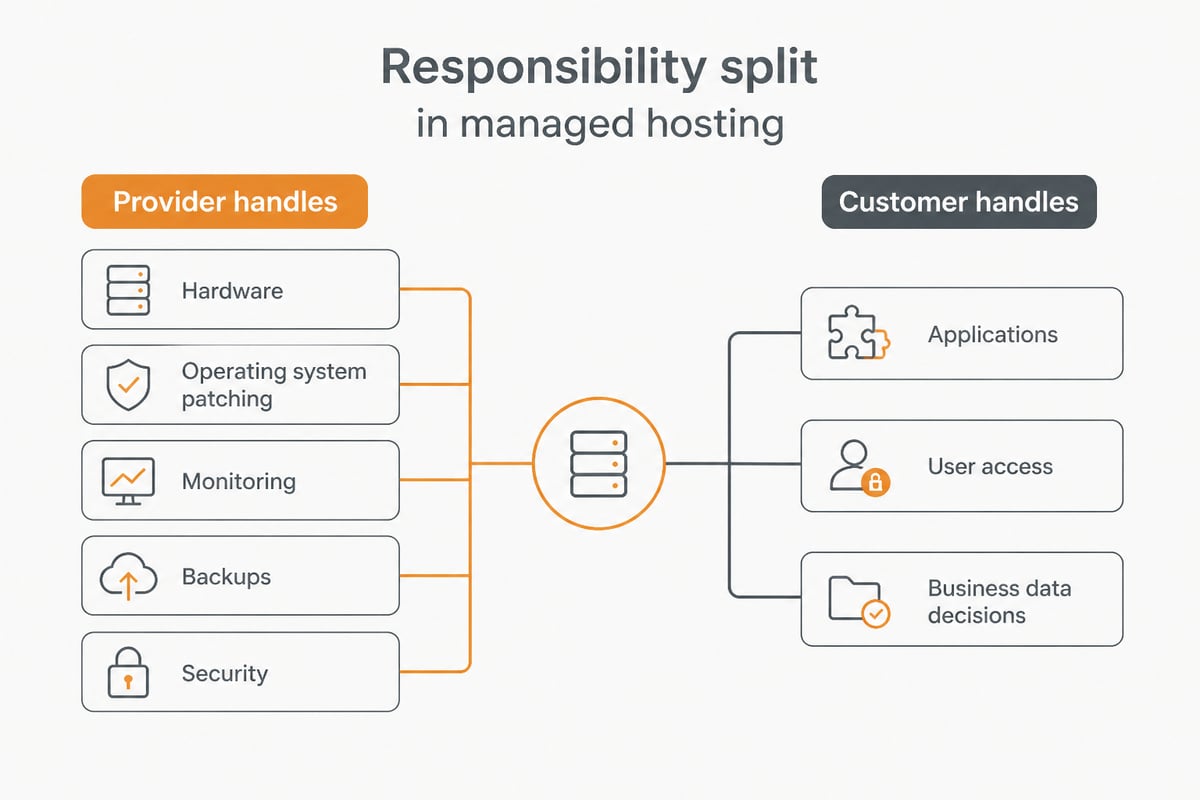
A managed hosting facility is a data centre environment in which the provider owns or operates the hardware and also takes responsibility for administering it, including patching, monitoring, backups and security. You rent capacity and a service level, rather than only rack space or a bare server.
In practice, the provider's engineers handle tasks that would otherwise fall to your internal IT team. Examples include operating system updates, firewall configuration, hardware replacement, performance tuning and incident response. In addition, a good provider documents who is responsible for what, which is essential for audits.
The alternative is unmanaged hosting, where you receive a server and are responsible for everything above the hardware layer. Unmanaged plans are cheaper on paper. Nevertheless, the cost of an engineer's time, out-of-hours callouts and recovery after a failure often outweighs the saving, particularly for businesses without a dedicated systems administrator.
What does managed hosting usually include?
Most managed plans bundle a core set of services, although the exact scope differs between providers and plans. Therefore, always confirm the details in writing before signing.
Typical inclusions are:
- Server administration: installation, configuration and operating system patching
- Proactive monitoring: alerts for CPU load, disk space, network faults and failing services
- Security management: firewalls, intrusion prevention, malware scanning and certificate handling
- Backup and recovery: scheduled backups with tested restore procedures
- Technical support: access to engineers by phone, chat or remote session
- Migration assistance: help moving existing workloads onto the new platform
Some providers add application-level services such as database tuning, email hosting or collaboration software. If your business runs file sharing, e-signing or email alongside its websites, look for a provider that offers these under one contract. Fewer vendors means fewer contracts, fewer data processing agreements and a simpler audit trail.
Which types of web hosting services exist?
There are five main types of web hosting services, and managed hosting is a service layer that can sit on top of most of them rather than a separate technology. The choice depends on traffic, performance needs, compliance requirements and budget.
| Hosting type | How it works | Typical fit |
|---|---|---|
| Shared hosting | Many sites share one server's resources | Small brochure websites |
| Virtual private server (VPS) | A virtual slice of a server with guaranteed resources | Growing sites and business applications |
| Dedicated server | A whole physical server for one customer | High-load or compliance-sensitive workloads |
| Cloud hosting | Resources spread across a cluster, scaled on demand | Variable traffic and flexible projects |
| Colocation | You supply the hardware, the facility supplies space and power | Organisations with existing equipment |
Shared hosting is rarely fully managed in the sense described above, because the provider only maintains the platform, not your application. By contrast, managed VPS, dedicated and cloud plans can include comprehensive administration. For a deeper look at the cloud model, see this overview of cloud hosting for business, and for a comparison of virtual servers with administration included, the article on managed cloud VPS is a useful companion.
Why does the data location matter for European businesses?
The location and ownership of your hosting provider determine which laws can reach your data, and for European businesses this is a compliance question as much as a technical one. Under the GDPR, you remain responsible for personal data even when a processor handles it.
Therefore, three points deserve attention when assessing providers:
- Jurisdiction: a provider headquartered outside the EU may be subject to foreign laws that conflict with European data protection rules, such as the US CLOUD Act.
- Data residency: confirm that data, metadata, backups and support tooling all remain inside the EU, not only the primary storage.
- Contractual protection: a data processing agreement should be available as standard.
Breach handling is a further reason to choose carefully. According to the European Data Protection Board, when a personal-data breach is likely to risk individuals' rights and freedoms, the organisation should notify the relevant data protection authority no later than 72 hours after becoming aware of it. Consequently, your provider must be able to report incidents to you quickly and with enough detail for you to meet that deadline. The European Commission also publishes GDPR guidance for businesses that clarifies these responsibilities.
How much does hosting a website cost in the UK and Europe?
The cost of managed hosting ranges from a few pounds per month for basic shared plans to several hundred pounds or euros per month for dedicated or high-availability setups, and the price reflects how much work the provider takes on. Because pricing varies by provider and configuration, treat any figure as a starting point and request a written quote.
The main cost drivers are:
- Resources: CPU, memory, storage and bandwidth allocated to you
- Service level: response times, support hours and the scope of administration
- Redundancy: whether the setup includes failover hardware and multiple power feeds
- Add-ons: backups, certificates, security tooling and migration work
- Contract term: monthly rolling terms usually cost more than annual commitments
For UK businesses, remember that post-Brexit data transfers between the UK and the EU rely on an adequacy arrangement, so it is sensible to confirm where your provider stores data. Compare total cost of ownership rather than the headline price. A cheap plan that requires a part-time contractor to maintain it is not cheap. For specific pricing on vBoxx services, consult the vBoxx hosting page or contact the team directly.
Which host is best for hosting WordPress sites?
The best host for WordPress is one that offers current PHP versions, automatic updates, daily backups, server-level caching and engineers who can resolve application issues, regardless of the brand name. Rather than ranking providers, it is more useful to apply a consistent checklist.
Check the following before you commit:
- Performance: server-side caching, a modern PHP version and fast storage
- Security: web application firewall, malware scanning and automatic certificate renewal
- Updates: clear policy on core, theme and plugin updates, and a staging environment for testing them
- Backups: retention period and a documented, tested restore process
- Data location: EU-based servers if the site collects personal data through forms, shops or accounts
In addition, consider the surrounding services. A web hosting plan that also covers domain management and SSL certificates reduces the number of moving parts. Nevertheless, remember that WordPress plugins remain your responsibility unless the contract states otherwise.

How do you choose between managed and unmanaged hosting?
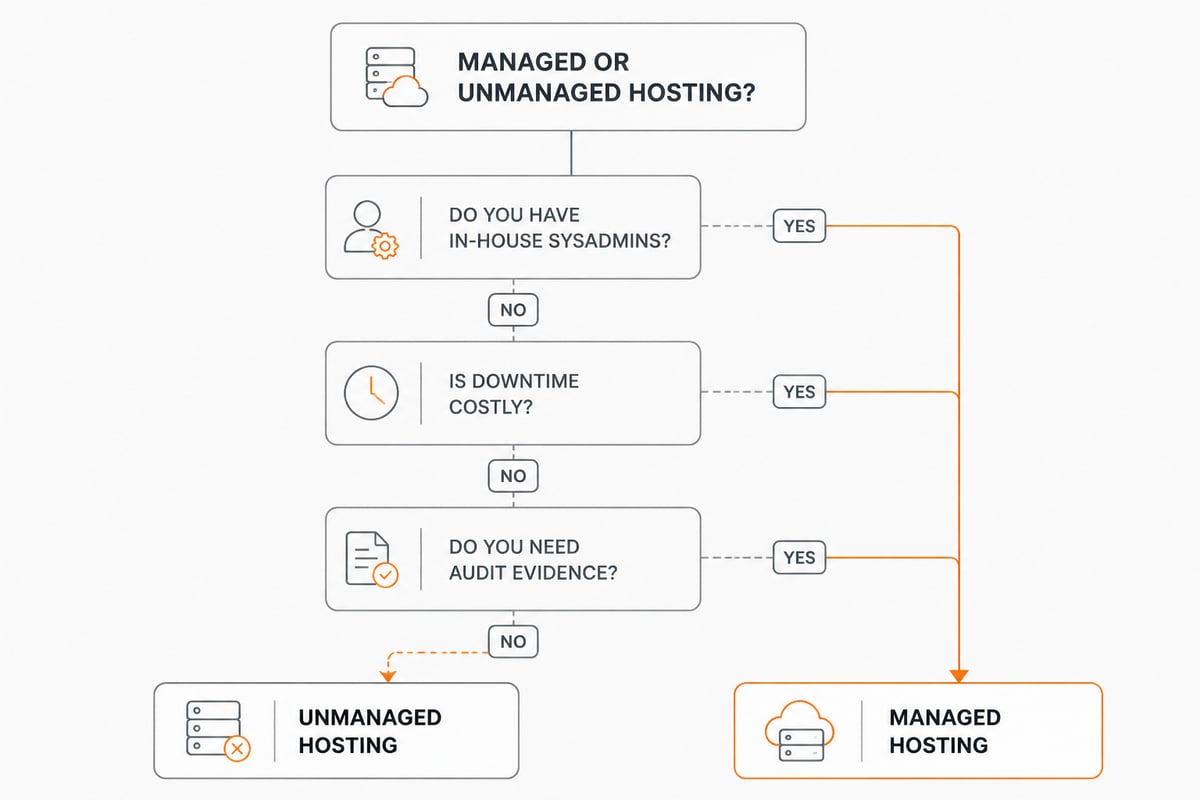
Choose managed hosting when your team lacks the time or expertise to administer servers around the clock, and choose unmanaged hosting only when you have skilled staff and a clear reason for full control. The decision is easiest when you assess your actual resources honestly.
Managed hosting is usually the better fit if:
- You have no dedicated systems administrator, or only one person covering all of IT
- Downtime directly affects revenue, customer service or contractual obligations
- You must demonstrate security controls to clients, auditors or regulators
- You want predictable monthly costs rather than variable engineering time
Unmanaged hosting can make sense if you have an experienced DevOps team, need unusual software configurations or run non-critical development environments. However, even then, many organisations still prefer managed services for production systems because the cost of an outage is high.
Why do uptime, security and support deserve the closest scrutiny?
Uptime, security and support are the three areas where managed providers differ most, and they are also where failures cost the most. Evidence from the industry shows why.
According to the Uptime Institute's annual outage analysis, more than half of respondents said their most recent significant, serious or severe outage cost more than $100,000. The same body reports that power issues remained the most common cause of serious and severe data-centre outages. Therefore, ask providers about redundant power, generator capacity and how often failover is tested.
When reviewing a provider, look for:
- Independent certification: ISO 27001 with audit by a recognised body, rather than self-declared security
- Measured uptime: a track record of actual availability, not only a contractual promise
- Proactive monitoring: engineers who detect faults before you do
- Human support: access to a person by phone, chat or remote session, not only a ticket queue
- Incident communication: a clear process for informing you of problems and breaches
For practical safeguards you can apply on your own side, the article on hosting security covers essential measures in more detail.
Which workloads benefit most from managed hosting?
Managed hosting benefits any workload where reliability and expertise matter more than hands-on control, and several categories stand out for European businesses. Specifically, the following are common cases:
- Business applications: accounting, ERP and line-of-business software that must stay available during working hours
- Collaboration and file storage: shared documents, e-signing and email that hold sensitive client data
- Websites and online shops: where downtime means lost orders and where customer data falls under the GDPR
- Backup and recovery: off-site copies of Microsoft 365 or Google Workspace data
- Development and build environments: including Apple-specific build and test pipelines
That last category deserves a closer look. Teams that build iOS applications or run macOS-only software often keep ageing hardware under a desk, which is hard to secure and maintain. A managed alternative is vBoxx Mac mini Hosting, which provides Apple M5 Pro and M6 hardware in ISO 27001-certified data centres in the Netherlands, with 99.99% uptime and expert support included. In addition, it suits AI and machine learning workloads and creative production.
How can you evaluate a managed hosting provider step by step?
You can evaluate a provider in six steps, and following them in order prevents you from being swayed by marketing before the essentials are confirmed. This process also produces documentation that auditors may later request.
- Define requirements. List your applications, data types, expected traffic, recovery targets and compliance duties.
- Check jurisdiction and location. Confirm that the provider is EU-based, that data and backups stay in the EU, and that a data processing agreement is available.
- Verify certifications. Ask for the ISO 27001 certificate and the name of the auditing body.
- Review the service level. Read the uptime commitment, support hours, response times and what happens when targets are missed.
- Test support. Contact the provider with a technical question and judge the speed and quality of the reply.
- Plan the exit. Ask how data is returned if you leave, in what format and whether migration help is offered.
Finally, request a trial or a short pilot where possible. For providers that run their own infrastructure, you can also ask who maintains the servers and whether they are monitored proactively. Providers that run their own infrastructure with in-house engineers, rather than outsourcing to large hyperscalers, are one option some businesses prefer. For a wider view of the Dutch market, read about hosting in the Netherlands.
FAQ
Is managed hosting more expensive than unmanaged hosting?
The monthly fee is usually higher, because it includes administration, monitoring and support. However, once you count engineering time, out-of-hours callouts and the cost of downtime, managed hosting is often cheaper for businesses without a dedicated systems team.
Does managed hosting guarantee GDPR compliance?
No provider can guarantee compliance on your behalf, because you remain the data controller. A suitable provider supports compliance through EU data residency, a data processing agreement, documented security controls and prompt breach reporting.
Can I move from unmanaged to managed hosting later?
Yes, and many businesses do as their workloads grow. Providers that offer migration services can transfer your applications and data with limited disruption, so ask about migration support when you request a quote.
If you would like to test the approach, start by listing your current servers, data types and recovery needs, then compare them against the checklist above. vBoxx, an ISO 27001-certified European provider that runs its own infrastructure in Dutch data centres, can help with migration, maintenance and support, including hosting for Apple workloads through vBoxx Mac mini Hosting. To see how it fits your team, Get a free trial of vBoxx and judge the service for yourself.